계산된 필드로 사용자 지정 식 적용
필드를 결합하고, 유연한 그룹화 및 정렬을 가능하게 하며, 원본 변경에 대한 의존도를 줄여 보고서를 의미 있는 인사이트로 전환하세요.
2026년 4월 13일기능 강조
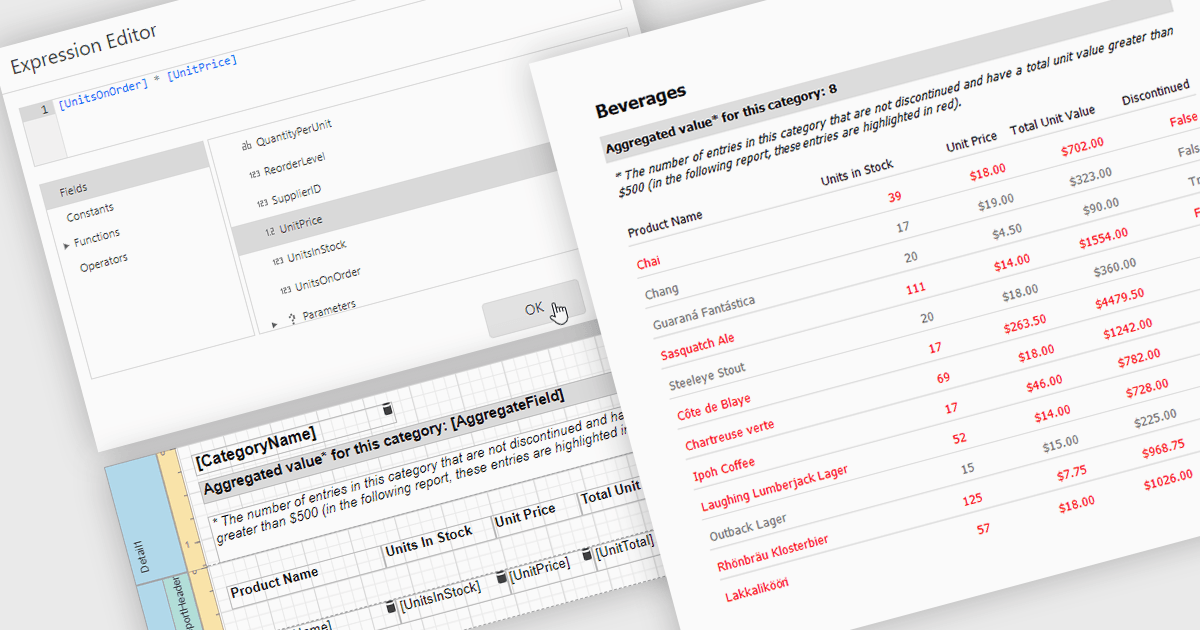
보고서의 계산된 필드를 사용하면 하나 이상의 데이터 필드에 사용자 지정 식을 적용하여, 보고 환경 내에서 직접 데이터를 변환할 수 있습니다. 이를 통해 기본 데이터 원본을 변경하지 않고도 백분율, 비율 또는 결합된 값과 같은 새로운 지표를 만들 수 있습니다. 그 결과 보고서는 더욱 유연하고 효율적으로 되어 사용자가 더 깊은 인사이트를 발견하고 특정 요구에 맞게 출력을 조정하는 데 도움이 됩니다. 계산된 필드는 데이터를 동적으로 그룹화하고 정렬하는 데도 사용할 수 있어 정보가 구성되고 표시되는 방식을 개선합니다. 일반적인 사용 사례로는 이익률 계산, 성과 지표 생성, 그리고 보고서의 명확성을 높이기 위한 필드 결합 등이 있습니다.
여러 .NET 보고 컨트롤이 다음과 같은 계산된 필드 기능을 제공합니다:
- DevExpress Reporting은 계산된 필드를 만들어 데이터를 변환하고, 사용자 지정 지표를 구축하며, 보고서 내에서 유연한 그룹화 및 정렬을 사용할 수 있게 해줍니다.
- Telerik Reporting은 데이터 원본을 결합하고 의미 있는 인사이트를 생성하며, 그룹화를 통해 보고서 구성을 향상시키는 계산된 필드를 정의할 수 있게 합니다.
- Stimulsoft Reports.NET은 식을 사용하여 데이터를 처리하고, 맞춤형 값을 만들며, 고급 그룹화 기능으로 보고서의 명확성을 개선하는 계산된 필드를 지원합니다.
- FastReport .NET WEB은 계산된 필드를 사용하여 보고서 데이터를 조작하고, 새로운 지표를 도출하며, 사용자 지정 정렬 및 그룹화를 통해 정보를 구성할 수 있게 해줍니다.
기능과 가격에 대한 심층 분석은 .NET Reporting 컨트롤 비교를 참조하세요.