더 명확한 피드백을 위해 PDF 내 주석 기능 활성화
문서 안에 직접 메모, 강조 표시, 시각적 표시를 추가하여 피드백을 한 곳에서 명확하고 쉽게 확인할 수 있게 합니다.
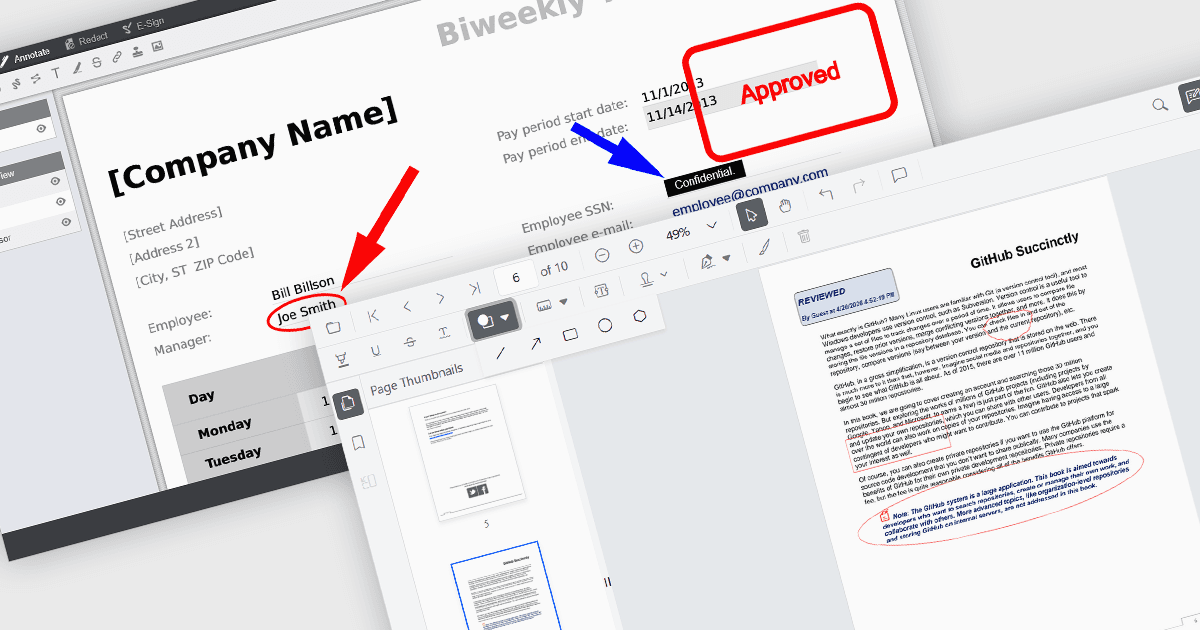
PDF Viewer 구성 요소의 주석 기능을 통해 사용자는 시각적 및 텍스트 마크업으로 문서와 상호 작용할 수 있으며, 검토, 협업, 문서화 프로세스를 지원합니다. Line, Rectangle, Free text와 같은 도구는 구조를 강조하고 명확성을 더하는 데 도움이 되며, Sticky note와 Stamp 주석은 맥락에 맞는 피드백과 상태 표시를 제공합니다. 이러한 기능을 뷰어에 직접 내장하면 애플리케이션은 외부 소프트웨어 없이도 PDF를 편집하고 검토할 수 있는 일관된 경험을 제공할 수 있습니다.
일반적인 주석에는 다음이 포함됩니다:
- Ellipse 주석은 직사각형 주석보다 덜 엄격한 형태로 영역을 강조할 수 있는 원형 또는 타원형 도구를 제공합니다.
- Free text 주석을 사용하면 사용자가 페이지의 어느 곳에나 편집 가능한 텍스트를 삽입하여 인라인 의견이나 수정 사항을 추가할 수 있습니다.
- Freehand draw (Ink) 주석은 서명, 스케치 또는 손글씨 메모를 위한 자연스럽고 펜 같은 입력을 가능하게 합니다.
- Line 주석을 사용하면 사용자가 점 사이에 직선 연결선이나 강조선을 그릴 수 있으며, 주로 관계나 정렬을 지적하는 데 사용됩니다.
- Rectangle 주석은 관심 영역을 둘러싸는 방법을 제공하여 페이지의 특정 섹션을 강조하는 데 유용합니다.
- Stamp 주석은 승인 또는 검토 상태와 같은 미리 정의된 또는 사용자 지정 레이블을 문서에 직접 적용합니다.
- Sticky note 주석은 문서를 시각적으로 어지럽히지 않으면서도 자세한 피드백을 저장할 수 있는 댓글 표시를 추가합니다.
기능과 가격에 대한 심층 분석은 JavaScript PDF viewer components comparison를 방문하세요.