제어된 입력으로 오류 줄이기
미리 정의된 값 목록을 제공하여 사용자가 유효한 항목을 빠르게 선택할 수 있도록 돕고, 정확성을 높이며 검증 부담을 줄입니다.
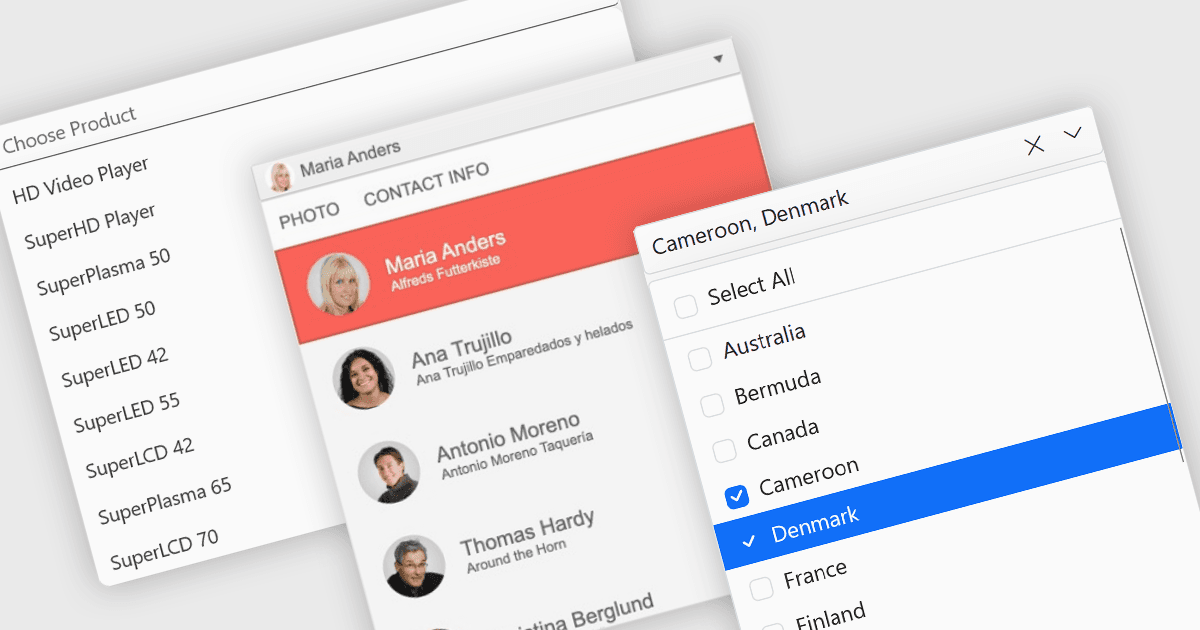
드롭다운과 목록은 사용자가 그리드, 폼 또는 테이블에서 값을 선택하고 관리할 수 있는 구조화된 방법을 제공합니다. 입력을 미리 정의된 옵션으로 제한함으로써 이러한 컨트롤은 데이터 일관성을 유지하고, 입력 오류를 줄이며, 전반적인 사용성을 향상하는 데 도움이 됩니다. 이들은 구성 패널, 데이터 관리 도구, 엔터프라이즈 시스템과 같이 정확성과 효율성이 중요한 비즈니스 애플리케이션에서 일반적으로 사용됩니다.
주요 기능은 다음과 같습니다:
- Combobox는 텍스트 입력과 드롭다운 목록을 결합하여 사용자가 미리 정의된 값 중에서 선택하거나 사용자 지정 데이터를 입력할 수 있게 합니다.
- Checked Combobox는 드롭다운 내의 체크박스를 통해 여러 항목을 선택할 수 있도록 이를 확장합니다.
- Image Combobox는 각 옵션 옆에 아이콘이나 이미지를 표시하여 시각적 인식을 향상합니다.
- Listbox는 고정된 영역 내에서 단일 또는 다중 선택이 가능한 스크롤 가능한 항목 목록을 제공합니다.
- Checked Listbox는 체크박스 지원을 추가하여 사용자가 여러 항목을 더 명확하게 선택할 수 있도록 합니다.
- Image Listbox는 목록 항목에 이미지를 포함하여 사용자가 옵션을 빠르게 식별하고 구분할 수 있도록 돕습니다.
기능과 가격에 대한 심층 분석은 ASP.NET Core 데이터 편집기 구성 요소 비교를 방문하세요.