스프레드시트에 조건부 서식 추가
React 스프레드시트 애플리케이션에 지능형 시각적 신호를 추가하여 사용자가 추세, 임계값, 주요 변경 사항을 더 효율적으로 식별할 수 있게 합니다.
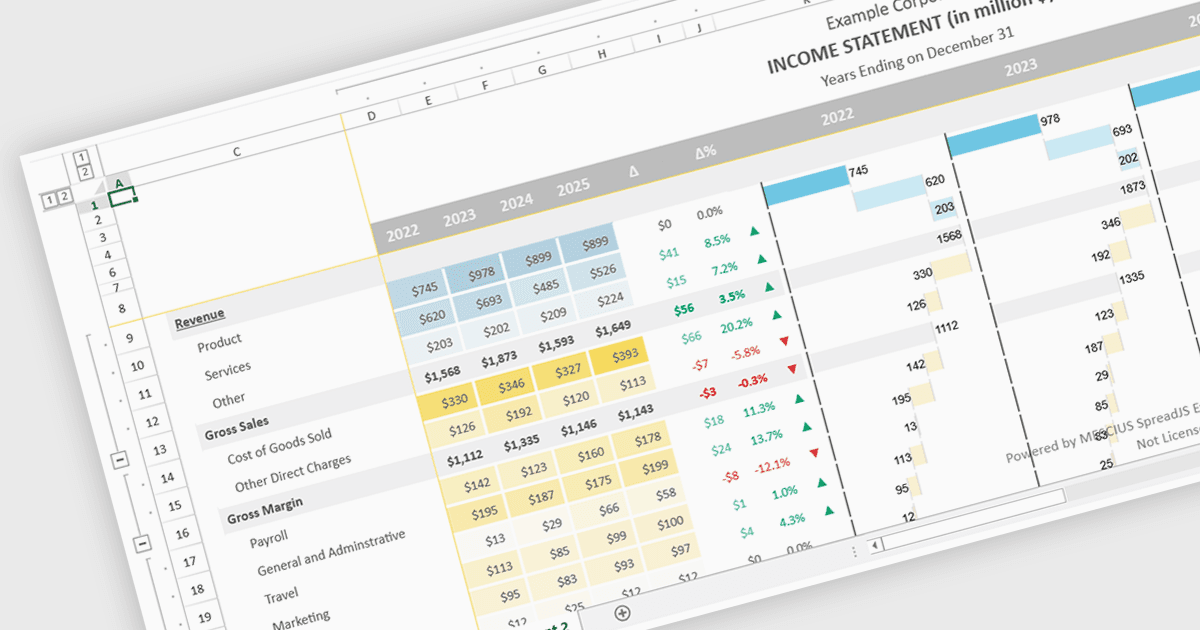
React 스프레드시트 구성 요소의 조건부 서식 지원을 통해 개발자는 정의된 규칙, 값, 지원되는 경우 수식, 또는 미리 정의된 조건에 따라 셀에 동적인 시각적 스타일을 적용할 수 있습니다. 예를 들어 데이터가 변경될 때 추세, 임계값, 오류 또는 상태 변경을 강조 표시할 수 있습니다. 이 기능은 사용자가 수동 분석 없이도 중요한 정보를 빠르게 식별하도록 도와 데이터의 가독성과 사용성을 향상시키며, 보다 상호작용적이고 반응성이 뛰어난 데이터 기반 애플리케이션을 구현할 수 있게 합니다. 소프트웨어 개발자에게는 React 애플리케이션 내에서 익숙한 스프레드시트 경험을 제공하고, 맞춤 렌더링 로직의 필요성을 줄이며, 더 명확한 시각적 맥락과 함께 대시보드, 금융 도구, 보고 시스템, 엔터프라이즈 데이터 관리 인터페이스를 만드는 데 도움이 됩니다.
다음과 같은 여러 React 스프레드시트 컨트롤이 조건부 서식을 지원합니다:
- SpreadJS by MESCIUS는 React 스프레드시트에서 규칙 기반 조건부 서식을 적용할 수 있게 하며, 동적인 시각적 셀 스타일링으로 추세와 임계값을 강조합니다.
- Infragistics Ignite UI for React Spreadsheet (Infragistics Ignite UI의 일부)는 중요한 데이터를 강조하는 조건부 서식 규칙을 사용하여 React 스프레드시트를 만들 수 있게 합니다.
- Syncfusion React Spreadsheet (Syncfusion Essential Studio Enterprise의 일부)는 개발자가 패턴과 예외를 시각화할 수 있도록 조건부 서식을 제공합니다.
기능과 가격에 대한 자세한 분석은 React 스프레드시트 컨트롤 비교를 방문하세요.