PDF 문서에서 텍스트 추출
사용자가 Blazor 앱의 PDF 뷰어에서 텍스트를 직접 선택하고 복사할 수 있도록 하여 정보를 편리하게 캡처하고 재사용할 수 있는 방법을 제공합니다.
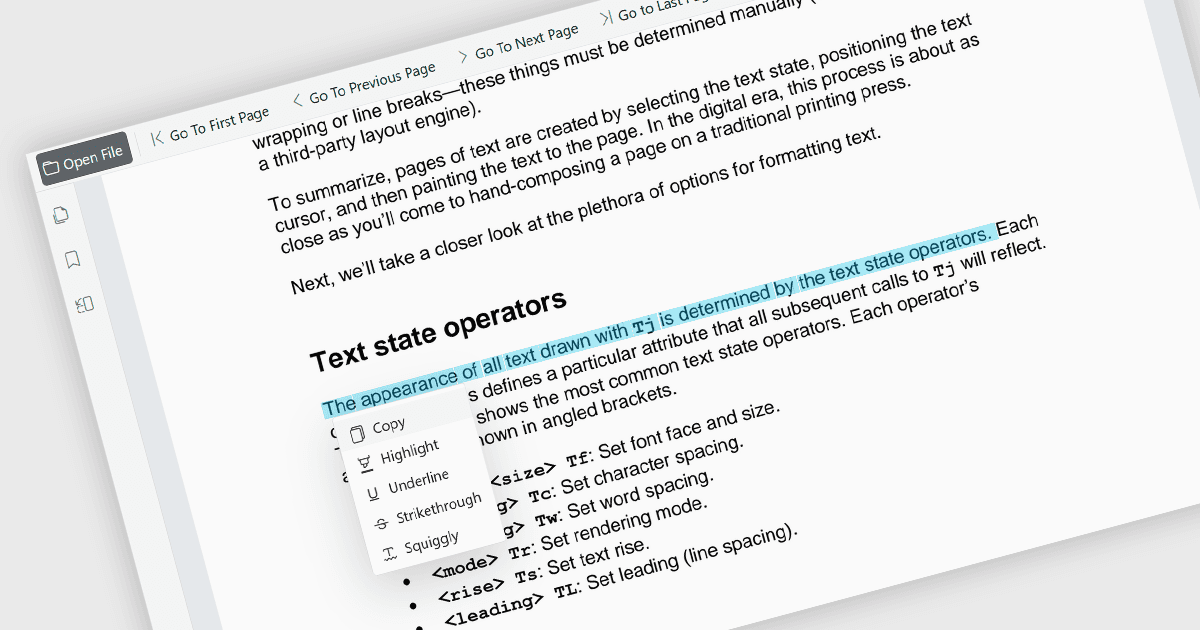
PDF 뷰어 내에서 직접 텍스트를 선택하고 복사할 수 있는 기능은 사용자가 문서를 벗어나지 않고도 콘텐츠를 강조 표시하여 다른 응용 프로그램으로 전송할 수 있게 합니다. 이 기능은 PDF 파일에서 효율적으로 정보를 추출할 수 있도록 하여 수동으로 내용을 다시 타이핑할 필요를 줄이고 오류를 최소화하는 데 도움을 줍니다. 연구, 문서 검토, 콘텐츠 재사용, 팀 간 협업 등 다양한 사용 사례를 지원합니다. 이 기능은 정보를 쉽게 재사용하고 주요 세부사항을 추출하며 연구 활동을 지원하고 보고서, 이메일, 프레젠테이션 또는 기타 비즈니스 문서에 콘텐츠를 통합하는 작업을 간소화하여 생산성을 향상시키고 효율적인 읽기 경험을 유지합니다. 또한 사용자가 문서 내용을 더 유연하고 실용적으로 상호작용할 수 있도록 접근성과 사용성을 향상시킵니다.
다음과 같은 여러 Blazor PDF 뷰어 컴포넌트가 텍스트 선택 및 복사 기능을 제공합니다:
- ComponentOne Blazor FlexViewer (MESCIUS의 ComponentOne Studio Blazor Edition의 일부) 사용자가 PDF 문서 내에서 텍스트를 선택하고 선택한 내용을 클립보드에 복사하여 다른 곳에서 사용할 수 있게 합니다.
- Telerik UI Blazor PDF Viewer (Telerik UI for Blazor의 일부) 텍스트 선택 기능을 제공하여 사용자가 표시된 PDF 파일 내에서 직접 텍스트를 선택하고 상호작용할 수 있도록 하며, 일반적인 문서 검토, 참조 및 콘텐츠 추출 시나리오를 지원합니다.
- Syncfusion Blazor PDF Viewer SDK (Syncfusion Essential Studio Enterprise의 일부) 텍스트 선택 및 복사 작업을 지원하여 사용자가 PDF 파일에서 콘텐츠를 추출하고 선택한 텍스트를 다른 앱에서 사용할 수 있도록 전송할 수 있습니다.
기능 및 가격에 대한 심층 분석은 Blazor PDF 뷰어 컴포넌트 비교 페이지를 방문하세요.