SharePoint PDF Converter
SharePoint 내에서 문서를 직접 PDF로 변환하고 병합합니다.
- 다양한 MS Office 문서와 PDF 형식 간 변환을 지원합니다.
- 여러 파일을 하나의 PDF로 효율적으로 결합할 수 있습니다.
- SharePoint에서 변환된 문서를 이메일 첨부 파일로 쉽게 보낼 수 있습니다.

Format Conversion
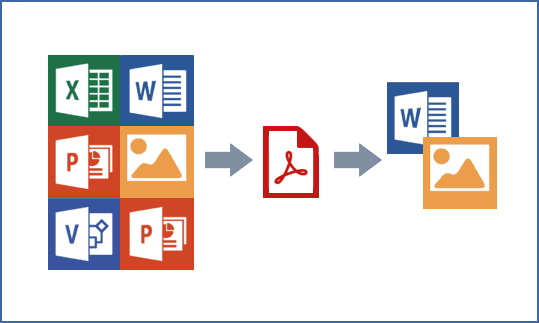
MS Word, Excel, PowerPoint, Visio, Outlook message files, Photoshop PSD files, and various image formats를 SharePoint 문서 라이브러리 내에서 직접 PDF 또는 TIFF로 변환합니다.
Bidirectional Conversion
PDF 파일을 Word 또는 TIFF 형식으로 다시 변환하고, Word 파일을 .doc와 .docx 간에 변환하여 유연한 문서 편집 및 공유를 지원합니다.
Multi-File Combination
SharePoint에서 여러 문서 또는 폴더 내의 모든 문서를 선택하여 하나의 통합된 PDF 파일로 병합할 수 있으며, 결합하기 전에 문서 순서를 재배열하는 옵션을 제공합니다.
Download as PDF
사용자는 추가 소프트웨어 설치 없이 SharePoint를 통해 문서나 파일을 PDF로 로컬 컴퓨터에 다운로드할 수 있습니다.
Email Distribution
SharePoint에서 직접 문서를 PDF 이메일 첨부 파일로 보내 문서 배포 워크플로를 간소화합니다.
Rich Content Support
표, 글꼴 스타일, 워터마크, 책갈피와 같은 리치 텍스트 콘텐츠의 변환을 지원하여 문서 무결성을 유지하는 데 도움을 줍니다.
Multiple Output Formats
유연한 문서 처리를 위해 PDF, DOC, DOCX, CSV, XLS, TIFF를 포함한 여러 출력 파일 형식을 지원합니다.
User-Friendly Interface
SharePoint 문서 라이브러리 인터페이스에 통합된 명령을 제공하여 사용자가 변환, 결합, 배포 작업을 쉽고 간단하게 수행할 수 있습니다.
제품 호환성
아래의 세부 정보를 확인하여 이 제품이 사용 환경에서 지원되는지 확인하세요.
호스트 애플리케이션
- SharePoint
BoostSolutions에 대해
2007년에 설립된 BoostSolutions는 미국과 중국의 사무실에서 운영되며, SharePoint 향상 기능을 제공하는 신뢰받는 전문 기업으로 자리매김해 왔습니다. 숙련된 개발팀은 모든 규모의 조직을 위해 SharePoint의 기능을 개선하는 다양한 소프트웨어 구성 요소와 애드온을 개발합니다. 90개국 이상에서 10,000개 이상의 고객에게 서비스를 제공하는 BoostSolutions는 강한 고객 중심성과 고객 요구에 대한 신속한 대응으로 잘 알려져 있습니다. 사용자 친화적이고 고품질의 제품에 대한 헌신으로, SharePoint 환경을 최적화하고 확장하려는 글로벌 기업들로부터 인정을 받아 왔습니다.