
공식 공급 업체
200 이상의 소프트웨어 개발처와 판매 계약을 맺은 공인 디스트리뷰터로서 합법적인 라이선스를 제공합니다.
모든 브랜드 보기.

스크린샷: 0 ... 더 읽기 본 제품에 관한 더 많은 결과 보기
스크린샷: 0 ... 더 읽기
스크린샷: 0 ... 더 읽기

릴리스 노트: Updated user-interface libraries. 0 ... 더 읽기 본 제품에 관한 더 많은 결과 보기
릴리스 노트: Fixed an issue where license activation window throws an error when the user clicks on the Log ... 더 읽기
릴리스 노트: Allow the user control over whether the interim reports from the command line writes to the log ... 더 읽기
릴리스 노트: Updates in V4.1 Enhanced User Interface- SQL Schema Compare includes a new Ribbon control ... that improves the usability of the tool. Entity Filters- In the user interface you can access these filters from ... the context menu of the comparison grid. The command line interface includes three additional sample XML files ... 더 읽기 본 제품에 관한 더 많은 결과 보기
릴리스 노트: Wizard- Allows the user to create a command line xml file step-by-step, via a simple and intuitive ... interface. New Data Compare Options- SQL data compare now supports several new compare options ... 더 읽기
설명: including tables, stored procedures, views, user-defined functions, extensible markup language (XML) schema ... 더 읽기

릴리스 노트: Improved the 'Diagram Data Version Upgrade' user interface. Repository Options dialog ... box now allows users to select whether to add DDL code to Team Server. Added support for comments ... 더 읽기 본 제품에 관한 더 많은 결과 보기
릴리스 노트: of Objects for the tree nodes. Resolved an issue causing users to receive user interface errors when ... 더 읽기
릴리스 노트: you to edit and deploy to source control tools. Improved REST API for better integration with Team ... Adds support for Oracle 18c and 19c. Added a new ribbon-based user interface for ease of use. ... management, and administration. Macro- Allows the user to populate the ribbon with shortcuts to user ... 더 읽기


기능: and columns from the graphical user interface. Leverage the rich set of visual options including joins, group ... 더 읽기 본 제품에 관한 더 많은 결과 보기
설명: a variety of relational and NoSQL databases. With its user-friendly interface, it enables developers, ... these capabilities in a single tool, Aqua Data Studio helps users save time, eliminate the need to switch between ... in a single, unified interface. SQL Query and Scripting: Write, execute, and debug SQL queries with advanced ... 더 읽기
릴리스 노트: sign-on integration. UI Updates Added new Desktop icon to the main interface. Additionally, users will now ... Authentication & Connectivity: Kerberos authentication support for Oracle. Users can now ... an issue where user edits in the Table Data Editor were not being applied or saved. Fixed a file ... 더 읽기
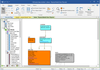
릴리스 노트: Improved the 'Diagram Data Version Upgrade' user interface. Repository Options dialog ... box now allows users to select whether to add DDL code to Team Server. Added support for comments ... 더 읽기 본 제품에 관한 더 많은 결과 보기
릴리스 노트: you to edit and deploy to source control tools. Improved REST API for better integration with Team ... Adds support for Oracle 18c and 19c. Added a new ribbon-based user interface for ease of use. ... management, and administration. Macro- Allows the user to populate the ribbon with shortcuts to user ... 더 읽기
릴리스 노트: to receive user interface errors when attempting to use Chinese characters. Resolved a Compare and Merge ... Catalog Tree to show Fields instead of Objects for the tree nodes. Resolved an issue causing users ... 더 읽기
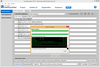
릴리스 노트: user interface for easier navigation. Java-based automation interface to script common tasks. Enhanced ... 더 읽기 본 제품에 관한 더 많은 결과 보기
설명: 모든 플랫폼에서 귀하의 애플리케이션을 배포합니다. InstallAnywhere Enterprise 에디션의 목적은 2가지 있습니다. 하나는 바탕화면, 원 타입 라이즈, 다층 Web 서비스 등 모든 종류의 소프트웨어를 어떠한 플랫폼이라도 인스톨이 가능하도록 하는 것입니다. 또 한 가지는 그러한 응용 프로그램을 제대로 설정해서 최적을 성능을 도출시키는 것입니다. Java, C++, Perl, C# 중 한 가지에서 응용 프로그램을 작성하는 경우에도 EJB 또는.NET Web 서비스를 도입하는 경우에도 인스톨의 모든 상세한 부분은 모두 ... 더 읽기
설명: via Java APIs. InstallAnywhere Premier Edition with Cloud Pack Additional Features Build Multi-Tier ... that allows you to create installers without coding; yet its innovative APIs allow unlimited customization ... applications install securely by digitally signing installation to support Windows User Access Control (UAC). ... 더 읽기
릴리스 노트: AimBetter Agent- version 3.4.6.1: Modernized User Interface- A refreshed, intuitive design ... 더 읽기 본 제품에 관한 더 많은 결과 보기
설명: and resolving problems. User-Friendly UI AimBetter's unique user-friendly interface enables ... 더 읽기
설명: user-friendly interface enables anyone to understand what is happening within the Database servers' ... Comprehensive and User-friendly Server RTPS: Real-Time Problem Solving SaaS Platform. AimBetter ... deficiencies. This helps in promptly addressing and resolving problems. User-Friendly UI AimBetter's unique ... 더 읽기
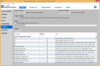
릴리스 노트: user interface for easier navigation. Merge modules allow the reuse of shared code across multiple ... InstallAnywhere projects. Java-based automation interface to script common tasks. Enhanced license compliance ... 더 읽기 본 제품에 관한 더 많은 결과 보기
설명: 모든 플랫폼에서 귀하의 애플리케이션을 배포합니다. InstallAnywhere Enterprise 에디션의 목적은 2가지 있습니다. 하나는 바탕화면, 원 타입 라이즈, 다층 Web 서비스 등 모든 종류의 소프트웨어를 어떠한 플랫폼이라도 인스톨이 가능하도록 하는 것입니다. 또 한 가지는 그러한 응용 프로그램을 제대로 설정해서 최적을 성능을 도출시키는 것입니다. Java, C++, Perl, C# 중 한 가지에서 응용 프로그램을 작성하는 경우에도 EJB 또는.NET Web 서비스를 도입하는 경우에도 인스톨의 모든 상세한 부분은 모두 ... 더 읽기
설명: automation scripts to edit, build, and test installations via Java APIs. InstallAnywhere Premier Edition ... that allows you to create installers without coding; yet its innovative APIs allow unlimited customization ... with extensive user interaction, client/server features and localization for 30+ languages. InstallAnywhere ... 더 읽기


릴리스 노트: a SQL Server database. Removed old technologies from the Precise user interface. Resolved an issue ... of the database has not been certified as a supported database for PMDB," to appear after the user selects ... 더 읽기 본 제품에 관한 더 많은 결과 보기
설명: relational database performance for multiple platforms from a single user interface. Organizations depend on ... SAP Sybase ASE. For each of these database platforms, the interface of Precise looks and behaves the ... 더 읽기
설명: monitor, diagnose, and optimize relational database performance for multiple platforms from a single user ... interface. Organizations depend on the reliability and speed of databases to support mission-critical ... for end-users. Precise for Databases ensures that databases perform at peak efficiency. It captures, measures, ... 더 읽기
전화 : 00798 14 800 6332
팩스 : +1 770 250 6199


