
 (9)
(9)

공식 공급 업체
200 이상의 소프트웨어 개발처와 판매 계약을 맺은 공인 디스트리뷰터로서 합법적인 라이선스를 제공합니다.
모든 브랜드 보기.
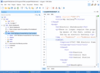
릴리스 노트: Output- You can now make your WebHelp Responsive output more accessible to AI and Large Language Models ... The report groups errors by document, provides sortable tables for easier analysis, and includes links ... 더 읽기 본 제품에 관한 더 많은 결과 보기
릴리스 노트: Prompts the user for extra details passed to the action prompt. replace-selection-based-on-image-analysis ... to ask the AI to regenerate another answer. With OpenAI, you can also decide which engine model to employ ... and preferences. Easily Choose Between AI Models- The AI model used for each particular action or chat session can ... 더 읽기
릴리스 노트: to the AI server, resulting in a faster and more efficient process. Change Default Model- The Oxygen AI ... Positron Assistant preferences page has an option for changing the default model (GPT 3.5 or GPT 4) to use ... for the chat view and for actions that do not explicitly specify a model. Custom AI Actions- In the Oxygen AI ... 더 읽기

설명: can create, read, convert and modify 3D files easily. Moreover, the API assists developers to model ... is a collection of classes and methods that rely on the Document Object Model (DOM), giving developers direct ... 더 읽기 본 제품에 관한 더 많은 결과 보기
설명: and modify 3D files easily. Moreover, the API assists developers to model and create worlds in games, ... Model (DOM), giving developers direct access to a document's inner workings at the element level. ... 더 읽기
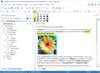
릴리스 노트: make your WebHelp Responsive output more accessible to AI and Large Language Models (LLMs) by enabling ... The report groups errors by document, provides sortable tables for easier analysis, and includes links ... 더 읽기 본 제품에 관한 더 많은 결과 보기
릴리스 노트: Prompts the user for extra details passed to the action prompt. replace-selection-based-on-image-analysis ... to ask the AI to regenerate another answer. With OpenAI, you can also decide which engine model to employ ... and preferences. Easily Choose Between AI Models- The AI model used for each particular action or chat session can ... 더 읽기
릴리스 노트: to the AI server, resulting in a faster and more efficient process. Change Default Model- The Oxygen AI ... Positron Assistant preferences page has an option for changing the default model (GPT 3.5 or GPT 4) to use ... for the chat view and for actions that do not explicitly specify a model. Custom AI Actions- In the Oxygen AI ... 더 읽기

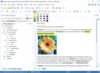
릴리스 노트: Model Context Protocol Integration- Oxygen AI Positron can connect to Model Context Protocol (MCP) ... review changes in the visual file comparison tool. AI-based DITA conversion and analysis actions can ... provide visual context. Expanded AI Models and Connectors- Oxygen AI Positron now supports a broader range ... 더 읽기 본 제품에 관한 더 많은 결과 보기
릴리스 노트: added via Model Context Protocol or provided in the chat mode definition), giving you more control ... sent to the AI so that it better understands the document. Updated Model Context Protocol Library- ... The Model Context Protocol SDK that is bundled with AI Positron 8.1 has been updated to contain the latest ... 더 읽기
릴리스 노트: Prompts the user for extra details passed to the action prompt. replace-selection-based-on-image-analysis ... to ask the AI to regenerate another answer. With OpenAI, you can also decide which engine model to employ ... and preferences. Easily Choose Between AI Models- The AI model used for each particular action or chat session can ... 더 읽기
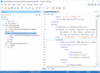
릴리스 노트: Model Context Protocol Integration- Oxygen AI Positron can connect to Model Context Protocol (MCP) ... review changes in the visual file comparison tool. AI-based DITA conversion and analysis actions can ... Models and Connectors- Oxygen AI Positron now supports a broader range of OpenAI models (including ... 더 읽기 본 제품에 관한 더 많은 결과 보기
릴리스 노트: added via Model Context Protocol or provided in the chat mode definition), giving you more control ... sent to the AI so that it better understands the document. Updated Model Context Protocol Library- ... The Model Context Protocol SDK that is bundled with AI Positron 8.1 has been updated to contain the latest ... 더 읽기
릴리스 노트: Prompts the user for extra details passed to the action prompt. replace-selection-based-on-image-analysis ... to ask the AI to regenerate another answer. With OpenAI, you can also decide which engine model to employ ... and preferences. Easily Choose Between AI Models- The AI model used for each particular action or chat session can ... 더 읽기
설명: is a collection of classes and methods that rely on the Document Object Model (DOM), giving developers direct ... then be used for further analysis and processing. Convert documents to other formats- The API supports a wide ... are supported. Aspose.Words Report- Streamline data analysis using powerful Report Generation features. ... 더 읽기 본 제품에 관한 더 많은 결과 보기
설명: Microsoft Word를 활용 하지 않고도 Word 문서를 열람, 수정, 작성합니다. Aspose.Words는 문서 생성, 내용과 서식 수정, 강력한 편지 병합, DOC, HTML, PDF(Aspose.Pdf 필요)로 내보내기 등을 포함해 광범위한 기능을 지원합니다. Aspose.Words Application Programming Interface(API)는 강력하고 사용하기 쉽습니다. 그리고 클래스, 속성, 메소드 명칭은 널리 사용하는 두 API인 Microsoft Word Object Model과 System.Xml의 ... 더 읽기
릴리스 노트: AI Integration: Added the ability to create an instance of the OpenAi Model class directly. ... 더 읽기
릴리스 노트: via Aspose.Cells' object model. Loading the converted SpreadsheetML file causes an exception ... 더 읽기 본 제품에 관한 더 많은 결과 보기
고객 리뷰: with multiple files (our goal is 1500+ files) for repetitive cleaning, accruing, sorting and data analysis ... 더 읽기
릴리스 노트: related objects such as Title, DataLabels. Improved the model for Line and Area (Fill) to support new ... properties that are imported by Excel 2007 file format. Improved the model for Markers to support new ... 더 읽기
릴리스 노트: replace-selection-based-on-image-analysis- Uses details obtained from the referenced DITA XML images when performing the action prompt. ... the AI to regenerate another answer. With OpenAI, you can also decide which engine model to employ when ... Choose Between AI Models- The AI model used for each particular action or chat session can now be easily ... 더 읽기 본 제품에 관한 더 많은 결과 보기
릴리스 노트: sortable tables for easier analysis, and includes links to quickly open the validated documents, ... 더 읽기
릴리스 노트: to the AI server, resulting in a faster and more efficient process. Change Default Model- The Oxygen AI ... Positron Assistant preferences page has an option for changing the default model (GPT 3.5 or GPT 4) to use ... for the chat view and for actions that do not explicitly specify a model. Custom AI Actions- In the Oxygen AI ... 더 읽기
릴리스 노트: Added support for OFD to PDF conversion. Unable to set 'StateModel' for annotations. Watermark does not apply to XFA PDF file. Discrepancies when rendering text rotated by 90 degrees. PDF to JPEG- new engine degrades image quality. PDF to DOCX Incorrect paragraph marks inside table cells. ... 더 읽기

릴리스 노트: extracts data from mobile device live streams and photos. Performs deep analysis to ensure that information ... 더 읽기 본 제품에 관한 더 많은 결과 보기
릴리스 노트: for all document formats: DOC, DOCX, XLS, XLSX, PPT, and PPTX. DOC/DOCX Mathematical equation model (OMML) ... 더 읽기
릴리스 노트: Model (XML and JSON) support. Import and export XML format (PS3.19). Import and export to DICOM JSON ... model (PS3.18). Improved support for inserting large data. HTML5 Medical Viewer Restrict user access ... 더 읽기
전화 : 00798 14 800 6332
팩스 : +1 770 250 6199


