by Developer Express - Product Type: Component / ASP.NET WebForms / ASP.NET AJAX (ATLAS) / .NET Class / 100% Managed Code / AJAX
Add navigation, data layout management and application flow control to your Web applications. ASPxperience Suite has been written from ground up to extend you with components that natively support the ASP.NET 2 Framework and provide complete out-of-the-box AJAX support. Controls included into the ASPxperience Suite generate minimum possible HTML code, can load scripts on demand, optimize style usage, provide full client-side API where appropriate. ASPxperience Suite includes twenty ASP.NET components: ASPxCallback, ASPxCloudControl, ASPxDataView, ASPxHeadline, ASPxMenu, ASPxNavBar, ASPxNewsControl, ASPxObjectContainer, ASPxPageControl, ASPxPager, ASPxPopupControl, ASPxPopupMenu, ASPxRoundPanel, ASPxSiteMapControl, ASPxSiteMapDataSource, ASPxTabControl, ASPxTimer and ASPxTitleIndex.
Our regular prices are shown below. Please logon to see your discounted prices.
| Add to Cart | $ 244.99 | 1 Developer License without Source code - Includes one year subscription | Download (163.6 MB) | |
| Add to Cart | $ 284.99 | 1 Developer License with Source code - Includes one year subscription | Download (163.6 MB) |
Our prices include ComponentSource technical support and, for most downloadable products, an online backup and a FREE upgrade to the new version if it is released within 30 days of your purchase. All sales are made on our standard Terms and Conditions and subject to our Return Policy. Please contact us if you require any licensing option not listed above including volume licensing and previous versions.
Our regular prices are shown above. Please logon to see your discounted prices.
What’s new in ASPxperience Suite v2008 vol 2?
ASPxCallbackPanel Improvement - The panel's content can now remain visible during callback processing. Note that this behavior is optional – a loading panel is displayed by default
What’s new in ASPxperience Suite v2008 vol 1?
Control Visibility Can Now Be Changed on the Client Side - Previously, there was only one programmatic way to switch a web control's visibility - by requesting it from the server and changing the server-side Visible property value. This required an additional round trip to the server, which in turn, reduced the application's response time. You can now specify the initial visibility state of a control and then easily change it via client-side code without initiating any round trips to the server.
Styles Rendering Optimization - In previous versions, you composed the same CSS styles repeatedly on each creation of identical control elements (such as menu items). With this release, these styles are cached and are calculated only once. This significantly improves rendering performance of our web controls.
Callback Processing Improvements - While a callback is being processed on the server, developers can now redirect the application to another web resource. Previously this was possible only with postbacks. In addition, you can now handle errors that occur during callbacks (this doesn't only relate to errors raised by Developer Express controls). For instance, session timeout expiration might previously hang the application if it occured during a callback. You can now easily catch and handle these errors on the server side and thus provide a proper response. This is possible because we've implemented a special HTTP module that intercepts any errors and gives you control over further application flow.
What's new in v2007 vol 3?
Modal Mode in ASPxPopupControl - In this mode, the entire page behind the popup control is grayed and all controls within it are disabled. Once the the popup control is closed, the web page becomes active again.
ASPxMenu Enhancements - The checked state is now available for menu items. This allows you to emulate toolbar functionality using the ASPxMenu control.
ASPxPivotGrid Suite - You can now specify style settings for individual cells. Row field values can now be aligned to the top edge of their cell. You can now save and then restore the pivot grid's layout. Vertical scrolling is now available in the Field List window. Built-in context menus can now be turned off using a single option. You can now respond to click and double-click events within a cell. A new server event notifies you when a field's location or visibility has been changed.
ASPxCloudControl - The ASPxCloudControl allows you to introduce a popular web navigation and data analysis UI into your next ASP.NET project. It organizes hyperlinks by automatically arranging them within a specified area and indicating their weight (importance) using different size fonts and different colors.
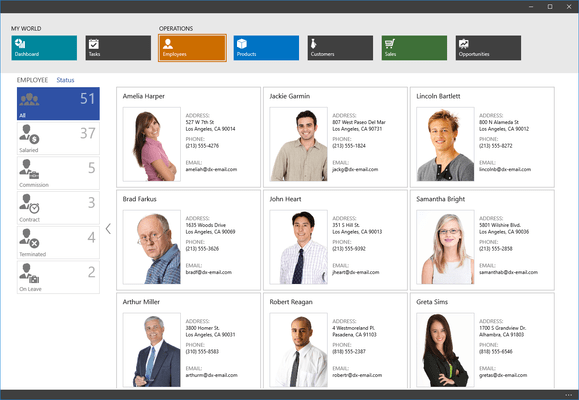
The ASPxDataView is a flexible data presentation tool. It arranges records into a specified number of rows and columns. If needed, it automatically splits content across multiple pages and provides end-users with an embedded page navigation UI - ASPxPager control. Page navigation can be accomplished via postbacks or AJAX callbacks - whichever is more appropriate for your application. Since record content is specified via templates, you can easily modify the ASPxDataView to display any type of information your require. For instance, the ASPxNewsControl is a good extensibility example. This control is derived from the ASPxDataView to display records as news headlines.
ASPxDataView
ASPxPager
The ASPxMenu offers you an elegant way in which to provide website navigation options to your end-users. This library includes two individual components - ASPxMenu and ASPxPopupMenu - to enrich your sites with both static navigation capabilities and context-sensitive action lists. Like other Developer Express web controls, building standard menus for your web app are not the only thing you can deliver with this suite. With integrated template technology, you can easily transform menu items into anything you can imagine - for instance, you can transform a single-item context menu into a popup entry form.
Control Features
Client-Side Features
Root-level Menu Features
Sub-menus
Separators
Item Features
The ASPxNavBar allows you to introduce cutting edge site navigation capabilities to your ASP.NET solutions with ease and simplicty. Whether you wish to emulate a Windows Style Explorer Bar or an MS Outlook SideBar within your application. In addition to traditional UI presentation elements, the ASPxNavBar allows you to create customized navigation options with its built-in template support - you can use it anywhere and everywhere you need to display list-oriented information to end-users.
The ASPxNewsControl provides a quick and easy way in which to display news/product headlines within a web page. To accomplish this, it includes two distinct controls: The first is designed for the representation of a single headline - The second is a ready-to-use news/product list control with built-in AJAX paging support
ASPxPopupControl makes it easy to display popup windows and hints on your Web pages. Simply place an ASPxPopupControl onto a form and populate it with arbitrary HTML content and choose where to display it. Need to display this window when end-users hover or click an HTML element? Then you only need to specify that element's ID and choose the end-user action - the rest is done automatically. It offers you mulitple options so you can properly align your window relative to that element and add arbitrary offset to its position. Of course, you can also show any number of windows at any pixel position you choose. And if multiple windows have been invoked, they will behave just like ordinary windows you are used to - end-users will be able to move them, switch the active window, etc.
The ASPxSiteMapControl adds an site map generation engine to your appliactions. It lets you read an XML site map and visualize it using numerous automatic link arrangement options. It offers you style customization mechamisms and even node templates so you can display anything you like within a site map node - from page descriptions to images.
The ASPxTabControl includes two components, allowing you to build tabbed interfaces within your web sites. You can either use the ASPxTabControl component to only display tabs or use the ASPxPageControl to associate specific page content with each tab. Both controls have been built to generate minimal HTML code, work on the client-side without hassles, be fast and fully support AJAX for on-demand page loading via callbacks.
ASPxTitleIndex is a Web control that can be used to organize a catalog - i.e. provide easy access to elements in a lengthy list (on the client side or via AJAX callbacks). This control arranges links into an alphabetically sorted and grouped list by default. If needed, you can group data by any field value. End-users can easily narrow down their search to a particular group by selecting an auto-generated shortcut link or by using the filtering option.
ASPxCallback - Provides an easy way in which to implement AJAX callback functionality. This component exposes a method that initiates a callback and passes arbitrary data to the server. The callback can then be processed using this component's specially designed server-side event. You can analyze data sent from the client and send the required data back. Once processed, a client-side event is raised so that you can update the web page on the client and thus finish the callback cycle.
ASPxObjectContainer - Enables you to embed flash movies, videos, sound tracks and image files into your web pages. In most cases, all you need to do is simply specify the target media file.
ASPxTimer - Represents an easy-to-use server-side or client-side timer component. It exposes a complete client-side API. You can stop or start the timer on the client side, change tick interval and, of course, respond to tick events.
ASPxRoundPanel - Provides an easy way to create a panel with rounded corners. This component ships with a designer dialog that allows you to specify corner radius, panel and border color, header visibility and color.
Publisher
Primary Category
Related Products
Related Categories