by Developer Express - Product Type: Component / .NET WinForms / .NET Class / 100% Managed Code
Please note: DXperience Professional has been renamed and is now called DXperience WinForms.
DXperience Professional by Developer Express
All the WinForms component suites and libraries produced by DevExpress in one package. DXperience Professional includes the following products: XtraGrid Suite, XtraBars Suite, XtraPivotGrid Suite, XtraScheduler Suite, XtraReports Suite, XtraTreeList Suite, XtraVerticalGrid Suite, XtraCharts Suite, XtraLayoutControl Suite, XtraNavBar, XtraEditors Library, XtraPrinting Library, XtraSpellChecker.
Components designed for Windows Forms
XtraReports Suite
A reporting tool that features an extremely easy-to-use report designer - the XtraReports Suite is fully integrated into MS Visual Studio IDE so you customize reports like you customize your Windows Forms. You simply build an XtraReport class descendant either within the designer or via code.
Other features include: large set of export formats including XLS, HTML and PDF; the ability to integrate reports into ASP.NET applications; several wizards simplifying the report construction process; numerous built-in native controls including rich text box, bar code, zip code and charts; the ability to print 3-rd party Windows Forms controls; master-detail and sub-report support; fully functional end-user designer; multi-column reports, and much more.
XtraCharts Suite
A 2D/3D charting solution for both Windows Forms and the Web. Regardless of platform or chart type, you are free to customize each aspect of data representation – from axes and diagram backgrounds to legend and titles. The XtraCharts Suite offers multiple built-in coloring schemes for all charts types and natural lighting with full smoothing support for 3D charts. You simply provide data and automatically get a perfect visualization.
XtraGrid Suite
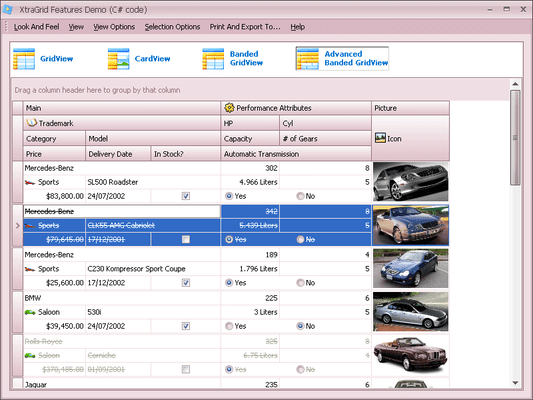
A grid control with four data layout options from a simple table to banded multi-line row layout and card views. XtraGrid offers true master-detail support with unlimited nesting levels that doesn’t affect any other features, intuitive on-form customization without the need for any designer dialogs, rich end-user experience, printing and exporting to a number of formats, and so much more.
XtraBars Suite
The suite offers you the complete range of navigation and window layout management tools. Using XtraBars, you can build Ribbons, traditional toolbar-menu systems, dock windows, tabbed MDI interfaces and context menus. You have the choice of over ten item types to be used in Ribbons, bars and menus – from push and check buttons and integrated editors from the XtraEditors Library to automatically constructed MDI children lists and toolbar lists.
XtraScheduler Suite
XtraScheduler Suite enables you to incorporate the UI found in Microsoft Office Calendar to your applications with just a couple of mouse clicks. Everything you need is available out-of-the-box. You get multiple data views - from a single day to multiple weeks; you get built-in recurrence and reminders, and, most importantly, you get the complete set of build-in end-user menus and dialogs.
XtraPivotGrid Suite
The XtraPivotGrid Suite is a data analysis, data mining and visual reporting solution for Windows Forms applications. It was engineered to provide a bridge between on-screen forms and printed reports. With it, your users can break down raw data in any manner they require using easy-to-understand Windows commands and instantly render the desired output to a printer. By incorporating the XtraPivotGrid in your application, you can deliver an almost endless array of reports - both on-screen and in printed form - without hassles or aggravation.
XtraLayoutControl
The XtraLayoutControl represents an new way in which to design and manage your Windows GUI - with it, you can construct forms with full runtime customization and offer end-users complete control over the layout and appearance of your applications with ease.
XtraTreeList Suite
A hybrid tree-view and grid control that has both bound and unbound data access options. The optimal choice for building newsreader-like applications and any other hierarchical data viewers like folder or registry browsers.
XtraVerticalGrid Suite
A 90 degrees rotated grid where records are arranged one after another from right to left. The control gives you the choice of 3 data layouts – single record (similar to the Properties window of the MS Visual Studio), bands layout (one record is displayed in a number of columns) and multi-records layout (just like the inverted grid control). The vertical grid supports tree-like data representation structure, breaking the columns into collapsible categories, complex cell layouts, automatic row drag and drop and much more.
XtraNavBar
A navigation control allowing you to build side-bars, explorer bars and Office navigation panes – over 20 views are available which also includes XP painted and custom-skinned views. You set up the control structure once and don’t have to redo a single thing to change the paint style and layout. Within its groups, the control can display either links arranged using one of the four built-in layouts or any Windows Forms controls. Other main features include: on-form design-time customization without the need for designer dialogs, automatic link drag and drop support, full appearance customization including even owner-drawn hints for groups and links.
XtraEditors Library
The library is comprised of over 20 editors that can be used both as standalone or be embedded into cells of the XtraGrid, XtraTreeList, XtraVerticalGrid controls and bars and menus produced with the XtraBars Library. Additionally, the XtraEditors Library offers numerous controls like labels, buttons, list boxes, splitters and so on so you can create visually consistent applications. Included style controller and editors repository components eliminate the need to create the same styles or editors more than once.
XtraPrinting Library
The data rendering and visualization system allowing you to construct any printed pages from scratch or print Windows Forms controls like the XtraGrid, XtraTreeList, XtraPivotGrid, XtraCharts, DataGrid, ListView, TreeView. This library is also integrated into the XtraReports Suite to provide printing facilities.
XtraSpellChecker
The XtraSpellChecker provides you a straightforward way in which to add Microsoft Office style spell checking capabilities into your next Windows application and offers you built in suggestion forms that replicate corresponding forms found in Microsoft Word and Outlook.
What’s new in DXperience Professional 2008 vol 1?
XtraCharts Suite
New Spline Views - Eight in Total: 2D Spline View, 3D Spline View, 2D Spline Area View, 3D Spline Area View, 2D Stacked Spline Area View, 3D Stacked Spline Area View, 2D Full-Stacked Spline Area View, and 3D Full-Stacked Spline Area View
New XML Serialization
Medium Trust Support
Advanced Customization: Separate Titles for Pie and Doughnut Views; Display Text Patterns for Labels;Labels for Zero-Height Bars
XtraGrid Suite and XtraEditors Library
LINQ Server Mode - When the grid control is in server mode, it delegates all data processing to the server and downloads only those records it needs to be displayed on screen. This allows you to dramatically increase performance against large datasets. Any LINQ query provider is supported.
Various Layout View's Enhancements
Filter Dropdown Lists with Check Boxes
New Component – CheckedComboBoxEdit
Other new capabilities within DXperience include:
XtraReports Suite: New Cross-Tab Control, Improved ASP.NET Reporting, New Styles and Style Overriding, Better control over Report layout
XtraPrinting Library: Export to XLS - Support for Native Data Formatting
XtraPivotGrid Suite: Custom Group Intervals, Drill-Down Functionality in OLAP Mode, Printing in Both Portrait and Landscape Mode
XtraVerticalGrid Suite: Property Description Control, Unbound Rows
XtraBars Suite: Close Buttons in Tabs when using XtraTabbedMdiManager
XtraLayoutControl: Custom Customization Forms
XtraScheduler Suite: Mapping Wizards, Filter Control Integration, Better Time Zone Support
PartNumbers:
PurchaseOptions:
Resources:
Operating System for Deployment: Windows Vista, Windows XP, Windows 2000
Architecture of Product: 32Bit
Product Type: Component
Component Type: .NET WinForms, .NET Class, 100% Managed Code
Compatible Containers: Microsoft Visual Studio 2008, Microsoft Visual Studio 2005, Microsoft Visual Basic 2008, Microsoft Visual Basic 2005, Microsoft Visual C++ 2008, Microsoft Visual C++ 2005, Microsoft Visual C# 2008, Microsoft Visual C# 2005, .NET Framework 3.5, .NET Framework 3.0, .NET Framework 2.0
Product Class: Business Components
Search Items: New Product May 04, New Product June 04, New Product May 05, New Product June 05, New Product Sep 05
Keywords: validation validate Calendar calendaring calendars Scheduling Schedule Schedules Database DB Reporting Report reports planning plan scheduling schedule schedules scheduler User Interface Collections UI User Interface UI Toolbar tool bar tool-bar Toolbars Menu Menus Ribbon Ribbonbar Spelling spell spel speling check spellcheck Reporting Reports Report Product Suites Suite bundles bundle Print Preview Printing previews prints Treeview List tree view tree-view list-view listview listbox Grid Grids Table Tables DataGrid DataGrids Chart Charting Charts Graph Graphing Graphs Explorer exploring explore Developer Express devexpress Entry data-entry Enterprise Partner dxperience dexperience dx perience experience devexpress developer express winforms winform win form windowsforms windowsform .net windows forms form window
Publisher
Primary Category
Related Products
Related Categories