FormSuite - .NET/ActiveX - Summary

by Pegasus Imaging Corporation - Product Type: Component / .NET WinForms / ActiveX DLL

Summary

FormSuite - .NET/ActiveX - . by Pegasus Imaging Corporation

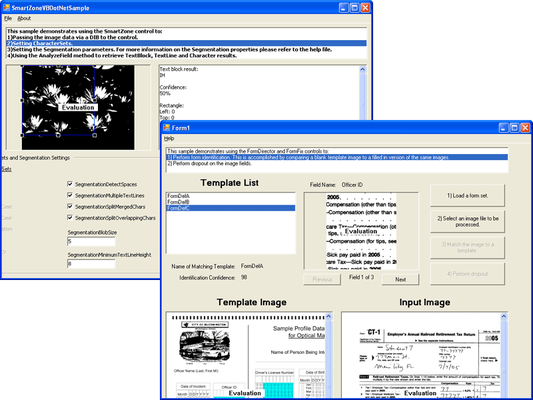
Add image compression, decompression, form identification, file conversion and more to your application. FormSuite includes FormFix Professional, SmartZone Professional, ScanFix Xpress and ImagXpress Document. FormFix delivers both .NET and ActiveX COM components offering bitonal template-based form identification, form registration, form drop out, and OMR technology to developers of forms processing applications. SmartZone offers developers the ability to perform zonal OCR (machine print character recognition) commonly used in forms processing applications. ScanFix Xpress offers bitonal document image enhancement technology. ImagXpress Document is ideal for document imaging and forms processing application development.

FormFix

Form Setup

API support for setting up fields, form templates, and sets of form templates

Flexible architecture for defining custom operations at any stage of processing

Define OMR, text, image, or custom fields on each form

Extensive support for form processing operations

Form Identification

Match forms against previously defined unfilled templates and return confidence values

Provide automatic identification without the need for registration marks, ID marks, or anchor marks

Match forms that are rotated 90, 180, or 270 degrees from template image

Match forms that have been scaled from 90% to 110% of the template size

Match forms scanned with resolution of 50% to 150% of the template resolution

Match forms that are skewed up to 20 degrees by pre-processing with the included ScanFix

Identify thousands of different forms

Limit a recognition operation to a subset of the available templates

Set the level of effort expended in completing form matching

Return Identification Certainty indicating confidence of form matching

Accept a Minimum Certainty level for acceptance as a matched form

Return up to 100 alternative form matches of lower certainty

Quickly identify forms, even when using very large sets of template forms

Form Registration

Automatically align a filled form to its master template based on image contents, to within one or two pixels of the blank template without requiring registration marks

Analyze the master template form content and determine anchor points automatically

Adjust alignment within a drop out zone to compensate for small differences between forms

Support an alternate registration process using anchor marks in each corner

Register forms even when the forms exhibit these characteristics:

Skew (up to 20 degrees)

Smaller or larger image size than the template (up to 10%)

Forms scanned at different resolutions (up to 50% greater and lesser) than the template resolution

Rotation (at 90, 180, and 270 degrees from the template)

SmartZone

Zone Definition & Processing

Perform recognition on defined zones

Perform image cleanup on defined zones

Optical Character Recognition (OCR)

Recognize text using pre-defined character sets, including uppercase, lowercase, mixed case alphabetic, digits, currency symbols, combined currency and digits, arithmetic symbols and punctuation characters

Limit recognition to customer defined subsets of supported character sets

Return confidence values for each individual character, as well as the complete OCR result, to help manage the recognition process

Return multiple character results with associated confidence values

Specify the rejection character provided when recognition of a character fails

Specify the confidence level below which the rejection character is returned

Specify recognition segmentation parameters

Support English characters only

Image Input, Image Output, and Image Handling

SmartZone includes ImagXpress Standard for basic image conversion, image processing, and TWAIN scanning

Support image data transfer with other components

Bitonal Image Cleanup

SmartZone Professional and Standard editions include ScanFix Xpress Lite for bitonal image cleanup technology such as deskew, despeckle, rotate, mirror, flip and more

ScanFix Xpress

Image Input, Image Output, and Image Handling

Provided through the included ImagXpress Professional .NET component and ActiveX/COM control

Features include image viewing, compression, conversion, TWAIN scanning, annotation, printing, image processing, and more

Deskew

Automatically straighten crooked images and report correction angle

Deskew images in a fraction of a second

Uses content of the images, not just the document

User configurable High Quality vs. High Speed setting

High Quality sets a higher number of places to check around the image, ultimately providing the highest level of deskew accuracy, but the image processing speed is slower

High Speed sets a lower number of places to check around the image, ultimately providing the fastest image processing speed, but offers a slightly lower level of accuracy

Noise Removal

Remove random specks or noise from images

Configurable user specification of speck size, or use automatic settings

Special Isolated Despeckle algorithm prevents removal of desired dots such as punctuation

Dot Shading Removal

Automatically remove dot shading surrounding text for improved OCR accuracy

Remove scanner noise caused by colored backgrounds (gray, blue, etc.)

Reduce files sizes caused by additional pixels, without destroying text

ImagXpress Document

Document Image Processing and Editing

Comprehensive set of over 80 image processing functions

Automated 1 bpp image cleanup

Configurable Binarization and Half Toning

Anti-alias and scale to gray

Advanced merging capabilities

Autocrop

Automatic Deskew - Automatically detect and remove skew from bitonal images. Detection focuses on the content of the image, such as text and drawings, rather than the border. You can also specify acceptable skew angle, quality, and confidence levels

Despeckle - Use advanced technology to remove specks from bitonal images, including specification of speck size and reporting of number of specks removed

Line Removal - Remove lines of defined size, thickness, and other specifications, from bitonal images. Report the number of lines removed

Dilate - Add black pixels to extend objects vertically, horizontally, or diagonally

Erode - Remove black pixels from objects in bitonal images vertically, horizontally, or diagonally

Smooth Zoom - Enhance character clarity, using Smooth Zoom. Replace an image with a new image with width and height doubled and with pixels smoothed

Shear - Apply rotation of bitonal images, along only the vertical or horizontal axis, by the specified angle in degrees. Allow the user to specify the color with which to pad the image

Hole Punch & Blob Removal - Locate and remove all black blobs (e.g. hole punch marks) in bitonal images, within a defined search area, based on size or density. Detect and report the number of blobs found within the search area

Blank Page Detection - Automatically determine that a page is blank within a set of bitonal images, by detecting if no objects are found to exceed the minimum object dimension. A border (top margin, left margin, right margin, bottom margin) within which to test for blank page, and minimum confidence, can be specified

Border Crop - Remove the black border around a bitonal image

"Preserve Dark" Detail Enhancement

Ideal for enhancing thumbnail images or images that are zoomed out

Preserve the dark pixels of an image when an image is scaled at ratios less than 1:1 (many pixels are averaged for the one displayed)

Avoid losing details in fine lines or fine text

Retention of image transparency

Color anti-aliasing and smoothing for zoomed

Adjust contrast, brightness, hue, saturation, gamma, and more (Display adjustment of contrast, brightness, and gamma)

24, 8, 4, and 1-bit color depth conversions with advanced palette control

Area and region processing

PartNumbers: PC-517541-107869 517541-107869 PC-517541-107870 517541-107870 PC-517541-107871 517541-107871 PC-517541-107872 517541-107872 PC-517541-107873 517541-107873 PC-517541-107874 517541-107874 PC-517541-107875 517541-107875

PurchaseOptions: FormSuite 1 Developer License , FormSuite - Runtime Licenses 1-4 Installations (per CPU) , FormSuite - Runtime Licenses 5-9 Installations (per CPU) , FormSuite - Runtime Licenses 10-24 Installations (per CPU) , FormSuite - Runtime Licenses 25-49 Installations (per CPU) , FormSuite - Runtime Licenses 50-99 Installations (per CPU) , FormSuite - Server License 1 Server (CPU) License

Resources: Read the FormFix help file, Read the SmartZone help file, Read the ScanFix help files, Read the ImagXpress help file, Read the Product Feature Matrix, Read the Pegasus Licensing Information, Download the FormSuite for .NET evaluation on to your computer - Displays nag screens, Download the FormSuite for ActiveX evaluation on to your computer - Displays nag screens

Operating System for Deployment: Windows Vista, Windows XP, Windows 2000

Architecture of Product: 32Bit

Product Type: Component

Component Type: .NET WinForms, ActiveX DLL

Compatible Containers: Microsoft Visual Studio 2005, Microsoft Visual Studio .NET 2003, Microsoft Visual Studio 6.0, Microsoft Visual Basic 2005, Microsoft Visual Basic .NET 2003, Microsoft Visual Basic .NET, Microsoft Visual Basic 6.0, Microsoft Visual C++ 2005, Microsoft Visual C++ .NET 2003, Microsoft Visual C++ .NET, Microsoft Visual C++ 6.0, Microsoft Visual C# 2005, Microsoft Visual C# .NET 2003, Microsoft Visual C# .NET, .NET Framework 2.0, .NET Framework 1.1, .NET Framework 1.0

Keywords: Scan scanning scanned scanner scans OCR optical character recognition image images processing imaging Product Suites Suite bundles bundle Pegasus Image Imaging Imaging image images Professional Partner form suite pegasus imaging FormFix Form Fix, SmartZone Smart Zone, ScanFix Xpress, Scan Fix ImagXpress Document

Product Search

Enter search words:

Quick Links

Award