by Developer Express - Product Type: Component / .NET WinForms / .NET Class / 100% Managed Code
Developer Express XtraEditors .NET by Developer Express
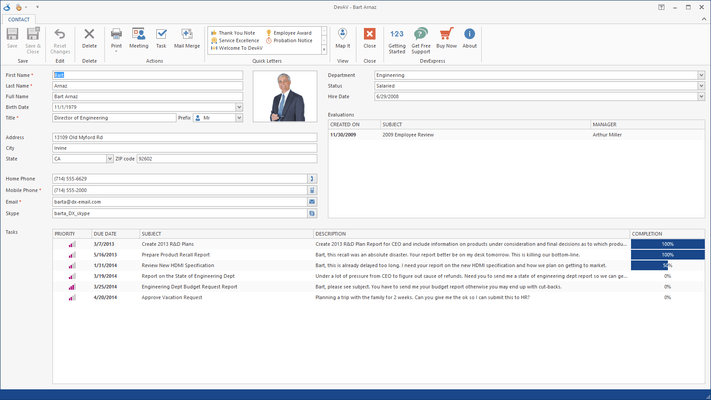
Build rich user interfaces for your .NET applications without writing a single line of code. The XtraEditors Library is a 100% C# based component suite designed and optimized for Visual Studio .NET and all .NET languages. It includes 15 data edit controls. Every editor in the suite is available in both unbound and data-aware mode. With built-in Windows XP Theme support, you can easily enable the newest look and feel standards in your next .NET application. Like all Developer Express .NET controls, you can also purchase the full C# source code for this library.
The XtraEditors Library gives you 20 feature-complete editors and 2 custom editor samples which demonstrate how easy it is to create your own editors. All the editors can be used in bound and unbound modes. All of them can be used as standalone or within container controls such as the XtraGrid, XtraTreeList, XtraVerticalGrid and XtraBars. The XtraEditors Library in addition gives you 16 controls from panels and group boxes, to tab control, data navigator and list boxes. This ensures that you build consistent applications whatever your business needs are.
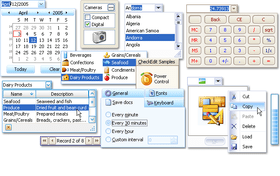
The XtraEditors Library includes the following editors that can be used in bound or unbound mode, standalone or within containers like the XtraGrid, XtraTreeList, XtraVerticalGrid, XtraBars:
CheckEdit - a multi-purpose control that can serve either as a check box with two or three states or as a radio button
ProgressBarControl - a progress bar
MarqueeProgressBar - an infinite progress bar control
RadioGroup - an automatically arranged radio button group
PictureEdit - a control that allows pictures to be displayed and edited, by pasting them from the clipboard or loading them from a file
TextEdit - a single-line text editor that implements the basic text editing features used by other controls which have a text box
MemoEdit - a multi-line text editor
ButtonEdit - a text editor that allows you to display any number of buttons on the left or right edge of a text box
HyperLinkEdit - a text editor that provides a hyperlink appearance to the text and allows hyperlinks to be invoked
SpinEdit - provides easy editing of numeric values by incrementing or decrementing edit values using spin buttons, the mouse wheel or keyboard
TimeEdit - allows you to increment / decrement the currently selected time value element (hours, minutes, seconds) using spin buttons, the mouse wheel or keyboard
ComboBoxEdit - allows text values to be edited by selecting an item from the dropdown list or typing in values directly. It provides advanced features such as auto-completion of entered values
ImageComboBoxEdit - a combo box with a separate edit value and display text. Allowing you to display images within the text box and dropdown items
MRUEdit - a combo box that adds all the most recently entered values into the dropdown list
LookUpEdit - a multi-column combo box with lookup functionality. It offers you a number of advanced features such as dropdown list sorting, incremental filtering, etc.
DateEdit - a date editor with a dropdown calendar
PopupContainerEdit - allows you to display any control within the dropdown window.
CalcEdit - provides a dropdown calculator for easy editing of numeric values
ColorEdit - an editor with a Visual Studio-like color picker dropdown
MemoExEdit - a control with a dropdown memo editor. The best choice for providing memo fields in grids if you don't want to corrupt the layout of the cells
ImageEdit - a control with a dropdown picture editor. The best choice to present image fields in grids if you don't want to corrupt the layout of the cells
TrackBar - a track bar control
RangeTrackBar - a track bar control allowing you to set two values
ZoomTrackBarControl - Office 2007 style track bar control
Font Edit - font selector control
The following additional controls are included.
FilterControl - a stand-alone emulation of the XtraGrid's built-in Filter Editor which allows end-users to construct filter criteria of any complexity
XtraTabControl - a feature-complete tab control
DataNavigator, ControlNavigator - these controls have a common interface but differ in functionality. The first is bound to a data source to provide navigation through records, addition, deletion, etc. The second can be bound to controls that implement a specially designed interface. The XtraGrid control, for instance, implements this interface to provide master-detail navigation
ListBoxControl, ImageListBoxControl, CheckedListBoxControl - three variants of the list box control
LabelControl - a label that can display a horizontal divider after the text
SimpleButton - a button control that can display an image along with text
PanelControl - a panel control
GroupControl - a group box whose caption can be repositioned
SplitterControl - a splitter control
SplitContainerControl - a control represented by two group boxes which are separated by a vertical or horizontal splitter
HScrollBar, VScrollBar - scroll bars
XtraScrollableControl - allows you to easily implement custom scrollable controls
XtraForm, XtraUserControl, XtraMessageBox - controls designed to bring complete consistency to the user interface throughout the entire application
Appearance Customization
All the controls can be painted in 3D, Flat, UltraFlat, Office 2003 style or using the currently applied XP theme
Included controls fully support the Skins technology which means elements are constructed from a set of bitmaps. This allows you to provide an XP look and feel for any operating system. With the XtraEditors, you get multiple built-in skins including Office 2007 skins
The previous two benefits are possible since the XtraEditors Library supports a shared painting library. With this library, you have centralized control over the look and feel of all controls. You can change the paint style of all the controls by changing just a single property
The main benefits brought to you by the editor controls:
Masked input capabilities. You have numerous mask specification alternatives. From specifying masks as format strings to fully functional regular expressions with branching and auto-completion functionality
Formatting display values using standard format strings, custom format strings or by implementing a custom formatter class
Advanced data validation and error indication mechanisms
The ability to enter and indicate null values
Custom parsing for entered text
If you build data entry forms with the XtraEditors Library, end users can move focus to the next control in the tab order using the ENTER key
Full support for the keyboard and mouse wheel
What's New in XtraEditors Library v2008?
New Component - CheckedComboBoxEdit - This new control allows you to display a set of Boolean options or bit fields in a dropdown window. It can be used both standalone and for in-place editing within container controls (XtraGrid, XtraTreeList, etc).
What's New in XtraEditors Library v2007 vol. 2?
New Components - The XtraEditors Library introduces two new button controls and a new component that makes it easier to validate user input.
DropDownButton - This button can be associated with a popup control or a context menu. End-users can invoke the associated control by clicking the button's drop-down arrow
CheckButton
DXValidationProvider - Previously, in order to validate data within standalone editors, you had to manually subscribe to Validation events and invoke custom validation code. The DXValidationProvider component looks at the validation task from a different standpoint. With this component, you don't need to write code. Simply create validation rules and associate them with editors.
Embeddable MarqueeProgressBar Сontrol - In previous versions, MarqueeProgressBar could only be used as a standalone control. With this release, it can be integrated into toolbars, ribbons, grids and all other Developer Express container controls.
Animation - The PictureEdit and ImageEdit controls now support animated GIF files. GIF animation support is also available within container controls (such as the XtraGrid, XtraTreeList, XtraBars, etc). As an example, the following image shows how you can enhance a grid control's functionality using animated GIF files:
Displaying RTF Data in Container Controls - Container controls (such as the XtraGrid, XtraTreeList, XtraVerticalGrid, etc) can now display RTF data within their cells (read-only mode). This allows you to show formatted text with images without using any custom draw features.
What's New in XtraEditors Library v2007 vol. 2?
ZoomTrackBarControl - The new ZoomTrackBarControl component enables you to imitate the track bar used in Microsoft Office® 2007. This track bar allows users to scale documents and is usually displayed within the status bar's right section. If you own the XtraBars Suite, you can implement the same interface, since editors from the XtraEditors Library can be embedded into our toolbar, menu, Ribbon and status bar components
FontEdit - Another new editor is the font selection combo box. This control provides the same appearance and behavior as the font selector in Microsoft Office®. Just like the ZoomTrackBarControl, the new FontEdit can be embedded into our container controls, including grids, toolbars and ribbons
Vista Style Clock in Date Editor's Dropdown - The DateEdit control now allows end-users to manipulate the time portion of the edit value. The editor's dropdown window displays a Windows Vista style clock and a TimeEdit control
Re-designed List Box Controls - In v2007 vol. 2 the following controls have been redesigned from the XtraEditors Library: ListBoxControl, ImageListBoxControl and CheckListBoxControl
PartNumbers: PC-512164-162707 512164-162707 PC-512164-162708 512164-162708
Publisher PartNumbers: 92 93
PurchaseOptions: Developer Express XtraEditors .NET v2008 vol 2 (V8.2.4) 1 Developer License - Includes one year subscription , Developer Express XtraEditors .NET v2008 vol 2 (V8.2.4) 1 Developer License with Full C# Source Code - Includes one year subscription
Resources: Read the Developer Express XtraEditors help file, Download the DXperience v2008 vol 2 (V8.2.4) for Visual Studio 2005/2008 evaluation on to your computer - Expires After 30 Days
Operating System for Deployment: Windows Vista, Windows XP, Windows ME, Windows 2000, Windows NT 4.0
Architecture of Product: 32Bit
Product Type: Component
Component Type: .NET WinForms, .NET Class, 100% Managed Code
Compatible Containers: Microsoft Visual Studio 2008, Microsoft Visual Studio 2005, Microsoft Visual Basic 2008, Microsoft Visual Basic 2005, Microsoft Visual C++ 2008, Microsoft Visual C++ 2005, Microsoft Visual C# 2008, Microsoft Visual C# 2005, .NET Framework 3.5, .NET Framework 3.0, .NET Framework 2.0
Product Class: User Interface Components
Search Items: New Version Oct 03, New Product May 05, New Product Sep 05
Keywords: validation validate User Interface UI Developer Express devexpress Entry data-entry Enterprise Partner
Publisher
Primary Category
Related Products
Related Categories