Developer Express XtraGrid .NET Suite - Summary

by Developer Express - Product Type: Component / .NET WinForms / .NET Class / 100% Managed Code

Summary

Developer Express XtraGrid .NET Suite by Developer Express

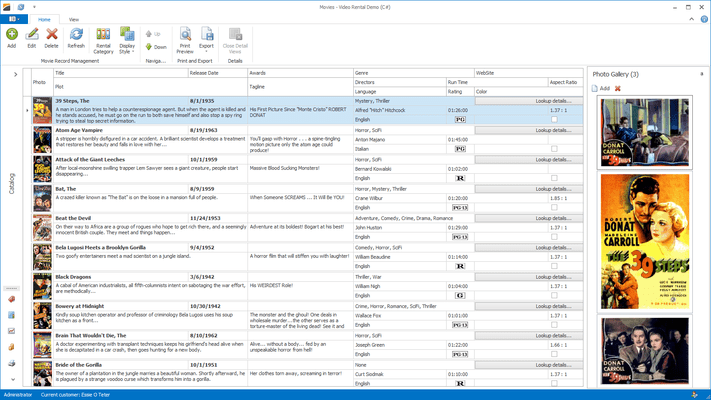
Add bound or unbound, native .NET grids to your .NET applications. Developer Express XtraGrid .NET Suite is a 100% C# Grid, CardView, and Editors Library built specifically for .NET. Optimized to take full advantage of the .NET Framework and all .NET Languages, offering everything from standard two-dimensional grids, to runtime grouping and column customization; from master/detail support, to Card Views; from 15 feature rich data editors to advanced alpha blending and custom draw. With the XtraGrid Suite, you also get full access to the C# source code.

The View Technology

Four Built-In Data Views - The XtraGrid ships with expandable cards (Card View), a table layout (Grid View), nested band columns (Banded Grid View) and multi-row column headers and cells (Advanced Banded Grid View). Each view includes numerous data representation and editing features such as end-user grouping, sorting, filtering, data summary calculations, integrated cell editors, etc.

Create Your Own Custom Views - The XtraGrid allows you to easily create a new view based on any existing view via specially designed registration routines that allow you to use your custom view in the same manner as our built-in views. Not a single design-time or runtime feature will be sacrificed if you create a view to solve a specific business requirement.

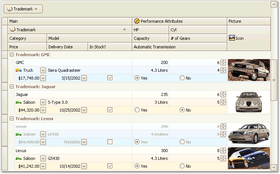
Different Views for Master and Detail Records - The grid naturally allows you to represent data at each master-detail level by its own view. Thus you can have a GridView as a master and a CardView as a detail. If a table has two detail relations, you can even have GridView and CardView representing the neighboring details. There are simply no limits except having a CardView as a master.

Easy-to-Use API - With Views, you have the benefit of only viewing the settings which you actually need. You'll not have to deal with properties related to cards and grids mixed within a single grid control object. Each view gives you an easy to understand API that's native for the View's data layout and user interaction capabilities.

Different Detail Views for Different Master Rows

View Repository - View objects are stored within the grid control's view repository. This allows you to create as many views as you wish - you are not limited to a specific master-detail tree. The view repository is especially useful if you need to provide different views for different master rows. You can also create multiple views and allow end users to switch between different data representation formats at runtime.

Master-Detail Layout without Feature Sacrifice - Views are separate objects fully-functional in regards to data representation and editing. Thus, all the features like data editing, grouping, sorting, filtering, summaries, preview sections are available regardless of whether the view is used to represent a master or detail.

Optional Detail Data Synchronization - Each detail for each master row is represented by an individual view object that's cloned from the object you supplied to the corresponding master-detail level. Thus, details can live separately from each other. You can group or filter a single detail and the rest will remain unchanged. And you can also force the details to synchronize their layouts as needed.

Detail View Zoom Option - When a grid that displays master-detail relationships includes large detail sections, it becomes rather difficult to manage, view and manipulate the contents of the grid control. With the XtraGrid's Detail View Zoom option, your end-users can simply press a button and hide all master levels and focus on the detail section in its entirety. A second button click will return the XtraGrid to its original layout. Of course, all views at any nesting level can be zoomed.

Alternate Methods to Switch between Detail Views - The XtraGrid allows you to switch between details using either tabs or a specially designed tooltip. This allows end users to handle multiple details without frustration. They have direct access to any detail right under the master row and don't ever have to scroll to reach the second or third detail.

Column Layout

Automatic Column Width Adjustment - the Auto-Width feature ensures that the total column width always matches the View's width

Fixed Column Width

Customizable Column Visibility and Display Order - In addition to drag and drop operations, end-users can use the Microsoft Outlook style Field Chooser window

Best Fit

Fixed (Frozen) Columns

Row Layout

Customizable Row Height

Automatic Row Height Calculation

Manual Row Height Calculation

End-User Row Resizing

Preview Sections

Displaying Memo Field Values

Custom Preview Content - You can supply custom preview content via a specially designed event. If you need to display non-textual information within the preview section (such as a combination of text and images), you can use manual painting to easily achieve your business objectives

Automatic and Manual Preview Height Calculation

Customizable Preview Indentation

Cell Merging - You can enhance data readability by using the automatic cell merging feature of the XtraGrid. When enabled, neighboring column cells that have identical values are merged into a single cell. You can provide a custom algorithm to determine which cells are to be merged. For instance, you can merge cells that hold numeric values with the same sign. To implement custom cell merging, you need to handle the specially designed CellMerge event.

Navigation Features

Incremental Searching

Two Scrollbar Feedback Options - Live and Postponed scrolling

Vertical Scrolling Tooltip

Sticky Scroll Wheel

Card Layout

Customizable Card Intervals

Predefined Number of Cards and Columns

End-User Card Resizing

Auto Card-Width - Card width can be calculated automatically so that the View does not display truncated cards

Card Field Layout

Suppressing Empty Fields

Automatic Field Height Calculation

End-User Field Visibility Customization

Card scrolling - If cards do not vertically fit into a View, they will display scroll buttons which allow end-users to access all card fields.

Sorting

Sorting Against Unlimited Number of Fields

Sorting by Cell Display Values

Custom Sorting Algorithms

Immediate or On-Demand Row Position Update

Grouping

Grouping Against an Unlimited Number of Columns

Joined Group Panel for Master-Detail Mode

Multiple Predefined Grouping Intervals

Outlook 2003/2007 Style Group Row Painting

Images in Grouped Rows

Custom Grouping Algorithms

Automatic Group Expansion after Grouping Operations

Maintain Expansion State after Sort Operations

Summary Computation

Total Summaries

Group Summaries (in grouped rows and group footers

Five Built-in Functions - record count, sum, average, maximum and minimum values

Custom Aggregate Functions - You can provide any logic to calculate summary values via event handlers.

Sorting Against Group Summary Values

Data Filtering

Microsoft Excel Style Filter Dropdowns

Microsoft Excel Style Filter Dialogs

Auto-Filter Row

Filter Panel

Advanced Filter Editor Dialog - With this dialog, you will be able to build filter criteria of any complexity - create any number of conditions and combine them in any manner using any logical operator

Custom Filtering via an event

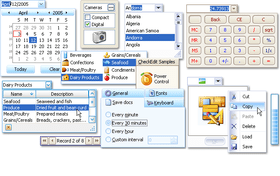
Embedded Cell Editors - Over twenty editors from the XtraEditors Library (included with the XtraGrid Suite) can be used within any view to display and edit data. You can also create custom editors by deriving from those that ship with the XtraGrid Suite.

Appearance Customization - For applications that require a unique visual presentation, the XtraGrid Suite (and all other Developer Express WinForms visual controls) fully supports Skins. With several built-in skins and the ability to create your own unique skins, the XtraGrid Suite allows you to design the 'perfect' look and feel. And as you've probably guessed by now, by using Skins, you can introduce the XP look and feel experience into applications that are not running under the XP Operating System. When necessary, you can change the appearance of each and every element within the grid control - you can apply gradient backgrounds with customizable directions, change font settings and text color, specify text alignment, as well as trimming and wrapping options.

Conditional Formatting - Visually differentiating specific records or cells is a common approach utilized in numerous applications to improve the end-user experience and make information more understandable. With the XtraGrid, you have at your disposal a straightforward and highly flexible mechanism to control conditional cell and row formatting.

Custom Painting - The XtraGrid allows you to manually paint all its individual elements. With custom painting, the grid can be turned into anything - even a tetris game. And the XtraGrid ships with a demo application showing how this can be done.

Design-time Experience

On-Form Object Access and Layout Customization - you simply click on the object you need to customize and you'll instantly see its settings in the Properties window. This is available for columns, bands, card fields and Views - all objects you see on screen

The Feature Browser - a superior alternative to the standard Properties window

The Appearance Editor - You simply click the element that requires customization and access its properties

Data Binding and Exchange Features

Unbound Columns are fully supported

Data can be exported to TXT, XML (with accompying XSL), HTML, XLS and PDF formats

Grid views can be rendered to BMP, GIF, JPEG, PNG, TIFF, WMF, EMF images

The XtraGrid, allows you to render and print its contents via the XtraPrinting Library - which must be purchased separately

What’s new in XtraGrid Suite v2008 vol 2?

HTML Style Text Formatting in WinForms Controls - Historically, Windows Forms controls never allowed you to emphasize portions of their text. For instance, you couldn't apply bold formatting to a few words within a label text. With version 2008 vol 2, this ability has been added to the Label, Check Editor and Grid Control (for column and band headers). You can now specify captions for these elements using HTML-style markup – using the following tags: <br/>, <color>, <size>, <b>, <i> and <u>.

Server Mode Performance Improvement - If the XtraGrid is in server mode, focused row and selection are not restored after sorting, grouping or filtering operations. This significantly improves application performance. You can enable focused row and selection persistence by enabling a single option.

New Built-in Comparison Operator in Filtering Dialogs - The newly implemented Contains operator increases the count of built-in comparison operators. It allows less experienced end-users to easily find data and avoid using the Like operator which requires wildcard knowledge.

What’s new in XtraGrid Suite v2008 vol 1?

LINQ Server Mode - When the grid control works in server mode, it delegates all data processing to the server and downloads only records to be displayed on screen. This allows you to dramatically increase performance against large datasets. Previously, this data operation mode could be enabled only with XPO data sources. Now, any LINQ query provider is also supported.

Layout View's Enhancements - In version v2008 vol 1, the Layout View's functionality has been significantly extended by introducing new customization and layout features:

Runtime Field Layout Customization in Layout View - This feature allows end-users to easily customize card field layout at runtime via drag and drop operations, just like you would at design time. Clicking the Customize button at the top of the View invokes the Customization form that provides customization capabilities. With a few lines of code you can save the customized layout to a data store (e.g. an XML file) when the form is closed and then restore the layout on a form load event.

New Layout Elements - The Layout View now fully supports a tabbed interface, thus giving you a way to present information in a more compact manner. You can add static labels and separators to cards. Groups and fields can display small icons next to the labels, making your applications look more attractive.

Stretching Cards to View -Cards can be horizontally or vertically stretched to fully fill the View's width or height. This allows you to emulate detail entry forms. You can optionally display multiple cards simultaneously so that they are stretched to fit the control's dimensions.

Filter Dropdown Lists with Check Boxes - The grid control can now display check boxes within filter dropdown lists. This allows end-users to filter columns against multiple values on the fly. They simply need to select required values and click OK. The grid will filter out rows that don't contain checked values.

New Component - CheckedComboBoxEdit - This new control allows you to display a set of Boolean options or bit fields in a dropdown window. It can be used both standalone and for in-place editing within container controls (XtraGrid, XtraTreeList, etc).

What's new in XtraGrid v2007 vol 3?

Layout View

With the release of version v2007 vol 3, the WinForms Grid Control introduces a new data representation format - Layout View. Like the Card View, this View type displays data records as cards. The difference is that it allows to present data more compactly. You can freely customize field layout and thus use form space more effectively. The Card View, on the other hand, simply arranges fields one under another. The following field arrangement features are supported by the Layout View:

Fields can be freely arranged into any number of rows and columns

Fields can span over several adjacent fields

Fields can be combined into groups, as if they were added to a group box

Empty regions can be added to cards, if required

The Layout View can display a single card centered within the view, as well as multiple cards arranged into columns and rows.

The Layout View's features are powered by the comprehensive layout management library used in the XtraLayoutControl Suite.

What's new in XtraGrid v2007?

Server-side Data Management - Server-side data management mode is now available. Unlike standard ADO.NET adapters that would require the retrieval of the entire record set, this new mode allows the XtraGrid to only fetch the records that need to be displayed on-screen - giving you significant performance benefits against very large datasets. Better record set loading performance is not the only benefit of this new server-side data mode. Numerous key grid operations - sorting, grouping, filtering and summary calculations - are now performed on the server. As you can imagine, performance is highly responsive when large datasets are encountered.

OLAP Support in Pivot Grid Controls - Microsoft Analysis Services (OLAP) data sources are now fully supported by the XtraPivotGrid and ASPxPivotGrid. If bound to such a data source, a pivot grid control delegates all data management and calculations to the server side. This feature greately increases your application's performance if you are dealing with a large dataset. In windows applications, it may take a long time for a client machine to reclaculate data. It web application, the entire dataset will have to be reloaded with each control update. It is much faster to request server-side data recalculation and then simply display the downloaded result

PartNumbers: PC-512146-162709 512146-162709 PC-512146-162712 512146-162712

Publisher PartNumbers: 90 91

PurchaseOptions: Developer Express XtraGrid .NET Suite v2008 vol 2 (V8.2.3) 1 Developer License - Includes one year subscription , Developer Express XtraGrid .NET Suite v2008 vol 2 (V8.2.3) 1 Developer License with Full C# Source Code - Includes one year subscription

Resources: Read the Developer Express XtraGrid .NET Suite help file, Read the Developer Express License Agreement, Download the DXperience v2008 vol 2 (V8.2.3) for Visual Studio 2005/2008 evaluation on to your computer - Expires After 30 Days

Operating System for Deployment: Windows Vista, Windows XP, Windows ME, Windows 2000, Windows NT 4.0

Architecture of Product: 32Bit

Product Type: Component

Component Type: .NET WinForms, .NET Class, 100% Managed Code

Compatible Containers: Microsoft Visual Studio 2008, Microsoft Visual Studio 2005, Microsoft Visual Basic 2008, Microsoft Visual Basic 2005, Microsoft Visual C++ 2008, Microsoft Visual C++ 2005, Microsoft Visual C# 2008, Microsoft Visual C# 2005, .NET Framework 3.5, .NET Framework 3.0, .NET Framework 2.0

Product Class: User Interface Components

Search Items: New Version Sep 03, New Version Nov 03, New Product May 05, New Product Sep 05

Keywords: validation validate User Interface UI Grid Grids Table Tables DataGrid DataGrids Developer Express devexpress Entry data-entry Enterprise Partner net dotnet xtra

Product Search

Enter search words:

Quick Links

Screenshot Gallery

Award Award