XtraLayoutControl Suite

by Developer Express - Product Type: Component / .NET WinForms / 100% Managed Code

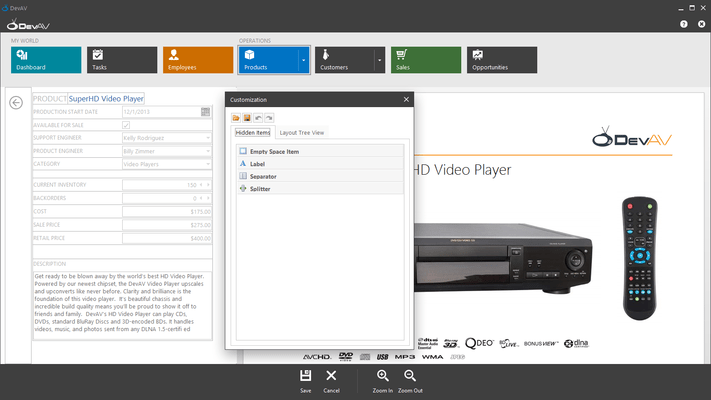
Screenshot of XtraLayoutControl Suite - .NET - v2008 vol 2Create elegant User Interfaces for your .NET applications. XtraLayoutControl Suite allows you to create elegant UIs in the shortest possible time. From auto-arrangement of individual controls to resolution independence, the XtraLayoutControl Suite delivers a comprehensive form design feature set. It allows runtime layout customization so that end-users can reorder controls via simple drag and drop operations. The XtraLayoutControl Suite includes the XtraEditors Library and full Source code is available.

Average Review:  Average Review score for XtraLayoutControl Suite - .NET - v2008 vol 2 based on 1 review.

From
$142.49
Price in

Our regular prices are shown below. Please logon to see your discounted prices.

XtraLayoutControl Suite v2008 vol 2 (V8.2.4)

Add to Cart $ 142.49 1 Developer License - Includes one year subscription Download (166.9 MB)
Add to Cart $ 189.99 1 Developer License - with Source Code - Includes one year subscription Download (166.9 MB)

This product is available on the GSA Pricing ScheduleOur prices include ComponentSource technical support and, for most downloadable products, an online backup and a FREE upgrade to the new version if it is released within 30 days of your purchase.  All sales are made on our standard Terms and Conditions and subject to our Return Policy. Please contact us if you require any licensing option not listed above including volume licensing and previous versions.

Our regular prices are shown above. Please logon to see your discounted prices.

What’s new in XtraLayoutControl v2008?

Custom Customization Forms - It is now easier to create custom Customization Forms for the LayoutControl. To accomplish this, you only need to derive a form from a specific class, add required controls to it and register the form with a single line of code.

What's new in XtraLayoutControl v2007 vol 3?

Customize Layout by Dragging Tree View Nodes - Runtime layout customization can be a tough task because it's difficult to initiate drag and drop operations against elements with small or non-existant borders. To simplify layout customization, we've implemented a new feature - drag and drop within the layout tree view. Open the Customization Form and switch to the Layout Tree View tab. Grip an item and drag it. You can drop it at any of the target item's four edges. This will determine where the item will be displayed on the form relative to the target item.

What's new in XtraLayoutControl v2007 vol 2?

  • Create Data-Bound Detail Forms with Ease - If you need to create a detail form with editors bound to fields in a data table, use the new DataLayoutControl to instantly eliminate the drudgery associated with traditional form layout. With this component, you don't have to place individual labels and editors onto the form and then carefully align them to one another -- You do not have to bind each individual editor to data and provide proper label captions corresponding to field names. With the DataLayoutControl, all this is done automatically for you. You simply bind the control to a data source and specify which fields are to be displayed.
  • Initial layout generation is only a half of what the DataLayoutControl has to offer you. Form maintenance is made much easier as well. To add or delete a data-bound control, you simply click a check box. To change the editor or data-bound property used by default, select an appropriate value from a dropdown list.
  • LayoutConverter Is Now Ready
  • The LayoutConverter component, whose Beta version was released with DXperience 2007 vol. 1, is now offically available. With this component, you can easily convert an existing manually-created layout into a LayoutControl and vice versa.
  • Item Visibility Maintenance - If no layout customizations have been made other than changes to element visibility, the LayoutControl is guaranteed to maintain element layout no matter the order in which elements were hidden or made visible.
  • Anchored Background Images - Each layout group can now display an additional background image that covers a part of the background and is anchored to a container's corner or edge. For instance, you can use this feature to display a large icon within a form's bottom-right corner. The image will stay within its corner regardless of resize operations. It will be overlapped by controls, if needed. With this feature, you can build much nicer interfaces, similar to those found in Windows Vista™ Welcome Center or Windows Vista™ File Explorer.

The XtraLayoutControl is not simply a design-time control arrangement tool. Once you've incorporated the library into your application, you can deliver run-time customization and form management options to your end-users so that their business needs can be addressed as needed, without any additional design-time modification on your end. Take for instance Visual Studio's dock windows and toolbar system. Its integrated options allow you to determine what you see on-screen, the location of individual items and help you extend it as your skills and business requirements mature. Of course, once you are no longer satisfied with a given layout or your programming habits change, you can make the necessary modifications instantly - no need to wait for Microsoft to deliver the next major version.Toolbars and dock windows are not the only examples of user-customizable interfaces. End-users frequently resize and reorder grid columns, sort and group rows by clicking and dragging headers. They can collapse splitters to temporarily hide unnecessary controls, resize and reorder windows in multi-window applications, etc. It all makes sense as it relates to toolbars and dock windows, but what does it have to do with the controls on my form? Rather than a narrative explaining why control layout customization makes sense, let's review a few scenarios wherein this capability is not only convenient, but essential for any well designed business solution.

  • Ever spent time trying to guess the most efficient arrangement of individual controls on a form and their tab order and when specifications change or security rules are modified had to redesign the entire layout?
  • Rebuild and release a new version of your application to simply move an editor to a new position or adding a new data entry field?
  • Provide two or more forms with different layouts that are used to edit the same type of object when different users/departments require unique views of the same information?

The XtraLayoutControl removes all these limitations to pixel oriented form design and automatically ensures that your forms look polished at any resolution and best of all, lets your end-users to create the desired experience as their requirements dictate.
Key features include the following:

  • End-user Layout Customization
  • Controls from the XtraEditors Library are included
  • DataLayoutControl - an easy way to create and maintain data-bound input forms
  • LayoutConverter - instantly convert your existing manually created layout into a LayoutControl or vice versa
  • Resolution Independence
  • Straightforward Design-Time Layout Customization
  • Automatic Proportional Control Resizing
  • Intuitive Layout Customization Rules
  • Auto-aligned Labels
  • Customization Form
  • Built-in Context Menu
  • Tabbed Pages
  • Expandable Groups
  • Empty Space Items
  • Splitter Items
  • Anchored Background Image
  • An easy way to create multi-lingual applications. If you need to translate an application's UI to another language, you will most likely have to re-arrange your controls since the same label can significantly vary in size depending on which language it is written in. With the XtraLayoutControl you are guaranteed to avoid such problems - everything is aligned automatically
  • Save and Restore Layouts
  • Customizable Spacings and Paddings
  • Customizable Size Constraints
  • Automatic Enforcement of Microsoft UI Guidelines
  • Control-to-Control Alignment
  • Auto-Specified Tab Order
  • Images in Tab and Group Headers
  • Printing via the XtraPrinting Library (must be purchased separately)
  • Multiple Look and Feel Options

Product Search

Enter search words:

Quick Links

Publisher

Primary Category

Related Products

Related Categories

Screenshot Gallery

Award