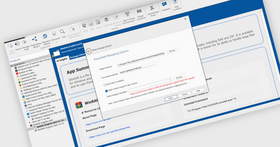
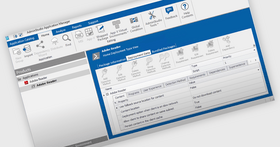
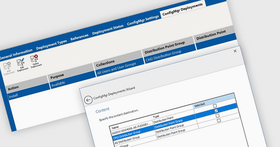
Screenshot Preview

AdminStudio Enterprise with Application Compatibility Pack

by Flexera Software - Product Type: Application

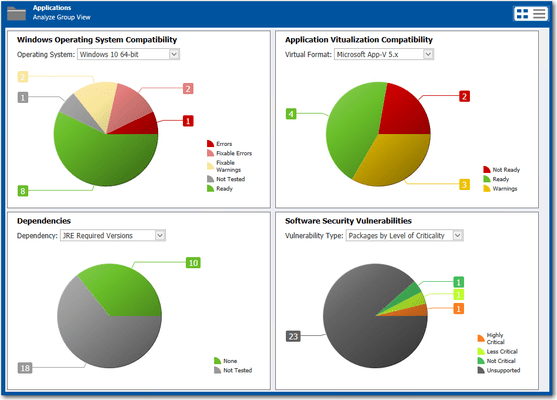
Automated application compatibility testing and fixing. AdminStudio Enterprise with Application Compatibility Pack automates application preparation to help ensure MSI packages deploy successfully with today’s most popular deployment tools. AdminStudio’s catalog forms a central repository for storing applications, enabling testing to eliminate application conflicts. A management reporting dashboard provides a continuous view of readiness to streamline migration planning. AdminStudio Enterprise with Application Compatibility Pack significantly reduces the time and effort involved in migration by automatically assessing and fixing application compatibility issues.

Our regular prices are shown below. Please logon to see your discounted prices.

Price in

AdminStudio Enterprise with Application Compatibility Pack V11 with Bronze Maintenance

Add to Cart $ 19,007.01 1 User License (per User, per Machine) with Bronze Annual Maintenance
Mfr. Part No: BADPD
Download (829.2 MB)
Add to Cart $ 10,097.01 1 User License (per User, per Machine) with Bronze Annual Maintenance Upgrade from AdminStudio 11 Enterprise
Mfr. Part No: BADPDUB4
Verify Download (829.2 MB)
Add to Cart $ 13,067.01 1 User License (per User, per Machine) with Bronze Annual Maintenance Upgrade from any active AdminStudio Enterprise
Mfr. Part No: BADPDUB3
Verify Download (829.2 MB)

AdminStudio Enterprise with Application Compatibility Pack V11 with Silver Maintenance

Add to Cart $ 19,799.01 1 User License (per User, per Machine) with Silver Annual Maintenance
Mfr. Part No: BADQD
Download (829.2 MB)
Add to Cart $ 10,889.01 1 User License (per User, per Machine) with Silver Annual Maintenance Upgrade from AdminStudio 11 Enterprise
Mfr. Part No: BADQDUB4
Verify Download (829.2 MB)
Add to Cart $ 13,859.01 1 User License (per User, per Machine) with Silver Annual Maintenance Upgrade from any active AdminStudio Enterprise
Mfr. Part No: BADQDUB3
Verify Download (829.2 MB)

AdminStudio Enterprise with Application Compatibility Pack V11 with Gold Maintenance

Add to Cart $ 20,294.01 1 User License (per User, per Machine) with Gold Annual Maintenance
Mfr. Part No: BADRD
Download (829.2 MB)
Add to Cart $ 11,384.01 1 User License (per User, per Machine) with Gold Annual Maintenance Upgrade from AdminStudio 11 Enterprise
Mfr. Part No: BADRDUB4
Verify Download (829.2 MB)
Add to Cart $ 14,354.01 1 User License (per User, per Machine) with Gold Annual Maintenance Upgrade from any active AdminStudio Enterprise
Mfr. Part No: BADRDUB3
Verify Download (829.2 MB)

AdminStudio Enterprise with Application Compatibility Pack Maintenance Renewals

Add to Cart $ 3,167.01 1 Bronze Annual Maintenance Renewal License (includes Subscription and Support)
Mfr. Part No: KBWEDK1
Verify Download (829.2 MB)
Add to Cart $ 3,959.01 1 Silver Annual Maintenance Renewal License (includes Subscription and Support)
Mfr. Part No: KSWEDK1
Verify Download (829.2 MB)
Add to Cart $ 4,454.01 1 Gold Annual Maintenance Renewal License (includes Subscription and Support)
Mfr. Part No: KGWEDK1
Verify Download (829.2 MB)

Our prices include ComponentSource technical support and, for most downloadable products, an online backup and a FREE upgrade to the new version if it is released within 30 days of your purchase.  All sales are made on our standard Terms and Conditions and subject to our Return Policy. Please contact us if you require any licensing option not listed, including volume licensing and previous versions.

Our regular prices are shown above. Please logon to see your discounted prices.

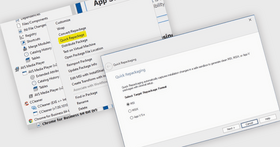
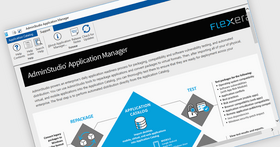
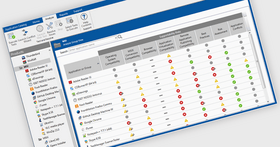
Screenshot of AdminStudio Enterprise with Application Compatibility Pack - Application - V11

What’s new in AdminStudio 11?

Software Tagging Support (Enterprise, Professional and Standard Editions)

  • AdminStudio 11 now includes ISO 19770-2 tagging as standard, which enables a more efficient software asset management and license optimization process. The ISO tag file contains accurate descriptive information on the application (publisher, name, version, etc.) and simplifies the software asset management task by enabling the collection and analysis of the tags to provide an accurate picture of application inventory.

Facilitating Migration to Microsoft's Configuration Manager 2012 (Enterprise and Professional Edition only)

  • AdminStudio 11 provides import functionality to help speed your migration to Microsoft System Center Configuration Manager 2012.  Bulk import eliminates the laborious task of importing applications manually one at a time.
  • AdminStudio 11 gathers application deployment metadata by mining package elements like dependencies.  In addition to metadata, AdminStudio also identifies product level data such as product icon, manufacturer, scripts, etc.
  • AdminStudio offers the option to automatically identify the best candidates for migration to Configuration Manager 2012.
  • AdminStudio now has the ability to publish applications to Microsoft's Configuration Manager 2007 and 2012.

Microsoft Server App-V Application Suitability Testing (Enterprise with Virtualization Pack and Professional with Virtualization Pack Editions only)

  • AdminStudio 11 performs automatic suitability testing of packages for Microsoft Server App-V. By identifying conversion issues in advance, AdminStudio 11 helps avoid compatibility problems.

InstallShield Suiting/Wrapping (Enterprise Edition only)

  • Included with AdminStudio 11 Enterprise Edition, InstallShield 2012 Premier edition streamlines the bundling of applications into suites. It handles application dependencies, post-install updates and other issues to minimize the risk of rolling out incomplete packages or packages with out-of-date applications.

Platform (API) (Enterprise Edition only)

  • AdminStudio 11 includes an API that enables users to sequence and orchestrate individual AdminStudio automated tasks to perform higher-level processes such as such as importing packages, checking for virtualization readiness, converting to virtualized packages, testing packages and distributing to Microsoft's Configuration Manager . You can use.NET, PowerShell, scripting languages such as VB Script to communicate with AdminStudio.

AdminStudio with Application Compatibility Pack Features

Accelerate Application Migration Projects

  • Integrated solution tests, fixes and packages MSI and virtual package for error free deployments
  • Cut MSI packaging time by up to 70%
  • Deploy software to desktops with 99% success or better

Centrally Manage and Report on Virtual and Traditional Application Portfolio

  • Application centric management enables side-by-side MSI and virtual package management
  • Access all software binary files and metadata for virtual and MSI packages from a single database
  • Always know exactly what is in the environment
  • Customizable reports and dashboards include high-level statistics, a list of modified packages and recent catalog management activity

Tight Integration with Leading Software Deployment Tools

  • Supports the leading software deployment tools – including Microsoft® System Center Configuration Manager , Novell® ZENworks, LANDesk® Management Suite, BMC® Configuration Management (Marimba), Citrix XenApp, and IBM® Tivoli®
  • Integrated with Microsoft System Center Configuration Manager for direct importing and exporting of packages - leverages your current investment and further streamlines Application Readiness processes

Advanced Package Editing and Authoring Capabilities

  • Powered by the latest version of an MSI authoring and editing tool, InstallShield 2011, for advanced MSI package customization and authoring
  • Create and edit MSI installations, virtual profiles, patches and transforms

Windows 7 Compatibility Assessment

  • Drag and drop applications into the testing process to receive a “traffic light” summary report on both application code and installation package compatibility issues of all applications in minutes rather than days.
  • Over 10,000 automated checks for Windows 7 compatibility provides at-a-glance status for your entire application portfolio to quickly understand what applications will require fixing along with the associated cost and effort for each issue.
  • Provides accurate information to scope and budget for an application migration project.

Detailed Application Compatibility Issue Reporting

  • A single click provides immediate detailed information on an application’s specific compatibility issues. The reporting outlines installation package and application code compatibility issues so packagers can accelerate the remediation process.

Automated Windows 7 Application Compatibility Fixing

  • Automatically fix over 98% of installation package related application compatibility issues. It automatically generates standard MSI transforms that can be applied to fix the application.
  • Understand in minutes rather than days which applications will require fixing or re-development.

Application Compatibility Testing for Web-based Applications

  • Drag and drop multiple web site addresses (URLs) or web based applications into the testing process to automatically pinpoint Internet Explorer 8 compatibility issues.
  • Automatically test applications that are accessed by, or depend on a browser for their compatibility with Internet Explorer 8 in minutes.
  • Dramatically reduce the time and cost of manual testing, and ensure a consistent and accurate approach.

AdminStudio with Application Compatibility Pack Enterprise Features – the Enterprise Edition includes everything in the Professional Edition plus the following:

  • Centrally Manage and Report on Application Portfolio - Customizable reports and dashboards allow reporting on any parameter of the Application Catalog.
  • Job Manager - Schedule conflict testing tasks to run anytime without human intervention.
  • Security Console - Easily define and control the access rights of every AdminStudio user. Now with LDAP support.
  • Integration with Workflow Manager -AdminStudio and Workflow Manager are fully integrated, making it even easier to standardize and streamline packaging, as well as implement application packaging best practices ITIL and Microsoft's MOF and BDD.
  • Detailed Application Portfolio Compatibility Reporting - Instantly run pre-defined reports showing all applications grouped by their compatibility status. Shows precisely which applications have issues with each platform, to focus and prioritize further testing and fixing.
  • Automated Internet Explorer Compatibility Testing for Web Applications - Simple, bulk loading of Web site addresses (URLs) and Web based applications for Internet Explorer compatibility testing.
  • Windows Server 2008 R2 Compatibility Testing -In-depth testing and reporting on both installation package and application code compatibility issues. 
  • Patch Impact Testing - Identify the impact a patch will have on your applications before you deploy it.
  • Patch File Import Wizard - Easily import new patches from Microsoft into the AdminStudio catalog for conflict testing.
  • PackageExpert - PackageExpert saves you time by running MSI validation and QA tests on your MSI packages and automatically fixing any errors.

AdminStudio with Application Compatibility Pack Professional Features

  • Enhanced Application Management Catalog and Application Manager - Application centric catalog allows the management of MSIs alongside virtual application packages.
  • Process Workflow Management - A process-oriented interface allows you to step through project lists, visually tracking your progress.     
  • Application Catalog Merge Replication -Automatically synchronize every AdminStudio Application Catalog in your organization.
  • Catalog Replication - For organizations managing software in multiple offices, any location can publish packages to another's Application Catalog.     
  • Remote Package Alert - Get notified whenever applications in other Application Catalogs in your organization are altered or updated, ensuring you never duplicate work.     
  • Package Auto-Import - Drop items into a defined folder for automatic import into the Application Catalog, saving you time.     
  • FlexWrap - Inject license tracking capabilities into applications so they can be managed with FlexNet Manager (sold separately).
  • Expanded Windows 7 Support - x32 and x64 -Create packages for Windows 7 deployment, modify exclusion lists for accurate Windows 7 packages, test for Windows 7 application suitability.
  • Enhanced Exclusions for Windows 7 Projects -Simplify Windows 7 packaging with automatic exclusion of OS and registry files. Plus, process exclusions for Windows 7 and Vista are now included in the process exclusions used by the Repackager Installation Monitoring.    
  • Support for MSI 5.0 - Keeping current with the latest standards, AdminStudio produces MSI compatible with MSI 5.0.    
  • Enhanced User Folder Handling - Matching the realignment of user data folders in Windows 7, the AdminStudio Repackager now improves the handling of user data.    
  • Enhanced Side-by-Side Assemblies - Private and shared side-by-side assemblies are improved with streamlined functionality.    
  • Convert Applications to Windows 7 Ready MSIs -AdminStudio helps ensure applications run reliably on Windows 7 (or any Windows OS) by automatically repackaging any setup to a fully compliant MSI package. AdminStudio itself runs on Windows 7, so you can follow best practices by performing MSI repackaging and testing on machines running the same Windows 7 OS as your target environment.
  • Manage InstallScript MSI Setups - AdminStudio automatically converts InstallScript MSI setups into 100% pure MSIs.
  • Convert Any Setup to Windows Installer - AdminStudio has the technology to convert any setup, even InstallScript MSIs, into pure Windows Installer packages.
  • Solution for Packaging InstallShield Setups -AdminStudio can see inside native InstallShield setups, automatically capture their information, and accurately convert them into MSIs. No matter if the original installation is 100% InstallScript™ or an InstallScript MSI mix, AdminStudio can repackage it into a pure, accurate MSI. AdminStudio can also automatically convert Microsoft® Configuration Manager (formerly SMS), Novell ZENworks®, WinINSTALL®, and Wise® WSE software packages directly into robust MSIs without repackaging.
  • Capture Context Data during Repackaging -AdminStudio’s Repackager now captures context data during the MSI repackaging process.
  • Runs On Windows 7 - AdminStudio itself runs on Windows 7, so you can follow best practices by performing MSI repackaging and testing on machines running the same Windows 7 OS as your target environment.    
  • Snapshot-Free MSI Repackaging - Save time and improve MSI package quality by capturing all system changes made by a setup — and only those changes — without waiting for snapshots.
  • Process Assistant - The Process Assistant speeds you through the entire software packaging process.
  • Setup Intent - The Setup Intent Wizard scans your source project files for any uncaptured DLLs or dependencies and automatically prompts you to add them to your package.
  • AXT and AOT Conversion to MSI - Save time by automatically converting multiple ZENworks AXT and AOT files to MSI packages at once.    
  • VMware Integration - AdminStudio integrates with VMware Workstation, making it easier to repackage and test packages.    
  • Software Package Conversions - Convert Microsoft® Configuration Manager, Novell ZENworks®, WinINSTALL®, and Wise® WSEsoftware packages into MSIs.
  • Global Exclusions Editor - Identify what files you never wish to deploy with any package, and they will be automatically blocked.
  • Traditional Snapshot Capturing - AdminStudio offers you the option of repackaging using the traditional snapshot approach.    
  • Package Applications Quickly and Correctly -Intelligent, automated tools speed you through the software packaging process.
  • Double-Byte Character Support- AdminStudio’s Repackager now properly captures double-byte character sets (such as Japanese, Korean, or Arabic), so you can accurately verify data.    
  • InstallShield - AdminStudio is powered by the latest version of an MSI authoring and editing tool, InstallShield, which includes the ability to natively create an App-V installation, support for MSI 5.0 and more.
  • VBScript Custom Action Editor - Easily edit and format your VBScript custom action code.     
  • Language Pack Included - Automatically localize installation UIs into 33 languages, eliminating hours of tedious translation effort.  Supported languages Chinese (Simplified), Greek, Chinese (Traditional) Hungarian, English, Italian, Basque, Norwegian, Bulgarian, Polish, Catalan, Russian, Croatian, Thai, Czech, Turkish, Danish, Portuguese (Brazil), Dutch, Portuguese (Portugal), Finnish, Romanian, Indonesian, Serbian, Japanese, Slovak, Korean, Slovenian, French (Canada), Spanish, French (France), Swedish and German.
  • Customize Virtual Packages and MSIs with InstallShield - The AdminStudio Editor is powered by InstallShield.
  • Flexible Package Build Options - Get tremendous flexibility in your package build formats, including the new ability to build installations with a single external CAB file.
  • Create Your Own MSIs and Patches - Easily author your own MSI installations and patches.
  • Create and Edit Transforms - Quickly create or edit transform files (MSTs) for modifying MSIs. More
  • Prerequisite Support - Check for and install any prerequisite applications or system components before your MSI package is executed.    
  • Rapidly Locate Files within MSIs - Run a search to determine if a file is present in a repackaged MSI and located in your desired path.    
  • XML File Editing - Author installations that edit XML files on the target machine without having to create a custom action.    
  • Palm OS Device Support - Create installations for any mobile device running the popular Palm OS.    
  • Windows 7 Application Compatibility Assessment - Overview report of entire portfolio for project scoping by performing over 10,000 Windows 7 compatibility tests on each application.
  • Pinpoint Application Compatibility Issues -Identifies both installation package and application code compatibility issues.
  • Automated Windows 7 Application Compatibility Fixing - Auto generate standard MSI transforms to fix over 98% of installation package related issues.
  • Eliminate Software Conflicts - Automatically detect and eliminate conflicts between Windows Installer packages and installed apps before you deploy.
  • Support for Terminal Services - Automatically validate that applications requiring terminal service environments will function properly once deployed.     
  • File Dependency Scanning - Run automated scans to determine the file dependencies of any application in your environment.     
  • System Snapshot Analysis - Capture the state of an operating system and import it into the Application Catalog for use in resolving conflicts.     
  • Transform Management - Automatically identify and eliminate conflicts in multiple configurations of the same package, including transforms.     
  • Application Isolation Wizard - Ensure new MSIs won't interfere with installed applications by automatically isolating their shared DLLs and other dependencies before deployment.
  • Quality Assurance Testing - Test packages before deployment to ensure they will install correctly and behave reliably.
  • Configuration Testing - QualityMonitor automatically verifies before deployment that all installation elements will be configured correctly.
  • Locked-Down User Testing - Verify that a package has sufficient access rights to operate in a locked-down environment before you deploy it.
  • Diagnose and Repair Installed Applications -Determine if an installed application needs repair, what repair is needed, and why.
  • Ensure MSIs Meet Corporate Standards-  Easily create custom rules that identify applications violating your corporate standards and define how you wish AdminStudio to correct them.
  • Risk-Free Predeployment Testing - Simulate the deployment of a package to identify and correct problems before the real deployment.
  • Configuration Manager Web Console - Prepare, publish, and distribute applications through Microsoft Configuration Manager without ever touching the Configuration Manager console.
  • Hand Off Packages to Any Deployment Solution -Automatically release packages to any deployment solution, including Microsoft® System Center Configuration Manager, Novell® ZENworks®, LANDesk® Management Suite, BMC® Configuration Management, Citrix, and Tivoli®.
  • Support for Other Deployment Methods -AdminStudio facilitates distributing packages via network destinations, FTP servers, administrative installations, and more.