Screenshot Preview

Aspose.Pdf for SharePoint

by Aspose - Product Type: Add-In

Convert SharePoint content to PDF files. Aspose.Pdf for SharePoint is an add-in that allows users to export lists, items (within the lists) and SharePoint Wiki pages from your SharePoint library to a PDF file. To generate documents, Aspose.Pdf for SharePoint relies on a built-in version of Aspose.Pdf for .NET. Aspose.Pdf for SharePoint requires no additional system requirements besides the ones which exist for Microsoft SharePoint Server 2010.

Our regular prices are shown below. Please logon to see your discounted prices.

Price in

Aspose.Pdf for SharePoint V1.0

Add to Cart $ 783.02 1 Developer with Deployment to 1 Physical Location - Small Business Subscription License - Includes Maintenance and Support (1 Year) Download (2.6 MB)
Add to Cart $ 2,349.06 1 Developer with Deployment to Unlimited Physical Locations - OEM Subscription License - Includes Maintenance and Support (1 Year) Download (2.6 MB)
Add to Cart $ 3,132.08 10 Developer with Deployment to 10 Physical Locations - Site Small Business Subscription License - Includes Maintenance and Support (1 Year) Download (2.6 MB)
Add to Cart $ 9,396.24 10 Developer with Deployment to Unlimited Physical Locations - Site OEM Subscription License - Includes Maintenance and Support (1 Year) Download (2.6 MB)

Aspose.Pdf for SharePoint V1.0 - Subscription Renewals Post Expiry

Add to Cart $ 469.81 1 Developer Small Business Subscription License Subscription Renewal – Includes Maintenance and Support (1 Year) Verify Download (2.6 MB)
Add to Cart $ 1,409.44 1 Developer OEM Subscription License Subscription Renewal – Includes Maintenance and Support (1 Year) Verify Download (2.6 MB)
Add to Cart $ 1,879.25 1 Site Small Business Subscription License Subscription Renewal – Includes Maintenance and Support (1 Year) Verify Download (2.6 MB)
Add to Cart $ 5,637.74 1 Site OEM Subscription License Subscription Renewal – Includes Maintenance and Support (1 Year) Verify Download (2.6 MB)

Aspose.Pdf for SharePoint V1.0 - Subscription Renewals Pre Expiry

Add to Cart $ 391.51 1 Developer Small Business Subscription License Subscription Renewal – Includes Maintenance and Support (1 Year) Verify Download (2.6 MB)
Add to Cart $ 1,174.53 1 Developer OEM Subscription License Subscription Renewal – Includes Maintenance and Support (1 Year) Verify Download (2.6 MB)
Add to Cart $ 1,566.04 1 Site Small Business Subscription License Subscription Renewal – Includes Maintenance and Support (1 Year) Verify Download (2.6 MB)
Add to Cart $ 4,698.12 1 Site OEM Subscription License Subscription Renewal – Includes Maintenance and Support (1 Year) Verify Download (2.6 MB)

Aspose Priority Support

Add to Cart $ 440.02 Developer Small Business 1 Year Priority Support License Verify Download (2.6 MB)
Add to Cart $ 1,175.02 Developer OEM 1 Year Priority Support License Verify Download (2.6 MB)
Add to Cart $ 1,567.02 Site Small Business 1 Year Priority Support License Verify Download (2.6 MB)
Add to Cart $ 4,703.02 Site OEM 1 Year Priority Support License Verify Download (2.6 MB)

Our prices include ComponentSource technical support and, for most downloadable products, an online backup and a FREE upgrade to the new version if it is released within 30 days of your purchase.  All sales are made on our standard Terms and Conditions and subject to our Return Policy. Please contact us if you require any licensing option not listed, including volume licensing and previous versions.

Our regular prices are shown above. Please logon to see your discounted prices.

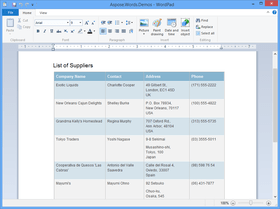
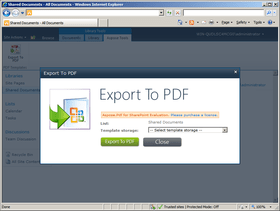
Screenshot of Aspose.Pdf for SharePoint - Add-in - V1.0

Aspose.Pdf for SharePoint Main Features:

  • Export lists and list items from SharePoint document library to PDF
  • Export Wiki pages from SharePoint server to PDF
  • Convert XML files to PDF

Export lists and list items from SharePoint document library to PDF
To export a particular item from a list, please choose “Export to Pdf” item in the item’s Edit Control Block (ECB).

Export Wiki pages from SharePoint server to PDF
When on a Wiki page you can use the “Save as PDF” option on menu tab to export the pages to the PDF file format.

Convert XML file to PDF
Aspose.Pdf for SharePoint is built on top of the Aspose.Pdf for .NET component which means to you can convert XML files to PDF using Aspose.Pdf for SharePoint

  • Create PDF Template - Select ‘Site Action’ and select ‘All Items’. Select the create option and from available list of items, select PDF Template option. Enter template name and press create button.
  • Load XML template -Once the template has been created, we need to load the XML file that we created in step-1. On PDF template page, please select ‘Add new item’.
  • Specify source file path - On document upload dialog, press browse button and locate the XML file stored over your system. You may enable the check box to overwrite existing file option. Press the OK button.
  • Specify file properties - Once the file is loaded, you need to add information in fields marked as mandatory (*).
  • Export to PDF - Once the XML file is added to PDF template, right click test.xml file and from context menu, select Export to PDF. You may also consider selecting ‘Aspose Tools’ menu option from Library Tools and press Export to PDF button.
  • Save PDF document - On Export to PDF dialog, select Template storage (the location where source file is stored) and select the file you need to export from the drop down menu. Now press ‘Export to PDF’ button to save the final PDF document.

Product Search

Enter search words:

Quick Links

Publisher

Primary Category

Related Products

Related Categories

Award