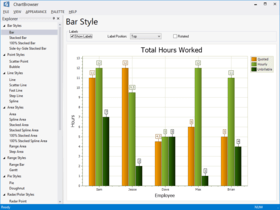
Screenshot Preview

Codejock Xtreme Calendar ActiveX - Summary

by Codejock Software - Product Type: Component / ActiveX OCX / ActiveX EXE / ActiveX DLL / DLL / VB Class Library / ActiveX Designer

Summary

Codejock Xtreme Calendar ActiveX by Codejock Software

URLs: codejock-xtreme-calendar-activex, codejock xtreme calendar activex, codejockxtremecalendaractivex, codejock

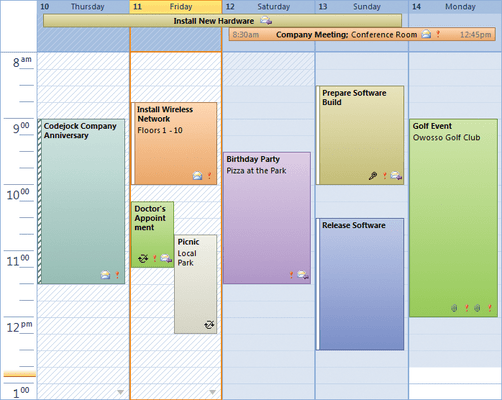
Let your applications manage appointments and arrange them by day, week, work week or month. Codejock Software's Xtreme Calendar provides Windows developers with a sophisticated Outlook style Calendar. Windows developers can easily create a calendar that can manage appointments that can be arranged by day, week, work week or month. The data in the calendar can be bound to an external database, xml file, or binary file.

Xtreme Calendar provides Windows developers with a sophisticated Outlook style Calendar.

Windows developers can easily create a calendar that can manage appointments that can be arranged by day, week, work week or month. Week view is displayed as a seven day calendar; month view is designed like a traditional 31 day calendar.

Adding appointments to the calendar can be done with the click of a mouse. Appointments can be rescheduled simply by dragging the appointment to the new time. Appointments can easily be identified by assigning them a color label or a busy status. Furthermore, appointments can be labeled as Private or Meeting.

Several built in appointment types are provided that are ready to use in the calendar. You can choose from any of the predefined appointment types including single day, multi-day, all-day, weekly, monthly, and yearly appointments.

The Calendar comes with its own built in Date Picker control. The Date Picker can work in both Bound and Un-bound mode. While working in bound mode, the Date Picker is synchronized with the Calendar.

An integrated Time Scale is automatically displayed while in Day or Work Week view. The time scale can be displayed in time increments from 5 minutes up to 1 hour. Up to two Time Scales can be displayed to show two different time zones at the same time. This allows you to easily keep track of appointments across time zones.

There are three methods provided for saving and retrieving data in the calendar. Data in the calendar can be bound to an external database, xml file, or binary file.

Xtreme Calendar

Xtreme Calendar supports many standard features you would expect from an enterprise class calendar component.

Integrated Time Scale

Integrated Date Picker

Edit Appointments with Ease

Calendar Views - Xtreme Calendar provides several built in display formats to choose from. You can choose from day, 7 day week, 5 day work week, or month view. If a built in view is not desired, then a user defined range of day can be specified.

Day View

5 Day Work Week View

7 Day Week View

Month View

Calendar View Options - Several options are available to customize the different views in the calendar.

Work Week Mask for Day and Work Week Views

Select the Starting Day of the Week

Week Count in Month View

Built in Appointment Types - Xtreme Calendar provides several built in appointment types that are ready to use in the calendar. You can choose from any of the predefined appointment types.

One Time Appointment

Daily Appointment

Multi-Day Appointment

All Day Appointment

Weekly Appointment

Monthly Appointment

Yearly Appointment

Appointment Attributes - Xtreme Calendar provides several ways to customize the appearance of the appointments in the calendar to make it easy to see what the appointment is simply by looking at it.

Private Item

Scheduled Meeting

Appointment Label

Time Management During the Appointment

Appointment Start and End Times

Data Formats - Xtreme Calendar provides several ways to save and load the Appointment data in the calendar. The data in the calendar can be bound to an external database, xml file, or binary file.

Subscription License: Includes the latest product updates and phone/email technical support for one year/30 days.

Let your applications manage appointments and arrange them by day, week, work week or month.

Pricing: Codejock Xtreme Calendar 2011 Vol 2 V15.2.1 ActiveX with 30 Days Subscription 1 Developer License, Codejock Xtreme Calendar 2011 Vol 2 V15.2.1 ActiveX with 30 Days Subscription 4 Developer License, Codejock Xtreme Calendar 2011 Vol 2 V15.2.1 ActiveX with 30 Days Subscription 8 Developer License, Codejock Xtreme Calendar 2011 Vol 2 V15.2.1 ActiveX with 30 Days Subscription 1 Site Wide License (Allows Unlimited Developers at a Single Physical Address), Codejock Xtreme Calendar 2011 Vol 2 V15.2.1 ActiveX with 1 Year Subscription 1 Developer License, Codejock Xtreme Calendar 2011 Vol 2 V15.2.1 ActiveX with 1 Year Subscription 4 Developer License, Codejock Xtreme Calendar 2011 Vol 2 V15.2.1 ActiveX with 1 Year Subscription 8 Developer License, Codejock Xtreme Calendar 2011 Vol 2 V15.2.1 ActiveX with 1 Year Subscription 1 Site Wide License (Allows Unlimited Developers at a Single Physical Address), Codejock Xtreme Calendar ActiveX - Subscription Renewal 1 Developer License, Codejock Xtreme Calendar ActiveX - Subscription Renewal 4 Developer License, Codejock Xtreme Calendar ActiveX - Subscription Renewal 8 Developer License, Codejock Xtreme Calendar ActiveX - Subscription Renewal 1 Site Wide License (Allows Unlimited Developers at a Single Physical Address)

Evals & Downloads: Read the Codejock Xtreme SuitePro ActiveX help file, Browse the Codejock Xtreme SuitePro License Agreement, Download the Codejock Xtreme SuitePro for Visual Basic (ActiveX) 2011 Vol 2 V15.2.1 evaluation on to your computer - Expires After 30 Days

Operating System for Deployment: Windows 7, Windows Vista, Windows XP, Windows ME, Windows 2000, Windows 98, Windows NT 4.0, Windows 95

Architecture of Product: 32Bit, 64Bit

Product Type: Component

Component Type: ActiveX OCX, ActiveX EXE, ActiveX DLL, DLL, VB Class Library, ActiveX Designer

Built Using: MFC V4.2 / V6.0, ActiveX Framework

Compatible Containers: Microsoft Visual Studio 2008, Microsoft Visual Studio 2005, Microsoft Visual Studio .NET 2003, Microsoft Visual Studio .NET, Microsoft Visual Studio 6.0, Microsoft Visual Studio 97, Microsoft Visual Basic 2008, Microsoft Visual Basic 2005, Microsoft Visual Basic .NET 2003, Microsoft Visual Basic .NET, Microsoft Visual Basic 6.0, Microsoft Visual Basic 5.0, Microsoft Visual Basic 4.0, Microsoft Visual Basic 3.0, Microsoft Visual C++ 2008, Microsoft Visual C++ 2005, Microsoft Visual C++ .NET 2003, Microsoft Visual C++ .NET, Microsoft Visual C# 2008, Microsoft Visual C# 2005, Microsoft Visual C# .NET 2003, Microsoft Visual C# .NET, Microsoft Internet Explorer 6.0, Microsoft Internet Explorer 5.5, Microsoft Internet Explorer 5.0, Microsoft Internet Explorer 4.0, Microsoft Internet Explorer 3.0, Delphi 7.0, Delphi 6.0, Delphi 5.0, Delphi 4.0, Delphi 3.0, Delphi 2.0, Delphi 1.0, .NET Framework 3.5, .NET Framework 3.0, .NET Framework 2.0, .NET Framework 1.1, .NET Framework 1.0

Product Class: User Interface Components

Keywords: calendar pro porfessional

code jock

Calendar calendaring calendars Scheduling Schedule Schedules

date dates pickers pick

Part numbers: PC-516197-424026 516197-424026 PC-516197-424029 516197-424029 PC-516197-424032 516197-424032 PC-516197-424035 516197-424035 PC-516197-424038 516197-424038 PC-516197-424041 516197-424041 PC-516197-424044 516197-424044 PC-516197-424047 516197-424047 PC-516197-424050 516197-424050 PC-516197-424053 516197-424053 PC-516197-424056 516197-424056 PC-516197-424059 516197-424059

Mfr. Part No: 1521-COM-CALENDAR-1DL-30 1521-COM-CALENDAR-1DL-365 1521-COM-CALENDAR-1DL-SUB 1521-COM-CALENDAR-4DL-30 1521-COM-CALENDAR-4DL-365 1521-COM-CALENDAR-4DL-SUB 1521-COM-CALENDAR-8DL-30 1521-COM-CALENDAR-8DL-365 1521-COM-CALENDAR-8DL-SUB 1521-COM-CALENDAR-UDL-30 1521-COM-CALENDAR-UDL-365 1521-COM-CALENDAR-UDL-SUB