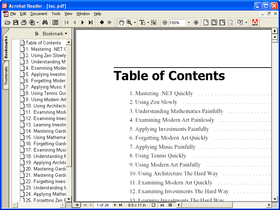
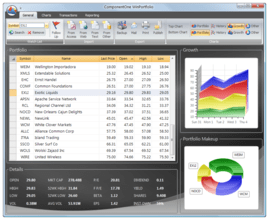
Screenshot Preview

ComponentOne PDF for WinForms - Summary

by ComponentOne - Product Type: Component / .NET WinForms / 100% Managed Code

ComponentOne PDF for WinForms can also be bought as part of ComponentOne Studio Enterprise and ComponentOne Studio for WinForms.

If you require more information please Contact Us

Summary

ComponentOne PDF for WinForms by ComponentOne

URLs: componentone-pdf-winforms, componentone pdf winforms, componentonepdfwinforms, componentone

Create secure, compressed PDF documents from your applications. ComponentOne PDF for WinForms was designed to provide developers with an easy-to-use tool for creating PDFs from their applications. In fact, the commands provided for adding content to documents are similar to the ones available in the .NET Graphics class. So, if you know how to display text and graphics in .Net Graphics, then you can use ComponentOne PDF for WinForms. ComponentOne PDF for WinForms is now Visual Studio 2010 and .NET Framework 4.0 compatible.


Create Adobe PDF documents from your applications using ComponentOne PDF for WinForms. The commands provided for adding content to documents are similar to the ones available in the .NET Graphics class. C1 PDF for .NET gives you security, compression, outlining, hyper-linking, and attachments.

ComponentOne PDF for WinForms Features

Fast Rendering and Compression of Images in Metafiles

Metafiles are not converted into bitmaps; they are parsed and converted into vector graphics commands and thus retain the best possible resolution. If you want to add charts or technical drawings to your PDF document, metafiles are better than bitmap images.

AcroForms Support

Use the new AddField method to add Acrobat form fields to your PDF documents. PDF for .NET supports the following field types: textbox, checkbox, radio button, push button, combo box, and list box.

HTML Support

Use the new DrawStringHtml method to render HTML into your PDF documents. You can flow HTML content into multiple pages or columns, use existing style sheets, and mix HTML with other types of content (images, RTF, plain text, form fields, and so on).

Familiar Syntax Using DrawImage Method

Adding images to PDF documents is easy; all the work is done by the DrawImage method. DrawImage draws a given image at a specified location and has parameters that provide control over the image alignment and scaling. You can render any regular .NET Image object, including metafiles.

Manage Document Restrictions

Allow users to copy and edit content, restrict users from printing the document, set annotation edit permission to the user, and more.

Add Attachments to PDF Files

Attachments can contain any kind of file, including spreadsheets with detailed information that would clutter the main document, multimedia files with movies and sound, sample code, and more. Adding an attachment to your PDF file is easy. Simply specify which file you want to attach, what area of the page should contain the attachment, and optionally, the appearance of the attachment.

Owner and User Password Protection

If your PDF documents contain sensitive information, you can encrypt them so that only authorized users can access it. There is a separate password for the owner of the document and for all other users. The user's access can be selectively restricted to allow only certain operations, such as viewing, printing, or editing the document.

Add Graphical Elements

Add lines, rectangles, ellipses, pies, arcs, rounded rectangles, polygons, Bezier curves, and more.

Create an Outline Structure

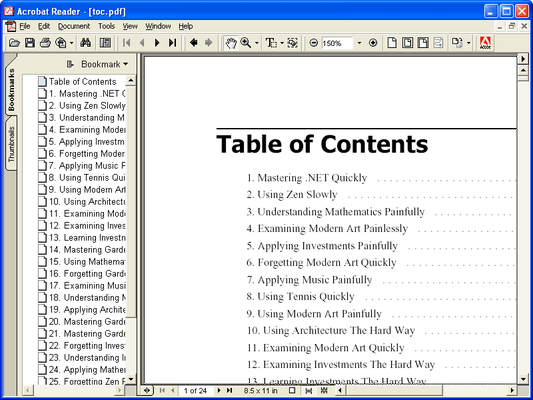
Most long PDF documents contain an outline structure that is displayed on a pane on the left of the reader. The outline makes it easy to browse through a document's structure and find specific topics. With ComponentOne PDF for WinForms, you can build this outline structure by adding outline entries (bookmarks).

Add Hyperlinks and Local Links

ComponentOne PDF for WinForms provides methods for adding hyperlinks and hyperlink targets to your PDF documents. You can also add local links, that when clicked take the user to another location within the same PDF document. This type of link is useful when you want to implement some type of cross-referencing within the document, such as a table of contents or an index

Control Document Information and Viewer Preferences

ComponentOne PDF for WinForms allows you to add meta data to the PDF documents you create. Specify author, creation date, keywords, and so on. You can also provide default viewer preferences to be applied when the document is opened in the Adobe Reader. Specify the initial page layout, window position, as well as reader toolbar and menu visibility.

VS2010 Compatible

ComponentOne PDF for WinForms is VS 2010, .NET 4.0 Framework compatible.

What's New in ComponentOne PDF for WinForms 2012 v1

New Features

Added support for EMF+ files and the DrawPath/FillPath methods for Pdf document.

Added support for page breaks in the DrawStringHtml method (). Page breaks are specified in HTML using the 'page-break-before' and 'page-break-after' .css attributes.

Changed the PieArc method. Arc/pie angles are now correct.

Changed RGN_AND clipping. In the previous version, new region AND empty equaled empty, but now it equals new region.

Updated licensing with fixes to conform with Federal Information Processing Standards requirements.

Merge from C1Zip.

What's New in ComponentOne PDF for WinForms 2011 v3

Added support for 128-bit encryption.

Optimized performance through file caching features. Added the new UseFileCaching property to allow pages to be cached on local, temporary disk space.

Added support for exporting hyperlinks in HTML rendered content.

What's New in ComponentOne PDF for WinForms 2010 v2

Includes support for .NET 4.0

Create secure, compressed PDF documents from your applications.

Pricing: ComponentOne PDF for WinForms 2012 v1 1 Developer Subscription License, ComponentOne PDF for WinForms 2012 v1 10-29 Developer Subscription License - Price per license, ComponentOne PDF for WinForms 2012 v1 30-49 Developer Subscription License - Price per license, ComponentOne PDF for WinForms 2012 v1 50-99 Developer Subscription License - Price per license, ComponentOne Platinum Support 1 Platinum Support License (Includes a year of Telephone and Online Technical Support)

Evals & Downloads: Read the ComponentOne PDF for .NET help file, ComponentOne Studio Enterprise and ComponentOne Report Designer Edition Case Study, Read End-User License Agreement for ComponentOne Software, Download the ComponentOne Studio for WinForms 2012 v1 evaluation on to your computer - Expires after 30 days

Operating System for Deployment: Windows 7, Windows Vista, Windows XP, Windows 2000

Architecture of Product: 32Bit

Product Type: Component

Component Type: .NET WinForms, 100% Managed Code

Built Using: Visual C# .NET

Compatible Containers: Microsoft Visual Studio 2010, Microsoft Visual Studio 2008, Microsoft Visual Studio 2005, Microsoft Visual Basic 2010, Microsoft Visual Basic 2008, Microsoft Visual Basic 2005, Microsoft Visual C++ 2010, Microsoft Visual C++ 2008, Microsoft Visual C++ 2005, Microsoft Visual C# 2010, Microsoft Visual C# 2008, Microsoft Visual C# 2005, Delphi 8.0, C#Builder, .NET Framework 4.0, .NET Framework 3.5, .NET Framework 3.0, .NET Framework 2.0

Product Class: Business Components

Keywords: componentone pdf for winforms, componentone pdf winforms, componentone pdf for .net, componentone pdf .net, componentone pdf, component one pdf .net, component1 pdf, c1 pdf, c1pdf, c1 pdf winforms

c1 controls, c1 components, componentone controls, componentone components, componentone, componentone, c1, componentone studio, component one, componentone studio enterprise, componentone review, componentone activex, truegrid, true dbgrid, flexgrid

PDF

pdf

Part numbers: PC-514667-452167 514667-452167 PC-514667-452168 514667-452168 PC-514667-452170 514667-452170 PC-514667-452169 514667-452169 PC-514667-452171 514667-452171

Mfr. Part No: ESD-N-PDF SUPPORT-TS

Product Search

Enter search words:

Quick Links

Publisher

Primary Category

Related Products

Related Categories

Award Award