Screenshot Preview

ComponentOne Studio for Windows Phone

by ComponentOne - Product Type: Component / .NET Class / Silverlight

Enhance your Windows phone applications with this collection of over 15 user interface components. ComponentOne Studio for Windows Phone expands your toolbox with UI controls for data visualization, rich text, data input and layout, as well as four class libraries which speed up development time. Designed to enhance the user experience of the Windows Phone 7, these ComponentOne controls provide you with powerful and unique functionality allowing you to build better and attractive mobile applications.

Our regular prices are shown below. Please logon to see your discounted prices.

Price in

ComponentOne Studio for Windows Phone 2012 v1

Add to Cart $ 91.20 1 Developer Subscription License
Mfr. Part No: ESD-WINPHONE-STUDIO
Download (17.2 MB)
Add to Cart $ 82.08 10-29 Developer Subscription License - Price per license
Mfr. Part No: ESD-WINPHONE-STUDIO
Download (17.2 MB)
Add to Cart $ 77.52 30-49 Developer Subscription License - Price per license
Mfr. Part No: ESD-WINPHONE-STUDIO
Download (17.2 MB)
Add to Cart $ 72.96 50-99 Developer Subscription License - Price per license
Mfr. Part No: ESD-WINPHONE-STUDIO
Download (17.2 MB)

ComponentOne Studio for Windows Phone 2012 v1 Renewal

Add to Cart $ 43.20 1 Developer Subscription Renewal License
Mfr. Part No: ESD-WINPHONE-STUDIO-R
Verify Download (17.2 MB)
Add to Cart $ 38.88 10-29 Developer Subscription Renewal License - Price per license
Mfr. Part No: ESD-WINPHONE-STUDIO-R
Verify Download (17.2 MB)
Add to Cart $ 36.72 30-49 Developer Subscription Renewal License - Price per license
Mfr. Part No: ESD-WINPHONE-STUDIO-R
Verify Download (17.2 MB)
Add to Cart $ 34.56 50-99 Developer Subscription Renewal License - Price per license
Mfr. Part No: ESD-WINPHONE-STUDIO-R
Verify Download (17.2 MB)

ComponentOne Studio for Windows Phone 2012 v1 Upgrade

Add to Cart $ 72.00 1 Developer Subscription Upgrade License
Mfr. Part No: ESD-WINPHONE-STUDIO-U
Verify Download (17.2 MB)
Add to Cart $ 64.80 10-29 Developer Subscription Upgrade License - Price per license
Mfr. Part No: ESD-WINPHONE-STUDIO-U
Verify Download (17.2 MB)
Add to Cart $ 61.20 30-49 Developer Subscription Upgrade License - Price per license
Mfr. Part No: ESD-WINPHONE-STUDIO-U
Verify Download (17.2 MB)
Add to Cart $ 57.60 50-99 Developer Subscription Upgrade License - Price per license
Mfr. Part No: ESD-WINPHONE-STUDIO-U
Verify Download (17.2 MB)

Our prices include ComponentSource technical support and, for most downloadable products, an online backup and a FREE upgrade to the new version if it is released within 30 days of your purchase.  All sales are made on our standard Terms and Conditions and subject to our Return Policy. Please contact us if you require any licensing option not listed, including volume licensing and previous versions.

Our regular prices are shown above. Please logon to see your discounted prices.

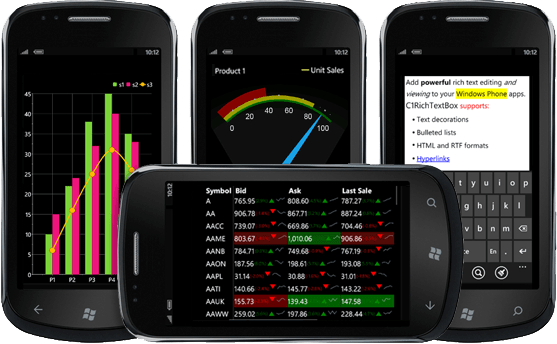
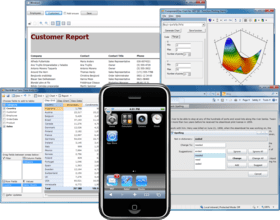
Screenshot of ComponentOne Studio for Windows Phone - Subscription - 2012 v1

What’s new in Studio for Windows Phone 2012 v1
New to ComponentOne Studio for Windows Phone, users can now access Map controls powered by Esri software. Also in the 2012 v1 release, enjoy a new Calendar control, as well as enhancements to Chart, DateTimePicker, and FlexGrid.

New Features

  • Maps Powered by Esri - ComponentOne has partnered with Esri, the leading online map and GIS provider, to bring you the best mapping tools and UI controls together in one package. Easily transform GIS data into business intelligence with Maps powered by Esri software. The Maps powered by Esri utilize the powerful mapping, geocoding, and geoprocessing capabilities provided by ArcGIS Server. With Studio for Windows Phone 2012 v1 you get: Unrestricted access to the Esri Map control and the ArcGIS API for Windows Phone. Access to substantial amounts of geographical data made available by Esri.
  • Calendar Control - Deliver your own Metro-style calendars with ComponentOne Calendar for Windows Phone. Get gesture-based navigation, date range selection and a highly customizable styling model for quick and simple app development. You can alter the appearance of any individual day using a custom template and template selector. Display content within the date blocks, such as appointments from the phone’s user data.

Enhancements

Chart for Windows Phone

  • Enhance your pie charts! The new PieSlice.Offset property makes it easy to set the individual offset for each slice of a pie. Expand and contract slices upon tap or provide loading animations.
  • MVVM Data Binding Improvements. The inner axes and series elements now inherit the data context from the parent chart making binding in MVVM scenarios easier to accomplish.

DateTimePicker for Windows Phone

  • Faster and smoother! With improved performance and animation this control has been enhanced to be used with C1Calendar.

FlexGrid for Windows Phone

  • Custom Aggregates. Added support for custom aggregates. This is useful if you need to provide unusual aggregations that are not already provided by the control.
  • And More. Added the SelectedItemChanged event and the HeaderTemplate property to enable customization of column header cells.

What’s new in Studio for Windows Phone 2011 v3

  • C1ContextMenu control - provides touch-sensitive menus that can display additional commands while saving UI space.
  • C1DateTimePicker control - provides a single, intuitive UI for selecting date and time values.
  • C1ProgressBar control - visually indicates the progress of an operation.
  • C1ToggleSwitch control - provides a simple, gesture-friendly on-off switch for user input.
  • Excel- Read and write Microsoft Excel files (XLSX) with this easy-to-use class library.
  • FlexGrid- Display tabular data across columns and down rows with this simple, yet powerful grid control.
  • Gauges- Visualize your data and create dashboard apps with attractive gauges.
  • Imaging- Edit images (PNG and JPEG) and display animated GIFs on the Phone.
  • PDF- Create dynamic PDF files within your Phone apps.
  • Zip- Compress data sent over the wire and use isolated storage efficiently and securely.
  • Improved PdfViewer  - performance has been drastically improved and the rendering has been enhanced with hardware-accelerated bitmap caching.
  • Enhanced Chart - better touch interaction.

ComponentOne Studio for Windows Phone Features and Highlights

15+ Windows Phone Controls and Growing
ComponentOne Studio for Windows Phone includes over 15 UI controls for data visualization, text editing, layout, and navigation. Plus, you get four code libraries which speed up development time. Studio for Windows Phone not only fills the gap with what's missing in the standard toolkit, but it adds more enterprise-level features you can't get in the box.

Metro UI Design
Studio for Windows Phone supports the Metro UI design and interaction guidelines as specified by Microsoft. Each visual control supports a Metro theme used by default, so you can feel confident that your apps will look nice on the device.

Supports Default Phone Theme
Studio for Windows Phone controls automatically inherit the Windows Phone theme by default, but using a custom theme is just as easy.

ClearStyle Technology for XAML Styling Made Easy
ComponentOne ClearStyle technology allows developers to easily change control colors without having to modify control templates. By just setting a few brush properties in Visual Studio you can quickly give a unique look to any UI control without having to work in Expression Blend or hire a professional designer.

Advanced Data Visualization
With over 30 chart types, and a wide range of color palettes, your charting apps are just a few clicks away. Chart brings animation, advanced features, and user interaction capabilities to your Windows Phone applications. With a variety of designs and shapes, Gauges give you dashboard-style visualization perfect for the mobile platform. Or you can visualize your data geographically with Maps.

Tabular Data Editing
Only with the legendary FlexGrid control can you get tabular data editing on the Windows Phone. Display data records across columns and down rows with this simple, yet powerful grid control. Plus, unlock advanced features such as sorting, cell merging, and even editing with a platform-specific UI.

Display and Edit Rich Text
ComponentOne RichTextBox for Windows Phone is the only Windows Phone 7 control available which enables rich text editing in both RTF and HTML formats. Get rich by delivering complete rich text editing.

Code Sharing with Silverlight
Studio for Windows Phone controls share the same codebase with our Studio for Silverlight. Developers already familiar with Silverlight will be able to create new applications for Windows Phone without a steep learning curve. Reuse code and XAML and save development time.

Free Online Support
Collaborate with ComponentOne technical experts and fellow developers on the community forums. ComponentOne officially supports all forums for technical issues both during trial and after purchase.

ComponentOne Studio for Windows Phone includes:

  • Chart - Visualize your data with advanced charts supporting all popular chart types, interaction, data labels, and animations
  • CoverFlow - Visually navigate through items in an animated, three-dimensional graphical UI
  • DockPanel - Dock elements to the top, bottom, left, and right edges of any parent container
  • Excel - Read and write Microsoft Excel files (XLSX) with this easy-to-use class library
  • FlexGrid - Display tabular data across columns and down rows with this simple, yet powerful grid control
  • Gauges - Visualize your data and create business dashboards with attractive gauges
  • Imaging - Edit images (PNG and JPEG) and display animated GIFs in your apps
  • LayoutTransformer - Rotate, skew, translate, and scale any elements of your UI with ease
  • Maps - Display map tiles, or render KML files, and superimpose your own data onto the maps with this smooth viewer control
  • MaskedTextBox - Provide input mask validation such as phone numbers
  • NumericBox - Display and edit formatted numeric values such as currencies and percentages
  • PDF - Create dynamic PDF documents within your phone apps
  • PdfViewer - Add PDF viewing capabilities to your Windows Phone apps
  • Reflector - Display a 2D or 3D reflection of any element
  • RichTextBox - Display and edit RTF and HTML with support for common text decorations, hyperlinks, tables and more
  • UniformGrid - Neatly display child elements of equal size in rows and columns
  • WrapPanel - Create flowing layouts that wrap content vertically or horizontally
  • Zip - Compress data sent over the wire and use isolated storage efficiently and securely

Product Search

Enter search words:

Award Award