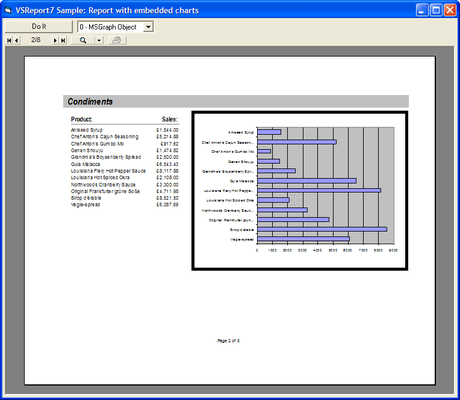
Screenshot Preview

VSVIEW Reporting Edition

by ComponentOne - Product Type: Component / ActiveX OCX

ComponentOne VSVIEW is now officially part of ComponentOne Studio Enterprise and ComponentOne Studio for ActiveX.

If you require 5 or more individual licenses for ComponentOne VSVIEW , please Contact Us for pricing and availability.

Create Microsoft® Access-style database reports for your Visual Basic, VC++, Delphi, and C++Builder applications. ComponentOne's VSVIEW Reporting Edition adds powerful, flexible database reporting to VSVIEW. It comes complete with preview, print, and export capabilities enabling reports on your computer or over the Web. Also available as VSVIEW Classic Edition.


Screenshot of VSVIEW - Reporting Edition - 2009 v1

VSVIEW Reporting Edition is part of ComponentOne Studio Enterprise and the ComponentOne Studio for ActiveX

The key to the strength of VSVIEW Reporting Edition lies in its two unique controls: VSReport and its companion Report Designer that generate your database reports, and VSPrinter, a standalone control that handles all of your previewing, printing, and exporting requirements. Together, you get all the power of VSVIEW, with an easy-to-use, full-fledged report writer perfect for both your standard and ASP reports.

VSReport and the Companion Report Designer

The VSReport control reads report definitions stored in XML files, combines them with data from ADO/DAO recordsets or custom data sources, and generates reports that can be previewed, printed, or saved to files. It can create reports in HTML, DHTML, PDF, and Text file formats, as well as in a native VSPrinter format. The VSReport, control supports most features found in MicrosoftAccess reports, such as:

  • A Microsoft Access-style banded-report model based on Groups, Sections, and Fields.
  • Fields may be bound to simple and binary (object) database fields.
  • Fields may contain VBScript expressions, including extensions for aggregate expressions (Sum, Max, Average, etc.), and have access to the control's object model.
  • Reports may contain event handlers, making them independent of the host application.
  • Reports may contain subreports.
  • Reports may contain parameterized queries, allowing your users to customize the report by adding/limiting the data that should be included in the report.
  • Report definitions may be saved within the control at design time, or loaded at run time from XML report definition files.

Use the companion WYSIWYG Report Designer to create, edit, load, and save report definition files. Report definition files are XML files that may contain multiple reports, and can be read by the VSReport7 control. The Report Designer can import report definitions from Microsoft Access MDB files, and can also import report definitions from VSReports1.0 VSR files. The Report Designer has a user interface similar to the Microsoft Access report designer, including a wizard that makes report creation a breeze.

The VSPrinter Control

The VSPrinter control provides the VSReport control with previewing and printing capabilities, plus can be used to create documents without VSReport. Depending on what you want to do, you may use the VSReport control along with the VSPrinter control. For example, to preview a report, you'll use the VSPrinter and VSReport controls. The VSReport control reads data from a database, formats it according to the report definition, and sends its output to the VSPrinter control.


Features include:

  • RTF, HTML, and PDF Export - You can export documents (including their font/paragraph formatting and tables) to RTF, HTML, and PDF formats. The HTML export filter also allows for paged HTML output, which generates a series of hyperlinked HTML pages
  • Internet Awareness - You can load documents located on your Web site directly into a control hosted by a browser on the clients machine. You can also monitor the document downloading process and the control state in general
  • Tables - You can create tables with rows that span page breaks, row and column spanning (cell merging), vertical text in table cells, and custom borders on a per-row/per-column basis. You can also add custom contents to individual table cells, suppress repeated values, add spacing before and after each row, and more
  • Document Navigation - Allow end users to browse through the preview document, zoom in and out, and print! Navigation with the mouse wheel and keyboard is also supported
  • Pictures - You can clip, tile, and zoom pictures (scale them while preserving aspect ratio). This is especially useful for handling pictures that come from databases and may have varying dimensions
  • Styles - Define, apply, save, and load styles that define the properties for pages, paragraphs, characters, and graphical objects! This makes it easy to create documents with consistent formatting, favors separating formatting from content generation, and eliminates the need to save several controls properties in order to restore them after rendering parts of the document that have special formatting
  • Page Ranges - You can also include retrievable, invisible tags in documents. You can use tags to implement pop-up help, hyperlinks, and many other interesting and useful elements
  • Active Documents - Easily retrieve text from a document: search for a string within a document or retrieve the contents of an area on a page

Support

ComponentOne Platinum Support Subscriptions provide a full year of Telephone and Online Technical Support. ComponentOne Technical Support Engineers are available by phone Monday through Friday, except U.S. holidays, from 9:00 a.m. to 5:00 p.m. Eastern,USA.
Customers outside the USA, please remember to check your time difference for phone support.

Product Search

Enter search words:

Quick Links

Publisher

Primary Category

Related Products

Related Categories

Award Award