Desaware NT Service Toolkit
by Desaware - Product Type: Component / DLL
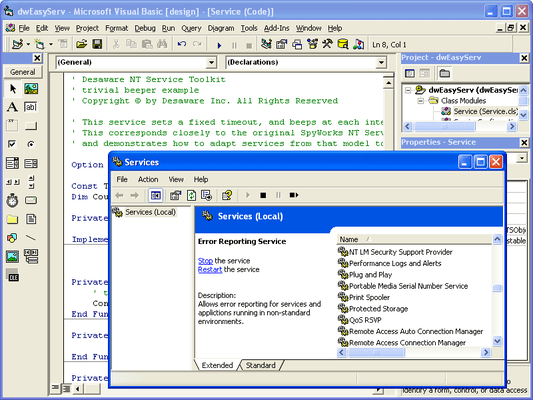
Create full featured NT Services. More than just "running as a service" Desaware NT Services Toolkit allows you to build services that support all NT service options and controls. Services hold a distinct advantage over applications in the area of system monitors, background tasks, business objects, etc. Create your own Control Panel applets for service control and other purposes.

Our regular prices are shown below. Please logon to see your discounted prices.
Desaware NT Service Toolkit V2.0
| Add to Cart |
$ 489.02 |
1 Developer License |
|
Download (4.2 MB) |
| Add to Cart |
$ 146.02 |
1 Developer Upgrade License from previous version |
|
Download (4.2 MB) |
Our prices include ComponentSource technical support and, for most downloadable products, an online backup and a FREE upgrade to the new version if it is released within 30 days of your purchase. All sales are made on our standard Terms and Conditions and subject to our Return Policy. Please contact us if you require any licensing option not listed above including volume licensing and previous versions.
Our regular prices are shown above. Please logon to see your discounted prices.

What's new in V2.0?
New Service Executable Command Line options
- User and -Password allow you to specify the account in which the service will run. This setting overrides that provided in the Service Configuration file, and is ideal for cases where the account must vary from system to system. These options are not supported for services that are set to interact with the desktop
- Params allows you to set parameters during installation which can be read at any time by the service when it runs
- Silent prevents any message boxes from being displayed during installation operations, improving support for remote and automated installs
New IdwServiceControl Methods and Properties
- StartupParameters - Allows you to read parameters set during manual startup of a service via the control panel or Service Control Manager
- InstallParameters – Allows you to read parameters specified in the command line when the service is installed
- Trace – Allows you output arbitrary text from your service component to the framework tracing system for diagnostic purposes (see following section)
- GetInteractiveUser – Obtains the account information for the currently logged on user
Improved Instrumentation and diagnostics
- Framework logging – Definable trace levels control logging of detailed information about the operation of the framework to help resolve configuration issues
New features for Interactive Services
- New IdwEasyService2 interface provides an OnLogout method that allows you to determine when an interactive user has logged off the system
- New features allows you to determine if an interactive user is logged on and retrieve their account name and domain in most cases
Improved Error Handling
- Robust trapping and detection of runtime errors that occur in your Visual Basic component allow cleaner shutdown of services when errors occur. Improved diagnostics allow reporting of where and when errors occur, making debugging of services much easier
Service Control Features
- New VB6 classes demonstrate how to control services (including starting, stopping and sending information to running services). Full source code for these classes is included
Other Features
- Improved and earlier detection and handling of System Shutdown
- Improved default security handling reduces the amount of configuration needed in remote and DCOM based scenarios
- Batch creation of Service executables. You can now create your Service executable files as part of a build script
Migration Support for .NET
- Services created with the COM edition of the NT Service Toolkit can be migrated easily to the .NET edition of the NT Service Toolkit. The .NET edition uses the same overall architecture including virtually identical interfaces. Simply migrate your existing VB6 classes to VB.Net or C#, and they will plug in directly to the .NET framework. Plus, the .NET version of your services will automatically continue to support access by today’s COM and DCOM clients as well as access from .NET clients using .NET remoting
Desaware NT Services Toolkit allows you to create Professional NT Services using Visual Basic.
Why NT Services?
- System Monitors
- Background Tasks
- Software Agent
- Resource Pool
- Business Objects
Toolkit Features
- Debugging
- COM/DCOM Support
- Scalability
- Impersonation
- Simulation
- Configuration
- Synchronization
- Control Panel Applets