by ComponentOne - Product Type: Application
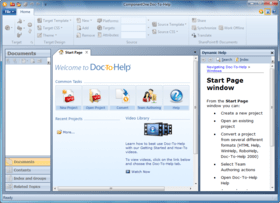
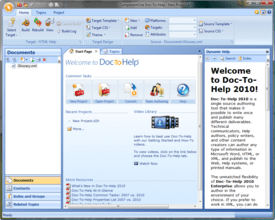
Create professional Help Systems and Manuals from HTML or Word. Whether you are converting from RoboHelp or creating new projects, Doc-To-Help empowers you to create HTML or Microsoft Word content and convert it to virtually every popular Help file format or printed documentation. Doc-To-Help Enterprise can produce help files in popular formats including HTML Help, Cross-Platform HTML-based Help, JavaHelp, WinHelp, Visual Studio .NET-style Help, and printed documentation. Since Doc-To-Help Enterprise uses a simple style markup to create Help systems, you have the freedom to use any editor. Doc-To-Help Enterprise supports Windows 7, Vista and the 2010 Microsoft Office System including seamless integration with Word 2010. Doc-To-Help Enterprise now offers integration with SharePoint which allows you to upload your content to a SharePoint library and take advantage of SharePoint’s management and workflow features. Doc-To-Help Enterprise also includes exclusive features such as one-click RoboHelp project conversions. Doc-To-Help for Enterprise includes updates and upgrades for 1 year. Platinum Support including 1 year of unlimited phone support also available.

Our regular prices are shown below. Please logon to see your discounted prices.
| Add to Cart | $ 1,147.20 | 1 User Subscription License Mfr. Part No: ESD-D2H-ENT-DW |
Download (225.7 MB) |
| Add to Cart | $ 1,051.20 | 1 User Subscription License Mfr. Part No: ESD-DTHENT |
Download (206.4 MB) | |
| Add to Cart | $ 946.08 | 10-29 User Subscription License - Price per license Mfr. Part No: ESD-DTHENT |
Download (206.4 MB) | |
| Add to Cart | $ 893.52 | 30-49 User Subscription License - Price per license Mfr. Part No: ESD-DTHENT |
Download (206.4 MB) | |
| Add to Cart | $ 840.96 | 50-99 User Subscription License - Price per license Mfr. Part No: ESD-DTHENT |
Download (206.4 MB) |
| Add to Cart | $ 1,339.20 | 1 User Subscription License Mfr. Part No: ESD-DTHENT-PLAT |
Download (206.4 MB) | |
| Add to Cart | $ 1,205.28 | 10-29 User Subscription License - Price per license Mfr. Part No: ESD-DTHENT-PLAT |
Download (206.4 MB) | |
| Add to Cart | $ 1,138.32 | 30-49 User Subscription License - Price per license Mfr. Part No: ESD-DTHENT-PLAT |
Download (206.4 MB) | |
| Add to Cart | $ 1,071.36 | 50-99 User Subscription License - Price per license Mfr. Part No: ESD-DTHENT-PLAT |
Download (206.4 MB) |
| Add to Cart | $ 859.20 | 1 User Upgrade Subscription License Mfr. Part No: ESD-DTHENT-U |
Verify | Download (206.4 MB) |
| Add to Cart | $ 773.28 | 10-29 User Upgrade Subscription License - Price per license Mfr. Part No: ESD-DTHENT-U |
Verify | Download (206.4 MB) |
| Add to Cart | $ 730.32 | 30-49 User Upgrade Subscription License - Price per license Mfr. Part No: ESD-DTHENT-U |
Verify | Download (206.4 MB) |
| Add to Cart | $ 687.36 | 50-99 User Upgrade Subscription License - Price per license Mfr. Part No: ESD-DTHENT-U |
Verify | Download (206.4 MB) |
| Add to Cart | $ 1,147.20 | 1 User Upgrade Subscription License Mfr. Part No: ESD-DTHENT-PLAT-U |
Verify | Download (206.4 MB) |
| Add to Cart | $ 1,032.48 | 10-29 User Upgrade Subscription License - Price per license Mfr. Part No: ESD-DTHENT-PLAT-U |
Verify | Download (206.4 MB) |
| Add to Cart | $ 975.12 | 30-49 User Upgrade Subscription License - Price per license Mfr. Part No: ESD-DTHENT-PLAT-U |
Verify | Download (206.4 MB) |
| Add to Cart | $ 917.76 | 50-99 User Upgrade Subscription License - Price per license Mfr. Part No: ESD-DTHENT-PLAT-U |
Verify | Download (206.4 MB) |
| Add to Cart | $ 523.20 | 1 User Renewal Subscription License Mfr. Part No: ESD-DTHENT-R |
Verify | Download (206.4 MB) |
| Add to Cart | $ 470.88 | 10-29 User Renewal Subscription License - Price per license Mfr. Part No: ESD-DTHENT-R |
Verify | Download (206.4 MB) |
| Add to Cart | $ 444.72 | 30-49 User Renewal Subscription License - Price per license Mfr. Part No: ESD-DTHENT-R |
Verify | Download (206.4 MB) |
| Add to Cart | $ 418.56 | 50-99 User Renewal Subscription License - Price per license Mfr. Part No: ESD-DTHENT-R |
Verify | Download (206.4 MB) |
| Add to Cart | $ 811.20 | 1 User Renewal Subscription License Mfr. Part No: ESD-DTHENT-PLAT-R |
Verify | Download (206.4 MB) |
| Add to Cart | $ 730.08 | 10-29 User Renewal Subscription License - Price per license Mfr. Part No: ESD-DTHENT-PLAT-R |
Verify | Download (206.4 MB) |
| Add to Cart | $ 689.52 | 30-49 User Renewal Subscription License - Price per license Mfr. Part No: ESD-DTHENT-PLAT-R |
Verify | Download (206.4 MB) |
| Add to Cart | $ 648.96 | 50-99 User Renewal Subscription License - Price per license Mfr. Part No: ESD-DTHENT-PLAT-R |
Verify | Download (206.4 MB) |
Our prices include ComponentSource technical support and, for most downloadable products, an online backup and a FREE upgrade to the new version if it is released within 30 days of your purchase. All sales are made on our standard Terms and Conditions and subject to our Return Policy. Please contact us if you require any licensing option not listed, including volume licensing and previous versions.
Our regular prices are shown above. Please logon to see your discounted prices.

What's new in Doc-To-Help 2012 v1
What's new in ComponentOne Doc-To-Help 2011 V2
More User Experience Improvements
Every release contains a number of features and enhancements Doc-To-Help users are asking for. Other improvements you will find in this release include:
Doc-To-Help 2011 version 1 Update
The following fixes and enhancements are included in this release:
NetHelp JavaScript search:
- The conjuction OR could return incorrect results if the search query contained a word that was absent in topics;
- Compound words such as "Doc-To-Help" couldn't found;
- If a word ended with a special German character, "highlight search hits" didn't work as expected;
- Special characters (% $ @, etc.) couldn't be searched for;
- Firefox couldn't load the search engine in NetHelp targets and always displayed "Loading search engine." (This issue only occurred in FireFox and only when the NetHelp target was hosted on Unix operating system);
- Optimized memory usage by search engine;
- Optimized speed of generating an index when building a target.
Manual targets:
- The numbered lists before headings were not displayed correctly;
- If cross-reference links had numbering, it didn't updating in LiveLinks mode and displayed incorrect numbers.
Translation:
- Not all documents could be displayed in the Document Import wizard when creating a new target translation project;
- An unhandled exception could be thrown in the Share wizard when pressing next after showing list of files to share.
Building targets:
- Themes weren't upgraded without errors when building a target with UAC enabled in Windows Vista and Windows 7.
- When building NetHelp or HTMLHelp target, a compilation error could occur if project folders contained ".svn" folders.
Dynamic Help has been updated for the "Movie in Flash Format Properties" dialog and for the Translation tab page.
Fixed SharePoint access through HTTPS.
What's New in Doc-To-Help 2011
New NetHelp Search Engine
Doc-To-Help’s NetHelp output has a new search engine with exact phrase, fuzzy, Boolean, and synonym search. The best part is that you don’t have to do anything. It is automatically built into every NetHelp output.
Build Scheduler
Doc-To-Help always allowed you to schedule builds via command line, but now there is a convenient interface to schedule one-off or recurring builds. Run your builds at night or start them and do something else while you wait.
Translation Support
Doc-To-Help integrates with SharePoint’s translation management features to help you manage and track translations.
User Experience Improvements
Every release contains a number of features and enhancements Doc-To-Help users are asking for. More items you will find in this release include:
What's New in Doc-To-Help 2010 v3?
Integration with SharePoint:
Doc-To-Help Enterprise’s integration with SharePoint allows you to upload your content to a SharePoint library and take advantage of SharePoint’s management and workflow features. Doc-To-Help Enterprise works with SharePoint’s check in/check out features and permissions, so you get a complete source control and version control system without headaches.
Several Enhancements to improve User Experience:
Specify Exactly Where You Want Page Breaks
Doc-To-Help now gives you more options to control page breaks for print output. Specify where page breaks will fall when a specific style appears. A typical scenario is to place all Heading 1 styles on the next odd page, but you can do whatever you want. This is one more feature that ensures that you get usable print output without the need to post-format or use an additional tool.
Enjoy Continued User Experience Improvements
With every release, ComponentOne throw in some enhancements that make your life better. This time, enjoy a visual indicator for bookmarks in Doc-To-Help Enterprise’s editor, a new build progress bar, and a menu for inserting special characters.
Doc-To-Help 2010 V3 includes many enhancements designed to make the user more productive and efficient, save time and provide a more pleasant user experience.
What's New in Doc-To-Help 2010 v2?
What's New in Doc-To-Help 2010 v1?
Team Foundation Server (TFS) Integration
Doc-To-Help 2010 will integrate and provide an interface for TFS. This provides better workflow and support for a team environment and makes collaboration easier.
Better User Experience
Enhanced Conversion Tools
What's New in Doc-To-Help 2009 v3?
What's New in Doc-To-Help 2009 v2?
What's New in Doc-To-Help 2009?
What's New in Doc-To-Help 2008?
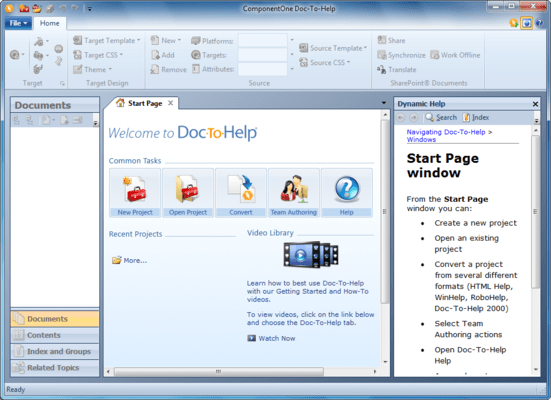
Doc-To-Help 2008 has a completely redesigned, contemporary user interface:
All the single-source Help authoring features you need
Doc-To-Help gives you every feature you need to create fully functional and customized Help files and printed manuals from a single source document, or set of documents. Use basic features, such as Topic Jumps and Pop-ups, or more advanced features like Conditional Text and Context Sensitive Help.
Author HTML and configure Help systems in the editor of your choice
Doc-To-Help allows you to author content and configure your Help systems in your favorite editor. You simply apply pre-defined styles to your content and Doc-To-Help uses that information to create your Help systems. This eliminates the need for a proprietary editor or proprietary code.
RoboHelp project converter
Convert RoboHelp projects to Doc-To-Help format with one click.
Doc-To-Help Enterprise and Doc-To-Help Word main differences:
Doc-To-Help Enterprise includes:
Doc-To-Help 2010 Main Features:
Creating Help Systems and Printed Manuals (Features for Your Help Systems)
Use Existing Content (Convert files from RoboHelp, other tools, and Doc-To-Help 2000. Also import existing documents)
Authoring and Editing Projects (Features to make your content creation process easy and flexible)
Generating Help Systems and Printed Documentation (Features to empower you to create the outputs you need)
Application Developer Support (Features to support Web and Windows application developers)
Doc-To-Help: Two Versions to Choose From
You have two versions to choose from: Doc-To-Help Enterprise and Doc-To-Help for Word. Both versions have the same interface, workflow, and publishing technology.
Version Comparison
| Doc-To-Help for Word | Doc-To-Help Enterprise | |
| Built-in Editor | • | |
| Word Source | • | • |
| Word-to-XML Converter | • | |
| HTML Source | • | |
| Multiple Author Support | • | |
| SharePoint Integration | • | |
| SharePoint Output | • | |
| Team Foundation Server Integration | • | |
| RoboHelp HTML Converter | • | |
| HTML Help Converter | • | |
| RoboHelp Word Converter | • | • |
| WinHelp Converter | • | • |
| All Outputs | • | • |
| All Help Features | • | • |
Standard Service (Included with any Doc-To-Help purchase) includes:
Platinum Service includes all Standard Service features and: