by GrapeCity - Product Type: Component / ActiveX OCX / DLL
FarPoint Spread 8 COM by GrapeCity
URLs: farpoint-spread, farpoint spread, farpointspread, grapecity
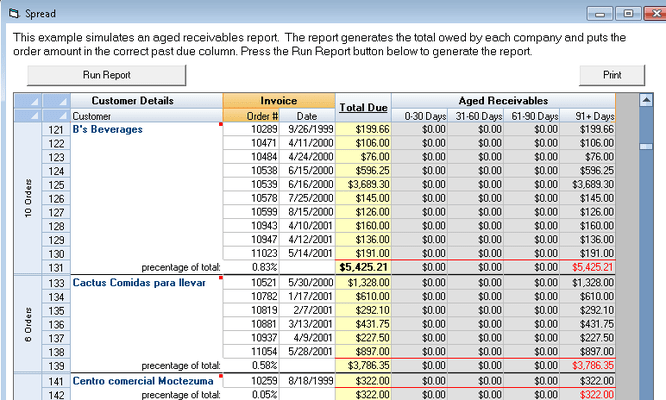
Add advanced spreadsheet functionality to your applications. Use FarPoint Spread 8 COM to easily incorporate advanced grid and high-level spreadsheet features into your applications. FarPoint Spread 8 COM offers unmatched flexibility at the cell level for maximum control over the display and entry of the data, plenty of events to respond to user changes and an impressive feature list for everything in between; including import/export capabilities, including the ability to import and export Excel 97, 2000 and Excel 2007 files (requires the .NET Framework). FarPoint Spread 8 COM also offers enhanced printing, many cell types, formulas, a 64bit DLL and many more features. FarPoint Spread 8 COM will allow you create a spreadsheet with up to 2 billion rows by 2 billion columns.

FarPoint Spread 8 COM General Features:
Create a spreadsheet with up to 2 billion rows by 2 billion columns
Drag and drop data anywhere in the spreadsheet control
Use the clipboard copy/cut/paste shortcut keys
Prevent editing of data by locking any cell data
Create headers by allowing cell data to overflow into adjacent cells
Freeze the top-most rows or the left-most columns from scrolling to allow certain data to be viewed at all times
Import and export spreadsheet files in Microsoft Excel BIFF8 format
Use the Operation modes to set Spread to read-only or let it act as a single or multi-selection listbox
Use the 33 Action properties to perform tasks, including saving and printing the spreadsheet
Cell Formatting
Display up to 32K of data in each cell
Customize your interface by changing the font and background and foreground colors of any cell
Highlight any cell or block of cells using six border styles
Provide the most popular data and database formats using 12 cell types
Button: Display a push button in a cell, Include text, graphics, or both
Checkbox: Display a check box, text, and/or picture in a cell, Allow true, false, or grayed states
Combobox: Display a drop-down list in a cell
Date: Display or allow editing of formatted dates in a cell
Support Year 2000 seamlessly
Edit: Display or allow editing of text in a cell
Float: Display or allow editing of a formatted floating-point (currency) value in a cell
Formatted PIC: Display or allow editing of a formatted PIC (mask) in a cell
Integer: Display or allow editing of an integer value in a cell
Owner Drawn: Display a user-defined picture using Windows APIs
Picture: Display a picture in a cell, Choose between .bmp or .ico file formats
Static Text: Display noneditable, nonscrolling text in a cell
Time: Display or allow editing of a formatted time value in a cell
FarPoint Spread 8 COM Printing
Create custom print configurations by specifying margins, page orientation, borders, headers, gridlines, colors, and shadow effects
Print a block of cells, a range of pages, or only the columns and rows that contain data
Use the new Print Preview control to see how your printed spreadsheet will look
Calculate the number of pages to print based on the current print settings
Query the next page break either by row or column
Define the starting page number to print in the header of the first page
Specify the order in which pages are printed (down then across or across then down)
FarPoint Spread 8 COM Sorting and Calculations
Use up to three keys to sort data by column or row, in ascending or descending order
Use the Calc Engine to perform complex mathematical functions with named expressions and relative cell addressing
Add user-defined custom functions for greater flexibility
Use one of 74 functions (includes 61 new ones) in your formulas
Sort with up to 256 sort keys
Recalculate the value of an individual cell
Retrieve and set data in float or integer cells as numeric values
Query the list of, retrieve information about, or remove custom functions
FarPoint Spread 8 COM Data Binding
Automatically save any user-entry changes back to the database
Increase control by validating when and what data gets written to the database
Insert unbound columns or load specified fields into a bound spreadsheet
Increase data access speed by using the Virtual Data Manager to control how many records are read and displayed at a time
Bind the spreadsheet to ActiveX Data Objects (ADO) 2.0 using OLE DB technology [still supports data binding to Data Access Objects (DAO) and Remote Data Objects (RDO)]
FarPoint Spread's Spread Designer
Increase productivity and decrease your learning curve by using its unique WYSIWYG interface
Open and design multiple spreadsheets
Apply any view from Spread Designer back to the original control
Use the user-friendly design-time interface that includes dockable toolbars and help balloons
Awards: Visual Basic Programmers Journal Readers Choice Award
What's new in FarPoint Spread 8 08.00.14 COM?
Certain Excel-formatted files are now imported correctly
Files used with the DLL now have the correct information
Formulas now respond correctly when columns are removed
Frozen and hidden columns are now exported correctly
The SelModeSendMessage method now works correctly
Certain Excel-formatted files are now imported correctly
Certain database fields now update correctly
Currency and float cells are now correctly exported to an Excel-formatted file
The SSSetData function and the SetText method now work correctly
Scrolling now works correctly with large column widths
The Spread Designer now works correctly with three state check box cells
The Spread control now works correctly on an MDI form
The MaxTextCellHeight property now works correctly
The ScrollBarShowMax property now works correctly
The SaveBlockToBuffer and LoadBlockFromBuffer methods now work correctly
Certain data now correctly exports to an Excel-formatted file
Editable combo cells now work correctly
The scroll bar now works correctly
The scroll bar works with the mouse wheel
What's new in FarPoint Spread 8 COM?
Excel 2007 format support (requires the .NET Framework). The source code does not include source for reading/writing the new Excel 2007 format.
New Formula Functions
Ability to create a custom cell
A 64-bit DLL (New 64 bit component now included)
Shape and color settings for cell notes
New OCX methods for saving and loading to/from a buffer
New event for circular references
Enhanced appearance
Enhanced appearance for headers and sheet corners
Enhanced appearance for scroll bars
Enhanced appearance for sheet tabs
Enhanced selection highlighting
Additional export options when exporting to HTML
Users can apply a secondary sort using control-click
What's new in FarPoint Spread V7.0?
Multiple Sheets support
Cross-sheet Formula Referencing
Unicode Support
Built-in Support for Moving Rows or Columns, with visual indication
New Scientific Notation celltype
Improved Number Formatting
Faster, improved Sorting
More Robust Spread Designer
Customize the colors, widths and the heights for the Scroll Bars
Double-click the header to automatically resize the column to the widest text
Scalable (Percentage) Printing
Fit-To-Page Printing
Center Horizontal and Center Vertical Printing
Control Characters (such as /time, /date) for Printing the Header and Footer
Enhanced image type support, including .gif and .jpg
Expanded Text Tips Support (allows >1000 characters)
LoadTextFile defaults to 32,000 characters when loading a file
Hide or show the focus rectangle when the cell has focus
Auto-Positioning of the cursor when using EditModePermanent
Column Labels Convertible (letters to numbers and numbers to letters)
Align Text and Images in the Button Cell
Maximum Column Width Calculations Can Include Button Cells
Refresh the Data Set without affecting headers
Check Box Cell Has Familiar Windows Appearance
Event for Scroll Tips
DataLoaded event fires when all data has been loaded from the database
What's new in FarPoint Spread V6.0?
Define multiple column and header rows
Merge columns or rows that contain identical data for easier viewing of the data
Create a cell span to join multiple cells
Use Spread's new Search feaure to find specified text or values in a column or row
Rotate cell or header text 90 degrees, 180 degrees or 270 degrees
Identify any column by giving it a unique name (useful when moving columns)
Automatically display negative numbers as red in currency, number, and percent cells
Set user-defined tags for a specified cell, column, row, or the entire spreadsheet
Type one or more characters to automatically search for an item in the list of a combo box cell
New Percent cell type
Enhanced Currency cell type
Enhanced Number cell type
Data can overflow into adjacent empty cells while edit mode is on in a cell
Display a spin button in a currency, date, number, percent, or time cell
Copy, Move or Swap the data and formatting in a range of columns, rows, or cells in the spreadsheet
What's new in FarPoint Spread V3.5?
Cells in the Spread control can have notes associated with them
The Spread control can display scroll tips as users move the scroll box
You can export a range of cells or the entire spreadsheet in XML format to a file or a buffer
Users can sort by clicking column headers using built-in sort
Users can print a spreadsheet to an owner-defined area of the page, allowing you to print multiple items on a single page.
Cells can display ellipsis points when left-aligned text is too long to fit in the cell
New mathematical and other functions are provided by the Calc Engine
Improved Spread Designer
You can set the pop-up calendar text for a specific Spread control You can export a range of cells or the entire spreadsheet in ASCII text format to a file and specify the delimiters you want to use to separate your data in the file
27 methods and 20 events have been enhanced for use in scripting environments
Add advanced spreadsheet functionality to your applications.
Pricing: FarPoint Spread 8 COM (Spread 8 One License Software) 1 Developer License (Spread 8 One License Software), FarPoint Spread 8 COM Site License 1 Site Wide License (Allows Unlimited Developers at a Single Physical Address), FarPoint Spread 8 COM (Spread 8 Upgrades) 1 Developer Upgrade License from V7.0, FarPoint Spread 8 COM (Spread 8 Upgrades) 1 Developer Upgrade License from any GrapeCity Product, FarPoint Spread 8 COM Source Code 1 Source Code License (Delivered separately by email)
Evals & Downloads: Read the FarPoint Spread 8 COM help file, FarPoint Spread 8 COM End User License Agreement, Download the FarPoint Spread 8 evaluation on to your computer - Expires after 30 days
Operating System for Deployment: Windows 7, Windows Vista, Windows XP, Windows 2000, Windows 98, Windows NT 4.0, Windows 95, Windows NT 3.51
Architecture of Product: 32Bit, 64Bit
Product Type: Component
Component Type: ActiveX OCX, DLL
Built Using: MFC V4.2 / V6.0
General: Includes Digital Signature, Marked as Safe for Scripting, OCX96 Compatible, Supports Component Categories, Supports Apartment Model Threading
Compatible Containers: Microsoft Visual Studio 6.0, Microsoft Visual Studio 97, Microsoft Visual Basic 6.0, Microsoft Visual Basic 5.0, Microsoft Visual Basic 4.0, Microsoft Visual C++ 6.0, Microsoft Visual C++ 5.0, Microsoft Visual C++ 4.0, Microsoft Visual J++ 6.0, Microsoft Visual InterDev 6.0, Microsoft ActiveX Control Pad, Microsoft Internet Explorer 4.0
Product Class: Business Components
Keywords: farpoint spread, fpoint spread, farpoint spreadsheet, farpoint spread control, farpoint technologies, farpoint spread 8, spread farpoint, farpoint spread com, spread com
GrapeCity, Grape City, Powertools, Power Tools, Japanese power-tools, 動力工具 Grape City, GrapeCity Grape City グレープシティ グレプシティ
datagrid controls, datatable controls, datagrid components, datatable components, datagrid, data grid, data table, net gridview, net datagrid, data grid, grid control, net datatable, c# gridview, c# datagrid, asp.net datagrid, grid asp, vb.net datagrid
Spreadsheet spread sheet worksheet workbook excel lotus 123 1-2-3 xls xl
Part numbers: PC-504585-448056 504585-448056 PC-504585-448092 504585-448092 PC-504585-448080 504585-448080 PC-504585-448074 504585-448074 PC-504585-448086 504585-448086
Mfr. Part No: S8S01 SP801 SP802 SP803
Publisher
Primary Category
Related Products
Related Categories