Screenshot Preview

Janus Schedule and Timeline Controls for .NET

by Janus Systems - Product Type: Component / .NET WinForms / .NET Class / 100% Managed Code

You can also buy Janus Schedule and Timeline Controls for .NET as part of Janus WinForms Controls Suite

If you require more information please Contact Us

Add MS Outlook style scheduling and timeline functionality to your .NET applications. Janus Schedule and Timeline Controls for .NET provides a pair of fully featured time-management controls for .NET WinForms. Janus Schedule Control for .NET is a 100% C#, managed control patterned after Outlook’s Calendar View. Janus Timeline is a control patterned after MS Outlook’s Journal, ideal for displaying items in relation to time. Both components also offer advanced functionality like Office 2010 Visual Style, support for Visual Studio 2010 and .NET Framework client profiles. Janus Schedule and Timeline Controls for .NET are 64-bit compatible.

Our regular prices are shown below. Please logon to see your discounted prices.

Price in

Janus Schedule and Timeline Controls for .NET v4

Add to Cart $ 489.00 1 Developer License Download (16.8 MB)
Add to Cart $ 1,489.00 4 Developer Team License Download (16.8 MB)
Add to Cart $ 2,489.00 8 Developer Team License Download (16.8 MB)
Add to Cart $ 4,889.00 1 Site Wide License (Allows Unlimited Developers at a Single Physical Address) Download (16.8 MB)

Janus Schedule and Timeline Controls for .NET v4 - Upgrades

Add to Cart $ 349.00 1 Developer Upgrade License (Upgrade from Janus Schedule and Timeline Controls V3.x 1 Developer License) Verify Download (16.8 MB)
Add to Cart $ 889.00 4 Developer Upgrade License (Upgrade from Janus Schedule and Timeline Controls V3.x 4 Developer Team License) Verify Download (16.8 MB)
Add to Cart $ 1,489.00 8 Developer Upgrade License (Upgrade from Janus Schedule and Timeline Controls V3.x 8 Developer Team License) Verify Download (16.8 MB)
Add to Cart $ 2,489.00 1 Site Wide Upgrade License (Upgrade from Janus Schedule and Timeline Controls V3.x 1 Site Wide License) Verify Download (16.8 MB)

Our prices include ComponentSource technical support and, for most downloadable products, an online backup and a FREE upgrade to the new version if it is released within 30 days of your purchase.  All sales are made on our standard Terms and Conditions and subject to our Return Policy. Please contact us if you require any licensing option not listed, including volume licensing and previous versions.

Our regular prices are shown above. Please logon to see your discounted prices.

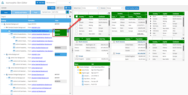
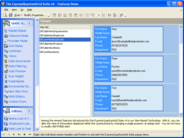
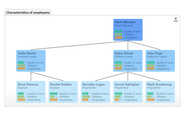
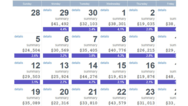
Screenshot of Janus Schedule and Timeline Controls for .NET - .NET - V4.0

What's New in Janus Schedule and Timeline Controls v4?

  • Office 2010 Visual Style
  • Support for Visual Studio 2010 and .Net Framework client profiles:  Janus controls can now be used in projects targeting .Net Framework client profiles.

What's New in Janus Schedule Control V3.x?  

  • Janus Schedule and Timeline Controls for .NET are 64 bit compatible.
  • Office 2007 Look and Feel added
  • New OwnerDrawnArea property and DrawScheduleArea events were added for custom painting the areas in the control
  • The RecurrencePattern property was added to the ScheduleHourRange class to allow you to specify the background color of the rows in the control based on a recurrence pattern
  • The WorkingHourSchema was added to Calendar control to allow you to set the background and foreground colors of the days in the calendar
  • New RowHeight property was added to allow you to set the height of the rows in the control
  • The AllowDrawInNonWorkingTime property was added to specify whether the appointments can be dragged to a time marked as non-working
  • The FindFreeSlot method returns the immediate time available to book a new appointment

What's New in Janus Timeline Control V3.x?

  • Office 2007 Look and Feel added
  • New OwnerDrawnArea property and DrawTimeLineArea events were added for custom painting the areas in the control
  • The ability to have an extra duration bar for the timeline items was added. You can use the EstimatedStartTime and EstimatedEndTime properties of the TimeLineItem to set its value
  • The RecurrencePattern property was added to the Timeline HourRange class to allow you to specify the background color of the rows in the control based on a recurrence pattern

Janus Schedule Control Overview

Janus Schedule Control

Janus Schedule for .NET can present appointments or items arranged on a calendar, similar to a day planner in paper form. You can view items in different blocks of time or “Views”, which represent Days, Work Weeks, Weeks and Months. Since all the Views are part of the same Schedule control you can easily switch between them. Janus Schedule for .NET is 64bit compatible. Janus Schedule Control also offer advanced functionality like Office 2010 Visual Style, support for Visual Studio 2010 and .NET Framework client profiles.

An appointment in the Janus Schedule Control can be related to an owner, and the different Views in the control are capable to present the appointments in relation to its owners.

Appointments in Janus Schedule Control can be moved and resized by the user as in MS Outlook.

Janus Schedule Control library also has a “Calendar” control that can be used to navigate between the different views and dates in the schedule control and also be used as a target for automatic re-scheduling of appointments via drag and drop.

Janus Schedule Control can be bound to any table in a DataSet or to any other data source that supports IList, ITypedList or IBindingList interfaces.

Janus Schedule Control allows you to specify which member of the data source will be used as Text, Owner, StartTime and EndTime properties of an appointment. In addition to this, the control exposes a Fields Collection that permits you to map all the members in the data source to an Appointment in the Schedule.

Besides working with a data source, Janus Schedule Control has several methods that permit you to work with the appointments collection in a totally unbound fashion. LoadAppointments and SaveAppointments methods allow you to persist and restore the appointments of the schedule control.

Janus Schedule Control for .NET also offers many of the advanced features present in the Janus GridEX Control for .NET like FormatStyles (supporting Gradients, Blend colors and Transparency), FormatConditions, FilterConditions and the ability to save and restore Layouts.

A standalone Janus CalendarCombo Control used to edit date and time values is also included with Janus Schedule. With Janus Schedule, the user can select a date from the calendar dropdown, change the date using an up-down control or type it directly in the control and the control will enforce the date format you specified in it. Janus Schedule Control exposes a BindableValue property that allows you to bind it to any Date field even if the field were DBNull.

Janus Schedule Control for .NET library also includes a SchedulePrintDocument component to print the data presented by Janus Schedule Control v4.

With the SchedulePrintDocument component you can define page headers and footers for your documents. The SchedulePrintDocument component can be used with the PrintPreviewDialog or PrintPreviewControl to provide your apps with a customizable Preview Window.

Janus Timeline Control

Items in the Janus Timeline control are arranged in chronological order from left to right on a time scale that can be divided in hours, days, weeks or months. Janus Timeline for .NET is 64bit compatible. Janus Timeline Control also offer advanced functionality like Office 2010 Visual Style, support for Visual Studio 2010 and .NET Framework client profiles.

A bar representing the duration of an item can be shown above its text and the appearance of such bar can be easily customized by using a FormatCondition withing Janus Timeline for .NET

Janus Timeline Control for .NET can be bound to any table in a DataSet or to any other data source that supports IList, ITypedList or IBindingList interfaces.

Janus Timeline Control for .NET allows you to specify which member of the data source will be used as Text, StartTime and EndTime properties of an item. In addition to this, the control exposes a Fields Collection that permits you to map all the members in the data source to a Timeline Item.

In addition to work with a data source Janus Timeline Control has several methods that permit you to work with the Items collection in a totally unbound fashion. LoadItems and SaveItems methods allow you to persist and restore the items of Janus Timeline control.

Janus Timeline control for .NET also offers many of the advanced features present in the Janus GridEX Control for .NET like FormatStyles (supporting Gradients, Blend colors and Transparency), FormatConditions, FilterConditions and Layouts.

Related items can be presented within groups and the group headers can present totals based on items’ related fields. The Totals presented in the headers could also be calculated using only records which meet the criteria specified in a FilterCondition.


Product Search

Enter search words:

Award