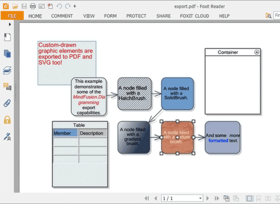
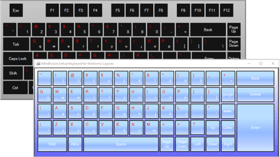
Screenshot Preview

MindFusion Pack for Windows Forms

by MindFusion Group - Product Type: Component / .NET WinForms / 100% Managed Code

Add professional diagramming, charting, scheduling and reporting functionality to your .NET Windows Forms applications. MindFusion Pack for Windows Forms offers four professional programming components that cover most of the features required in a typical Windows Forms business application. MindFusion Pack for Windows Forms includes FlowChart.NET (to create and present workflow, process diagrams, database entity-relationship diagrams, organizational charts; object hierarchy and relationship charts,etc.), MasterChart (with graph, line, area, bar, pie and doughnut components), Mindfusion Planner.NET (a calendar and scheduling component) and Mindfusion Reporting for .NET (to design, display and print various types of reports). MindFusion Pack for Windows Forms components include 12 months Subscription. Source Code is available. Buy MindFusion Pack for Windows Forms and obtain 12 months of free upgrades. MindFusion Pack for Windows Forms renewals will extend your MindFusion Pack for Windows Forms subscription for another year. MindFusion Pack for Windows Forms Enterprise and MindFusion Pack for Windows Forms Site Licenses also available.

Our regular prices are shown below. Please logon to see your discounted prices.

Price in

MindFusion Pack for Windows Forms R2.2012 - with Source Code

Add to Cart $ 1,470.00 1 Developer Subscription License (12 Months Subscription Included) Download (142.5 MB)
Add to Cart $ 2,156.00 4 Developer Subscription License (12 Months Subscription Included) Download (142.5 MB)
Add to Cart $ 3,234.00 8 Developer Subscription License (12 Months Subscription Included) Download (142.5 MB)
Add to Cart $ 5,390.00 1 Site Wide Subscription License (Allows Unlimited Developers at a Single Physical Address) (12 Months Subscription Included) Download (142.5 MB)
Add to Cart $ 9,261.00 1 Enterprise Subscription License (Allows unlimited number of developers of an enterprise at all its physical addresses (worldwide)) (12 Months Subscription Included) Download (142.5 MB)

MindFusion Pack for Windows Forms R2.2012

Add to Cart $ 833.00 1 Developer Subscription License (12 Months Subscription Included) Download (137.9 MB)
Add to Cart $ 1,519.00 4 Developer Subscription License (12 Months Subscription Included) Download (137.9 MB)
Add to Cart $ 2,597.00 8 Developer Subscription License (12 Months Subscription Included) Download (137.9 MB)
Add to Cart $ 4,753.00 1 Site Wide Subscription License (Allows Unlimited Developers at a Single Physical Address) (12 Months Subscription Included) Download (137.9 MB)
Add to Cart $ 8,624.00 1 Enterprise Subscription License (Allows unlimited number of developers of an enterprise at all its physical addresses (worldwide)) (12 Months Subscription Included) Download (137.9 MB)

MindFusion Pack for Windows Forms R2.2012 with Source Code Upgrade/1 Year Subscription Renewal

Add to Cart $ 588.00 1 Developer Subscription Renewal License (12 Months Subscription Included) Verify Download (142.5 MB)
Add to Cart $ 862.40 4 Developer Subscription Renewal License (12 Months Subscription Included) Verify Download (142.5 MB)
Add to Cart $ 1,293.60 8 Developer Subscription Renewal License (12 Months Subscription Included) Verify Download (142.5 MB)
Add to Cart $ 2,156.00 1 Site Wide Subscription Renewal License (Allows Unlimited Developers at a Single Physical Address) (12 Months Subscription Included) Verify Download (142.5 MB)
Add to Cart $ 3,704.40 1 Enterprise Subscription Renewal License (Allows unlimited number of developers of an enterprise at all its physical addresses (worldwide)) (12 Months Subscription Included) Verify Download (142.5 MB)

MindFusion Pack for Windows Forms R2.2012 Upgrade/1 Year Subscription Renewal

Add to Cart $ 333.20 1 Developer Subscription Renewal License (12 Months Subscription Included) Verify Download (137.9 MB)
Add to Cart $ 607.60 4 Developer Subscription Renewal License (12 Months Subscription Included) Verify Download (137.9 MB)
Add to Cart $ 1,038.80 8 Developer Subscription Renewal License (12 Months Subscription Included) Verify Download (137.9 MB)
Add to Cart $ 1,901.20 1 Site Wide Subscription Renewal License (Allows Unlimited Developers at a Single Physical Address) (12 Months Subscription Included) Verify Download (137.9 MB)
Add to Cart $ 3,449.60 1 Enterprise Subscription Renewal License (Allows unlimited number of developers of an enterprise at all its physical addresses (worldwide)) (12 Months Subscription Included) Verify Download (137.9 MB)

Our prices include ComponentSource technical support and, for most downloadable products, an online backup and a FREE upgrade to the new version if it is released within 30 days of your purchase.  All sales are made on our standard Terms and Conditions and subject to our Return Policy. Please contact us if you require any licensing option not listed, including volume licensing and previous versions.

Our regular prices are shown above. Please logon to see your discounted prices.

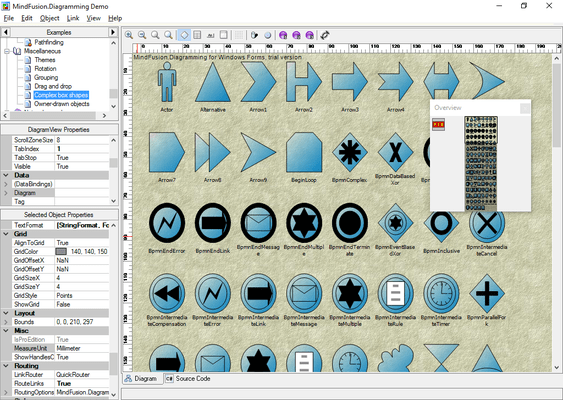
Screenshot of MindFusion Pack for Windows Forms - .NET - R2.2012

What's New in MindFusion Pack for Windows Forms R2.2012?

  • Glass and Aero effects in diagram and calendar controls
  • Modify data interactively in bar and line charts
  • Reusable report editor control added to MindFusion.Reporting
  • SVG viewer control added to the suite

What's New in MindFusion Pack for Windows Forms 2012.R1?

  • Map control added
  • Automatic node alignment in diagrams
  • Fractal tree layout
  • Custom start and end nodes for LayeredLayout
  • Numeric edit and spin components

What's New in MindFusion Pack for Windows Forms 2011 Q4?

  • Snap links to nodes from a distance
  • Serialization of CompositeNode components
  • DiagramView3D improvements
  • Calendar print preview can be customized
  • Export reports and calendars to Excel

What's New in MindFusion Pack for Windows Forms 2011?

  • Create composite nodes from various kinds of components
  • SvgNodes now support SVG text and marker elements
  • The swimlane grid can be exported to Visio
  • PdfExporter supports radial gradients
  • VisioImporter can import attributes from shape masters

What's New in MindFusion Pack for Windows Forms 2010.1?

  • SvgNode improvements
  • Adjustment handles styling
  • Chart themes

MindFusion Pack for Windows Forms combines MindFusion's popular .NET components for diagramming, charting, scheduling and reporting. MindFusion Pack for Windows Forms components include 12 months Subscription.

MindFusion Flowchart.NET Professional

FlowChart.NET is designed in such a way that you can create even the most complex schemes. In order to do so you combine different FlowChart.NET objects and set their properties. You can respond to the users' interaction with the flowchart objects with the events the control provides.

MindFusion FlowChart.NET component

  • Redistribution is royalty free
  • Assembly is strong-named
  • Is digitally signed
  • Can be purchased with source code
  • Is written in C#

MindFusion FlowChart.NET User interaction

  • Several user interaction modes
  • Scrolling and zooming
  • Panning
  • Copy and paste to/from Windows clipboard
  • Automatic scrolling while dragging objects with the mouse
  • Alignment to grid
  • Multiple selection
  • Tool-tip
  • Docking points can be defined for nodes
  • Undo / redo support

MindFusion FlowChart.NET Programming

  • Programmatic access to the diagram objects and selections
  • Numerous properties for customizing appearance and behavior
  • Numerous utility methods
  • Path finding and cycle detection
  • Rich event set

MindFusion FlowChart.NET Store and retrieve diagrams into/from

  • Files on disk
  • .NET streams
  • ASCII strings
  • XML documents

MindFusion FlowChart.NET Output

  • To display via Windows Forms
  • Printing
  • Print preview
  • To browser via the utility WebChart class
  • Export image files

MindFusion FlowChart.NET Diagram elements

  • More than 70 predefined node shapes
  • Tables with unlimited number of rows and columns
  • Control hosts allow using .NET controls as diagram nodes
  • Arrows can comprise multiple segments
  • Arrow segments can be straight lines or curves

MindFusion FlowChart.NET Automatic layout

  • Spring-Embedder graph layout
  • Directional tree layout
  • Radial tree layout
  • Layered graph layout
  • Grid layout ( FlowChart.NET Pro only)
  • Automatic arrow routing

MindFusion FlowChart.NET Appearance

  • Nodes can display images and text
  • Various text alignment styles
  • Text can be laid-out in polygonal areas
  • Styled HTML-like text formatting
  • Customizable fonts and colors
  • Ability to define custom node shapes
  • Custom painting of nodes
  • Shadows
  • User-assigned mouse cursors
  • Z order
  • Rich choice of pen and brush styles
  • Transparent nodes
  • Invisible nodes

MindFusion Planner.NET

MindFusion Planner.NET provides your applications with a rich set of calendar and scheduling features. With Planner.NET you can present task and appointment information during different time periods (hours, days, weeks and months) as well as recurrent appointments or show all engagements at a specific day or several consequent days. Planner.NET can display a schedule in several view types, such as:

  • Months - A range of months, displaying several months in a grid, each of the months displaying its days in a smaller grid
  • Month - A single month view, displaying the days of a month and allowing scrolling to previous or next month
  • Weeks - A range of weeks, displaying days in a grid in which the days of a week occupy a single row
  • Day - A range of days, displaying a single day on each row or column
  • Timetable - A timetable view, displaying the allotment of resources to distinct hours of a day. The columns of this view can be grouped by location, task or contact

Planner.NET provides an intuitive user-interaction model for creating or editing appointments and events in a schedule. In addition, its programmatic interface places at your disposal many useful functions, ranging from printing and XML serialization to displaying reminders and checking what occurrences of recurrent events happen in a specified time interval. The control has been tested with the most popular Dotnet (.NET) development environments and programming languages like CSharp (C#), VB.NET or Delphi.NET. It can be used to create applications in Visual Studio .NET (VS.NET) C#, Visual Basic .NET (VB .NET) or Delphi .NET among others.

Planner.NET consists of three assemblies:

  • Schedule.dll assembly defines the schedule data model and implements the Schedule class which serves as a document in the document-view architecture. This assembly also defines classes such as Item and Appointment which represent individual events in the schedule
  • Calendar.NET.dll assembly implements several calendar and schedule view as part of the Calendar Windows Forms control class. All views are implemented in the same control to allow drilling down the schedule data simply by changing the views. Each view allow creating new schedule items in it by typing over a time cell. Schedule items can be moved around and resized to change their start time and duration
  • ScheduleStandardForms.dll implements several standard dialogs that allow creating and editing schedule data such as tasks, contacts and appointments. Planner.NET provides assemblies for versions 1.1 and 2.0 of the .NET framework.

MindFusion Reporting for .NET

MindFusion.Reporting allows you to create advanced business reports in the style and format you want and has a programming interface which makes the component easy to integrate and use. MindFusion.Reporting includes rich design time support and full Visual Studio integration as well complete control overt the report's appearance. It is written in C# and strong-named, is royalty free and can be purchased with source code. All MindFusion.Reporting licenses include a 12 months subcription.

MindFusion.Reporting Report Design Features

  • Assigning text style, size, font color, format, alignment
  • Using a built-in charting component for visual presentation of report's data
  • Arrangement of Line, Bar, Pie and Radar charts for data presentation
  • Placement of any WinForms control as a report element
  • Setting page size and orientation within a single report
  • Setting page header and footer
  • Single and multiple item selection
  • Zooming reports at design time

MindFusion.Reporting Reports data:

  • Supports all .NET data sources
  • Compatible with ADO.NET
  • Multiple data sources can be used in a single report
  • Both bound and unbound modes are supported

MindFusion.Reporting Visualisation

  • Design of charts for visual data representation
  • Support for pictures and shapes
  • Multi-page reports

MindFusion.Reporting Charts

  • 4 chart types: Pie, Bar, Line and Radar
  • Display charts in 3D
  • Customizable legend, grid, title
  • Full control over the brushes, pens, fonts
  • Stacked charts
  • Second Y-axis

MindFusion.Reporting Output

  • Display reports through Windows Forms
  • Printing and print preview of reports
  • Reports preview

MindFusion.Reporting Exporting Features

  • Exporting MindFusion reports to HTML files
  • Exporting MindFusion reports to Adobe Portable Document Format (PDF) files

MindFusion.Reporting Tools

  • Reports Designer automates customizing the report's appearance
  • Collection editors for charts allow inserting and editing charts data
  • Reports Viewer displays reports on a Windows Form

MindFusion MasterChart for .NET Winforms

MasterChart .NET is a chart component that renders charts directly in graphics objects and can generate chart bitmaps. MasterChart includes graph, line, area, bar, pie and doughnut components. Each of them can be fully customized via the hundreds of properties and methods exposed. Charts can have different styles, colors, fonts and pictures. MasterChart .NET controls support data-binding for fast database reports and data for visualization can also be provided programmatically.

MasterChart Features:

Data options:

  • Several data arrays in order to draw several graphs in a chart
  • Formatting options for numbers at both axes as well for pie data
  • Cancellation of numbers at each of the chart's axes in case they are too big
  • Retrieving chart data from a database

DateTime values

  • Customisable position and format for the zero (new)
  • Sorting (new)
  • Chart data can be calculated by a function and numerical interval for its argument
  • Summary data operations (min, max, average, sum) as well custom summary data

Axes options:

  • Several types of data to be drawn as axis labels (labels inside and outside pie pieces)
  • Custom text at any of the chart axes
  • Font and brush for the axis data
  • Explanation labels at the end of the chart axis
  • Position and orientation options for the axis labels
  • Pen for drawing the axis or the pie outlining
  • Rotation angle for the labels at the X-axis
  • Currency mark and/or currency code for each number
  • Length of the axes
  • Minimum and maximum number of the axis scale
  • Distance between rows/columns of texts/numbers at the chart axis when there is more than one graph in the chart.
  • 3D axes with customizable depth
  • Second Y - axis

Legend options:

  • Customisable brush and the font of the chart legend
  • Customisable position and alignment (new)
  • Customisable count of legend rows and/or columns (new)
  • Word wrap (new)
  • Legend labels
  • For pie charts: add legends for each pie in a group
  • Maximum chart legend width

General chart options:

  • Title and subtitle labels
  • Chart orientation (in bar, line and area charts)
  • Chart brushes and pens
  • Gird with customizable width
  • Several grid styles
  • Background brush or image
  • Brush and / or image for the area between the axes
  • Chart in many colors or one single color
  • Chart offset
  • Labels in same color as the graph they refer to

Special options for bar charts:

  • Summary bars in a group with the data bars or in one stacked bar
  • Cylinders (new)
  • Groups or clusters of bars
  • Custom set bar thickness, distance between bars and bar series
  • Cluster labels
  • Distance between series of bars
  • Labels inside and at the top of bars
  • Different labels type and alignment

Special options for line / area charts:

  • Summary lines in one chart with the data bars
  • Lines with customizable shapes
  • Different shapes for each line
  • Separate brushes and pens for each line/area graphics
  • Separate or stacked 3D area charts
  • Ribbon and scatter charts
  • Draw 3D area charts with a shadow on any of the axes
  • Several ways to sort the area data in multi - graphics charts

Special options for pie charts:

  • Different label types for the data drawn inside as well outside pie pieces
  • Possibility to set the count, position and distance of detached pieces
  • Length of the chart radius
  • Several styles for pointers to outside labels
  • Thickness and tension for 3D pies
  • Possibility to set style and data options for each pie in a group
  • Position of labels inside pies
  • More than one pie per chart - equal in size or proportional
  • Doughnut charts

Product Search

Enter search words:

Award