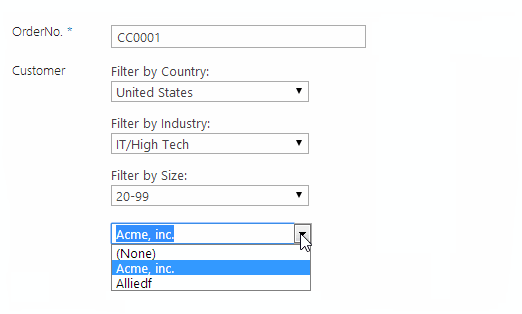
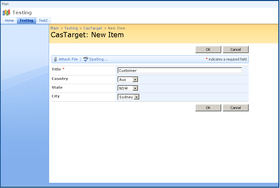
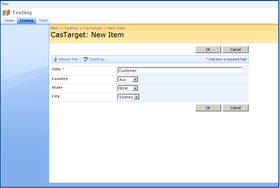
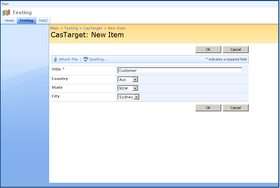
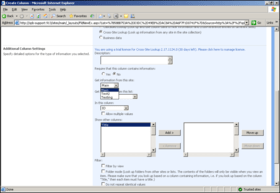
Screenshot Preview

SharePoint Cascaded Lookup

by SharePointBoost - Product Type: Component / Application / ASP.NET WebForms / ASP.NET AJAX (ATLAS) / Web Part / Server Application

Improvements to SharePoint's standard reference functions. SharePoint Cascaded Lookup is a powerful look-up tool that greatly enhances the lookup functionality already native to SharePoint. It quickly cross-references existing data from a list or site within the same site collection and then applies a combination of filters to reduce the number of options presented in the dropdown menu of your lookup field. To use it, you set a combination of filters available in both the source list (the list you are looking up from) and the target list (the list where you want to add looked-up information) to ensure that only applicable values are displayed as choices in the dropdown list.

Our regular prices are shown below. Please logon to see your discounted prices.

Price in

SharePoint Cascaded Lookup V3.1.210 Server License

Add to Cart $ 685.02 1 Server License Download (1.3 MB)

SharePoint Cascaded Lookup V3.1.210 Site Collection License

Add to Cart $ 263.62 50 End Users Site Collection License Download (1.3 MB)
Add to Cart $ 322.42 100 End Users Site Collection License Download (1.3 MB)
Add to Cart $ 381.22 200 End Users Site Collection License Download (1.3 MB)
Add to Cart $ 440.02 300 End Users Site Collection License Download (1.3 MB)
Add to Cart $ 498.82 400 End Users Site Collection License Download (1.3 MB)
Add to Cart $ 557.62 500 End Users Site Collection License Download (1.3 MB)
Add to Cart $ 606.62 600 End Users Site Collection License Download (1.3 MB)
Add to Cart $ 655.62 700 End Users Site Collection License Download (1.3 MB)
Add to Cart $ 704.62 800 End Users Site Collection License Download (1.3 MB)
Add to Cart $ 753.62 900 End Users Site Collection License Download (1.3 MB)
Add to Cart $ 802.62 1000 End Users Site Collection License Download (1.3 MB)
Add to Cart $ 900.62 1250 End Users Site Collection License Download (1.3 MB)
Add to Cart $ 998.62 1500 End Users Site Collection License Download (1.3 MB)
Add to Cart $ 1,096.62 1750 End Users Site Collection License Download (1.3 MB)
Add to Cart $ 1,194.62 2000 End Users Site Collection License Download (1.3 MB)
Add to Cart $ 1,488.62 3000 End Users Site Collection License Download (1.3 MB)
Add to Cart $ 1,782.62 4000 End Users Site Collection License Download (1.3 MB)
Add to Cart $ 2,076.62 5000 End Users Site Collection License Download (1.3 MB)
Add to Cart $ 2,566.62 8000 End Users Site Collection License Download (1.3 MB)
Add to Cart $ 3,056.62 10000 End Users Site Collection License Download (1.3 MB)
Add to Cart $ 3,546.62 20000 End Users Site Collection License Download (1.3 MB)

SharePoint Cascaded Lookup V3.1.210 Farm License

Add to Cart $ 447.86 50 End Users Farm License Download (1.3 MB)
Add to Cart $ 547.82 100 End Users Farm License Download (1.3 MB)
Add to Cart $ 647.78 200 End Users Farm License Download (1.3 MB)
Add to Cart $ 747.74 300 End Users Farm License Download (1.3 MB)
Add to Cart $ 847.70 400 End Users Farm License Download (1.3 MB)
Add to Cart $ 947.66 500 End Users Farm License Download (1.3 MB)
Add to Cart $ 1,030.96 600 End Users Farm License Download (1.3 MB)
Add to Cart $ 1,088.78 700 End Users Farm License Download (1.3 MB)
Add to Cart $ 1,155.42 800 End Users Farm License Download (1.3 MB)
Add to Cart $ 1,221.08 900 End Users Farm License Download (1.3 MB)
Add to Cart $ 1,283.80 1000 End Users Farm License Download (1.3 MB)
Add to Cart $ 1,418.06 1250 End Users Farm License Download (1.3 MB)
Add to Cart $ 1,547.42 1500 End Users Farm License Download (1.3 MB)
Add to Cart $ 1,671.88 1750 End Users Farm License Download (1.3 MB)
Add to Cart $ 1,792.42 2000 End Users Farm License Download (1.3 MB)
Add to Cart $ 2,196.18 3000 End Users Farm License Download (1.3 MB)
Add to Cart $ 2,585.24 4000 End Users Farm License Download (1.3 MB)
Add to Cart $ 2,959.60 5000 End Users Farm License Download (1.3 MB)
Add to Cart $ 3,593.66 8000 End Users Farm License Download (1.3 MB)
Add to Cart $ 4,279.66 10000 End Users Farm License Download (1.3 MB)
Add to Cart $ 4,974.48 20000 End Users Farm License Download (1.3 MB)

Our prices include ComponentSource technical support and, for most downloadable products, an online backup and a FREE upgrade to the new version if it is released within 30 days of your purchase.  All sales are made on our standard Terms and Conditions and subject to our Return Policy. Please contact us if you require any licensing option not listed, including volume licensing and previous versions.

Our regular prices are shown above. Please logon to see your discounted prices.

Screenshot of SharePoint Cascaded Lookup - Application - V3.1.210

What's new in v3

  • Build multiple parent-child relationship, No limitation on number of cascading levels
  • Support multiple filters
  • Support look up information from "Date and Time" and "Number" columns
  • Support Multiple Choice, Multiple SharePoint Lookup, Multiple Cross-Site Lookup, Multiple Cascaded Lookup columns as parent column
  • Support displaying additional columns from lookup list
  • Support adding new items in the source lookup list by the "Create new item..." link
  • Support Cascaded lookup as site column
  • Improved lookup performance
  • Support Japanese, German and Chinese

SharePoint Cascaded Lookup

  • Look up and cross-reference information from any SharePoint site in a site collection;
  • Build parent-child relationships between columns in the same list so that data entered in one field filters the options presented in another;
  • Use a combination of filter parameters from the source list and the target list to filter the items presented in a lookup field ;
  • Automatically synchronize data and update items in the target list when changes are made in the source list;
  • Add multiple selections from the source list to list items in the target list;
  • Convert between the default SharePoint Lookup column, Cross-Site Lookup column, and Cascaded Lookup column;
  • Integrated memory function saves Cascaded Lookup settings when converting between different Lookup column types;

SharePoint Cascaded Lookup is a powerful look-up tool that greatly enhances the lookup functionality already native to SharePoint. It quickly cross-references existing data from a list or site within the same site collection and then applies a combination of filters to reduce the number of options presented in the dropdown menu of your lookup field. To use it, you set a combination of filters available in both the source list (the list you are looking up from) and the target list (the list where you want to add looked-up information) to ensure that only applicable values are displayed as choices in the dropdown list.

SharePoint Cascaded Lookup creates relationships between columns in the same list: you build a parent-child relationship between a set of columns so that the value you choose in the parent column determines the options presented in the child column. Above, a cascading series of parent-child columns filter the options presented in the drop-down menu. Here, the Continent column is a parent to the Country column, so choosing North America filters the options presented in the Country column so that only countries in North America are presented as options. The Country column is a parent to the State column, so the value chosen in the Country column filters the State column, which in turn filters the options available in the City column.
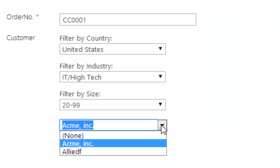
How Does It Work?
In order to take full advantage of the functionality of Cascaded Lookup, you need to establish several things:

  • The Source List, which is the list from which Cascaded Lookup will look up information. The Source list can be in any site.
  • The Source Column, located in the Source List, that contains all of the possible values for your drop-down menu.
  • The Filter Column, also located in the Source List, which is used to filter out irrelevant data from the Source Column so that only values that fit your filter criteria will be possible as choices.
  • The Parent Column, located in the target list (the list where you want to add looked up information).

Once you have set up your filter columns, Cascaded Lookup will automatically filter according to your parameters:

  • You select a value from the Parent column.
  • SharePoint takes this value and compares it to the values located in the Filter Column (in the Source List).
  • SharePoint instantly builds a list of possible choices by listing the Source Column values for rows with Filter Columns that match the value of the Parent Column. These results are then listed in the drop-down menu - all non-matching values have been filtered out, so they do not appear as possible choices.

SharePoint Cascaded Lookup is an invaluable lookup tool, saving you time by reducing the options presented in the drop-down list, and eliminating the possibility for error as a result of incompatible values.


Support

Basic Annual Support:
  • 24-7 access to SharePointBoost's online knowledge base and product FAQ.
  • Unlimited technical support via email with 1-2 business day initial response.
  • Minor version update releases.