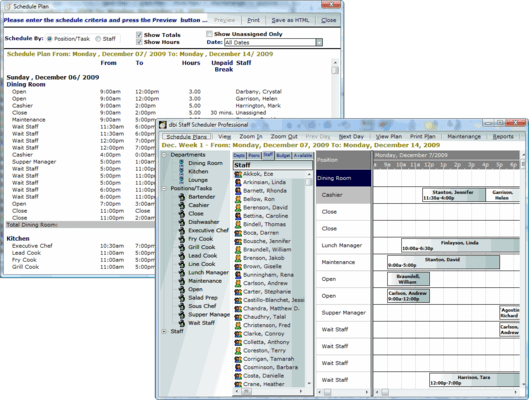
Screenshot Preview

DBI Staff Scheduler Pro - Summary

by DBI Technologies - Product Type: Application

Summary

DBI Staff Scheduler Pro by DBI Technologies

URLs: staff-scheduler-pro, staff scheduler pro, staffschedulerpro, dbi-tech, dbi tech, dbitech

One touch, drag and drop staff resources scheduling. DBI Staff Scheduler Pro provides users with the ability to create and view schedules either by Position/Task or by Employee. Building schedules using DBI Staff-Scheduler is fast and easy. Start by listing employees, departments and tasks, then create time bars using drag and drop functionality. Drop employee icons onto time bars and you are done. Staff Scheduler Pro's includes a simple setup, resource optimization and advanced reporting features like individual staff schedules, over time reports, exception reports, staff costs and many more. Staff Scheduler can be used with table management, credit card payment, security, kitchen management, meal planning, inventory, and ordering. Staff Scheduler Pro is integrated with Squirrel POS and Maitre'd.

DBI Staff-Scheduler Pro offers small and medium size business an intuitive, easy-to-use, employee scheduling solution.

Staff Scheduler Pro Main Features:
Schedule one or more locations: Ideal for individuals who manage more then one location. Keep information for specific employees and locations together.

Schedule by position: Allows the scheduling professional to define what positions need to be filled in certain departments. Positions are then filled by dragging and dropping selected staff members onto the unscheduled position.

Schedule by staff: Staff can be scheduled by assigning them to a department and then assigning them a task to perform. A task bar is created to define the time period which the the staff member will perform the duties they are assigned.

Schedule by staff experience: Experience of the staff member is defined in the staff profile. If experience or position is not defined in the profile, a warning will appear and notify the scheduler that there is a potential conflict in the experience or position of the staff profile, Staff Scheduler Pro will present an option to override the potential conflict or allow a change of staff member.

Schedule by staff availability: Allows managers to schedule according to an employee's status: already scheduled, available, experience, exceptions and days off.

Real-time labor burden: Manage staff over runs, labor cost, and staff allocations. Allows for on the fly labor burden information and labor information for a specified number of days.

Manage any number of schedules, per location: Can be used on a network by multiple users, and designed to accommodate numerous locations and department schedules. Perfect for managing multiple shifts and locations.

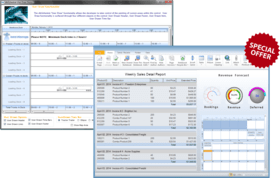
Create schedules based on historical / future budget values:Allows managers to look at past and future budget values and effectively schedule staff for certain periods maximizing on budget and revenue targets.

Schedule comparison : Planned vs. Actual. Compare schedules of planned hours versus the actual hours worked during a shift or schedule period.

Staff reporting : Track schedule exceptions, attendance of staff. Staff Scheduler Pro maintains a history of employee exceptions (booked time off, vacation requests, Dr's appointments etc.) attached to their profile and their attendance (late, no shows).

Payroll Reporting: Quickly prepare payroll reporting for external payroll services based on the actual hours reporting

POS Integration: Staff Scheduler is ideal for integration with point of sale systems, providing a complete management and reporting solution. Staff Schedule is currently integrated in Squirrel and Micros point of sale solutions.

Full staff information management: Allows for information such as staff, position, wage for positions, and departments to be imported.

Schedules can be emailed, posted, printed or sent over company intranet.

Reporting: Staff Scheduler allows for numerous reports to be generated such as 7 & 28 day schedules, daily sign in sheet, staff hours and exceptions, staff cost, attendance, payroll, and overtime, and scheduled hours vs. actual hours.

Staff Scheduler Pro built-in reporting includes:

7 day and 28 day Schedules

Individual staff schedules

Over-time reports

Exception reports

Daily sign in sheets

Staff hours

Position hours

Staff Cost

Staff attendance

Payroll

Scheduled vs Actual hours worked

Email Staff schedules

Labor analysis

What's new in DBI Staff Scheduler Pro 3.2?

Covers per labor hour

Position Wage History

Labor Analysis

Scheduled vs Actual Analysis

Print Schedules by Dept

Enhanced Payroll Export

One touch, drag and drop staff resources scheduling.

Pricing: DBI Staff Scheduler Pro 3.2 1 User License, DBI Staff Scheduler Pro 3.2 5 User License, DBI Staff Scheduler Pro 3.2 10 User License, DBI Staff Scheduler Pro 3.2 1 User Upgrade License from previous versions or competitive product

Evals & Downloads: Read the DBI Staff Scheduler Pro Help File, Download the DBI Staff Scheduler Pro 3.2 evaluation on to your computer - Expires after 60 days

Operating System for Deployment: Windows 7, Windows Vista, Windows XP

Architecture of Product: 32Bit

Product Type: Application

Product Class: Component Development Tools

Keywords: staff scheduler pro, dbi staff scheduler pro, staff scheduler, staff-scheduler

DBI Technologies

planning plan scheduling schedule schedules scheduler

Calendar calendaring calendars Scheduling Schedule Schedules

Part numbers: PC-513465-282354 513465-282354 PC-513465-282355 513465-282355 PC-513465-282356 513465-282356 PC-513465-282357 513465-282357

Product Search

Enter search words:

Award