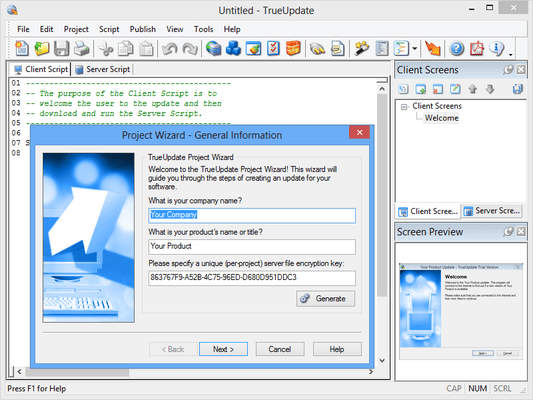
Screenshot Preview

TrueUpdate - Summary

by Indigo Rose - Product Type: Application

Summary

TrueUpdate by Indigo Rose

URLs: trueupdate, indigo-rose, indigo rose, indigorose

Add live updating capabilities to your software. TrueUpdate is a Windows application that provides a sophisticated framework for determining required updates and then retrieving and applying the necessary patch or installation files via the Internet, intranet or LAN. It was designed to meet the demand for a complete, web-enabled updating solution that can be integrated into new and existing software products, regardless of the installation and deployment methods used.


TrueUpdate's design workspace and generated updates are compatible with Windows Vista, including a configurable "requested execution level" setting for the update's manifest.

Integrates Easily - TrueUpdate was designed to minimize the time it takes to add automated update capabilities to your software. As a separate executable, the TrueUpdate system is easy to integrate into your software. Simply customize the client executable with the easy-to-use Client Configuration Utility and include it with your application. There are no additional compile-time dependencies, OCX controls, static libraries or runtime modules. Everything is included in one easily callable, standalone executable file. TrueUpdate's industry-leading ease of use is a very important feature. In order to maximize your return on investment, you need an automated update solution that can be implemented with a minimum of effort. TrueUpdate technology doesn't tie up your development team with difficult implementation details. It was designed from the ground up to be flexible, easy to use, and easy to integrate. With TrueUpdate technology, you can spend more time developing and marketing your product, and less time managing its distribution.

Reduces Support Costs - Automating the update process for your users can save you valuable time and expense. It reduces support costs by making it easier for your users to keep their software up to date - giving your tech support department fewer legacy support issues to deal with. It reduces your marketing costs, because you won't have to resort to expensive ad campaigns to keep your users abreast of new versions. It reduces production costs by allowing you to maintain a larger inventory with less concern over obselescense, relying on the TrueUpdate technology to get your users up to the latest release immediately after installing the product. No other product provides the same combination of industry-leading ease of use, cutting edge features, and absolute flexibility as TrueUpdate.

Lightweight and Stand-Alone - Written completely in optimized C and C++ code, the TrueUpdate client is small - weighing in around 550K in size. It's also completely self-contained. The TrueUpdate client has no external dependencies, so you don't have to distribute any extras to make it work. Unlike some products, it doesn't require the Java runtime, Internet Explorer, Visual Basic runtime, or any other multi-megabyte runtime engines and dependencies. It also avoids the use of proprietary server applications while still offering support for redundant, load-balanced environments. Compact and efficient, TrueUpdate technology is everything you need to get the job done.

Uses Standard Internet Protocols - TrueUpdate uses readily available client-server technologies, rather than the proprietary servers required by some other update products. By making use of affordable and trusted protocols such as HTTP and FTP, organizations of any size can deploy TrueUpdate enabled software without the need for specialized and costly hardware and software platforms. Of course, TrueUpdate also supports the use of redundant servers for companies that require the peace-of-mind of dynamic switchover and backup. TrueUpdate is built on the trusted, dependable standards you already rely on.

Puts You In Control - With TrueUpdate, there's no need to relinquish control over the reliability of your update process. Unlike services that lock you into using their servers, with TrueUpdate, you decide where your update files are hosted. You decide on the level of redundancy. You're in control of your update files, patches and web servers. There's no need to rely on the uncertain future of a "free" update service, or to wait helplessly during downtimes you are powerless to resolve. TrueUpdate technology puts you in control of the update process for your software.

Compatible with Your Existing Tools - When you choose TrueUpdate, you aren't locked into using any particular installation, deployment or patching solution. By leveraging your existing investment in software and experience, TrueUpdate saves you both time and money. While Indigo Rose suggests using the award winning Setup Factory installation tool or the Visual Patch product, you are certainly free to choose just about any tool you wish. Make use of your existing investment in software installation, deployment and patching tools. TrueUpdate is adaptable to your existing environment.

Familiar Yet Customizable Interface - With TrueUpdate, you can choose between a familiar wizard interface or a compact dialog client. Additionally, you have full control over which interface screens are displayed, along with all text messages and wizard images. Once you've built the customized client, you can further control the interface using command line switches and dynamic text variables. Of course, full international language support is built-in. You can easily translate and localize the client to dynamically display in over 70 languages.From the compact, integrated look of dialog boxes to the popular wizard style interface, the TrueUpdate client is customizable to fit your requirements.

Dozens of Actions -TrueUpdate comes with dozens of built-in actions and commands. While some products can only download and run an installer file (yet still require you to use their proprietary server application!), TrueUpdate gives you complete control. From downloading files via FTP and HTTP, to extracting ZIP files TrueUpdate is there. Throw in complete shell coverage for copying, deleting, renaming and moving files. Keep going with full conditional expression parsing, string manipulation, registry editing, add to ZIP file, application process creation and destruction. TrueUpdate even supports SMTP mail sending, FTP upload, CGI GET/POST web form interaction and a full suite of control structures and error handlers such as IF, WHILE, GOTO and ABORT. From basic HTTP file downloads to advance CGI web form interaction, FTP uploads and ZIP file manipulation, TrueUpdate keeps you covered.

Multiple Methods of Version Detection - TrueUpdate doesn't lock you into doing things in only one way. If you already have software out in the field, you'll still be able to retrofit it with TrueUpdate. Four seperate methods can be used to identify your software version. With TrueUpdate, you can choose to read a version identifier from the registry or from an INI file - whichever you prefer. Alternatively, TrueUpdate can read the embedded version resource information from executable or DLL files. Failing that, TrueUpdate also supports the calculation of 32-bit CRC values - able to identify a particular file with an accuracy of 1 in 4,294,967,296. TrueUpdate gives you the freedom to go your own way. With multiple methods of version detection and integration, TrueUpdate won't force you to change your development or deployment practices

What's new in TrueUpdate 3.5.4.1

Fix: Fixed a bug where action plugins would no longer work.

What's new in TrueUpdate 3.5.4.0

Feature: Added a "(plugin)" suffix in the Action Wizard for action categories that were added by a plugin.

Feature: Updated upx.exe to version 3.05.

Feature: Added SW_HIDE window mode to File.Run, File.RunAs and Shell.Execute actions.

Fix: Fixed a bug where File.Find action would sometimes fail when the executable was on a CD-ROM.

Fix: Fixed a bug where the last screen in a sequence was not freeing its font data at the correct time.

Fix: Fixed a bug where the unattended return code was not being set properly.

Fix: Fixed a bug where if the File.GetShortName action failed, a string containing garbage would be returned. Failure can occur if the file does not exist.

Fix: Fixed a bug where the second parameter of the Table.Sort action wasn't being handled properly.

Fix: Fixed a bug where the _IgnoreInvalidCertificate global would not ignore certificate revocation errors.

Fix: Fixed a bug where Application.LoadScript would fail if Lua was installed.

Fix: Fixed a bug where the spell checker would only work properly with text shorter than 1000 characters.

Fix: Fixed an issue where languages containing no Secondary IDs were not being mapped if a secondary ID greater than 0 was being returned at runtime. Now if the language in the language map map has no secondary IDs, it will map to that language if the Primary IDs match, regardless of the secondary ID detected.

What's new in TrueUpdate 3.5.3.0

Feature: Increased the maximum possible number of characters that can be read in when using the INIFile.GetValueNames action.

Feature: Added the ability to use the use the bold heading font for Text controls on Custom screens.

Feature: Added support for Windows Server 2008 R2 to the System.GetOSName action.

Feature: Made it so that the File.Install action will not overwrite files protected by WFP.

Feature: Added Indigo Rose Corporation as the default Company Name item in the resources to ensure Windows 7 compatibility. This can be overwritten using the Custom Resource Information option.

Fix: Fixed a bug where the HTTP.Sumbit action was not working properly with invalid certificates and the _IgnoreInvalidCertificate variable set to true.

Fix: Fixed a bug where the HTTP.TestConnection action was not using AutoProxy or setting proxy information properly.

Fix: Added support for Windows restart messages in TrueUpdate's design.

Fix: Fixed a bug where the click to skip option was not working for the Dialog.SplashImage action.

Fix: Fixed a bug where a final CRLF was throwing off the Base64 decoding.

Fix: Fixed a bug in the Dialog.SplashImage action where second delays greater than 59 seconds were not working.

Fix: Fixed an incorrect translation in the French language file.

What's new in TrueUpdate 3.5.2.0

Feature: Added three new returns codes, 10 - client EXE updating, 11 - client DAT updating, and 12 - both updating.

Fix: Fixed a bug where the Scrolling Text control was rendered unselectable if "HTML" text type, and "Load from file" was selected.

Fix: Fixed a bug where Scrolling HTML controls were displaying the wrong data.

Fix: Fixed a bug where comments were causing errors when importing .REG files.

Fix: Fixed a bug where Scrolling HTML controls could not be shown or hidden.

Fix: Fixed a bug where screen images located outside of a project theme when override project theme is selected weren't being saved properly.

Fix: Fixed a bug where REG_DWORD values larger then MAX_INT were not being written to the registry properly.

Fix: Added the multi-line edit dialog to the IR Script Editor.

Fix: Fixed a bug where Scrolling Text control IDs were incorrect when referenced on a custom screen.

Fix: Fixed a bug where design-time constants were not expanding when previewing a screen using the Preview button on its properties.

Fix: Fixed a bug where command line parameters passed to a restarted client executable were sometimes incorrect.

Fix: Fixed a bug where the system tray minimize option was not working.

Fix: Fixed a bug where the system tray exit option would leave the update process running.

Fix: Updated the autoproxy support to correctly use the INTERNET_PER_CONN_AUTOCONFIG_URL setting.

Fix: Added "compatibility" section to all distributed manifests for support on Windows 7.

What's new in TrueUpdate 3.5.1.0

Fix: Fixed a bug where FTP uploads were incorrectly stripping a letter from the upload directory.

What's New in TrueUpdate V3.0

The compact and standalone client executable is extremely easy to integrate into your product

Contains everything needed to handle even the most sophisticated software updating requirements.

Uses trusted, dependable standards you already rely on (such as HTTP, HTTPS, and FTP), eliminating the need for specialized and costly hardware and software platforms.

Update systems created with TrueUpdate 3.0 work on all Windows operating systems from Windows 95 to XP and Vista.

A scripting engine with more than 250 high-level actions gives incredible control over the software updating system.

The client can easily be integrated into existing software or installed as a standalone application.

A library of over twenty different screens and a complete graphical skinning system makes it easy to control the user interface.

Other services lock you into using their servers; with TrueUpdate, you decide where your update files are hosted. There is no need to rely on the uncertain future of an "update service," pay exorbitant annual fees or wait helplessly during downtimes

Add live updating capabilities to your software.

Pricing: TrueUpdate v3.5.4.1 1 User License (Includes 6 Months Maintenance Plan including all major and minor updates), TrueUpdate v3.5.4.1 5 User Team Pack (Includes 6 Months Maintenance Plan including all major and minor updates), TrueUpdate v3.5.4.1 Upgrade 1 User Upgrade License, TrueUpdate v3.5.4.1 Upgrade 5 Upgrade License from any 3 or 5 Team Licenses Previous Version, TrueUpdate 1 Year Renewal 1 Developer Maintenance Renewal License (Available for current subscribers or if you have the latest version), TrueUpdate 1 Year Renewal 3 to 5 Developer Maintenance Renewal License

Evals & Downloads: Read the TrueUpdate Help File, Download the TrueUpdate v3.5.4.1 evaluation on to your computer - Expires after 30 days

Operating System for Deployment: Windows Vista, Windows XP, Windows 2000, Windows 98, Windows NT 4.0, Windows 95

Architecture of Product: 32Bit

Product Type: Application

Built Using: MFC V4.2 / V6.0

General: Internet Enhanced

Product Class: Component Development Tools, Component Building Tools

Keywords: IndigoRose TrueUpdate, IndigoRose True Update, TrueUpdate 3, TrueUpdate 3.5

Indigo Rose

Updates Update Updating Patch Patches

File Handling

Installation Installing install installs uninstalling uninstall uninstalls setup MSI msi scripts

Part numbers: PC-511875-363251 511875-363251 PC-511875-363250 511875-363250 PC-511875-363253 511875-363253 PC-511875-363258 511875-363258 PC-511875-363255 511875-363255 PC-511875-363256 511875-363256

Mfr. Part No: TU TU-5 TU-UP

Product Search

Enter search words:

Quick Links

Publisher

Primary Category

Related Products

Related Categories

Award