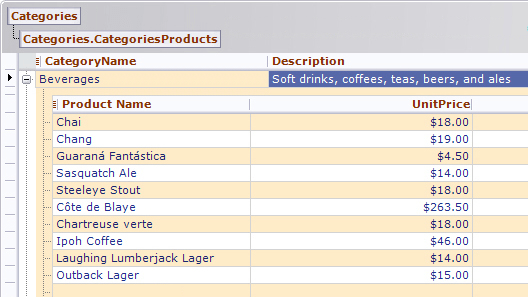
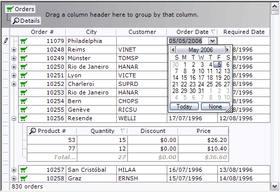
Screenshot Preview

Xceed Grid for .NET - Summary

by Xceed Software - Product Type: Component / .NET WinForms / .NET Class / 100% Managed Code

Summary

Xceed Grid for .NET by Xceed Software

URLs: xceed-grid-net, xceed grid net, xceedgridnet, xceed

An advanced and highly extensible Windows Forms grid control for your .NET applications. Xceed Grid for .NET is designed to provide developers of all levels with the necessary tools to build solid grid-based applications. Xceed Grid for .NET is a 100% extensible grid, that can use any .NET control as cell viewer or editor and that has a real WYSIWYG editor for efficient and fast set up. Xceed Grid for .NET includes all the controls from Xceed Editors for .NET and Input Validator for .NET. Excel export capabilities let you save grid data to XML spreadsheets. Vanguard Subscription provides updates to the latest versions as they are released, as well as priority support by telephone and dedicated email address. Blueprint Edition includes the product's C# source code as well as a 1-year Vanguard subscription including updates to the source code.

Introducing a multi-talented and advanced .NET data grid control that solves your current data grid needs yet lets you address other related needs with its additional built-in solutions.

Xceed Grid for .NET is sold separately and includes all the controls from Xceed Editors for .NET and Xceed Input Validator for .NET. Also sold as part of Xceed Ultimate Suite.

One of the first grids with a reporting engine built right in. Lets end-users generate, format, and print reports from their Grid-enabled apps. Developers can add this functionality to their apps in minutes. Includes all the controls available in Xceed Editors for .NET and Xceed Input Validator for .NET, free-of-charge.

Designed to combine all the best capabilities of bound and unbound grids while greatly improving on flexibility, ease-of-use and display speed. Offers the industry's cleanest, most logically crafted object model. Used by Microsoft in MS Small Business Accounting 2006.

You name the feature, it’s in this grid, including Outlook-style grouping, master/details views, pixel-perfect XP look, fixed rows and columns, insertion rows, summary rows, and much more.

Written in 100%-managed code, fast-loading object, fast display speed and scrolling, efficient memory use, CLS compliant, no external dependencies, supports accessibility. Faster than MS grid. Source available in Blueprint Edition.

Xceed’s quality components are backed by an equally strong technical support team. Their quick response time with help and solutions earns them praise from our customers on a daily basis.

OVERVIEW

.NET technology

Written entirely in managed C# code (source code included in the Blueprint Edition)

Object-oriented design created exclusively for the .NET framework offers a fresh and modern approach to grid programming, not an ActiveX interface ported to .NET

Supports Microsoft Active Accessibility 2.0 (new in Grid v2.1)

Comprehensive documentation fully integrated into Visual Studio .NET

All error handling works through .NET exception classes

CLS compliant (Common Language Specification)

Does not use unsafe blocks for minimal permission requirements

Fast loading object with efficient memory usage

Optimized drawing code for fast display, scrolling and resizing

Includes plenty of VB.NET and C# samples

Innovations

Reporting engine built right into the grid. End-users can generate, modify and print reports from their Grid-enabled applications. Developers can add this functionality in just minutes. (new in v3.0)

Xceed Grid for .NET is used by Microsoft in MS Small Business Accounting 2006.

Compatible with Xceed Editors for .NET (new in v2.5)

Full XP look & feel including XP themes that can automatically adjust to the user's current theme and that can even work on non-XP systems (new in v2.0)

Sharp looking Hierarchical Master/Detail view that is so flexible the grid can be used as a bound or unbound TreeView control with limitless levels and sub-items (new in v2.0)

True design-time WYSIWYG editor in a grid component. You can truly configure your grid right on the form without a configuration dialog or wizard. Set up your headers & footers, columns, grouping, master/detail views, insertion rows, styles etc. quicker and faster than other grids (improved in v2.0)

Exclusive ability to assign any Windows Forms control as a cell editor or cell viewer. Not limited only to custom controls created specifically for use in a grid. Use any VS.NET control or any of the wide variety of publicly available .NET controls

All of the grid's classes are inheritable and documented so developers can easily extend the grid's functionality as needed. Sample applications demonstrating how to extend the grid are included

Every visual element displayed by the grid is a distinct object that behaves like a separate control. Each element, including cells, rows, columns, groups, row selectors, header bars, etc. receives its own mouse, keyboard and paint events and can be replaced by custom objects

A variety of specialized row, cell and manager objects allow you to combine text and graphics anywhere on the grid for total control over the display

Offers two ways to perform custom painting of visual elements: add extra painting code to a grid element's paint event or inherit and override a visual element for complete control over the way it is drawn

The Grid Assistant: guides the developer through the basics of configuring and programming the grid right on the design-time form. It provides concise how-to descriptions to help developers get up to speed quickly without reading the manual

Reporting (All new in v3.0!)

Instant reports: Instantly provide your application's users with the power to print, preview and export customized reports right from Xceed Grid for .NET. Because they are built-in, Xceed Grid's reporting capabilities eliminate the need for you to acquire, learn and implement a separate reporting solution with your application.

Exporting: Export reports to PDF, HTML, Multi-page TIFF and JPEG.

Vector-based printing: Unlike the printing capabilities of other grids, which send the actual grid mostly in bitmap form to the printer, Xceed Grid for .NET's reporting engine generates a new layout and sends vector-based data to the printer. This results in professional-looking reports that scale to the printer's resolution instead of looking like someone used the "print screen" key.

Ready for end-users: With only a single line of code, developers can enable Xceed Grid for .NET's built-in, user-friendly "Generate Report" and "Customize Report Style" dialogs, allowing end-users to "skin" their reports before printing or exporting them, or to create their own customized report stylesheets.

Flexibility for end-users: End-users can configure the printed appearance of all report elements, select colors and fonts, add images, determine which data fields to print, define field widths, add lines, customize the report header and footer areas, and more.

Programmatic control: The grid's Report classes allow developers to programmatically generate, print, export and extensively customize reports to a level even deeper than what's available in the end-user forms.

Load/save as XML: Stylesheets can be loaded and saved as XML files, either programmatically or through the built-in end-user forms.

Custom headers/footers: Place images and text in page headers and/or footers, with macros for page number, report title, and a variety of date and time formats.

Column formatting: Choice of either multi-line layout or squeeze layout when there are too many fields to fit on a page. Multi-line layout wraps a row's cells over two or more lines, and squeeze layout vertically stretches cells, wrapping only their contents.

Page spanning: If there are too many fields to fit on one page, the fields can span two or more pages.

Summary row: New extensible summary row object for the grid includes 14 types of built-in statistical functions such as sum, running sum, count and average. This row can be placed at the bottom of each page, at the bottom of each groups, at the top, or anywhere that makes sense for your report.

Repeat on each page: Any row can be repeated on each page, such as column header rows, group header rows and summary rows.

Keep together: Ability to prevent splitting groups over two pages if possible.

Insert page breaks: Insert a page break before and/or after any row or group.

Grid lines: Add horizontal line types below or above any row, header, group or summary cell.

Print selected fields: Select which fields are printed in reports and specify their widths.

Customizable forms: The source code and instructions for customizing the end-user forms is included, allowing developers to customize the forms to match their application's look and feel.

True WYSIWYG design-time editor

Completely set up the grid's visual elements and configure their appearance directly on your form without the use of a separate wizard or custom property editor - just click on an element to view and edit its properties in the property editor.

Multi-select grid elements to view and edit their common properties

Add, copy and delete grid elements as needed

Undo operations

Drag & drop repositioning of grid elements

Resize, rearrange and sort columns, resize rows

Create, edit, delete, expand and collapse groups

Create, edit, delete, expand and collapse master/detail views (new in v2.0)

Create alternating row styles for two or more data rows in the main grid or in master/detail views

Easy access to event-handling code of any particular grid element

Style previewer allows you to base your grid's look on a predefined grid style

Seamless bound and unbound support

Display, edit and work with bound data, unbound data or a combination of both simultaneously

Detail views in a Master/Detail grid configuration can also be bound, unbound or both

Same programming model whether you deal with bound or unbound data

Can now be bound directly to an array of simple types such as String, Decimal, DateTime, TimeSpan, Guid or Primitive (e.g., SByte, Byte, Int32, etc.) and will show the value of those types in one column (new in v2.5)

Automatically obtains and synchronizes bound data from any .NET source including Jagged Arrays, any object that implements IListSource or IList and any ADO.NET DataSet, DataTable, DataView or DataViewManager object

Major features

New SummaryRow class displays sums or the results of statistical functions in the grid(new in v3.0)

The controls from Xceed Editors for .NET are now included as the grid’s default cell editors/viewers. Xceed Input Validator for .NET is also fully integrated into the Grid. (new in v3.0)

Can now hide the focus rectangle of the grid (new in v2.5)

Can custom paint the focus rectangle (new in v2.5)

When the grid's dock style is set to DockStyle.Fill, a GripperPosition can be set to reserve space for the resizing gripper (new in v2.5)

Outlook-style automatic row grouping

Custom grouping allows your code to group together rows by defining your own conditions

Logical, easy to use hierarchical Master/Detail views

Master/Detail views support multiple detail views per row or level

Sort one or multiple columns according to any criteria

Scroll grid's view to any cell, row, group or column

Improved sorting and display speed. Now sorts faster than Microsoft's grid. (new in v2.3)

Single-click edit mode allows entering edit mode and activating items such as check, text and combo boxes with one click (new in Grid v2.1)

Real-time scrolling and always synchronized scrollbars

Detail grids do not display a second set of scrollbars and also stay in view when horizontally scrolling the parent grid (new in v2.0)

Detail grids can be independent or can automatically synchronize with each other so that they all have the same columns, column order and configurations, sorting and grouping.

Ability to change each individual cell's formats and styles

Display customizable cell or row-level errors. Can display tooltips, blink cell backgrounds, show the standard error icon, etc (new in Grid v2.2)

Compatible with Xceed Input Validator for .NET so you can implement cell-level input validation quickly and easily (new in Grid v2.2)

"New item" line allows end user to quickly enter data and insert a new row item in the grid

Fixed, non-scrolling header and footer regions

Print and print preview including ability to print a range of pages

Display a background image under any visual grid element with optional alpha blending

Complete infrastructure for the development of custom summary rows

Add custom statistical functions (sum, average, etc.) to any of the grid cells

Intercept, parse and modify data being synchronized with the database from the grid

Full support for mouse, keyboard and drag & drop events on any visual grid element

Every grid element includes its own tag property for custom user data

Groups have their own completely extensible visual margin element

Interactive, hierarchical "Group By" row allows users to easily define their own groups and master/detail relationships (improved in v2.0)

Stylesheets with information about grid's visual elements such as colors, fonts, background images, borders and styles

Load a grid's visual configuration from one of the predefined stylesheets or from your own custom stylesheet

Visible, invisible and patterned grid lines and master/detail relationship lines

Extensible cell row, cell-less row, column, group, detail grid and other objects that you can fully customize

Grid elements can be read-only to prevent any portion of the grid from being edited

Ability to automatically change a row's height to fit the contents of the largest cell

Easy manipulation of the grid's current row

Query which section of a grid a row is in

Supports regional settings including numbers, money type, dates, etc.

Supports form localization

Plenty of meaningful edit events for both rows or cells

Grid can pre-generate a list of columns from a type (new in Grid v2.1)

Built in Bitmap column data type makes it a snap to display bitmaps in a column (new in v2.0)

Ability to hide the (+/-) symbol on desired DataRows (new in Grid v2.1)

Data filtering capabilities

Included viewer and editor controls

Can use any .NET control as a cell editor or viewer as well as the following additional included controls

CheckBox, TextBox, RichTextBox, ImageList & DateTimePicker

Intuitive masked text input box

Numeric input box that supports currency, scientific values, percentages, hex, fixed-point values, etc.

Grid Image Combo Box for assigning images to values listed in a combo box or for assigning an image to display for any cell value

Grid Calculator Box that lets users calculate values to enter using standard calculator notation

The grid itself: you can even use the Xceed Grid for .NET control as a cell viewer or editor!

What's New in Xceed Grid for .NET V3.9?

Xceed Grid for .NET is built and fully compatible with .NET Framework 4 for Visual Studio 2010

What's New in Xceed Grid for .NET V3.6?

Performance enhancements through cell UI virtualization, for shorter load times and decreased memory use. With a reference grid containing 10 columns and 100,000 data rows, load time is 3.3 times faster, and the grid uses 55% less memory, compared to previous versions of Xceed Grid for .NET

Delayed databound data-row load with collapsed detail grids: with a reference grid containing multiple detail grids, load time is 15.75 times faster compared to previous versions of Xceed Grid for .NET

What's New in Xceed Grid for .NET V3.5?

Full Windows Vista support

PDF export no longer encodes the non-breaking-space character as a bullet glyph instead of a space glyph

What's New in Xceed Grid for .NET V3.2?

Excel export capabilities let you save grid data to XML spreadsheets. These specially formatted files are recognized as Excel files by Windows and will be opened automatically as such. Complete control over the appearance of the spreadsheets is provided through the exporter's properties and events, as well as XMLSS attribute classes

What's New in Xceed Grid for .NET V3.1?

Fixed column support is available at runtime through the fixed column splitter glyph, or programmatically. Fixed columns are repeated on each printed page if there are too many columns to fit the page width

What's New in Xceed Grid for .NET V3.0?

A major upgrade to Xceed’s grid. Xceed Grid for .NET is one of the first grid controls to feature a built-in reporting engine, letting you do more with a single component. License keys for Xceed Editors for .NET are now provided with the grid. These controls integrate seamlessly into Xceed Grid for .NET but can also be used independently.

An advanced and highly extensible Windows Forms grid control for your .NET applications.

Pricing: Xceed Grid for .NET V3.9 - Royalty-Free Licenses - Standard Subscription - includes 1 year of major/minor upgrades and priority support 1 Developer License, Xceed Grid for .NET V3.9 - Royalty-Free Licenses - Standard Subscription - includes 1 year of major/minor upgrades and priority support 4 Developer Team License, Xceed Grid for .NET V3.9 - Royalty-Free Licenses - Standard Subscription - includes 1 year of major/minor upgrades and priority support 8 Developer Team License, Xceed Grid for .NET V3.9 - Royalty-Free Licenses - Standard Subscription - includes 1 year of major/minor upgrades and priority support 20 Developer Team License, Xceed Grid for .NET V3.9 - Royalty-Free Licenses - Blueprint Subscription - includes 1 year of major/minor upgrades and priority support and C# source code 1 Developer License, Xceed Grid for .NET V3.9 - Royalty-Free Licenses - Blueprint Subscription - includes 1 year of major/minor upgrades and priority support and C# source code 4 Developer Team License, Xceed Grid for .NET V3.9 - Royalty-Free Licenses - Blueprint Subscription - includes 1 year of major/minor upgrades and priority support and C# source code 8 Developer Team License, Xceed Grid for .NET V3.9 - Royalty-Free Licenses - Blueprint Subscription - includes 1 year of major/minor upgrades and priority support and C# source code 20 Developer Team License, Xceed Grid for .NET V3.9 - Additional Year Subscription - Standard Subscription - includes 1 year of major/minor upgrades and priority support 1 Developer License, Xceed Grid for .NET V3.9 - Additional Year Subscription - Standard Subscription - includes 1 year of major/minor upgrades and priority support 4 Developer Team License, Xceed Grid for .NET V3.9 - Additional Year Subscription - Standard Subscription - includes 1 year of major/minor upgrades and priority support 8 Developer Team License, Xceed Grid for .NET V3.9 - Additional Year Subscription - Standard Subscription - includes 1 year of major/minor upgrades and priority support 20 Developer Team License, Xceed Grid for .NET V3.9 - Additional Year Subscription - Blueprint Subscription - includes 1 year of major/minor upgrades and priority support and C# source code 1 Developer License, Xceed Grid for .NET V3.9 - Additional Year Subscription - Blueprint Subscription - includes 1 year of major/minor upgrades and priority support and C# source code 4 Developer Team License, Xceed Grid for .NET V3.9 - Additional Year Subscription - Blueprint Subscription - includes 1 year of major/minor upgrades and priority support and C# source code 8 Developer Team License, Xceed Grid for .NET V3.9 - Additional Year Subscription - Blueprint Subscription - includes 1 year of major/minor upgrades and priority support and C# source code 20 Developer Team License, Xceed Grid for .NET V3.9 - Subscription Renewals Before Expiration - Standard Subscription - includes 1 year of major/minor upgrades and priority support 1 Developer License, Xceed Grid for .NET V3.9 - Subscription Renewals Before Expiration - Standard Subscription - includes 1 year of major/minor upgrades and priority support 4 Developer Team License, Xceed Grid for .NET V3.9 - Subscription Renewals Before Expiration - Standard Subscription - includes 1 year of major/minor upgrades and priority support 8 Developer Team License, Xceed Grid for .NET V3.9 - Subscription Renewals Before Expiration - Standard Subscription - includes 1 year of major/minor upgrades and priority support 20 Developer Team License, Xceed Grid for .NET V3.9 - Subscription Renewals Before Expiration - Blueprint Subscription - includes 1 year of major/minor upgrades and priority support and C# source code 1 Developer License, Xceed Grid for .NET V3.9 - Subscription Renewals Before Expiration - Blueprint Subscription - includes 1 year of major/minor upgrades and priority support and C# source code 4 Developer Team License, Xceed Grid for .NET V3.9 - Subscription Renewals Before Expiration - Blueprint Subscription - i

Evals & Downloads: Read the Xceed Grid for .NET Help File, Read the Xceed License Agreement, Download the Xceed Ultimate Suite 2012 v1 evaluation on to your computer - Expires after 45 days

Operating System for Deployment: Windows 7, Windows Vista, Windows XP, Windows 2000, Windows NT 4.0

Architecture of Product: 32Bit

Product Type: Component

Component Type: .NET WinForms, .NET Class, 100% Managed Code

Built Using: Visual C# .NET

Compatible Containers: Microsoft Visual Studio 2010, Microsoft Visual Studio 2008, Microsoft Visual Studio 2005, Microsoft Visual Basic 2010, Microsoft Visual Basic 2008, Microsoft Visual Basic 2005, Microsoft Visual C++ 2010, Microsoft Visual C++ 2008, Microsoft Visual C++ 2005, Microsoft Visual C# 2010, Microsoft Visual C# 2008, Microsoft Visual C# 2005, .NET Framework 4.0, .NET Framework 3.5, .NET Framework 3.0, .NET Framework 2.0

Product Class: Business Components

Keywords: xceed grid for net, xceed grid

Xceed Software

datagrid controls, datatable controls, datagrid components, datatable components, datagrid, data grid, data table, net gridview, net datagrid, data grid, grid control, net datatable, c# gridview, c# datagrid, asp.net datagrid, grid asp, vb.net datagrid

Spreadsheet spread sheet worksheet workbook excel lotus 123 1-2-3 xls xl

Part numbers: PC-512988-290248 512988-290248 PC-512988-290249 512988-290249 PC-512988-290250 512988-290250 PC-512988-290251 512988-290251 PC-512988-290253 512988-290253 PC-512988-290254 512988-290254 PC-512988-290255 512988-290255 PC-512988-290256 512988-290256 PC-512988-290258 512988-290258 PC-512988-290259 512988-290259 PC-512988-290260 512988-290260 PC-512988-290261 512988-290261 PC-512988-290268 512988-290268 PC-512988-290269 512988-290269 PC-512988-290270 512988-290270 PC-512988-290271 512988-290271 PC-512988-290263 512988-290263 PC-512988-290264 512988-290264 PC-512988-290265 512988-290265 PC-512988-290266 512988-290266 PC-512988-290273 512988-290273 PC-512988-290274 512988-290274 PC-512988-290275 512988-290275 PC-512988-290276 512988-290276

Mfr. Part No: XGED1B-39 XGED1E-39 XGED1F-39 XGED1R-39 XGED1V-39 XGED1Y-39 XGED4B-39 XGED4E-39 XGED4F-39 XGED4R-39 XGED4V-39 XGED4Y-39 XGED8B-39 XGED8E-39 XGED8F-39 XGED8R-39 XGED8V-39 XGED8Y-39 XGEDVB-39 XGEDVE-39 XGEDVF-39 XGEDVR-39 XGEDVV-39 XGEDVY-39

Product Search

Enter search words:

Quick Links

Publisher

Primary Category

Related Products

Related Categories

Award