by DevExpress (Developer Express) - Product Type: Component / .NET WinForms / .NET Class / 100% Managed Code
Add advanced printing functionality to your applications. XtraPrinting Library is a 100% C# data rendering and visualization system, built specifically for Visual Studio .NET and designed to bring your User Interface to the printed page. Once you start using the XtraPrinting Library, you will be able to print the contents of advanced visual controls such as the XtraGrid and XtraTreeList with ease - without hassles, and thus offer your end-users a nearly unlimited series of "reports" without actually having to create a single report using a traditional report writer.
Our regular prices are shown below. Please logon to see your discounted prices.
| Add to Cart | $ 58.79 | Subscription Renewal for one year (for Subscriptions soon to expire or just expired) | Verify | Download (139.8 MB) |
| Add to Cart | $ 78.39 | Subscription Renewal for one year (for Subscriptions soon to expire or just expired) - with Source code | Verify | Download (139.8 MB) |
Our prices include ComponentSource technical support and, for most downloadable products, an online backup and a FREE upgrade to the new version if it is released within 30 days of your purchase. All sales are made on our standard Terms and Conditions and subject to our Return Policy. Please contact us if you require any licensing option not listed above including volume licensing and previous versions.
Our regular prices are shown above. Please logon to see your discounted prices.

What's new in XtraPrinting Library v2011 vol 1?
What's new in XtraPrinting Library v2010 vol 2?
What's new in XtraPrinting Library v2010 vol 1?
What’s new in XtraPrinting Library?
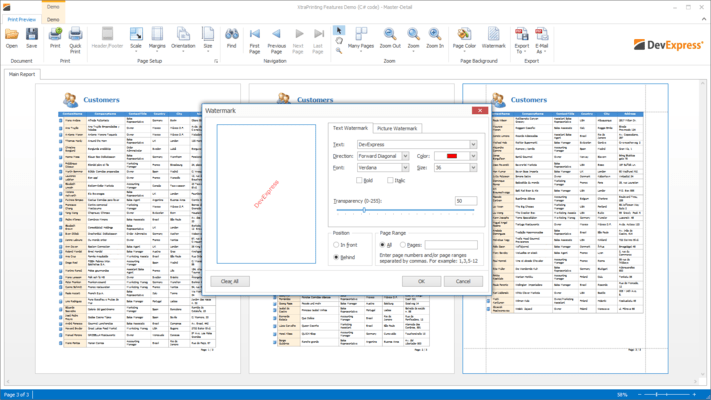
Storing Watermarks and Header/Footer Options - When a report is previewed in a Print Preview form, it is possible for end-users to insert a watermark into it, as well as add page numbers, current date/time and other information using the Header/Footer form. Once adjusted in a single report, these settings look fine. However, if end-users want to do the same for another report, they need to repeat all previously executed actions. With v2008 vol 3, you are now able to programmatically save Watermark and Header/Footer options into a file, stream or the system registry.
Improved Print Preview Form - The following changes have been made to the Print Preview Form's status bar:
What’s new in XtraPrinting Library v2008?
Export to XLS - Support for Native Data Formatting - Previously, the XtraPrinting Library exported its data to XLS either as strings, or numbers. Now, if numeric or date-time data is exported, information about the corresponding format strings is embedded into the resulting XLS file.
What's new in XtraPrinting System v2007 vol 3?
Saving and Loading Generated Documents - With v2007 vol 3, the XtraPrinting Library allows you to save a report document from the Print Preview to its internal file format (*.prnx), and then load it within another Print Preview form.
RTF Export Improvements - The RTF export module was totally re-written and now produces genuine WYSIWYG results. The document is now correctly broken down into pages. Previously, the document was exported to RTF as a single page and page headers and footers were ignored. Cells are now represented by frames with absolute positioning instead of nested tables. This makes it easier to edit documents and significantly improves text editor performance against exported files. Watermarks are now supported (both text and images).
Image Export Improvements - Export to graphic files is now more flexible. You can control the following attributes:
What's new in XtraPrinting System v2007 vol 2?
The XtraPrinting Library is a 100% C# data rendering and visualization system, built specifically for Visual Studio .NET and designed to bring your User Interface to the printed page. Once you start using the XtraPrinting Library, you will be able to print the contents of advanced visual controls such as the XtraGrid and XtraScheduler with ease, and thus offer your end-users a nearly unlimited series of "reports" without actually having to create a single report using a traditional report writer. With visual controls like the XtraGrid and XtraTreeList, you already have a wealth of data on-screen - which users can manipulate as they see fit: They can summarize data on any column, display Master/Detail Info, group and sort against any column, etc. In the end, this is the essence of a banded report - and with the XtraPrinting Library you can render the contents of your XtraGrid and XtraTreeList to paper - and never have to write a banded report again.
With the XtraPrinting Library, you can print and render the following Developer Express controls:
And the following standard controls:
Here is a brief list of other features available to you when using the XtraPrinting Library:
Publisher
Primary Category
Related Products
Related Categories