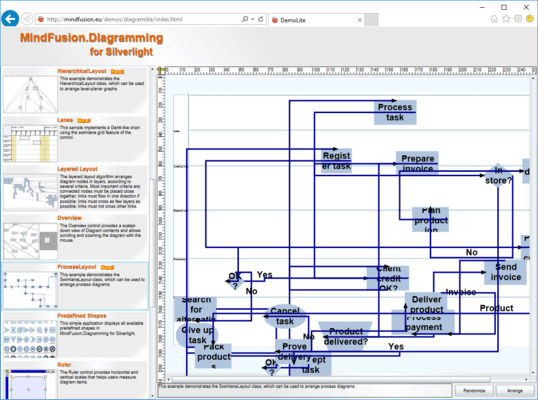
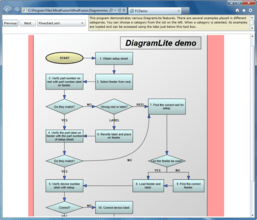
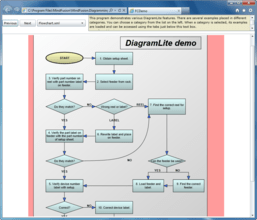
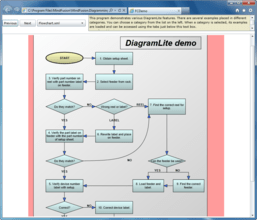
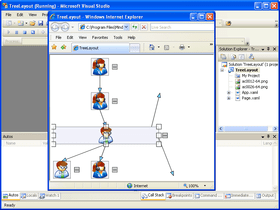
Add workflow, flowchart, process diagrams and more to your Silverlight applications. DiagramLite provides applications targeting the Silverlight platform with the ability to create and display various kinds of diagram. DiagramLite supports workflow, flowchart and process diagrams, object hierarchy and relationship charts, entity-relationship diagrams, structures like graphs and trees, etc. Every behavioral and appearance aspect of MindFusion DiagramLite can be customized as best suits your project. DiagramLite's Diagram objects can have different styles, colors, fonts and pictures. DiagramLite's programming model comprises more than 300 methods, properties and events. Source Code is available. DiagramLite now supports Silverlight 4 and Visual Studio 2010. DiagramLite can be purchased with Source Code. Buy MindFusion DiagramLite and obtain 12 months of free upgrades. MindFusion DiagramLite renewals will extend your DiagramLite subscription for another year. DiagramLite Enterprise and DiagramLite Site Licenses also available.

| Add to Cart | $ 300.00 | 1 Developer Subscription License (12 Months Subscription Included) | Download (19.5 MB) | |
| Add to Cart | $ 550.00 | 4 Developer Team Subscription License (12 Months Subscription Included) | Download (19.5 MB) | |
| Add to Cart | $ 950.00 | 8 Developer Team Subscription License (12 Months Subscription Included) | Download (19.5 MB) | |
| Add to Cart | $ 1,750.00 | 1 Site Wide Subscription License (Allows Unlimited Developers at a Single Physical Address) (12 Months Subscription Included) | Download (19.5 MB) | |
| Add to Cart | $ 3,200.00 | 1 Enterprise Subscription License (Unlimited number of developers of an enterprise at all its physical addresses) - (12 Months Subscription Included) | Download (19.5 MB) |
| Add to Cart | $ 650.00 | 1 Developer Subscription License - with Source Code (12 Months Subscription Included) | Download (20.2 MB) | |
| Add to Cart | $ 900.00 | 4 Developer Team Subscription License - with Source Code (12 Months Subscription Included) | Download (20.2 MB) | |
| Add to Cart | $ 1,300.00 | 8 Developer Team Subscription License - with Source Code (12 Months Subscription Included) | Download (20.2 MB) | |
| Add to Cart | $ 2,100.00 | 1 Site Wide Subscription License (Allows Unlimited Developers at a Single Physical Address) - with Source Code (12 Months Subscription Included) | Download (20.2 MB) | |
| Add to Cart | $ 3,350.00 | 1 Enterprise Subscription License (Unlimited number of developers of an enterprise at all its physical addresses) - with Source Code (12 Months Subscription Included) | Download (20.2 MB) |
| Add to Cart | $ 120.00 | 1 Developer Subscription Renewal License (12 Months Subscription Included) | Verify | Download (19.5 MB) |
| Add to Cart | $ 220.00 | 4 Developer Team Subscription Renewal License (12 Months Subscription Included) | Verify | Download (19.5 MB) |
| Add to Cart | $ 380.00 | 8 Developer Team Subscription Renewal License (12 Months Subscription Included) | Verify | Download (19.5 MB) |
| Add to Cart | $ 700.00 | 1 Site Wide Subscription Renewal License (Allows Unlimited Developers at a Single Physical Address) (12 Months Subscription Included) | Verify | Download (19.5 MB) |
| Add to Cart | $ 1,280.00 | 1 Enterprise Subscription Renewal License (Unlimited number of developers of an enterprise at all its physical addresses) - (12 Months Subscription Included) | Verify | Download (19.5 MB) |
| Add to Cart | $ 260.00 | 1 Developer Subscription Renewal License - with Source Code (12 Months Subscription Included) | Verify | Download (20.2 MB) |
| Add to Cart | $ 360.00 | 4 Developer Team Subscription Renewal License - with Source Code (12 Months Subscription Included) | Verify | Download (20.2 MB) |
| Add to Cart | $ 520.00 | 8 Developer Team Subscription Renewal License - with Source Code (12 Months Subscription Included) | Verify | Download (20.2 MB) |
| Add to Cart | $ 840.00 | 1 Site Wide Subscription Renewal License (Allows Unlimited Developers at a Single Physical Address) - with Source Code (12 Months Subscription Included) | Verify | Download (20.2 MB) |
| Add to Cart | $ 1,340.00 | 1 Enterprise Subscription Renewal License (Unlimited number of developers of an enterprise at all its physical addresses) - with Source Code (12 Months Subscription Included) | Verify | Download (20.2 MB) |
All sales are made on our standard Terms and Conditions and subject to our Return Policy.
DiagramLite Developer Subscription License: One developer license of MindFusion.Diagramming for Silverlight is required per developer seat. A licensed developer can use the product on as many systems as he/she needs to (i.e. desktop computer and on a laptop computer). 12 months of free upgrades included.
DiagramLite Site Wide Subscription License: One Site license of MindFusion.Diagramming for Silverlight allows unlimited Developers at a single physical address. 12 months of free upgrades included.
DiagramLite Enterprise Subscription License: One Enterprise license of MindFusion.Diagramming for Silverlight allows unlimited number of Developers of an enterprise at all its physical addresses (worldwide). 12 months of free upgrades included.
Run-time royalty free: Applications created with the software can be distributed Run-Time Royalty free.
Not sure which MindFusion DiagramLite License you need to buy?
As official MindFusion DiagramLite Reseller/Distributor, we can help you buy the right MindFusion.Diagramming for Silverlight License.
Please, feel free to contact us if you have any questions.
Man Months Research and Development: Data not supplied by Publisher
Lines of Code: 200000
Primary Development Language Used: Visual C# .NET
| Read the DiagramLite help file | (1.0 MB) |
| Read the DiagramLite End User License Agreement | (3 KB) |
| Download the DiagramLite V2.3 evaluation on to your computer - Displays Evaluation Label | (19.5 MB) |

What's New in DiagramLite (MindFusion.Diagramming for Silverlight) 2.3?
What's New in DiagramLite (MindFusion.Diagramming for Silverlight) 2.2?
What's New in DiagramLite (MindFusion.Diagramming for Silverlight) 2.1?
What's New in DiagramLite (MindFusion.Diagramming for Silverlight) 2.0.1?
What's New in DiagramLite (MindFusion.Diagramming for Silverlight) 2.0?
Swimlanes
The lane grid lets you emphasize the relationship between a group of diagram items by displaying them in a distinct lane or cell within the grid. To display the lane grid, set the EnableLanes property of the Diagram class to true. In order to customize the grid, set the various attributes exposed by the LaneGrid property, which lets you specify the number of rows and columns, add headers, customize the cell appearance, etc. The new Lanes sample project uses the lane grid to let users draw Gantt charts.
Swimlane Layout
Swimlane layout can be used to arrange process diagrams in which nodes representing activities are placed in swimlanes representing resources. The index of the resource allocated to an activity should be assigned to the corresponding node's LayoutTraits[SwimlaneLayoutTraits.Lane].
Cascade Layout
Cascade layout places nodes on a virtual grid and arranges links orthogonally, such that if the source graph is planar all links are guaranteed to have no more than two bends and will not intersect. By default the layout method arranges nodes in rows and link segments in columns; this can be changed by setting the Orientation property.
Triangular Layout
Triangular layout places nodes on a virtual grid, such that if the source graph is planar, all links are guaranteed to have a single segment and not intersect. If the graph is not planar, its intersecting links can be optionally segmented and bended in order to improve readability. The layout method places the nodes from the external face on a triangle and recursively adds the rest of the nodes as vertices of internal triangles. As a result, it is very effective for near maximal-planar (a.k.a. triangular) graphs.
Hierarchical Layout
Hierarchical layout places nodes on user-defined levels, such that if the source graph is level-planar, all links are guaranteed to have a single segment and not intersect. The layout method requires that for each node LayoutTraits contains a HierarchicalLayoutTraits.Level entry specifying the level, and no two connected nodes must be on the same level.
Miscellaneous
What's New in DiagramLite (MindFusion.Diagramming for Silverlight) 1.7?
Clipboard Support
A single diagram item or a selection of items can be copied or cut to the Windows clipboard. This is done programmatically using the CopyToClipboard and CutToClipboard methods. To paste the clipboard contents into the current diagram, call PasteFromClipboard. Clipboard support was introduced with version 4 of Silverlight, so these methods are not available in the Silverlight 3 build of the control.
Node rotation
Shape nodes can be rotated at an arbitrary angle. The RotationAngle property can be used to get or set the current rotation angle in code. Nodes can also be rotated interactively if the Rotate flag in EnabledHandles is set. That flag displays a round adjustment handle above the node which sets the rotation angle when dragged.
Miscellaneous
What's New in DiagramLite (MindFusion.Diagramming for Silverlight) 1.6?
Support for custom arrowheads
The type of the HeadShape, BaseShape and IntermediateShape properties of DiagramLink has been changed from enum ArrowHead to class Shape, which is also used to define ShapeNode shapes. The ArrowHeads class now exposes Shape definitions that correspond to the ArrowHead enumeration members from previous versions. It is also possible to assign any Shapes member or a custom shape as an arrowhead. When used for arrowheads, position (50, 0) in the shape definition corresponds to the arrowhead's tip point.
Adjustment handles styling
The ActiveItemHandlesStyle, SelectedItemHandlesStyle and DisabledHandlesStyle properties can be used to customize the appearance of selection handles. The HandlesVisualStyle objects returned by them provide sub-properties that control the handles stroke and fill attributes.
Other DiagramLite 1.6 improvements?
What's New in DiagramLite (MindFusion.Diagramming for Silverlight) 1.5?
Support for Silverlight 4
The package now includes a Silverlight 4 version of the MindFusion.Diagramming assembly, available in the VS2010 subfolder of the installation folder. That subfolder also includes sample projects for Visual Studio 2010. Silverlight 3 and Visual Studio 2008 are still supported.
Printing support
Printing support is available in the Silverlight 4 version of the component. Call the Print method to print the current diagram. The PrintOptions class exposes the available settings for printing such as Margins and HeaderFormat. An instance of this structure is accessible via the diagram's PrintOptions property.
Visual states
The DiagramItem class now defines two visual state groups. The group SelectionStates contains the Unselected and Selected states. The MouseStates group contains the MouseOut, MouseOver and MouseDown states. Note that the control does not provide any built-in animations for transitions between these states. If that's required, it can be implemented through custom Xaml templates where Storyboard objects are associated with states through the VisualStateManager.VisualStateGroups property.
Other Improvements
What's New in DiagramLite (MindFusion.Diagramming for Silverlight) 1.4?
What's New in DiagramLite (MindFusion.Diagramming for Silverlight) 1.3?
What's New in DiagramLite (MindFusion.Diagramming for Silverlight) 1.2?
Ruler control
The Ruler control provides horizontal and vertical scales that helps users measure and align diagram items. In order to use the Ruler, it must be set as a parent of the Diagram object, i.e. in XAML the <Ruler> element should contain the <Diagram> element. The control also implements a scrollable area and can be used instead of ScrollViewer.
Styling and templating
LayereLayout enhancements
Miscellaneous
What's New in DiagramLite (MindFusion.Diagramming for Silverlight) 1.1?
What's New in DiagramLite (MindFusion.Diagramming for Silverlight) 1.0.3?
What's New in DiagramLite 1.0.2?
DiagramLite (MindFusion.Diagramming for Silverlight) programming component lets you quickly and easy integrate great flowchart capabilities in all types of Web applications using Microsoft Silverlight.
DiagramLite's features range from useful user interaction events to numerous properties for complete control over appearance; from various input / output options to stunning layout algorithms.
DiagramLite (MindFusion.Diagramming for Silverlight) Features
DiagramLite (MindFusion.Diagramming for Silverlight) User Interaction
DiagramLite (MindFusion.Diagramming for Silverlight) Programming
DiagramLite (MindFusion.Diagramming for Silverlight) Store and Retrieve Diagrams into/from
DiagramLite (MindFusion.Diagramming for Silverlight) Diagram Elements
DiagramLite (MindFusion.Diagramming for Silverlight) Automatic Layout
DiagramLite (MindFusion.Diagramming for Silverlight) Appearance
DiagramLite (MindFusion.Diagramming for Silverlight) Behavior
DiagramLite (MindFusion.Diagramming for Silverlight) Link Diagram Items