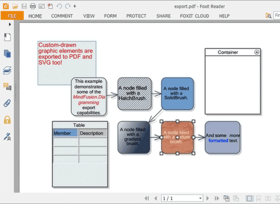
Enhance your applications with diagramming and graphing capabilities. MindFusion FlowChart.NET Professional helps you create and present work flow and process diagrams; database entity-relationship diagrams; organizational charts; object hierarchy and relationship charts, graphs, and trees. Its' basic types of objects - boxes, tables, and arrows - can be grouped and attached one to another and combined in complex structures. MindFusion FlowChart.NET Professional provides more than 50 predefined box shapes, as well as custom-designed and custom-painted boxes. FlowChart.NET Professional Source Code available.
| Add to Cart | $ 600.00 | 1 Developer Subscription License (12 Months Subscription Included) | Download (17.9 MB) | |
| Add to Cart | $ 1,100.00 | 4 Developer Team Subscription License (12 Months Subscription Included) | Download (17.9 MB) | |
| Add to Cart | $ 1,900.00 | 8 Developer Team Subscription License (12 Months Subscription Included) | Download (17.9 MB) | |
| Add to Cart | $ 3,500.00 | 1 Site Wide Subscription License (Allows Unlimited Developers at a Single Physical Address) (12 Months Subscription Included) | Download (17.9 MB) | |
| Add to Cart | $ 6,350.00 | 1 Enterprise Subscription License (Unlimited number of developers of an enterprise at all its physical addresses) - (12 Months Subscription Included) | Download (17.9 MB) |
| Add to Cart | $ 1,150.00 | 1 Developer Subscription License - with Source Code (12 Months Subscription Included) | Download (19.2 MB) | |
| Add to Cart | $ 1,650.00 | 4 Developer Team Subscription License - with Source Code (12 Months Subscription Included) | Download (19.2 MB) | |
| Add to Cart | $ 2,450.00 | 8 Developer Team Subscription License - with Source Code (12 Months Subscription Included) | Download (19.2 MB) | |
| Add to Cart | $ 4,050.00 | 1 Site Wide Subscription License (Allows Unlimited Developers at a Single Physical Address) - with Source Code (12 Months Subscription Included) | Download (19.2 MB) | |
| Add to Cart | $ 6,900.00 | 1 Enterprise Subscription License (Unlimited number of developers of an enterprise at all its physical addresses) - with Source Code (12 Months Subscription Included) | Download (19.2 MB) |
| Add to Cart | $ 400.00 | 1 Upgrade / Subscription Renewal (12 months subscription, for all license types) | Verify | Download (29 KB) |
All sales are made on our standard Terms and Conditions and subject to our Return Policy.
Developer Subscription License: One software license is required per machine. 12 months of free upgrades included.
Site Wide License:Allows Unlimited Developers at a single physical address. 12 months of free upgrades included.
Enterprise License: Unlimited number of developers of an enterprise at all its physical addresses (worldwide). 12 months of free upgrades included.
Upgrade / Subscription Renewal (12 months subscription, for all license types): Adds 12 months of free upgrades to your existing subscription period. The subscription time sums up - e.g. You can buy a Developer Subscrition License (which includes 12 months of upgrades) and also purchase 2 additional Upgrade (24 months subscription, for all license types) giving you a total of 36 months free upgrades. You can use this price option to upgrade from any previous version (i.e. V2.5) even if your subscription period has expired.
Run-time royalty free.
Man Months Research and Development: 14
Lines of Code: 20000
Primary Development Language Used: Visual C# .NET
What's New in MindFusion FlowChart.NET 5.3.3?
What's New in MindFusion FlowChart.NET 5.3.2?
What's New in MindFusion FlowChart.NET V5?
Document/View architecture
FlowChart.NET implements the Model-View-Controller (MVC) architectural pattern in its new version 5. The MVC design pattern as applied to FlowChart.NET separates the diagram data (model) from its representation to the user (view) and controlling it by the user (controller). According to the MVC design pattern, FlowChart.NET Version 5 provides two new classes instead of the FlowChart class, namely Diagram and DiagramView.
Support for custom diagram item types
The FlowChart.NET API has been redesigned to allow for seamless integration of custom node and link types. You can define a custom item type by deriving from DiagramLink or DiagramNode. You could also derive from more specific node types such as ShapeNode or ContainerNode. New items can be added to a diagram by instantiating them and adding them to the Nodes or Links collections. To improve support for custom types, many type-specific methods have been replaced with more generic versions, e.g. FindNode instead of FindBox and FindTable.
Containers
The ContainerNode class implements diagram nodes that can function as containers for other nodes. Containers can be folded to hide their content, and unfolded to show it again. Containers can be nested one within another, without limitation on the depth of nesting.
Orthogonal graph layout
OrthogonalLayout is a secondary layout algorithm that can be used to arrange links after an initial node arrangement has already been applied. The orthogonal layout is useful when there are much more links than nodes in a graph. The algorithm strives to achieve the following criteria, while preserving as much of the initial node configuration as possible: links must not overlap; only vertical and horizontal routing lines are used; graph routing is performed with respect to the specified main layout direction; links crossings are minimized; bends are minimized.
Graphics interface
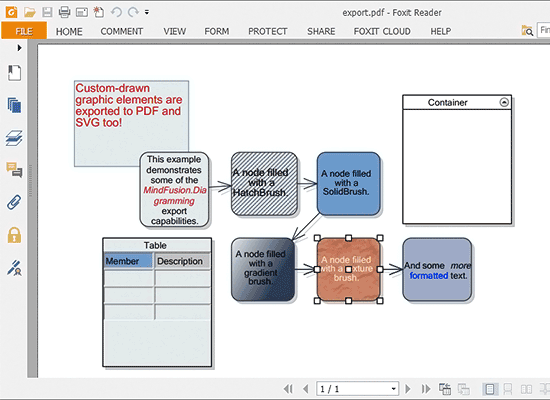
Now all drawing is done through an IGraphics interface, for which the control provides GdiGrahics, SvgGraphics and PdfGraphics implementations. Thus the files created by SvgExporter and PdfExporter can contain custom-drawn elements, which you draw either by handling custom drawing events or by implementing the Draw method in your custom item types.
API changes
Conformity with the .NET Framework naming conventions has been improved.
Main differences between Standard and Professional Editions:
Main Features
FlowChart.NET is designed in such way that you can create with it even the most complex schemes. In order to do so you combine different FlowChart.NET objects and set their properties. You can respond to the users' interaction with the flowchart objects with the events the control provides.
Below you can see a list of the most important FlowChart.NET characteristics separated in groups:
The FlowChart.NET component
User interaction
Programming
Store and retrieve diagrams into/from
Output
Diagram elements
Automatic layout
Appearance
Behavior
Linking via arrows
Hierarchical grouping
Auxiliary controls (FlowChart.NET Pro only)