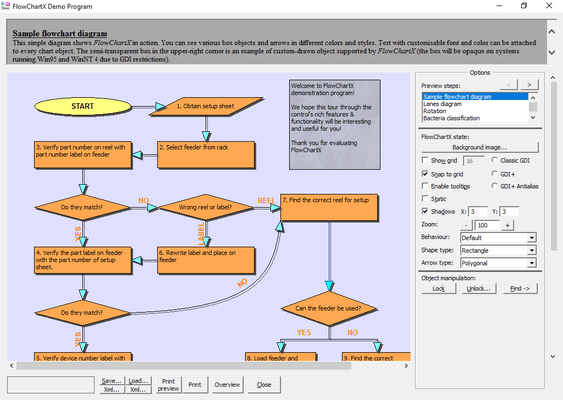
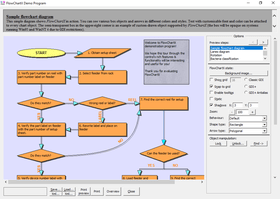
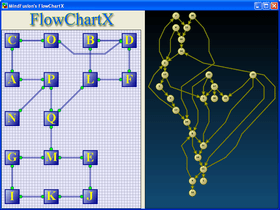
Add work flow diagrams to your applications. FlowChartX helps you create and present work flow, algorithm, and process diagrams, database entity-relationship diagrams, object hierarchy and relationship charts, graphs and trees. Its' basic types of objects - boxes, tables and arrows can be grouped and attached one to another, and combined in complex structures. The control provides more than 70 predefined box shapes, as well as user designated and custom-painted boxes.

| Add to Cart | $ 300.00 | 1 Developer License (12 Months Subscription Included) | Download (4.6 MB) | |
| Add to Cart | $ 550.00 | 4 Developer Team License (12 Months Subscription Included) | Download (4.6 MB) | |
| Add to Cart | $ 950.00 | 8 Developer Team License (12 Months Subscription Included) | Download (4.6 MB) | |
| Add to Cart | $ 1,750.00 | 1 Site Wide License (Allows Unlimited Developers at a Single Physical Address) (12 Months Subscription Included) | Download (4.6 MB) | |
| Add to Cart | $ 3,200.00 | 1 Enterprise Subscription License (Unlimited number of developers of an enterprise at all its physical addresses) - (12 Months Subscription Included) | Download (4.6 MB) |
| Add to Cart | $ 650.00 | 1 Developer License - with Source Code (12 Months Subscription Included) | Download (5.2 MB) | |
| Add to Cart | $ 900.00 | 4 Developer Team License - with Source Code (12 Months Subscription Included) | Download (5.2 MB) | |
| Add to Cart | $ 1,300.00 | 8 Developer Team License - with Source Code (12 Months Subscription Included) | Download (5.2 MB) | |
| Add to Cart | $ 2,100.00 | 1 Site Wide License (Allows Unlimited Developers at a Single Physical Address) - with Source Code (12 Months Subscription Included) | Download (5.2 MB) | |
| Add to Cart | $ 3,550.00 | 1 Enterprise Subscription License (Unlimited number of developers of an enterprise at all its physical addresses) - with Source Code (12 Months Subscription Included) | Download (5.2 MB) |
| Add to Cart | $ 200.00 | 1 Upgrade / Subscription Renewal (12 months subscription, for all license types) | Verify | Download (29 KB) |
All sales are made on our standard Terms and Conditions and subject to our Return Policy.
Developer Subscription License: One software license is required per machine. 12 months of free upgrades included.
Site Wide License:Allows Unlimited Developers at a single physical address. 12 months of free upgrades included.
Enterprise License: Unlimited number of developers of an enterprise at all its physical addresses (worldwide). 12 months of free upgrades included.
Upgrade / Subscription Renewal (12 months subscription, for all license types): Adds 12 months of free upgrades to your existing subscription period. The subscription time sums up - e.g. You can buy a Developer Subscription License (which includes 12 months of upgrades) and also purchase 2 additional Upgrade (24 months subscription, for all license types) giving you a total of 36 months free upgrades. You can use this price option to upgrade from any previous version (i.e. V2.5) even if your subscription period has expired.
Run-time royalty free.
What’s New in FlowChartX V4.2.1?
What’s New in FlowChartX V4.X?
Overview
FlowChartX provides more than 70 predefined box shapes, as well as user designated and custom-painted boxes. Both images and text can be placed inside boxes. Customizable fonts and colors and multiple arrow styles let you customize the appearance of a chart. Other layout features include an alignment grid; shadow effects; scrolling and zooming; locking; z-order; and pen styles.

The control's programming model comprises more than 200 methods, properties and events. The objects in a FlowChartX diagram can be enumerated through several collections - based on the object type and selection state. The diagrams relationship hierarchy can be traversed through 'incoming/outgoing arrows' collections available for the boxes and tables.
Every object type available in FlowChartX is exposed as a COM class with properties and methods controlling its look and behavior. Through these classes the FCX objects can be programmatically moved and resized, locked in place, repositioned in the Z-order, grouped and attached; their text, color, font, style and other visual attributes are exposed as properties.
A brief description of the basic FlowChartX types follows below:
Boxes can represent classes in class-hierarchies, flowchart elements, icons in network diagrams, etc. They can hold both graphics and text in different fonts, sizes and colors. Box objects can have any polygonal shape. There are more than 50 predefined box shapes. Apart from them FlowChartX offers you very easy and quick way to define your own shape as you like it. Furthermore boxes support two forms of custom painting. The first type gives you full control over the painting, while in the second one your painting code is performed additionally to the basic painting.
Tables can be used in database diagrams as well as in any other kind of charts that need table representation. They display grids of cells and every cell contains text. Cells, columns and rows can be customized in various ways there are properties available for setting their extents, style and text alignment. Tables dimensions can be programmatically changed; inserting, appending or deleting rows and columns can be done in a very comprehensive, intuitive way whenever you might need it. Tables can also display background images and graphics. The file formats supported are BMP, GIF, JPEG, ICO and WMF (same applies for boxes).
Arrows are used to represent various types of connections and relations in diagrams. FlowChartX offers three basic arrow-types:
Each arrow has to be connected to a box or a table object. You can use transparent boxes on any side of an arrow to make it appear as hanging. Some customizable arrows properties are: tip styles, colors, text, pen width and style, modification behavior and number of segments.
FlowChartX is written in C++ using the ATL libraries to implement the needed ActiveX control interfaces. The source code is included in the site-wide version, and also is optionally available with the single-developer version.