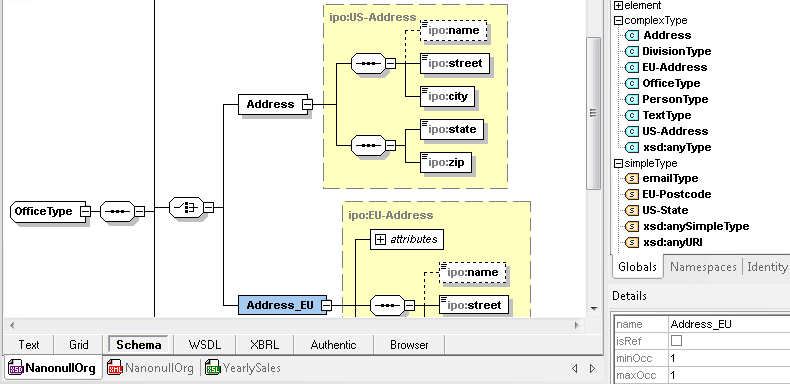
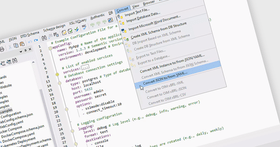
Screenshot Preview

Altova XMLSpy 2012 Enterprise Edition - Concurrent Users - Summary

by Altova - Product Type: Application

Summary

Altova XMLSpy 2012 Enterprise Edition - Concurrent Users by Altova

URLs: altova-xmlspy-enterprise-concurrent, altova xmlspy enterprise concurrent, altovaxmlspyenterpriseconcurrent, altova

Create advanced XML applications. Altova XMLSpy Enterprise Edition is an XML editor and XML development environment for modeling, editing, transforming, and debugging all XML-based technologies. The XMLSpy XML editor delivers the power you need to create the most advanced XML and Web applications, yet at the same time Altova XMLSpy is flexible enough to allow you to work with any XML technology in a way that best suits the complexity of the document and your preferences. Altova XMLSpy offers a leading XML editor and graphical XML Schema editor, code generation in Java, C#, or C++, file converters, debuggers, profilers, database integration, support for XSLT, XPath, XQuery, WSDL, SOAP, XBRL, and Open XML (OOXML), plus Visual Studio and Eclipse plug-ins, and more. Develop higher-quality, standards-conformant XML based applications more quickly than ever before with the Altova XMLSpy Enterprise Edition XML Editor.

Altova XMLSpy delivers all the power you need to create advanced XML applications, yet at the same time it’s flexible enough to allow you to work with XML using the views and options that best suit your business needs and working preferences. Altova XMLSpy increases productivity by allowing you to develop higher-quality, standards-conformant XML-based applications more quickly than ever before. Designed to increase your XML development productivity from start to finish.

Altova XMLSpy abstracts away the complexity of working with XML-based technologies through its intuitive user interface and rich variety of editing views and options. Five synchronized editing views allow you to work with any XML technology in a way that best suits the complexity of the document and your preferences, for instance, if you prefer to develop in a text view, graphical view, or switch back and forth between the two.

The intelligent editing features of Altova XMLSpy support auto completion, context sensitive syntax help, entry helpers, syntax coloring, and more to aid you in creating valid XML documents. Altova XMLSpy views and intelligent editing functions are designed to make working with documents as easy as possible. When working with XML is easy, productivity increases, saving money and decreasing time-to-market for your applications.

Develop Advanced XML Applications

In addition to its powerful XML modeling, editing, validation, and debugging capabilities, Altova XMLSpy supports the complementary technologies required to build advanced XML-based applications. Because XML documents must be bound to an external software application or runtime environment, Altova XMLSpy includes automatic code generation of Java, C++, or C# class files based on data elements defined in a schema.

Altova XMLSpy is the only tool on the market that lets you tackle Web services development on all of the major Web services platforms, including Microsoft .NET, J2EE, and Eclipse. Support for integration with Microsoft Visual Studio.NET and Eclipse allows you to seamlessly access the powerful Altova XMLSpy features from within your choice of multi-purpose development environment. You can also access many of the powerful Altova XMLSpy functions in a programmatic way using the Java or COM systems integration API.

In addition, most advanced applications require interaction with relational databases, Altova XMLSpy supports the most popular relational databases in their native interface languages, allowing you to generate XML Schemas based on database structures, import and export database data and generate relational database schemas from XML Schemas.

To see the differences between the Professional and Enterprise Editions please see the Feature Matrix in the Evals & Downloads section.

What's new in XMLSpy 2012 Release 2?

EPUB 2.x support - EPUB (electronic publication) is an open standard from the International Digital Publishing Forum (IDPF) for creating and distributing digital publications such as e-books. The files that are encapsulated in the EPUB file are zipped, so EBUB docs open in the XMLSpy Archive View. Here, they can be validated, and the included files can be added, opened, edited, and/or deleted. EPUB files are validated directly inside XMLSpy using http://code.google.com/p/epubcheck, which checks for OCF container structure, OPF and OPS mark-up, and internal reference consistency. With built in validation and support for editing XML, XHTML, CSS, and other Web standards, XMLSpy is a great choice for creating and working with EPUB content.

ZIP and OOXML support in Professional Edition - Starting with v2012r2, XMLSpy Professional Edition includes the Archive View for working with OOXML files and other zipped archives, functionality that was previously only available in the Enterprise Edition. This support allows users to access data in zipped files such as Microsoft Office documents, which, in versions 2007 and higher, is saved in Open Office XML (OOXML) format.

Support for logical files in IBM iSeries databases - XMLSpy now includes support for logical files specific to IBM iSeries databases.

Ability to escape/unescape XML characters - Sometimes it’s necessary to escape characters normally parsed as part of XML code to include them as text in an XML document. Now, it’s very simple to do by highlighting the XML in Text View and using the right-click context menu to escape the characters.

What’s new in Altova XMLSpy 2012?

HTML5 support - XMLSpy has long supported HTML4 and XHTML editing, and even includes an intelligent CSS editor. Now, with Version 2012, XMLSpy introduces intelligent support for editing HTML5 code and CSS3 stylesheets. It’s easy to write code in the XMLSpy HTML5 editor, which provides context sensitive editing help in both static entry helper windows and drop-down menus that offer allowed element and attribute choices as you type. Code completion also helps speed editing and ensure closed elements. As you’re working, the integrated Browser preview in XMLSpy lets you opt to view your HTML code and the resulting Web page side-by-side, so you can see the results of your edits immediately. In addition to viewing the Web page in XMLSpy, you can instantly open the active file in your choice of browser. The XMLSpy Info window will list all browsers currently installed on your system, and you can manually add other applications if required. To view a file in a particular browser, simply double click it. For example, double-clicking Google Chrome opens an instance of Chrome and loads the active HTML document. This is much quicker than manually opening the HTML file in multiple browsers as you test compatibility.

CSS3 support - The XMLSpy CSS editor now supports CSS3 in addition to CSS2.1. Syntax coloring, context-sensitive entry helper windows and drop-down menus, screen tips, and more assist developers with writing CSS code to style their HTML pages. Similar to working in the HTML editor, you can opt to view your CSS code and resulting HTML page side-by-side as you edit.

JDBC database driver support - As with other database-enabled MissionKit tools, XMLSpy 2012 supports JDBC drivers in addition to existing ODBC and ADO options. JDBC connections are easily configured in the Database Connection Wizard.

Java API - In addition to the existing COM API, XMLSpy 2012 includes a new, native Java API, giving Java developers an easy way to automate XMLSpy and integrate its functionality in their applications. This adds more flexible options for developers to efficiently access XMLSpy functionality from their preferred platform.

New samples for API use - As with other MissionKit tools that include a COM API and the new Java API, XMLSpy 2012 ships with code samples in JScript, C#, and Java to demonstrate how to utilize an API to automate XMLSpy from different development environments.

Find in Project - The power of the Find in Files and Find in Schemas functionality in XMLSpy has now been extended to XMLSpy Projects: simply enter the name of files(s) you need to find, and XMLSpy will locate them instantly. This makes working with even the most complex projects that much easier and efficient.

What’s new in XMLSpy 2011r3?

Digital XML signatures for XML documents - Enterprise Edition only

Support for PXF (Portable XML Form) file format

Support for .NET 4.0 scripting

Ability to add additional .NET assemblies for scripting

New spell checker with improved dictionary support

Support for Internet Explorer 9 in Browser View

Shortcut for selecting entire XML element

What’s new in XMLSpy 2011r2?

Embedding external files in XML

Customizable documentation generation

Enhancements to chart creation functionality

Sorting of elements and types in schema view

Refactoring support for XML Schemas

Intelligent support for changing element types and base types

What’s new in XMLSpy v2011?

Chart creation - Enterprise only

Chart creation in XMLSpy 2011 brings a whole new dimension to working with XML data. XMLSpy 2011 makes it easy to create eye-catching, compelling charts for displaying XML data. Now you can visualize and analyze numerical XML data – and XBRL data – directly inside XMLSpy with just a few clicks. No more exporting to Excel. The following types of charts are available:

2D & 3D pie charts

2D & 3D bar charts

Category line graphs

Value line graphs

Gauge charts

You can create up to nine different charts on the available tabs in the Output Window, and you can save each as a custom-sized image file with just a click or print it directly from XMLSpy. You can also copy it to your clipboard to paste it in another application, such as Microsoft Word or PowerPoint. What’s more, you can copy the XSLT or XQuery code to create the chart to the clipboard for use in your own stylesheet or application.

Validation of SOAP against WSDL - Enterprise only

This new feature will be very useful for Web services developers, as it allows them to ensure their SOAP messages are valid against the SOAP specification as well as any XML Schemas referenced in the corresponding WSDL definition.

Schema flattener -Enterprise and Professional

The new Schema Flattener in XMLSpy 2011 allows schema designers to write all the dependent files that are included in a schema into one file. This way, you can use the flattened schema without having to rely on a network connection to access the required files. This could be especially important when shipping a schema within an application.

Creation of schema from subset - Enterprise and Professional

In addition to flattening schemas, XMLSpy 2011 allows you to create a schema from a subset of a larger schema. Many schemas are quite large and contain more types and elements than are required for a particular application or information exchange. Furthermore, the larger a schema is, the longer loading and validation may take. The ability to create a new schema from a subset means a developer can select some global elements or types from a large schema to create a smaller one, using just the elements required. This feature is especially useful for working with NIEM information exchanges, but has also been requested by other users for a variety of applications.

Create advanced XML applications.

Pricing: Altova XMLSpy 2012 Release 2 Enterprise Edition Altova XMLSpy Enterprise Edition - Concurrent Users (1), Altova XMLSpy 2012 Release 2 Enterprise Edition Altova XMLSpy Enterprise Edition - Concurrent Users (5), Altova XMLSpy 2012 Release 2 Enterprise Edition Altova XMLSpy Enterprise Edition - Concurrent Users (10), Altova XMLSpy 2012 Release 2 Enterprise Edition Altova XMLSpy Enterprise Edition - Concurrent Users (20), Altova XMLSpy 2012 Release 2 Enterprise Edition Altova XMLSpy Enterprise Edition - Concurrent Users (50), Altova XMLSpy 2012 Release 2 Enterprise Edition + SMP (1 year) Altova XMLSpy Enterprise Edition - Concurrent Users (1) + SMP (1 year), Altova XMLSpy 2012 Release 2 Enterprise Edition + SMP (1 year) Altova XMLSpy Enterprise Edition - Concurrent Users (5) + SMP (1 year), Altova XMLSpy 2012 Release 2 Enterprise Edition + SMP (1 year) Altova XMLSpy Enterprise Edition - Concurrent Users (10) + SMP (1 year), Altova XMLSpy 2012 Release 2 Enterprise Edition + SMP (1 year) Altova XMLSpy Enterprise Edition - Concurrent Users (20) + SMP (1 year), Altova XMLSpy 2012 Release 2 Enterprise Edition + SMP (1 year) Altova XMLSpy Enterprise Edition - Concurrent Users (50) + SMP (1 year), Altova XMLSpy 2012 Release 2 Enterprise Edition + SMP (2 years) Altova XMLSpy Enterprise Edition - Concurrent Users (1) + SMP (2 years), Altova XMLSpy 2012 Release 2 Enterprise Edition + SMP (2 years) Altova XMLSpy Enterprise Edition - Concurrent Users (5) + SMP (2 years), Altova XMLSpy 2012 Release 2 Enterprise Edition + SMP (2 years) Altova XMLSpy Enterprise Edition - Concurrent Users (10) + SMP (2 years), Altova XMLSpy 2012 Release 2 Enterprise Edition + SMP (2 years) Altova XMLSpy Enterprise Edition - Concurrent Users (20) + SMP (2 years), Altova XMLSpy 2012 Release 2 Enterprise Edition + SMP (2 years) Altova XMLSpy Enterprise Edition - Concurrent Users (50) + SMP (2 years), Altova XMLSpy 2012 Release 2 Enterprise Edition SMP renewal (1 year) Altova XMLSpy Enterprise Edition - Concurrent Users (1) SMP Renewal (1 year), Altova XMLSpy 2012 Release 2 Enterprise Edition SMP renewal (1 year) Altova XMLSpy Enterprise Edition - Concurrent Users (5) SMP Renewal (1 year), Altova XMLSpy 2012 Release 2 Enterprise Edition SMP renewal (1 year) Altova XMLSpy Enterprise Edition - Concurrent Users (10) SMP Renewal (1 year), Altova XMLSpy 2012 Release 2 Enterprise Edition SMP renewal (1 year) Altova XMLSpy Enterprise Edition - Concurrent Users (20) SMP Renewal (1 year), Altova XMLSpy 2012 Release 2 Enterprise Edition SMP renewal (1 year) Altova XMLSpy Enterprise Edition - Concurrent Users (50) SMP Renewal (1 year), Altova XMLSpy 2012 Release 2 Enterprise Edition SMP renewal (2 years) Altova XMLSpy Enterprise Edition - Concurrent Users (1) SMP Renewal (2 years), Altova XMLSpy 2012 Release 2 Enterprise Edition SMP renewal (2 years) Altova XMLSpy Enterprise Edition - Concurrent Users (5) SMP Renewal (2 years), Altova XMLSpy 2012 Release 2 Enterprise Edition SMP renewal (2 years) Altova XMLSpy Enterprise Edition - Concurrent Users (10) SMP Renewal (2 years), Altova XMLSpy 2012 Release 2 Enterprise Edition SMP renewal (2 years) Altova XMLSpy Enterprise Edition - Concurrent Users (20) SMP Renewal (2 years), Altova XMLSpy 2012 Release 2 Enterprise Edition SMP renewal (2 years) Altova XMLSpy Enterprise Edition - Concurrent Users (50) SMP Renewal (2 years)

Evals & Downloads: Browse the Altova XMLSpy Edtions Feature Comparision, Read the Altova License Agreement - Requires Acrobat Reader, Read the XMLSpy help file, Download the Altova XMLSpy Enterprise Edition 2012 Release 2 evaluation on to your computer - Expires After 30 Days

Operating System for Deployment: Windows 7, Windows Server 2008, Windows Vista, Windows XP, Windows Server 2003, Windows ME, Windows 2000, Windows 98, Windows NT 4.0

Architecture of Product: 32Bit, 64Bit

Product Type: Application

Built Using: MFC V4.2 / V6.0

Compatible Containers: Microsoft Visual Studio 2010, Microsoft Visual Studio 2008, Microsoft Visual Studio 2005, Microsoft Visual Studio .NET 2003, Microsoft Visual Studio 6.0, Microsoft Visual Basic 2010, Microsoft Visual Basic 2008, Microsoft Visual Basic 2005, Microsoft Visual Basic .NET 2003, Microsoft Visual C++ 2010, Microsoft Visual C++ 2008, Microsoft Visual C++ 2005, Microsoft Visual C++ .NET 2003, Microsoft Visual C++ 6.0, Microsoft Visual C# 2010, Microsoft Visual C# 2008, Microsoft Visual C# 2005, Microsoft Visual C# .NET 2003, Microsoft Visual InterDev 6.0, Microsoft Office 2003, Microsoft Office 2000, Microsoft Access 2003, Microsoft Access 2002, Microsoft Access 2000, Microsoft SQL Server 2000, Microsoft SQL Server 7.0, Microsoft Outlook 2002, Microsoft Outlook 2000, Microsoft Exchange Server 5.5, Microsoft Internet Information Server 5.0, Microsoft Internet Information Server 4.0, Microsoft Internet Explorer 6.0, Microsoft Internet Explorer 5.5, C++Builder 6, C++Builder 5, Delphi 7.0, JBuilder 9, JBuilder 8, Oracle 9i JDeveloper, .NET Framework 4.0, .NET Framework 3.5, .NET Framework 3.0, .NET Framework 2.0, .NET Framework 1.1, WebLogic Workshop, IBM DB2 8.x, Eclipse V3.3, Eclipse V3.1.2, Eclipse V3.0

Product Class: Component Development Tools, .NET Development Tool, Component Building Tools

Keywords: altova xmlspy, xmlspy, altova xml spy, xml spy, xmlspy enterprise, xmlspy 2008

Altova GmbH - The XML Spy Company

XML Extensible Markup

Code Creation Editing

Entry data-entry

Database DB Connectivity

Development

Productivity performance efficiency

Debugging debug debugs Testing Test Tests

webservices web-services

Part numbers: PC-517371-439904 517371-439904 PC-517371-439907 517371-439907 PC-517371-439910 517371-439910 PC-517371-439913 517371-439913 PC-517371-439916 517371-439916 PC-517371-439919 517371-439919 PC-517371-439922 517371-439922 PC-517371-439925 517371-439925 PC-517371-439928 517371-439928 PC-517371-439931 517371-439931 PC-517371-439934 517371-439934 PC-517371-439937 517371-439937 PC-517371-439940 517371-439940 PC-517371-439943 517371-439943 PC-517371-439946 517371-439946 PC-517371-439949 517371-439949 PC-517371-439952 517371-439952 PC-517371-439955 517371-439955 PC-517371-439958 517371-439958 PC-517371-439961 517371-439961 PC-517371-439964 517371-439964 PC-517371-439967 517371-439967 PC-517371-439970 517371-439970 PC-517371-439973 517371-439973 PC-517371-439976 517371-439976

Mfr. Part No: S12E-C001 S12E-C001+M1 S12E-C001+M2 S12E-C005 S12E-C005+M1 S12E-C005+M2 S12E-C010 S12E-C010+M1 S12E-C010+M2 S12E-C020 S12E-C020+M1 S12E-C020+M2 S12E-C050 S12E-C050+M1 S12E-C050+M2 SE+M1-C001 SE+M1-C005 SE+M1-C010 SE+M1-C020 SE+M1-C050 SE+M2-C001 SE+M2-C005 SE+M2-C010 SE+M2-C020 SE+M2-C050