by Fast Reports - Product Type: Component / Application / ASP.NET WebForms / ASP.NET AJAX (ATLAS) / .NET WinForms / .NET Class / 100% Managed Code / Developer Application / Server Application
FastReport.Net WinForms + WebForms by Fast Reports
URLs: fast-report-net-winforms-webforms, fast report net winforms webforms, fastreportnetwinformswebforms, fast-reports, fast reports, fastreports
Create application-independent reports. FastReport.Net is a full-featured reporting solution for Windows Forms and ASP.NET. It can be used in Microsoft Visual Studio 2005 and 2008. With FastReport.Net, you can create application-independent reports. FastReport.Net can be used as a standalone reporting tool. You can connect to any database, use any table from it or create a query. Add dialogue form(s) to your report to ask some parameters before running a report, using built-in script, you can manage interaction between dialogue form’s controls, perform complex data handling. You can view the result, print it and export to many common document formats.

FastReport.Net Features
FastReport.Net is written in C# and contains only managed code. It is compatible with .NET Framework 2.0 and higher. .NET Framework 1.x is not supported.
Full source code is available. You can customize your copy of FastReport.Net to match your needs.
Report Designer. You get a full-featured reporting solution with runtime royalty-free report engine and designer!
Extendable FastReport.Net architecture allows you to create your own objects, export filters, wizards, DB engines. If existing abilities are not enough for you - extend it.
Very compact and really fast.
FastReport.Net is available in 4 editions:
Basic
WinForms
Win+WebForms
Professional
Feature:BasicWinFormsWin + WebFormsProfessional
Windows Forms Components••••
ASP.NET Components ••
Source Code •
Run-time report designer •••
Report script •••
In-report datasources •••
In-report dialogue forms •••
Export the prepared report to other formatsImage export only•••
Report objectsText, Picture, Shape, Line•••
FASTREPORT.NET - Report Elements
FASTREPORT.NET is a band-oriented report generator. There are 13 types of bands available: Report Title, Report Summary, Page Header, Page Footer, Column Header, Column Footer, Data Header, Data, Data Footer, Group Header, Group Footer, Child, Overlay. In addition, you may use subreports which are fully supported. Wide range of band types allows you to create any kind of report: list, master-detail, group, multi-column, master-detail-detail and many more.
Wide range of report objects available: text, picture, lines, shapes, barcodes, matrix, table, rich text, checkbox, chart.
Report can consist of several design pages. Thus you can build a report that consists of cover, data and back cover - all in one file.
The Table object allows you to build a table-type report with variable number of rows and/or columns, just like in the MS Excel. Aggregate functions are also available.
Powerful, fully configurable Matrix object that can be used to print pivot tables.
Powerful Chart object that uses Microsoft Chart for .Net (based on Dundas charts). More than 30 series types, 3D support, powerful data processing fetaures and many more.
FastReport.Net uses GDI+ rendering, so you can use all nice GDI+ features such as smooth fonts and graphics, semitransparent fills, gradients. This will help to create very nice looking reports.
Report inheritance. You have many reports with common elements such as titles, logos, footers? Put the common elements into base report and inherit all other reports from a base. This feature also may be used to create localized versions of your reports.
FASTREPORT.NET - Report Designer
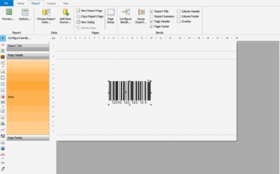
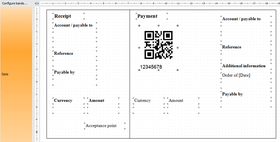
FASTREPORT.NET does not use MS Visual Studio IDE to create and modify reports, like many other reporting tools do. Instead, it contains powerful visual report designer that supports zooming, undo/redo, guidelines, rulers. It has fully customizable interface with MS Visual Studio look. Report designer can be used in run-time, so you can give your users the ability to modify existing reports and create new ones. Report designer is run-time royalty-free.
The Report Structure control visualizes the logical structure of your report. It helps you to better understand the report (especially if you are not its author).
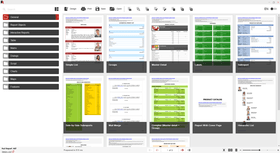
Standard Report wizard. Perform 5 steps and get well-shaped, ready-to-use report.
Label wizard supports most of label types and helps you to create label report in a few mouse clicks.
The report designer can be used in MDI (Multi-Document Interface) mode to allow work with several reports at one time.
FASTREPORT.NET - Data Processing
FASTREPORT.NET works with data from ADO.NET data sources. It has ability to sort and filter data rows, to use master-detail relations and lookup data columns. Everything can be done with a few mouse clicks.
Direct connect to ADO, MS SQL, xml-based databases. Other connectors available as plug-ins.
Ability to get data from business objects of IEnumerable type.
Report can contain data sources (tables, queries, DB connections). Thus you can not only use application-defined datasets, but connect to any databases and use tables and queries right inside a report.
FASTREPORT.NET has a built-in script engine that supports two .NET languages, C# and VB.NET. You can use all .NET power in your reports to perform complex data handling, manage the interaction with dialogue forms and many more.
Report can contain dialogue forms to ask for some parameters before the report is run. Dialog controls have built-in data filtering feature that allows you to view the data from a report data source and filter it in a few mouse clicks without writing a line of code.
Using visual query builder, you don't have to learn the SQL language to create a complex query from several data tables.
FASTREPORT.NET - Preview, Print, Export
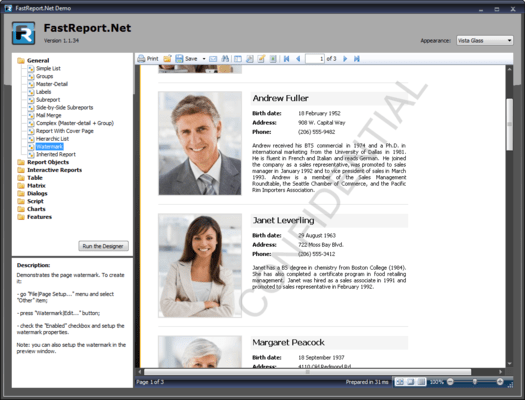
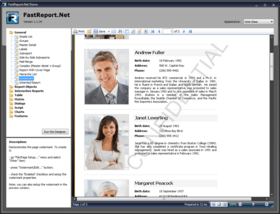
Handy MS Word-style preview window.
Ability to search text in the prepared report.
Ability to modify the prepared report pages.
Navigation in the preview window. When you design a report, you may define elements that will form a document outline. The outline will be displayed in the preview window. When you click an outline item, the preview will be scrolled to specified item. You also may define active items that will receive mouse clicks. It can be used to navigate to another report element or to external URL.
Interactive reports. You can define an action that will be performed if a user clicks an object in the preview window. For example, you can build and show another report with detailed information about the item that was clicked.
Rich printing abilities: cut big pages to several smaller ones, print several small pages on one big, print on specified paper size using scale. You need to print A3 report on A4 printer? It's not a problem anymore!
Add watermarks to your report with minimum efforts.
Export filters allow you to export your report to many supported formats (PDF, RTF, XLS, XML, HTML, JPG, BMP, GIF, TIFF, TXT, CSV, Open Document Format).
Send report by email with one mouse click.
What's New in FastReport.NET V1.8?
Added Web Farms and Web Gardens support in WebReport (example \Demos\C#\WebFarm\Web.Config)
Added HoverStyle property to all report objects
Added WebReport.CachePriority property
Improved WebReport using ControlState instead of ViewState, increased speed and stability
What's New in FastReport.NET V1.7?
Now you can Import from Crystal Reports
Config.DesignerSettings.PageAdded event added
Config.PreviewSettings.AllowPrintToFile property added Report.MaxPages
Property added MatrixObject.KeepCellsSideBySide property added outline
PDF export: added properties TableRow.KeepRows,
TableColumn.KeepColumns added TableObject.ManualBuildAutoSpans
Property added ability to hide some objects (export filters, report objects) by the code: RegisteredObjects.FindObject(typeof(PDFExport)).Enabled = false
Improved report file cache
Improved .fpx loading speed/memory usage
What's New in FastReport.NET V1.6
Added added ability to save template to RDL format (Report Definition Language)
Changed work of exports and printing in WebReport, now FastReport.NET use handlers in "web.config"
Added added Romanian, Hungarian, Japanese and Thai localization added
Added Report.InitialPageNumber property added TextObject.ParagraphOffset
Added property added PreviewControl.UseBackColor property added IsNull
Added function to check DB columns for null added import of WritingMode
Added property when import template from RDL format added saving of
Added TextObject.Angle property when saving template in RDL format added
Added FNC1 symbol encoding in the Datamatrix barcode (use &1; sequence)
Added Open Document Text, XPS, DBF exports in WebReport
Added ability to replace built-in query builder
What's New in FastReport.NET V1.5
Added import from RDL format (Report Definition Language)
Added XPS export
Added Word 2007 (docx) export
Added DataBand.ResetPageNumber property
Added properties PDFExport.JpegQuality and PDFExport.RichTextQuality (default value is 90 in both)
Added Slovak localization
Added support for custom functions in the matrix totals
Added calculation of percents in the Matrix object
Added TotalsFirst option for the matrix totals
Added property HTMLExport.Layers and a checkbox in the dialog of the HTML export (enable layers in HTML file)
Added Config.ReportSettings.ReportPrinted event
Added DataLoaded event to all dialog controls that support data filtering
Added inline printing from browser in WebReport
Added property WebReport.PrintInPdf (enable for PDF printing or disable for browser printing)
Added properties WebReport.PrintWindowWidth, WebReport.PrintWindowHeight
Added properties WebReport.ShowWord2007Export, WebReport.DocxMatrixBased
What's New in FastReport.NET V1.4:
Added Visual Studio 2010 support
Added support of font subsets in PDF export
Added SQL CE connection
Added HierachyRow# system variable which returns the row number like "1.2.1" in the hierarchical report
Added support for table schema in OleDB and ODBC connectors
Added NumToWordsEs function for spanish
Added Dutch localization
Added Ukrainian localization
Added Config.ReportSettings.DefaultPaperSize property
Added HTMLExport.Print property (show the browser's print dialog when html document is opened, available only in "single page" mode)
Added HTMLExport.PageBreaks property (insert hard page breaks in "single page" mode)
Added ForceLoadData property to all datasources
Added band.FirstRowStartsNewPage property
Added Parameter.Description property
Added Config.TempFolder property
Added report.ReportInfo.PreviewPictureRatio property
Added DataBand.PrintIfDatasourceEmpty property
Added ChildBand.PrintIfDatabandEmpty property
Added Config.DesignerSettings.Restrictions.DontCreateData restriction to disable the "Data|Add Data Source..." menu
What's New in FastReport .NET V1.3?
Added monochrome TIFF export
Added Excel 2007 export
Added PowerPoint 2007 export
Added MHT (web-archive) export
Added DBF export
Added ODBC connection
Added Oracle ODP.NET connection
Added ability to print copy name on the printed page
Added built-in support for cascaded data filtering (DetailControl property).
Added TextObject.NullValue property (to replace null values with specified string)
Added TextObject.ProcessAt property (allows to print totals in the header)
Added the ImageExport.MonochromeTiffCompression property
Added HTMLExport.WidthUnits, HTMLExport.HeightUnits properties (allows selection between Pixel and Percent)
Added Config.DesignerSettings.FilterConnectionTables event
Added DataSourceBase.Load event to load detail rows in code
Added Croatian localization added Persian localization
Added new demo projects in the Demos\VB.Net folder added "Script/Sort Group By Total" report
What's New in FastReport .NET V1.2?
Added Functions in the "Data" window
Added new report objects - CellularTextObject, ZipCodeObject
Added report's Email settings (see Report|Options... menu, "Email" tab)
Added multi-frame TIFF export
Added RC4 128-bit encryption in PDF export
Added "Visible" flag in the highlight editor. Now the highlight condition may hide the object
Added TextObject's AutoShrink, AutoShrinkMinSize properties
Added DataBand's RowCount property
Added ReportPage.ManualBuild event
Added PictureObject.Angle property
Added AfterData event to all report objects
Added CommandTimeout property to all connections
Added export of watermarks in HTML format
Added export of underlined TextObject (Underlines = true) in PDF format
Added Swedish, Chinese (Traditional), Czech, Turkish, Spanish localizations
Added new demo reports in the "Report Objects" category
Added new demo projects in the Demos folder
Improved performance (loading and running reports with lot of objects)
You can use Anchor property of report objects when printing hierarchical bands
Changed default extension of resulting file in Excel(XML) export from *.xls to *.xml
Changes in Excel(XML) export - added export of numeric values
Changes in Matrix object
Improvements in hierarchical reports (header/footers, totals)
Fixed bug in VB.Net report language
Fixed bug in Viewer.exe (exception if window is too small)
Fixed bug with selecting Report in the ReportTree in VS design-mode
Fixed bug when using WebReport with MasterPage
Fixed bug with RTL in HTML export and WebReport
Fixed bug with RTL in RichText(rtf) export
Fixed bug in MS Chart (border width is not scaled properly when printing)
Fixed bug with preview window's "Search" dialog
Fixed bug with Nullable column type
Fixed bug in PDF export when exporting complex fills
Fixed bug with export different frame styles in XML and RichText formats
Fixed bug when editing prepared report
Fixed printing of CellularTextObject
Fixed bug with dialogue form
Fixed bug with Entity Framework in ASP.NET mode
Fixed bug in PageSetup dialog in preview
Fixed bug with rendering side-by-side Matrix objects
Fixed bug in Label wizard
Fixed bug with send email via MAPI
Create application-independent reports.
Pricing: FastReport.Net V1.8 Win forms + Web forms 1 Single License (includes one year subscription), FastReport.Net V1.8 Win forms + Web forms 1 Team License (for up to 4 developers) (includes one year subscription), FastReport.Net V1.8 Win forms + Web forms 1 Site License (allows unlimited developers within one organization at a single physical address) (includes one year subscription), FastReport.Net Win forms + Web forms Subscription Renewal 1 Year Subscription Renewal for Single License, FastReport.Net Win forms + Web forms Subscription Renewal 1 Year Subscription Renewal for Team License, FastReport.Net Win forms + Web forms Subscription Renewal 1 Year Subscription Renewal for Site License
Evals & Downloads: Read the FastReports.Net Class Reference Documentation, Read the FastReports.Net Programmers Manual, Read the FastReports.Net User Manual, Download the FastReports.Net VS2005-VS2010 .NET 2 Evaluation on to your computer - Output Displays Evaluation Label, Download the FastReports.Net for VS2010 .NET 4 Evaluation on to your computer - Output Displays Evaluation Label
Operating System for Deployment: Windows Vista, Windows XP
Architecture of Product: 32Bit
Product Type: Component, Application
Component Type: ASP.NET WebForms, ASP.NET AJAX (ATLAS), .NET WinForms, .NET Class, 100% Managed Code
Application Type: Developer Application, Server Application
Built Using: Visual C# .NET
Compatible Containers: Microsoft Visual Studio 2010, Microsoft Visual Studio 2008, Microsoft Visual Studio 2005, Microsoft Visual Basic 2010, Microsoft Visual Basic 2008, Microsoft Visual Basic 2005, Microsoft Visual C++ 2010, Microsoft Visual C++ 2008, Microsoft Visual C++ 2005, Microsoft Visual C# 2010, Microsoft Visual C# 2008, Microsoft Visual C# 2005, .NET Framework 4.0, .NET Framework 3.5, .NET Framework 3.0, .NET Framework 2.0
Keywords: Fast Report FastReport FastReports Reports reporting reported
Fast Reports FastReports
Reporting Reports Report
Part numbers: PC-517843-432587 517843-432587 PC-517843-432589 517843-432589 PC-517843-432591 517843-432591 PC-517843-432593 517843-432593 PC-517843-432594 517843-432594 PC-517843-432595 517843-432595