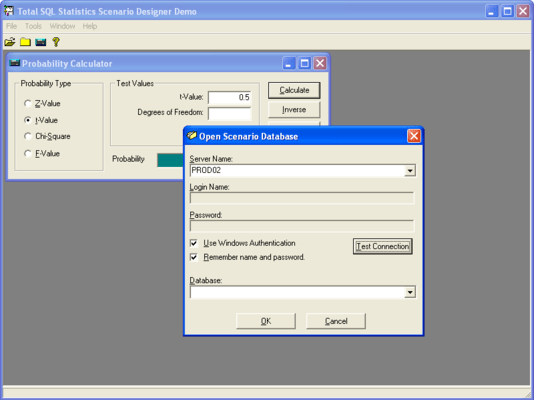
Screenshot Preview

Total SQL Statistics

by FMS - Product Type: Application

Perform a wide range of statistical functions with all results in SQL Server tables. Total SQL Statistics is a Windows application that offers a wide range of statistical functions for Visual Basic and Visual Studio.Net developers using SQL Server data. It includes functions to analyze data stored in SQL Server tables, views, stored procedures, and user defined functions. Total SQL Statistics can generate Visual Basic.Net code that runs any scenario you have defined.

Our regular prices are shown below. Please logon to see your discounted prices.

Price in

Total SQL Statistics V1.0

Add to Cart $ 979.02 1 Developer License
Mfr. Part No: SQLS
Download (4.6 MB)
Add to Cart $ 685.02 1 Developer License Upgrade from Total VB Statistics or Total Access Statistics
Mfr. Part No: SQLS-U
Verify Download (4.6 MB)
Add to Cart $ 2,939.02 5 Developer License
Mfr. Part No: SQLS-5
Download (4.6 MB)
Add to Cart $ 9,799.02 25 Developer License
Mfr. Part No: SQLS-25
Download (4.6 MB)

Annual Premium Support Subscription

Add to Cart $ 293.02 1 Support License Download (29 KB)
Add to Cart $ 263.62 1 Support License Renewal Verify Download (29 KB)
Add to Cart $ 979.02 5 Support License Download (29 KB)
Add to Cart $ 881.02 5 Support License Renewal Verify Download (29 KB)

Our prices include ComponentSource technical support and, for most downloadable products, an online backup and a FREE upgrade to the new version if it is released within 30 days of your purchase.  All sales are made on our standard Terms and Conditions and subject to our Return Policy. Please contact us if you require any licensing option not listed, including volume licensing and previous versions.

Our regular prices are shown above. Please logon to see your discounted prices.

Screenshot of Total SQL Statistics - Application (.NET Ready) - V1.0

Developed specifically for Visual Basic and Visual Studio.Net developers using SQL Server data, Total SQL Statistics eliminates the need to export your data to other programs for statistical analysis. You can perform a wide range of statistical functions with all results in SQL Server tables. View, sort, query, or display the results.

Total SQL Statistics includes two parts. The first is an interactive Statistics Scenario Designer. This standalone program lets you easily specify the database, data, fields, and analysis to perform. The second part is a DLL component that performs the analysis. Design analysis scenarios by running our standalone Scenario Designer program, and run them from your program with a simple DLL call into a distributable run-time library. Only the structure of the scenario is saved, not the data, so analysis is always performed on the current data.

Total SQL Statistics supports Microsofts .Net platform. You can create Visual Studio.Net projects and include a reference to the Total SQL Statistics Runtime DLL just as you would in Visual Basic 6. Additionally, Total SQL Statistics can generate Visual Basic.Net code that runs any scenario you have defined.

Scenario Designer

The Total SQL Statistics Scenario Designer is where you create analysis scenarios. Scenarios contain information on the data to analyze and the statistical options to perform. A Wizard-like interface guides you through the process with no programming required. This allows you to perform powerful analysis with point-and-click ease. Your selections are automatically saved as "scenarios" which can be run interactively or invoked programmatically.

Programmatic Interface

Total SQL Statistics includes a programmatic interface for programmers who want to incorporate statistical functions directly into their applications. A DLL is all that is needed to add Total SQL Statistics to your applicationssimply reference our DLL with the scenario you designed in the Scenario Designer, and the results are generated. You can specify all login information and direct output tables to a different database. While the analysis is running, events are available to let you know its progress. The analysis runs in the background, so your users wont even know how you generate the complex analysis!


Product Search

Enter search words:

Quick Links

Publisher

Primary Category

Award