by Accusoft (formerly Pegasus Imaging Corp.) - Product Type: Component / .NET WinForms
ImagXpress .NET Standard by Accusoft (formerly Pegasus Imaging Corp.)
URLs: imagxpress-standard, imagxpress standard, imagxpressstandard, accusoft-pegasus, accusoft pegasus, accusoftpegasus
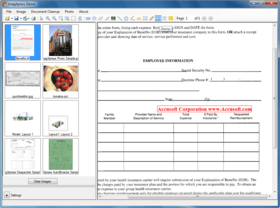
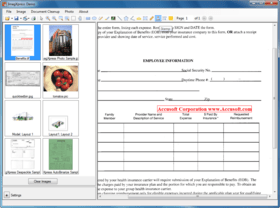
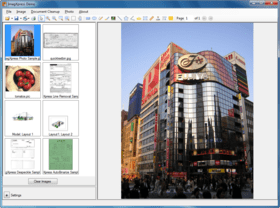
Perform image compression, decompression, and file conversion with support for over 30 popular image file formats. The ImagXpress SDK lets you quickly add imaging functions to your Windows application. With Accusoft Pegasus' powerful imaging tools, you can quickly develop applications that require complex imaging tasks for document imaging, photo processing, or medical applications, while you concentrate on the unique needs of your program. ImagXpress is the image handling engine behind most of Accusoft Pegasus' advanced recognition and image processing products. It's one of the fastest ways to develop professional applications involving images. ImagXpress Standard offers a solid set of basic image viewing, printing, scanning, and processing features. Viewing tools, image effects and basic image enhancement are included. Document image cleanup and annotation support are not provided. Includes the ImagXpress, ThumbnailXpress, and TwainPRO components.

ImagXpress Standard offers a solid set of basic image viewing, printing, scanning, and processing features. Viewing tools, image effects and basic image enhancement are included. Document image cleanup and annotation support are not provided. Includes the ImagXpress, ThumbnailXpress, and TwainPRO components.

Features / FunctionalityProfessionalStandard
Basic Image Processing••
Advanced Document Image Processing•
Advanced Photo Image Processing•
Compression File FormatsSee table belowSee table below
Annotation•
TWAIN Scanning••
Thumbnail Support••
Advanced Printing•
ImagXpress File Format Support in Each Edition
R = Read, W= Write
ImagXpress v10 .NET
Professional supports all file formats, including multi-page formats.
Standard supports a more limited set of file formats, including many multi-page formats.
ImagXpress v10 .NET File Format SupportProfessionalStandard
BMPR/WR/W
CALS (Type I)R/W
CALS metadata edit (CALS tags)R/W
Camera RAW FormatsR
DCX (multi-page)R/WR/W
DIBR/WR/W
DWFR
DWGR
DXFR
GIF (single page)R/WR/W
HD Photo (JPEG XR)- HDP, WDPR/WR
ICO (multiple image)R/WR/W
ICO (single image)R/WR/W
JBIG2R/WR
JEDMICS C4R
JPEG 2000 (JP2, J2K)R/WR/W
JPEG LS (JLS)R/W
JPEG metadata edit (IPTC, EXIF)R/W
JPEG metadata edit without opening fileR/W
JPEG, JIFR/WR/W
Lossless JPEG (LJP)R/W
MO:DCA, PTOCA, IOCA, ABIC (multi-page)R/W
PBMR/WR/W
PCXR/WR/W
PDF (multi-page, image only, with image compression)R/WR/W
PDF (single page, image only, with image compression)R/WR/W
PGMR/WR/W
PIC / ePICR/WR/W
PNGR/WR/W
PPMR/WR/W
RAWR/W
TGAR/WR/W
TIFF (multi-page)R/WR/W
TIFF (single page)R/WR/W
TIFF metadata edit (IPTC, TIFF tags)R/W
WBMPR/WR/W
WMF, EMFRR
WSQR/WR
The ImagXpress SDK is an all purpose imaging toolkit for building image enabled applications. Accusoft Pegasus' powerful tools allow you to simply add document imaging and photo processing capabilities to your applications.
ImagXpress v10 Features:
Compression & File Formats
Interact with file formats on disk, in memory and URLs
Support for 1, 4, 8, 16, 24, 32-bit images
Support for 2 to 16-bit grayscale images, including window leveling
Support beyond 8-bit, grayscale lossy JPEG
Unicode (double-byte) characters are supported in text, file, and in thumbnail descriptors
Convert to PDF or Scan to PDF (containing bitonal, grayscale, and color image data such as JPEG, JPEG 2000 or JBIG2). Users may add on PDF Xpress for enhanced PDF support.
Support for TIFF format including Group 3,Group 4, JPEG, JPEG Type 7, CCITT RLE, LZW, Pack Bits, and Deflate compressions. Additionally support is available for IPTC metadata, TIFF tag editing, compacting of multiple page files, Wang TIFF annotation compatibility, 9 to 16-bit grayscale, and intrinsic orientation (the file itself contains a rotation angle that can be interpreted during display).
Support vendor-specific Camera RAW - automatic detection and decompression of digital RAW photos from Canon, Fuji, Kodak, Minolta, Nikon, Olympus, and more.
Password protect images using .pic, an Accusoft Pegasus format that allows greater compression and password capability. These files require Accusoft Pegasus products to view and manipulate them.
Photo and Color Image Processing & Editing
Comprehensive set of over 80 image processing functions, such as:
Autocrop, Crop, Rotate, Scale, Zoom, Despeckle, Border Removal, and Color Deskew
Auto Red Eye Removal to automatically detect and correct red eyes in digital photos with reporting and "confidence level" for each region, supporting automated removal based on set criteria
Auto Color Correction & Auto Lightness Correction
Auto Color Level
Auto Contrast
Alpha Channel Support (e.g. alpha, integration, separation)
Photo Collage Layout and Printing
Dust Removal from color images
Scratch Removal from color images
EXIF tag editing without affecting image data
Color Anti-Aliasing and Smoothing for zoomed images
Advanced merging capabilities
Retention of image transparency
Adjust contrast, brightness, hue, saturation, gamma, and more
Display adjustment of contrast, brightness, and gamma
Color Matching with an easy to use interface, that allows reflected and emitted colors to be matched for visual equality.
Supports monitor and printer profile selection, programmatically specifying rendering intent.
Color Space Conversion using ICC Color Profile (CMYK to RGB and RGB to CMYK conversion for TIFF and JPEG images)
Color Proof of printer output prior to printing
24, 8, 4, and 1-bit color depth conversions with advanced palette control
Area and region processing
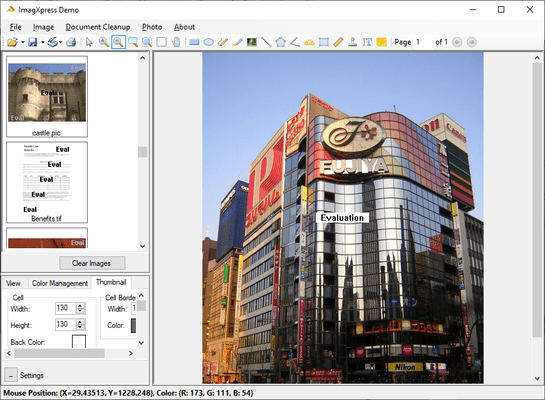
Thumbnail Image Support
An easy, flexible, memory-friendly way to add thumbnail image display and support a wide range of file formats
Multi-Page Image Support
Display thumbnails of directories and/or multi-page image files
Display thumbnails of PDF files (when PDF Xpress is installed)
Rapid Display
Load thumbnails from memory buffer or IOStream
Generate thumbnails asynchronously to provide the fastest display of thumbnail images possible
Cache thumbnail images for quick scrolling and redisplay
Multiple Navigation Options
Directory drill down
Drag and drop thumbnails within and between thumbnail windows, and from other applications
Programmatic scrolling, mouse wheel support, keyboard navigation, and more
Flexible Captions and Display Options
Set thumbnail display options including spacing between thumbnails, border width, border color, background color, and painting order
Set labels displayed with each thumbnail
Take advantage of extensive font formatting options
Unicode support for thumbnail descriptors
Flexible Image File Selection
Select one or multiple thumbnails using the mouse
Create custom actions using mouse methods and events
Tools
Hand tool, magnifying glass, pan and zoom, rubber band, rectangle (area and region), elliptical and free hand selection
Create custom cursors
Right click pop-up menu, including image information dialog, tool selection, zoom
Create customized mouse and key sequences for tools in toolbar
Automated support to maintain the Aspect Ratio for images with differing horizontal and vertical resolutions
Multiple image scaling algorithms
Advanced scrollbar, smooth scroll, mouse wheel support, and autosize features
Capture the contents of any window or section of any window
Built in timer with TimerTick event
Image property interface
Programmable image alignment within the control
1/1000 degree rotation increments
Annotation
Fully-programmable annotation support
Add annotation and redaction capability to applications
Add, delete, query, and manipulate annotation elements programmatically
XML multi-page support for import and export of annotations via file or memory
PDF annotation import and export using XFDF via file or memory (requires PDF Xpress)
Read and write the Wang/Kodak TIFF annotation format, and store all annotations in either TIFF files or in external files
Unicode (double-byte) characters are supported for languages with extended character sets
Multiple layer support
Create, display, save, restore, and password-protect annotations in independent layers
Standard annotation objects include ruler, freehand, text, rectangle, ellipse, polygon, line, polyline, image, and rubber-stamp
Add notes, block highlight, tooltip text support for individual annotations, and autosize
Brand annotations into images
Print annotations with the image
Supports opaque, translucent, and fully transparent backgrounds for notations
Supports opaque and translucent notations, useful for watermarking
Lock and unlock annotation data to locations in the control rather than the image, enabling navigation without moving the annotations (such as patient name and ID)
Document Image Processing & Editing
Comprehensive set of over 80 image processing functions, such as:
Autocrop, Automatic Deskew, Despeckle, Line Removal
Auto Binarize using image analysis and optimized settings when converting to a bitonal image
Anti-Alias and Scale to Gray
Dilate to add black pixels which extend objects vertically, horizontally, or diagonally
Erode bitonal images by removing black pixels from objects
Smooth Zoom enhances clarity by replacing small images with larger, smoothed images.
Color Anti-Aliasing and Smoothing for zoomed images
Shear enables degree rotation of bitonal images
Hole Punch & Blob Removal with results reporting
Blank Page Detection
Border Crop on bitonal images
Adjust contrast, brightness, hue, saturation, gamma, and more
"Preserve Dark" Detail Enhancement (many pixels are averaged for the one displayed)
Avoid losing details in fine lines or fine text
Retention of image transparency
24, 8, 4, and 1-bit color depth conversions
Automated 1 bpp image cleanup
Area and region processing
TWAIN Scanning
Acquire images from TWAIN scanners and digital cameras using the included TwainPRO component
Support for TWAIN v2.0 standard, including 64-bit TWAIN support (.NET Only)
Access device’s capability settings and configuration dialog
Read and write basic G3/G4 TIFF, JPEG, BMP, and PackBits
Save / compress to JPG, J2K, JBIG2, and TIFF-G4 within PDF files
Speed optimized TIFF writing (faster creation of large multi-page TIFFs)
Specify image resolution, image scaling, units, and color depth
Negotiate for all standard device features such as image dimensions, location, and resolution
Negotiate for optional device features such as: autofeeder enabling, brightness, contrast, image layout/frame, maximum image transfers, progress indicators, resolution, scaling, and units
Scan images faster and use less memory by transferring images from the data source in either Native or Buffered Memory transfer mode
Unicode (double-byte) characters are supported for languages with extended character sets
ISIS add-on available through ISIS Xpress
Printing
Add powerful printing features to applications with just a few lines of code
Print to File, including multi-page TIFF and multi-page PDF output (containing G4 compressed image data)
View and change printer properties, including default printer, bin, paper size, orientation, duplex mode, and more
Supports single and multi-page documents
Cancel print jobs that have been previously sent to the printer
Print single or multiple Device Independent Bitmaps (DIB) and Device Dependent Bitmaps (DDB) on any page
Color management support
Automatically maintain the bitmap's aspect ratio to print large images at any size
.NET (v10) Technical Notes:
Programming environments include: Visual Studio 2005 and Visual Studio 2008
Sample code is included for: VB.NET and C#
Creates .NET AnyCPU applications for use in 64-bit and 32-bit environments
Deploys within .NET as a managed control and is fully compliant with .NET Framework 2.0 and above
Streaming image support for progressive image viewing online
Can be used in multi-threaded applications
Query and update image data (e.g. tags) from memory buffer or IOStream without loading entire image
ImagXpress v10 Service Pack
Add the latest PDF support to your application
Using ImagXpress and PDF Xpress together you can easily create, modify, enhance, compress, and display PDF files.
Render PDFs, create image-based PDF files, edit bookmarks and metadata, convert to PDF/A, and more.
PDF developers now have more options. With this ImagXpress Service Pack, ThumbnailXpress offers improvements for displaying thumbnails of PDFs. ThumbnailXpress v3 provides the option to use a PDF Xpress feature to automatically try to correct corrupt PDF images. If the image can be corrected, the thumbnail will be displayed correctly. ThumbnailXpress customers working with PDF Xpress can either stay with PDF Xpress v3, or upgrade to PDF Xpress v4. The ThumbnailXpress component now supports both interfaces.
What's New in ImagXpress v10 .NET
64-bit support
Any CPU-compiled .NET SDK now supports application development for both 32 and 64-bit Windows platforms
Support for TWAIN 2.0, including 64-bit TWAIN Support
Additional Auto Binarize options available
Support for additional Camera RAW formats
Perform image compression, decompression, and file conversion with support for over 30 popular image file formats.
Pricing: ImagXpress .NET Standard V10.0 SP1 (10.0.46.0) 1 Developer License, ImagXpress .NET Standard V10.0 SP1 (10.0.46.0) - Upgrades 1 Developer Upgrade License from ImagXpress Standard V9.x, ImagXpress .NET Standard V10.0 SP1 (10.0.46.0) - Upgrades 1 Developer Upgrade License from ImagXpress View V9.x, ImagXpress .NET Standard V10.0 SP1 (10.0.46.0) Deployment Licensing(Servers are licensed per core, annually. Minimum 2 core per server.) 1 Server (CPU) Deployment License (Minimum quantity 2 per server), ImagXpress .NET Standard V10.0 SP1 (10.0.46.0) Deployment Licensing(A minimum of 5 client licenses is required for first time purchases) 1 Additional Client Runtime License, price per client (1 to 4) (you must already own at least 5 client Runtime Licenses), ImagXpress .NET Standard V10.0 SP1 (10.0.46.0) Deployment Licensing(A minimum of 5 client licenses is required for first time purchases) 1 Client Runtime License, price per client (5 to 9) (minimum quantity 5), ImagXpress .NET Standard V10.0 SP1 (10.0.46.0) Deployment Licensing(A minimum of 5 client licenses is required for first time purchases) 1 Client Runtime License, price per client (10 to 24) (minimum quantity 10), ImagXpress .NET Standard V10.0 SP1 (10.0.46.0) Deployment Licensing(A minimum of 5 client licenses is required for first time purchases) 1 Client Runtime License, price per client (25 to 49) (minimum quantity 25)
Evals & Downloads: Read the ImagXpress v10 .NET help file, Read the Pegasus Licensing Information, Download the ImagXpress V10.0 SP1 (10.0.46.0) .NET evaluation on to your computer - Displays Nag Screens
Operating System for Deployment: Windows 7, Windows Vista, Windows XP, Windows Server 2003, Windows 2000
Architecture of Product: 32Bit, 64Bit
Product Type: Component
Component Type: .NET WinForms
Compatible Containers: Microsoft Visual Studio 2008, Microsoft Visual Studio 2005, Microsoft Visual Basic 2008, Microsoft Visual Basic 2005, Microsoft Visual C++ 2008, Microsoft Visual C++ 2005, Microsoft Visual C# 2008, Microsoft Visual C# 2005, Microsoft Internet Explorer 5.0, .NET Framework 3.5, .NET Framework 3.0, .NET Framework 2.0
Product Class: User Interface Components
Keywords: Pegasus ImageXpress Imaging ImagXpress Activex com vcl Image Picture Bitmap processing graphic document scan view edit print annotation conversion Barcode ICR ISIS JPEG 2000 lossless JPEG TWAIN BMP DCX DIB PIC GIF JIF JPG PBM PCX PGM PNG PPM TGA TIFF WPG
Pegasus Image Imaging accusoft
image images processing imaging
compression java, compression c#, compression library, compression c++, compression control, compression vb, compression class, compress library, compression delphi, compression component, compression unzip, compression activex, compression dll
Imaging image images
Image images Compression compress compresses Conversion convert converting converts conversions
Scan scanning scanned scanner scans OCR optical character recognition
Part numbers: PC-506212-358619 506212-358619 PC-506212-358623 506212-358623 PC-506212-358627 506212-358627 PC-506212-358633 506212-358633 PC-506212-358631 506212-358631 PC-506212-358632 506212-358632 PC-506212-358634 506212-358634 PC-506212-358638 506212-358638
Publisher
Primary Category
Related Products
Related Categories