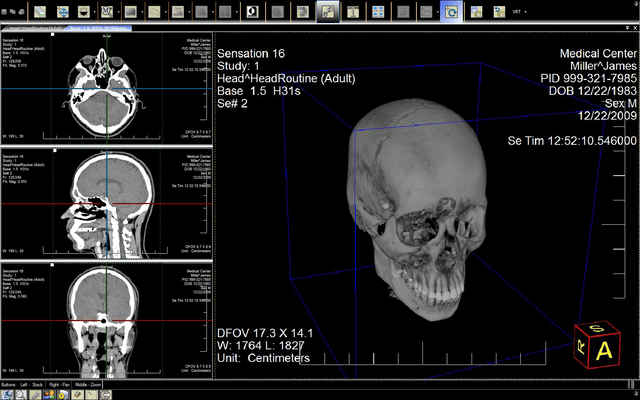
Screenshot Preview

LEADTOOLS Medical Imaging Suite Runtime Licenses - Summary

by LEAD Technologies - Product Type: Component / Add-In / ASP.NET AJAX (ATLAS) / .NET WinForms / .NET Class / .NET WCF / .NET WPF / Silverlight / .NET WF / DLL / VC++ Class Library

Summary

LEADTOOLS Medical Imaging Suite Runtime Licenses by LEAD Technologies

URLs: leadtools-medical-imaging-suite-runtimes, leadtools medical imaging suite runtimes, leadtoolsmedicalimagingsuiteruntimes, leadtools

Medical imaging programming libraries - LEADTOOLS Medical Imaging toolkit is a collection of .NET, VC++ Class Libraries and an API that provides complete support for the DICOM 3.0 specification, including all standard IOD classes and modalities, 12 and 16-bit grayscale imaging and much more. The Medical Imaging SDK provides powerful medical-specific annotation objects such as cross product, point, and protractor, allowing the measuring and mark-up of medical files.

This page outlines the Runtime Licenses for LEADTOOL Medical Imaging Suite.

Licensee must purchase a runtime license or server license for each Deployment of Application Software. For purposes hereof, a "Deployment of Application Software" will include Stand Alone Deployments, Stand Alone Deployments with CD Burn License, Concurrent Deployments, Server Licenses and Duplication Licenses. A "Stand Alone Deployment" includes any and all copies of the Application Software installed, used, distributed, leased, or sold by Licensee and any of its customers, employees, distributors, resellers, affiliates or other channel partners. A Stand Alone Deployment with CD Burn License is a Stand Alone Deployment where the user of the Application Software is permitted to "burn" Dicom files onto a CD and to distribute a read only Dicom viewer developed with the Software with each burned CD provided the viewer will only be able to view Dicom files that are on the burned CD. If the Application Software is installed on a server or network by Licensee or its customers, the number of Stand Alone Deployments that must be reported and the number of runtime licenses that must be purchased hereunder will be the number of computers that are permitted access to the Application Software via the network or server. Notwithstanding the foregoing, if the Application Software is installed on a server or network and only a specified number of the computers connected to the server or network can access the Application Software at the same time, the applicable number of computers that are permitted simultaneous access to the Application Software will be a "Concurrent Deployment" for purposes hereof. (For example, if the Application Software is installed on a network with 1000 computers connected, but only 10 computers may access the Application Software at the same time, licensing for 10 Concurrent Deployments and no Stand Alone Deployments will be required for purposes hereof. Additionally, Licensee has the option of purchasing a "Web Server License" for certain types of server installations of the Application Software and a Duplication License for certain types of CD duplication installations of the Application Software.

For more information see Pricing & Licensing and read the Licensing help file in the Evals & Downloads section.

LEADTOOLS Medical Imaging Suite includes everything in the Medical Imaging product and adds support for Cloud, DICOM - communication, PACS client and server, PACS eorkstation framework; Security; Multimedia formats; Medical Web Viewer Framework; Medical 3D; Multimedia - capture, compression, conversion, playback, processing, Print to PACS and Virtual Printer (Print Capture).

Key Features:

DICOM Basic

New WPF Standard .NET

New WPF Pro

DICOM Dataset

DICOM Waveform

DICOM Annotation

JPEG2000 Compression

Enhanced Greyscale Display

Enhanced Greyscale Processing

DICOM Digital Signatures

General Imaging Features

ePrint Integration

Medical Image Viewer

Additional features can be added to Document Imaging:

New DICOM Pacs Module

New Medical Multimedia Module

New Medical Web Viewer Framework Module

DICOM Data Security

DICOM Communication

Multimedia API and COM

MPEG-2 Video Codecs

Video Codec (MJPEG/MCMP)

New Optical Character Recognition (OCR)

New Intelligent Character Recognition (ICR)

New Optical Mark Recognition (OMR)

New Forms Recognition

OCR PDF Plug-in

Raster PDF Plug-ins

New JPIP Client and Server

Barcodes

DICOM Basic:

LEADTOOLS Medical Imaging product line includes general medical imaging technologies (1-16,24,32 bit color, 1-16 bit grayscale and window leveling of 12 and 16-bit grayscale images), and support for the DICOM file format. Load, process, display, window level and save 12 and 16 bit grayscale images (including support for 16-bit grayscale TIFF). Detect and set LowBit and HighBit for image data, display images with automatic LUT intensity expansion, or set LUT entries and ranges with specific values and gradients. Display images through the LUT without changing the data, or process the image data using the LUT.

DICOM Basic

LEADTOOLS Medical Imaging provides COMPLETE support for the DICOM 2003 specification, including all standard IOD classes and modalities (CR, CT, MR, NM, US, RF, SC, VL, etc.) and complete DICOM Basic Directory support.

With the base DICOM support you can do the following:

Supports 2008 version of DICOM

PDF, 1-bit and raw data can be stored in DICOM

Simply Create/Initialize complete Data Sets (all modules and elements) for any IOD class

Load and Save Data Sets with or without header, using any Transfer Syntax

Maneuver through a Data Set in Tree or List mode

Search a Data Set

Insert and Delete Data Set Members

Get and Set Data Element Values

Get and Set Data Set Information

Get, Set and Insert Single or Multiframe Images (compressed or uncompressed)

Maneuver through Basic Directory Data Set in Tree or List mode

Insert and Delete Keys in a Basic Directory Data Set

Get and Set Keys in a Basic Directory Data Set

Maneuver Through the IOD Table

Search the IOD Table

Insert and Delete IODs

Modify an Existing IOD

Set the Default IOD Table

Maneuver Through the Data Element TagTable

Search the Data Element Tag Table

Insert and Delete Tags

Modify an Existing Tag

Set the Default Data Element Tag Table

Maneuver Through the UID Table

Search the UID Table

Insert and Delete UIDs

Modify an Existing UID

Set the Default UID Table

Maneuver Through the Value Representation Table

Search the Value Representation Table

Insert and Delete Value Representations

Modify an Existing Value Representation

Set the Default Value Representation Table

NEW Windows Presentation Foundation (WPF) Standard .NET

WPF supports robust imaging capabilities, interface automation, data-driven user interfaces and visualization, as well as Windows shell integration. WPF can natively access Windows Imaging Component (WIC) codecs and APIs, allowing developers to write image codecs for their specific image file formats.

The LEADTOOLS WPF Standard Edition includes controls for everything you need to start adding imaging functions to your Windows Presentation Foundation (WPF) applications.

WPF Standard .NET Features:

WPF BitmapSource Viewer - Supports all Microsoft .NET BitmapSource image objects. Includes Display, Scroll, Zoom, Margin, Frame, Shadow, PanWindow, and customizable MagGlass options. Provides interactive UI Tools like ZoomTo, Pan, CenterAt, and Scale.

ImageList Control - Lets you display lists of thumbnail images in multiple View Styles like Explorer, Normal, Button, and User-defined. Allows you to set Image List Item Size, Selection Style, and scroll style.

WPF Bitmap Effects - Use 130+ image processing effects and functions to add visual interest to WPF content.

Windows Imaging Component (WIC) Codecs - Instantly add support for 40+ file formats to any WIC/WPF application, including the Windows XP SP3 Explorer and Vista Photo Explorer.

NEW Windows Presentation Foundation (WPF) Pro

Use the LEADTOOLS WPF Pro to unleash the power of LEADTOOLS in your XAML applications. Using LEAD's WPF interface, you can add LEADTOOLS OCR, TWAIN scanning, document pre-processing, medical imaging, and much more to any WPF application. Get Expression Blend-compatible and fully styleable controls for complete interoperation support between LEADTOOLS and Windows Presentation Foundation (WPF) images.

Key Features:

LEAD Technologies' most advanced WPF Image Viewer - Leadtools.Windows.Controls.Pro incudes image viewer controls that not only support all Microsoft .NET BitmapSource image objects, but works directly with LEADTOOLS Imaging Pro .NET classes, allowing you to leverage the full power of LEADTOOLS file format and image processing support. The fully styleable control includes scroll, zoom, pan, magnify glass, and image list.

Advanced WPF Image Processing - The Leadtools.Windows.Media namespace contains classes that let you convert a LEADTOOLS image (Leadtools.RasterImage) to and from a WPF image (System.Windows.Media.ImageSource). This namespace also gives you access to all LEADTOOLS image processing functions, allowing you to create powerful imaging applications using the WPF framework.

Benefits include:

The most support for File Formats - Support even more file formats and flavors, as well as file metadata. Extend WPF file format support with LEAD's WIC-enabled codecs to load and save many image formats including PDF, TIFF, lossless and lossy JPEG, JPEG2000, JBIG2, PSD, DICOM and many more. Includes low-level control when loading and/or saving image files.

Our most advanced Image Processing - Use over 130 Image Processing Effects including edge, blur, noise, artistic, texture, spatial, color adjustments and 3D. Low and High level image processing routines for document, medical, color adjustment, region processing, image analysis and statistics.

WPF Annotations

The Leadtools.Windows.Annotations namespace included with LEADTOOLS Document and Medical products adds powerful annotation capabilities to documents and images in WPF. These include not only lines, shapes, and pointers, but essential tools like redaction (blackout), hotspots, text, images, highlights, sticky notes, images, stamps and hyperlinks.

WPF Transition Effects

The Leadtools.Windows.Media.Transitions namespace allows you to add multiple slide show transition effects to your WPF projects. Choose from 10+ basic effects like wipe, blinds, push, rotate, and zoom, plus dozens of variants.

DICOM Dataset:

A Data Set is a collection of Data Elements stored in a DICOM file. Each DICOM file may or may not include a header consisting of a Preamble and a Prefix. Each DICOM file represents a separate class of information. For example, one DICOM file may represent the Computed Tomography Image class, and another DICOM file may represent the Radiotherapy Structure Set class. DICOM Standard defines a vast numbers of Class Information Object Definitions as standard classes. LEADTOOLS supports user-defined classes in addition to the standard classes.

For each class supported by DICOM there are certain modules contained in each class. Each module consists of a number of Data Elements, each Data Element having its own tag. These Data Elements can be mandatory or optional, depending on the module and the class. In addition to the standard modules and data elements supported by DICOM, user-defined modules and data elements are also supported by LEADTOOLS.

LEADTOOLS maintains the Data Set internally as a tree structure and provides functions to evaluate the Data Set as a tree or as a list. The developer can create the data set object with all the appropriate elements for the specified class in one function call. LEADTOOLS Medical Imaging toolkit provide a number of functions for maneuvering through the Data Set, getting and setting Data Set information, getting and setting Data Element values, searching the Data Set, and creating, loading and saving Data Sets. LEADTOOLS provides functions to delete individual items, delete entire modules, delete all items and delete one or more images in a Data Set.

To retrieve and store values in the Value Field of the Data Element in a Data Set, LEADTOOLS provides low-level and High-level functions.

What are Value Representations (VR's)?

The value representation of a data element indicates the type of data that can be stored in the value field of the data element. There are a number of value representations that are standard for the DICOM. In addition to the standard value representations, user-defined value representations may also be added using LEADTOOLS.

LEADTOOLS maintains a table (or list) internally along with the code, name, length, restrictions and unit size of all available standard and user defined value representations. LEADTOOLS also provides functions to get, set, delete, and rename the value representations in the table.

What are Data Elements and Tags?

The tag of a data element consists of an ordered pair of 16-bit values that represent a Group number and an Element number. The tag indicates the type of information stored in the value field of the data element. There are a number of tags that are standard in DICOM. In addition to the standard tags, user-defined tags may also be added using LEADTOOLS.

LEADTOOLS maintains a table (or list) internally of all available standard and user-defined tags, including the tag's code, name, value representation and value multiplicity information. LEADTOOLS provides a number of functions for maneuvering through, adding, deleting and modifying the Data Element Tag table. Also Data Element table allows the developer to add support for future Data Elements in DICOM without having to receive an upgrade from LEADTOOLS.

What do Unique Identifiers (UIDs) identify?

A unique identifier identifies items such as Service-Object Pair Classes and images. There are a number of unique identifiers that are standard for the DICOM file format. In addition to the standard unique identifiers, user-defined unique identifiers may also be added using LEADTOOLS.

LEADTOOLS maintains a table (or list) internally of all available standard and user-defined unique identifiers, with the UID's name, value and type information. LEADTOOLS provides a number of functions for maneuvering through, adding, deleting and modifying the UID Table.

What is an Information Object Definition?

An Information Object Definition (IOD) is an abstract data model that specifies information about Real-World objects. It provides a means of standardizing information exchanged between applications. There are a tremendous number of IODs that are standard in DICOM. In addition to the standard IODs, user-defined IODs may also be added using LEADTOOLS.

LEADTOOLS maintains a tree internally of all available standard and user defined Information Object Definitions (IODs). LEADTOOLS' functions allow you to evaluate the internal IOD Structure as a tree or as a list.

LEADTOOLS provides a number of functions for maneuvering through and modifying the IOD Structure such as GetRoot, GetParent, GetChild, GetFirst, GetLast, GetCountModule, etc... The toolkit provides several functions for searching the IOD Structure to insert new items, delete individual items and change the name or the description of an IOD already in the IOD Structure. A developer can use the IOD Structure to validate a DICOM Data Set. Additionally, the IOD table Structure allows user to add support for future IODs in DICOM with the current version of LEADTOOLS.

What are DICOM Basic Directories (DICOMDIR)?

In order to identify a DICOM file-set and to facilitate accessing the information stored in the DICOM files of the file-set, the DICOM standard has defined the Basic Directory IOD. A DICOM file-set contains one or more DICOM files. One of the files contained in the file-set is the DICOMDIR file. The DICOMDIR file contains DICOM Directory information, making it easier to access the information contained in the other DICOM files in the file-set. The DICOM files in the file-set are assigned File IDs; so, they can be referenced by the DICOMDIR File, which itself, is identified by a File ID of DICOMDIR.

DICOM Dir data sets may contain special data element called key elements. A Key element is a data element that also contains special information about other key elements in the data set and their relative location within the data set. The specialized information included in a key element maintains information on key element children, non-key element children, parent key elements, and the logical relationships between the elements.

LEADTOOLS maintains the DICOMDIR data set as a tree; however, all key elements are stored at the same level of the tree. LEADTOOLS provides special functions for searching the DICOM Dir data set, maneuvering through the data set, inserting and deleting key elements, and manipulating key elements.

LEADTOOLS also provides high-level functions to create or update DICOMDIR by adding DICOM files or DICOM Data Set loaded in the toolkit.

DICOM Waveforms:

The DICOM standard supports waveform storage and communication: this includes hemodynamic curve data, cardiac electrophysiology, electrocardiography (ECG) and audio signals (WAV files).

LEADTOOLS waveform support is comprehensive and handles the various features supported by the standard which include:

Management of Waveform Group attributes

Channel Manipulation (setting/getting channel samples, source, sensitivity and other attributes)

Audio Support (with the ability to create Basic Voice Audio files for report dictation)

Waveform annotations

In addition, LEADTOOLS supports the different waveform-related IODs defined by the standard which include:

Basic Voice Audio

12-Lead Electrocardiogram

General Electrocardiogram

Ambulatory Electrocardiogram

Hemodynamic

DICOM Annotation:

LEADTOOLS medical programming SDKs offer a variety of annotation (image markup) options that can be added to medical, grayscale and color images.

Annotation objects available include Ruler, Protractor, Cross Product, Pointer, Text, Circles, Freehand, etc. LEADTOOLS allows you to read or write annotations as an external annotation file, private DICOM data elements or LEAD or Wang annotation tags within a TIFF file, or annotations can become a permanent part of the image data or applied to a 1-bit image to create an overlay. With LEADTOOLS Annotations, you can choose between low level access to the annotations, or you can implement annotation support through a fully automated mode with a ready to use floating, customizable toolbar and pop-up menus. The superior annotation features provided in LEADTOOLS can be used in any application where image markup is desired.

LEADTOOLS allows the end-user to reposition nodes of an existing freehand object, which prevents the user from having to redraw the object. Enhanced redact objects allow you to restore parts of an image that were blacked out. When combined with annotation security, these redact objects provide a means of granting user-level access to parts of an image. Annotation objects can be stored as a separate object layer, or can be burned or embedded into the actual image. LEADTOOLS allows you to read or write annotations as an external file or as LEAD or Wang annotation tags within a TIFF file. With LEADTOOLS, you can choose between low level access to the annotations, or you can implement annotation support through a fully automated mode with a ready to use floating, customizable toolbar and pop-up menus. The superior annotation features provided in LEADTOOLS can be used in any application where image markup is required.

With LEADTOOLS Annotation support you can:

Create any of the following objects: line, arrow, rectangle, square, ellipse, circle, polygon, freehand line, text, highlighter, hot spot, note, stamp, redaction, button, audio clip, video, freehand hot spots, points, protractors, cross-products, push pins, and rubber stamps

Implement automated annotation support

Implement annotation passwords (case-sensitive) providing security for every object

Implement hyperlinks for every object. Hyperlinks can be user defined messages, programs to run, or jumps to Web pages

Modify text strings used in automated annotation support

Scale and position a group to fit the displayed bitmap

Group and ungroup objects

Apply an object or group to a bitmap

Size and position an object or group

Rotate an object or group

Flip, reverse, or shear an object or group

Save an object or group on the Windows clipboard

Print an object or group

Save an object or group in a file

Save annotations as an external LEAD file, WMF file, or as a WANG compatible tag inside a TIFF file

Save an object or group as a file in memory. (This is useful for database support)

Save an object or group in a database using OLEDB or VB data binding

Control over where optional annotation name or title is displayed

Multi-page annotation support

The LEADTOOLS Medical Image Viewer Control is a high-level component for building medical display applications such as DICOM viewers, view stations, teleradiology solutions, and high-end diagnostic workstations found in radiology and other medical specialty departments. Whether you are building a PACS for radiology, cardiology, mammography, ophthalmology, pathology, dermatology, dentistry or any other specialty, this control will eliminate the complexity from your project and give you a solid foundation you can rely on.

Key Features:

Display medical grayscale and colored images including MRI, CT, Digital X-Ray, Ultrasound and much more

Support to adjust the screen layout both manually and programmatically. For example the screen shot below shows an MRI and an XA series displayed side by side, the MRI series is shown as 2X2 images while the XA is shown as 1X1

Support to change the scale and offset of a single sub-cell

Support to add different images with different sizes to the same cell

Includes a ActiveSubCell changed event that fires when the active sub-cell has been changed

Support to reset Window Level, Position, Rotation, Zoom

Support to add and remove pages or images to the medical viewer cells

Support to display overlay information on the images, which is an essential feature for any high-end medical viewer. The programmer has full control over the text to be displayed and how it should be positioned and sized inside each window. The control also comes with a set of built-in overlays such as window center and window width values, field of view and much more

Built-in tools:

Window level (brightness and contrast)

Zooming or scaling an image

Panning or moving an image

Image magnification

Stacking or moving from one image to another in a series of images with a single mouse or button click

Annotation

Annotation created event to notify when a new annotation object is created by the user

Annotation clicked event to notify when an annotation has been clicked

Support for changing fore and back color of the text object

Support to rotate, flip and reverse the annotation container

Load and save the annotation objects that are drawn on the control

Region of Interest

Load and save region information that is drawn on the control

Region change event to notify when a region is created, removed or changed

Programtically adjust all the settings related to each one of these tools such as:

Which mouse button to use for applying the tool (left, right and so on)

What keyboard buttons to use for applying the tool. For example the right arrow can be used to increase the window width and the left button to decrease it

What cursor to use when the tool is activated

Apply the effect of the tool to a single image or to all images in a series

Apply the effect of the tool to a single series or to all series managed by the control

Apply the effect of the tool programmatically or through user interaction

Includes a function to easily convert mouse coordinates to bitmap coordinates

Events for mouse actions

Support to apply some action and adjust the MedicalViewer while an animation is running

The window level tool has settings that can be adjusted programmatically such as full control over the different properties of the display container, such as colors, cursors, rulers and so on. Some settings can be adjusted for the container such as built-in ruler that adjusts based on the DPI of the image and the zoom or scale factor. Interpolated image display for higher quality.

Typical applications that can be built using this control:

High-end medical diagnostic workstations

Medical review and quality assurance stations

DICOM viewers

Light-weight viewers that are typically distributed on a CD with patient images

Web-based medical viewers

JPEG2000 Compression:

LEADTOOLS JPEG2000 compression/decompression conforms to the JPEG2000 International Standard. This new state-of-the-art ISO/ITU still image compression standard provides a fast and flexible solution for high-quality, wavelet-based compression. LEAD has committed to fully support all future parts as they are released and therefore LEADTOOLS JPEG2000 will continue to grow as the JPEG2000 standard grows.

LEADTOOLS JPEG2000 Features currently supports:

Native support for 8, 10-16 bit grayscale and 24 bit color lossy compression in a DICOM dataset

Adds intrinsic DICOM JPEG2000 16-bit grayscale lossy compression support to LEADTOOLS Medical Imaging. (JPEG2000 is the only 16 bit grayscale lossy compression supported by DICOM)

Native support for 8, 10-16 bit grayscale and 24 bit color lossless compression in the DICOM dataset

Signed 10-16 bit grayscale image data as supported by JPEG2000

Easily convert DICOM datasets to and from JPEG2000 transfer syntax to and from any other transfer syntax included in DICOM 3 (2003 file standard) (except JPEG LS) using built in LEADTOOLS functions

Improved network performance and image quality as compared to JPEG

Support for four progressive display methods:

Quality Axis - The image starts blurred and the sharpness increases as more image data is received

Resolution Axis - The image is loaded as a smaller version and the physical pixel size increases as more image data is received

Color Axis - The image is loaded one color plane at a time. The image starts loading as a grayscale image and the color will fill in as more image data is received

Position Axis - The image is loaded as blocks. As more image data is received, more blocks are displayed

Multiple resolutions can be stored in the same file without duplication of the image data providing the ability to only decode and display the size of image required by the application

Error checking and robustness allows the transmission of JPEG2000 encoded files over a noisy medium. If an error occurs in the decoding, the image will still be displayed

Control over the final size of the file without hit and miss quality factor adjustments

JPEG2000 compared to JPEG:

JPEG2000 is a new image-encoding standard that provides a feature set vital to the medical imaging community. JPEG2000 provides high compression with image quality superior to all existing standard encoding techniques. This high compression and quality performance is due to the adaptation of wavelet transforms. Wavelet transforms are mathematical formulas that represent complex structures in the image, thereby compressing an extremely large amount of image data into a relatively small amount of compressed data. This compression technique allows applications to save compressed images with higher compression ratios and better image quality as compared to any other software currently in production.

JPEG2000 is a wavelet-based compression stored in a hierarchical format which can contain several stored resolutions of the image in the same file without duplication of data. For that reason, a JPEG2000 compressed image can then be sent to a device in the resolution that best fits without additional storage overhead. LEAD Technologies has used its more than twelve years in the imaging and compression developer toolkit marketplace to formulate a JPEG2000 product that offers DICOM developers the best JPEG2000 implementation available.

JPEG2000 Key Benefits:

Greater compression while maintaining better quality than traditional JPEG. This helps reduce network bandwidth and storage requirements.

JPEG2000 is the only 16-bit grayscale lossy compression supported in DICOM

Maintain diagnostic image quality by using JPEG2000

Multiple resolutions in JPEG2000 means that only the data needed to view the image for a particular device or zoom need be sent over the network and loaded into memory

Progressive display provides feedback to the user while the image is loading

Region of interest encoding and decoding. Compress specified areas of the image more or received more detail for an area of interest on the client maximizing network efficiency while providing the user the detail that he or she demands

JPEG2000 supports 24 bit color, and 8, 12 and 16 bit grayscale image data

LEADTOOLS supports JPEG2000 on multiple platforms including Windows, Pocket PC and an Internet Explorer plug-in

Grayscale Imaging:

Grayscale is a range of shades of gray without apparent color. The darkest possible shade is black, which is the total absence of transmitted or reflected light. The lightest possible shade is white, the total transmission or reflection of light at all visible wavelengths. Intermediate shades of gray are represented by equal brightness levels of the three primary colors (red, green and blue) for transmitted light, or equal amounts of the three primary pigments (cyan, magenta and yellow) for reflected light.

The LEADTOOLS Medical Imaging product line offers complete support for 8-16 bit grayscale, and 12 and 16 bit image processing and display with window leveling and LUT processing.

LEADTOOLS Document and Medical Imaging SDKs include the following grayscale functionality:

Grayscale Image Display

Grayscale Image Processing

Grayscale Common Dialogs

Grayscale Signed Images

Grayscale Compression - JPEG Lossy/Lossless, JPEG2000

Grayscale Image Processing:

LEADTOOLS includes a number of medical image processing functions. Below is a list of key image processing features focused on the medical imaging community and is not a comprehensive list of functionality. If there is a particular image processing function that you need, but can not find below, LEADTOOLS probably supports it. Contact sales@componentsource.com for information.

Get Functional Lookup Table Updates a range of entries in a lookup table, based on specified mathematical functions such as exponential, natural logarithm, linear

Get User Lookup Table Updates a lookup table, based on a curve that passes through specified points

Get Min and Max Bits Returns the low and high bits of the values present in a 12 or 16-bit grayscale or 48 or 64-bit color image

Get Min and Max Values Returns the minimum and maximum intensity values present in a 12 or 16-bit grayscale or 48 or 64-bit color image

Combine Combine performs logical or mathematical operations to merge the image data from two images to create a new image. Source and destination areas, color planes (R or G or B or R, G, and B) to combine as well as the operations to use on the data are specified by the user. Combine can be used to add or subtract overlay bits(plane) to an

Medical imaging programming libraries.

Pricing: LEADTOOLS Medical Imaging Suite V17.5 Prepaid Desk Top Runtime Licenses 1 Desk Top Runtime License, LEADTOOLS Medical Imaging Suite V17.5 Prepaid Desk Top Runtime Licenses 1 Desk Top Runtime License, per license from 10 up to 24 licenses (minimum quantity 10), LEADTOOLS Medical Imaging Suite V17.5 Prepaid Desk Top Runtime Licenses 1 Desk Top Runtime License, per license from 25 up to 49 licenses (minimum quantity 25), LEADTOOLS Medical Imaging Suite V17.5 Prepaid Desk Top Runtime Licenses 1 Desk Top Runtime License, per license from 50 up to 99 licenses (minimum quantity 50), LEADTOOLS Medical Imaging Suite V17.5 Prepaid Desk Top Runtime Licenses 1 Desk Top Runtime License, per license from 100 up to 249 licenses (minimum quantity 100), LEADTOOLS Medical Imaging Suite V17.5 Prepaid Concurrent Runtime Licenses 1 Concurrent Runtime License, LEADTOOLS Medical Imaging Suite V17.5 Prepaid Concurrent Runtime Licenses 1 Concurrent Runtime License, per license from 10 up to 24 licenses (minimum quantity 10), LEADTOOLS Medical Imaging Suite V17.5 Prepaid Concurrent Runtime Licenses 1 Concurrent Runtime License, per license from 25 up to 49 licenses (minimum quantity 25), LEADTOOLS Medical Imaging Suite V17.5 Prepaid Concurrent Runtime Licenses 1 Concurrent Runtime License, per license from 50 up to 99 licenses (minimum quantity 50), LEADTOOLS Medical Imaging Suite V17.5 Prepaid Concurrent Runtime Licenses 1 Concurrent Runtime License, per license from 100 up to 249 licenses (minimum quantity 100)

Evals & Downloads: Read the LEADTOOLS products Help files, Read the LEADTOOLS Licensing Help file, Download the LEADTOOLS Main V17.5 Re-master evaluation on to your computer - Displays Nag Screens

Operating System for Deployment: Windows 7, Windows Server 2008, Windows Vista, Windows XP, Windows Server 2003, Windows 2000, Windows Phone 7

Architecture of Product: 32Bit, 64Bit

Product Type: Component, Add-In

Component Type: ASP.NET AJAX (ATLAS), .NET WinForms, .NET Class, .NET WCF, .NET WPF, Silverlight, .NET WF, DLL, VC++ Class Library

Compatible Containers: Microsoft Visual Studio 2010, Microsoft Visual Studio 2008, Microsoft Visual Studio 2005, Microsoft Visual Studio 6.0, Microsoft Visual Basic 2010, Microsoft Visual Basic 2008, Microsoft Visual Basic 2005, Microsoft Visual C++ 2010, Microsoft Visual C++ 2008, Microsoft Visual C++ 2005, Microsoft Visual C++ 6.0, Microsoft Visual C# 2010, Microsoft Visual C# 2008, Microsoft Visual C# 2005, Microsoft FrontPage, Microsoft Internet Explorer 7.0, Microsoft Internet Explorer 6.0, CodeGear C++ 5.0 (formerly Borland), CodeGear C++ (formerly Borland), Visual dBase 7.0, Sybase PowerBuilder 6.0, Sybase PowerBuilder 5.0, Watcom C/C++, .NET Framework 4.0, .NET Framework 3.5, .NET Framework 3.0, .NET Framework 2.0, Silverlight 4, Silverlight 3

Keywords: Image PictureJPEGScanBitmap draw artprocessing graphicGIFTarga precision Twain

LEAD Technologies Image+50 Imaging+50 Toolkit+8 SDK+8, leadtools 17, leadtools V17, lead 17, lead v17, lead tools, lead tools 17, lead tools v17, lead tools v17.0, lead technologies

image images processing imaging

Imaging image images

Drawing Draw draws

Image images Compression compress compresses Conversion convert converting converts conversions

Scan scanning scanned scanner scans OCR optical character recognition

Part numbers: PC-510496-390110 510496-390110 PC-510496-390111 510496-390111 PC-510496-390112 510496-390112 PC-510496-390113 510496-390113 PC-510496-390114 510496-390114 PC-510496-390115 510496-390115 PC-510496-390116 510496-390116 PC-510496-390117 510496-390117 PC-510496-390118 510496-390118 PC-510496-390119 510496-390119