Screenshot Preview

LEADTOOLS Medical Imaging Suite - Summary

by LEAD Technologies - Product Type: Component / Add-In / ASP.NET AJAX (ATLAS) / .NET WinForms / .NET Class / .NET WCF / .NET WPF / Silverlight / .NET WF / DLL / VC++ Class Library

Summary

LEADTOOLS Medical Imaging Suite by LEAD Technologies

URLs: leadtools-medical-imaging-suite, leadtools medical imaging suite, leadtoolsmedicalimagingsuite, leadtools

Develop powerful PACS and Medical imaging applications. LEADTOOLS Medical Imaging Suite features include Medical Web Viewer Framework, Medical 3D, Medical Multimedia, high and low level PACS SCP and SCU functions and controls, DICOM PACS communication security, comprehensive full DICOM dataset support, 8-16 bit extended grayscale image support, image annotation, specialized extended grayscale image display such as window level and LUT processing, and specialized medical image processing. Other features include lossless JPEG compression, JPIP, and signed and unsigned image data processing.


Overview of LEADTOOLS Medical Imaging Suite Technology

For development of Windows and web applications and includes native 32 and 64 bit PACS and

medical imaging binaries

Add PACS and medical imaging technology to single and multi-threaded applications

Development tools and components for Silverlight, Win Forms, Web Forms, WPF, C and C++ development

Includes many broad and functionally specific projects for imaging, SCP and SCU with source

code for C, Visual C++ (MFC), VB.NET, Silverlight and C#

Imaging technology available as WCF services

Imaging technology available as WF activities

Documentation includes sample source code for every function, method, property and event

Free technical support is available to customers and developers evaluating LEADTOOLS

Extensive DICOM Data Set Technology

With LEADTOOLS, developers can create entire DICOM compatible applications that include DICOM Data Sets, Communication, Security and image display and processing. Create, load and save all IOD classes within the DICOM Specifications and Supplements. LEADTOOLS offers complete DICOM data set, directory (DICOMDIR), communication and security support, medical-related image processing and medical display, including 2D and 3D images. LEADTOOLS Medical toolkits are indispensable for programmers working on applications for the medical and other life sciences industries.

Robust Enterprise Level PACS Client and Server Technology

With LEADTOOLS, .NET, Web and C/C++ developers can create an entire PACS solution or any component of a PACS workflow. Implement DICOM Communication to query, retrieve, and store DICOM image data between PACS clients and servers. LEADTOOLS provides easy to use, high-level components for rapidly developing your PACS solution. Click the links below to find out more about the powerful PACS technologies available within LEADTOOLS. The LEADTOOLS High Level PACS Framework builds upon the LEADTOOLS DICOM Communications classes by implementing high-level client (SCU) and server (SCP) classes. These classes encapsulate LEAD's years of medical imaging development experience to provide an extensible, programmer-friendly framework for rapid application and system development.

3D Volume Construction and Advanced Visualization

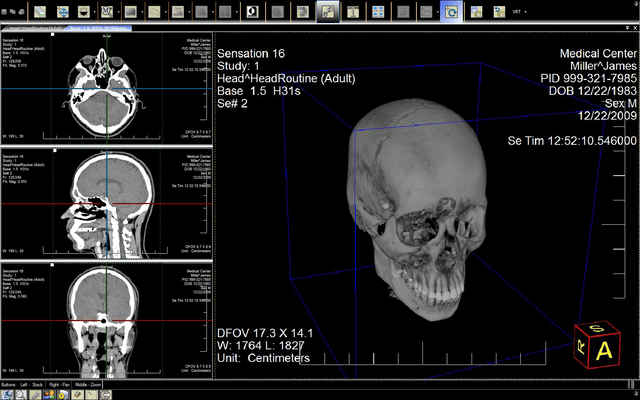
Automatically generates 3D volumes from 2D slices. LEADTOOLS Medical 3D SDK technology simplifies reconstruction techniques for three dimensional visual representations of two dimensional image slices such as MRI and CT stacks. LEADTOOLS Medical 3D SDK Technology offers many different alternate views of the original data using various 3D reconstruction techniques such as MPR, VRT, MIP, MinIP and SSD, and projection techniques supporting clipping planes, slab, scale, zoom, camera control, threshold, transparency and image processing. Examining volumetric data improves the speed of interpretation, recognition and total exam evaluation time for physicians by providing visualization of anatomical details which are difficult to diagnose using 2D slices alone.

Grayscale and Color Medical Image Processing

LEADTOOLS provides an advanced set of functions that are especially designed for enhancing and analyzing medical images regardless of their format or data distribution. Enhance the image or highlight the details by shifting, selecting, subtracting and removing the background for better visuals. This flexibility allows doctors and specialists to diagnose diseases and injuries faster and more accurately. Medical image processing technology available as C DLL, C++ classes, .NET classes, Silverlight binaries, WCF services and WF activities. Image data can be 1-64 bit color, extended grayscale or black and white.

Image Display and Annotation

Developers have complete control of how the image is displayed including:

Zooming

Scrolling

8-16 bit Grayscale

Signed and Unsigned image data

Window Leveling

LUT processing

Monochrome1, Monochrome2, Palletized, RGB, ARGB, CMYK, YBR Full 422, YBR Full Photometric interpretations

Interpolated image display for higher quality of scaled images

Customizable viewers for implementing DICOM Hanging Protocols

Full support for DICOM Overlays

3D Volume Reconstruction and Rendering

Zoom View call out

Edit, load and save DICOM Annotations

Several annotation objects can be stored as LEADTOOLS annotations or converted to DICOM annotations and stored in a DICOM dataset with the Graphic Annotation Module and Grayscale Softcopy Presentation State IOD. The following objects can be converted between LEADTOOLS and DICOM annotation types.

Image Capture and Acquisition

With LEADTOOLS Virtual Printer SDK developers can capture printer output from any application and export the data as EMF. The unique vector properties of EMF provides substantial flexibility, enabling print jobs captured by a LEADTOOLS Virtual Printer to be converted to document formats such as PDF, Word DOC and text, as well as any of the 150 raster image formats supported by LEADTOOLS. Capture output from any application including Word, Excel and web browsers. Supports over 150 output image formats including PDF. Create a Print to PACS solution.

Image Load, Save, Conversion and Compression

Load, save and convert many industry standard and proprietary formats. Raster, vector and document formats can be converted to raster images. Compress and Decompress over 150 formats including: JPEG, JPEG 2000, JPEG-XR, NITF, LZW, RLE and PackBits, CCITT, CCITT G3 and CCITT G4, ABIC, ZIPLIB, Huffman, Arithmetic, LEAD CMP, LEAD CMW, LEAD ABC. With LEADTOOLS Medical Imaging Suite you can also load, save and modify image metadata.

LEADTOOLS Cloud SDK

The LEADTOOLS Cloud SDK provides developers with a complete framework which can be used to create powerful cloud-based applications. Utilizing a network of servers and worker machines, developers can easily create any kind of distributed, grid or parallel computing application.

LEADTOOLS Medical Imaging Suite includes technology from

All of the technology from the following products is included with the LEADTOOLS Medical Imaging Suite:

LEADTOOLS Medical Imaging

LEADTOOLS PACS Imaging

LEADTOOLS Medical 3D SDK Module

LEADTOOLS Virtual Printer SDK Module

LEADTOOLS Multimedia SDK

LEADTOOLS Medical Multimedia SDK Module

LEADTOOLS Medical Imaging Suite can be extended to add more technology

Add-on modules and plug-ins may be added to LEADTOOLS Medical Imaging Suite to add even more imaging technology.

LEADTOOLS CCOW SDK Module

LEADTOOLS Advantage OCR SDK Module

LEADTOOLS Plus OCR SDK Module

LEADTOOLS Professional OCR SDK Module

LEADTOOLS Arabic OCR SDK Module

LEADTOOLS Asian OCR SDK Module

LEADTOOLS PDF OCR SDK Plug-in

LEADTOOLS Plus ICR Module

LEADTOOLS Professional ICR Module

LEADTOOLS OMR SDK Module

LEADTOOLS 1D Barcode SDK Module

LEADTOOLS 2D Barcode SDK Module

LEADTOOLS Raster PDF Read SDK Plug in

LEADTOOLS Raster PDF Write SDK Plug in

What's New in the LEADTOOLS Medical Engine V17.5 Re-mastered

The healthcare industry continues to demand innovation and rapid development capability. This new version of 17.5's Medical Web Viewer Framework and PACS Framework have new major features including cross-platform and mobile device capable viewers, more robust and simpler customization, and a new OEM-ready DICOM Server application with source code.

New OEM-ready DICOM Storage Server application with Source Code

New Patient Updater feature includes a patient/study management client that allows users to move, merge, and update patient information using DICOM communication

New Auto-Copy feature automatically routes retrieved DICOM image data to multiple storage locations

New Gateway feature acts as a query/retrieve proxy, automatically relaying a single query/retrieve message to any number of specified external DICOM servers

New Forwarding feature automatically forwards DICOM image data to another PACS server immediately upon storage, or on any schedule

Full source code provided for customization or branding with your own company logo

Medical Web Viewer Framework

HTML5 Viewer with window level support

Improved thin-client layout for mobile devices including iPhone, iPad, Android and Windows Phone

Medical Image Viewer

Improved reference line support

New Probe Tool to display pixel information and user text

New Snap Ruler that allows the ruler to snap to the image, making measurement simpler

Added customization of the look, style and color of overlay tags and rulers

New Zoom on Click mouse action

Added ability to set any number of rows and columns of cells

Dynamic Zoom which keeps the clicked area visible at all times

New LUT Spectrum feature which provides a colored lookup table that improves ability to analyze images

Other Enhancements

Enhanced DICOM Communication support

What's new in LEADTOOLS Medical Imaging SDK V17.5

Medical Workstation now fully supports customization and localization. Users can easily change the look and feel or language strings of the Medical Workstation for re-branding or localization purposes.

New DICOM Modality Worklist (MWL) WCF Service Component for the PACS Framework

Medical Image Viewer Features and Enhancements

Added options for customizing the border of cells in the viewer

Exposed more low-level annotation features

Image Orientation tag automatically updates based on the current image orientation

Added GetScale method, so user can get the current image scale value

Added feature to allow the user to change the active sub-cell programmatically

Added MatchScale method to allow users to make all the other cells match the scaling value of the specified cell

Added Cobb Angle annotation tool

Added user interface tools for Image Alpha(Sigmoid, Exponential and Logarithmic)

Added VirtualImage property which allows the user to receive advanced details and status regarding the cell. This is useful for MPR, Derivative and Low Memory Usage cells.

Empty cells with no assigned image can now be active, utilize tools and display text/tags

Added Drag and Drop support for cells

New image display and scaling options: UseDpi, FitIfLarger, Stretch, Explode

New MPRType property to identify the axis for localization purposes

Advanced synchronization tools including multiple series and viewer control instances

Added GetPage method to allow user to get the desired frame from any cell type

3D Features and Enhancements

Added support for Curved MPR/ Panoramic Polygon

Added ability to generate and view Paraxial Cuts

Added the ability to programmatically set the index of the MPR cell

Added ImageLoaded event

DICOM Features and Enhancements

New DLL dedicated to the internal DICOM tables, reducing deployment footprint

Ability to load DICOM tables from XML, making customization simpler

Get and Set encapsulated documents from memoryand disk

Added support for YBR_FULL Photometric Interpretation with uncompressed and RLE-compressed DICOM image pixel data

Added support for DICOM JPEG-LS Lossy and Lossless transfer syntaxes

Develop powerful PACS and Medical imaging applications.

Pricing: LEADTOOLS Medical Imaging Suite V17.5 1 Developer License, LEADTOOLS Medical Imaging Suite V17.5 1 Developer Upgrade License from previous version, LEADTOOLS Medical Imaging Suite V17.5 1 Annual Maintenance License

Evals & Downloads: Read the LEADTOOLS products Help files, Read the LEADTOOLS Licensing Help file, Download the LEADTOOLS Main V17.5 Re-master evaluation on to your computer - Displays Nag Screens

Operating System for Deployment: Windows 7, Windows Server 2008, Windows Vista, Windows XP, Windows Server 2003, Windows 2000, Windows Phone 7

Architecture of Product: 32Bit, 64Bit

Product Type: Component, Add-In

Component Type: ASP.NET AJAX (ATLAS), .NET WinForms, .NET Class, .NET WCF, .NET WPF, Silverlight, .NET WF, DLL, VC++ Class Library

Compatible Containers: Microsoft Visual Studio 2010, Microsoft Visual Studio 2008, Microsoft Visual Studio 2005, Microsoft Visual Studio 6.0, Microsoft Visual Basic 2010, Microsoft Visual Basic 2008, Microsoft Visual Basic 2005, Microsoft Visual C++ 2010, Microsoft Visual C++ 2008, Microsoft Visual C++ 2005, Microsoft Visual C++ 6.0, Microsoft Visual C# 2010, Microsoft Visual C# 2008, Microsoft Visual C# 2005, Microsoft FrontPage, Microsoft Internet Explorer 7.0, Microsoft Internet Explorer 6.0, CodeGear C++ 5.0 (formerly Borland), CodeGear C++ (formerly Borland), Visual dBase 7.0, Sybase PowerBuilder 6.0, Sybase PowerBuilder 5.0, Watcom C/C++, .NET Framework 4.0, .NET Framework 3.5, .NET Framework 3.0, .NET Framework 2.0, Silverlight 4, Silverlight 3

Keywords: Image PictureJPEGScanBitmap draw artprocessing graphicGIFTarga precision Twain

LEAD Technologies Image+50 Imaging+50 Toolkit+8 SDK+8, leadtools 17, leadtools V17, lead 17, lead v17, lead tools, lead tools 17, lead tools v17, lead tools v17.0, lead technologies

image images processing imaging

Imaging image images

Drawing Draw draws

Image images Compression compress compresses Conversion convert converting converts conversions

Scan scanning scanned scanner scans OCR optical character recognition

Part numbers: PC-510496-427236 510496-427236 PC-510496-427237 510496-427237 PC-510496-427238 510496-427238

Mfr. Part No: AMMEDSTE175 MEDSTE175 UMEDSTE175