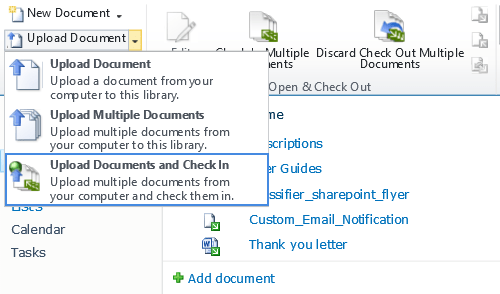
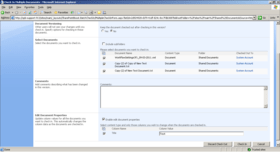
Screenshot Preview

SharePoint Batch Check In

by SharePointBoost - Product Type: Component / Application / ASP.NET WebForms / ASP.NET AJAX (ATLAS) / Web Part / Server Application

Upload multiple SharePoint pictures, form libraries and documents. SharePoint Batch Check In overcomes the limitations of SharePoint's document versioning management feature by creating a shortcut to file check-in without compromising document versioning integrity. Normally, when you upload multiple documents to a SharePoint document library, form library, or picture library, the files will remain checked-out unless you manually check in each file individually. This can be a time consuming task, especially if you are checking in several hundred documents at once. SharePoint Batch Check In solves this problem by allowing you to bulk check in a group of checked-out files all at one time, as well as upload & simultaneously check in multiple new documents.

Our regular prices are shown below. Please logon to see your discounted prices.

Price in

SharePoint Batch Check In V2.3.1125 Server License

Add to Cart $ 783.02 1 Server License Download (1.2 MB)

SharePoint Batch Check In V2.3.1125 Site Collection License

Add to Cart $ 263.62 50 End Users Site Collection License Download (1.2 MB)
Add to Cart $ 322.42 100 End Users Site Collection License Download (1.2 MB)
Add to Cart $ 381.22 200 End Users Site Collection License Download (1.2 MB)
Add to Cart $ 440.02 300 End Users Site Collection License Download (1.2 MB)
Add to Cart $ 498.82 400 End Users Site Collection License Download (1.2 MB)
Add to Cart $ 557.62 500 End Users Site Collection License Download (1.2 MB)
Add to Cart $ 606.62 600 End Users Site Collection License Download (1.2 MB)
Add to Cart $ 655.62 700 End Users Site Collection License Download (1.2 MB)
Add to Cart $ 704.62 800 End Users Site Collection License Download (1.2 MB)
Add to Cart $ 753.62 900 End Users Site Collection License Download (1.2 MB)
Add to Cart $ 802.62 1000 End Users Site Collection License Download (1.2 MB)
Add to Cart $ 900.62 1250 End Users Site Collection License Download (1.2 MB)
Add to Cart $ 998.62 1500 End Users Site Collection License Download (1.2 MB)
Add to Cart $ 1,096.62 1750 End Users Site Collection License Download (1.2 MB)
Add to Cart $ 1,194.62 2000 End Users Site Collection License Download (1.2 MB)
Add to Cart $ 1,488.62 3000 End Users Site Collection License Download (1.2 MB)
Add to Cart $ 1,782.62 4000 End Users Site Collection License Download (1.2 MB)
Add to Cart $ 2,076.62 5000 End Users Site Collection License Download (1.2 MB)
Add to Cart $ 2,566.62 8000 End Users Site Collection License Download (1.2 MB)
Add to Cart $ 3,056.62 10000 End Users Site Collection License Download (1.2 MB)
Add to Cart $ 3,546.62 20000 End Users Site Collection License Download (1.2 MB)

SharePoint Batch Check In V2.3.1125 Farm License

Add to Cart $ 447.86 50 End Users Farm License Download (1.2 MB)
Add to Cart $ 547.82 100 End Users Farm License Download (1.2 MB)
Add to Cart $ 647.78 200 End Users Farm License Download (1.2 MB)
Add to Cart $ 747.74 300 End Users Farm License Download (1.2 MB)
Add to Cart $ 847.70 400 End Users Farm License Download (1.2 MB)
Add to Cart $ 947.66 500 End Users Farm License Download (1.2 MB)
Add to Cart $ 1,030.96 600 End Users Farm License Download (1.2 MB)
Add to Cart $ 1,088.78 700 End Users Farm License Download (1.2 MB)
Add to Cart $ 1,155.42 800 End Users Farm License Download (1.2 MB)
Add to Cart $ 1,221.08 900 End Users Farm License Download (1.2 MB)
Add to Cart $ 1,283.80 1000 End Users Farm License Download (1.2 MB)
Add to Cart $ 1,418.06 1250 End Users Farm License Download (1.2 MB)
Add to Cart $ 1,547.42 1500 End Users Farm License Download (1.2 MB)
Add to Cart $ 1,671.88 1750 End Users Farm License Download (1.2 MB)
Add to Cart $ 1,792.42 2000 End Users Farm License Download (1.2 MB)
Add to Cart $ 2,196.18 3000 End Users Farm License Download (1.2 MB)
Add to Cart $ 2,585.24 4000 End Users Farm License Download (1.2 MB)
Add to Cart $ 2,959.60 5000 End Users Farm License Download (1.2 MB)
Add to Cart $ 3,593.66 8000 End Users Farm License Download (1.2 MB)
Add to Cart $ 4,279.66 10000 End Users Farm License Download (1.2 MB)
Add to Cart $ 4,974.48 20000 End Users Farm License Download (1.2 MB)

Our prices include ComponentSource technical support and, for most downloadable products, an online backup and a FREE upgrade to the new version if it is released within 30 days of your purchase.  All sales are made on our standard Terms and Conditions and subject to our Return Policy. Please contact us if you require any licensing option not listed, including volume licensing and previous versions.

Our regular prices are shown above. Please logon to see your discounted prices.

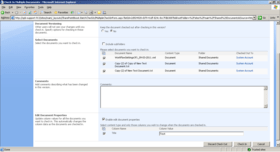
Screenshot of SharePoint Batch Check In - Application - V2.3.1125

What's new in SharePoint Batch Check In V2

  • Edit Managed Metadata columns
  • Edit External Data Columns
  • Automatically enter a default value to columns
  • Can be used in the custom document library
  • Users can choose to replace the original non-blank value of columns
  • Compatible with SharePoint Cascaded Lookup and Cross-Site Lookup Column
  • Compatible with SharePoint Column Permission
  • Check in and out local drafts

SharePoint Batch Check In overcomes the limitations of SharePoint's document versioning management feature by creating a shortcut to file check-in without compromising document versioning integrity. Normally, when you upload multiple documents to a SharePoint document library, form library, or picture library, the files will remain checked-out unless you manually check in each file individually. This can be a time consuming task, especially if you are checking in several hundred documents at once. SharePoint Batch Check In solves this problem by allowing you to bulk check in a group of checked-out files all at one time, as well as upload & simultaneously check in multiple new documents. Three different check-in settings give you full control over how SharePoint handles your documents:

Bulk check in a group of checked-out files all at one time
Use this option to check in a large group of previously uploaded documents. This function is especially useful if you choose to upload files first but don't want to check them in right away.

Upload and simultaneously check in multiple new documents
This bulk check in function bypasses the need to manually upload and check in each file individually. It enables you to upload and simultaneously check in multiple new documents quickly and easily. The document versioning setting let you decide whether you want to check in the files as major (published) or minor (draft) versions so that versioning integrity isn't compromised.

Automatically update column values for all the documents as they are checked in
The Edit Document Properties function makes checking in and updating information even easier by automatically changing columns as the files are checked in, so you don't have to change each item one by one.


Support

Basic Annual Support:
  • 24-7 access to our online knowledge base and product FAQ.
  • Unlimited technical support via email with 1-2 business day initial response.
  • Minor version update releases.