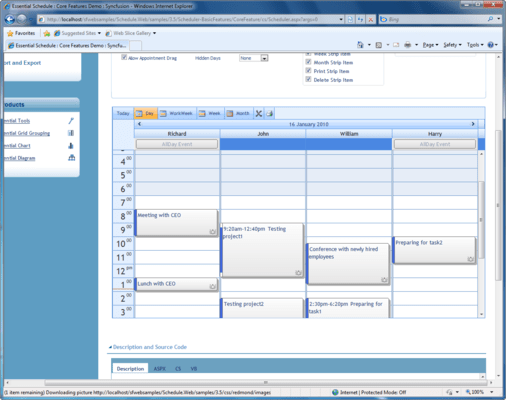
Screenshot Preview

Syncfusion Essential Schedule for ASP.NET

by Syncfusion - Product Type: Component / ASP.NET WebForms / ASP.NET AJAX (ATLAS) / ASP.NET MVC / .NET WinForms / .NET WPF / Silverlight / 100% Managed Code / JavaScript / AJAX

Syncfusion Essential Schedule for ASP.NET is available as part of Syncfusion Essential Studio Enterprise Edition and Syncfusion Essential Studio User Interface Edition.

If you require more information please Contact Us

Add AJAX enabled Outlook-like calendars to your ASP.NET applications. Syncfusion Essential Schedule for ASP.NET is a UI control library that lets you add Outlook-like scheduling support to your applications. The user interface mimics the Outlook user interface. Syncfusion Essential Schedule for ASP.NET comes with built-in AJAX support. Syncfusion Essential Schedule for ASP.NET comes with fully functional design time features that let you set up a schedule's style and behavior. Data binding can be easily set up and the control can be previewed and customized through the designer.

Screenshot of Syncfusion Essential Schedule - ASP.NET - 2012

Please note: Syncfusion Essential Schedule for ASP.NET also includes Windows Forms, Silverlight, WPF and ASP.NET MVC components.

What's new in Essential Schedule 2012 Vol 2?

  • All-day Appointments - With all-day appointments, you can create an engagement spanning an entire day or longer. This is useful when marking events such as tradeshows or holidays that persist for an extended time. All-day appointments have all the functionality found in normal appointments.
  • Dragging Appointments between Resources - An appointment can be dragged from one resource to another. For example, an appointment can be moved from one person’s schedule to the schedule of another by simply dragging and dropping the appointment. The date and time of a moved appointment will be updated accordingly.
  • Support for Date Ranges - You can set minimum and maximum dates to create a range of dates that can be selected in a schedule. The date range can be set relative to the current date or as a fixed range.
  • Customizing the Schedule View - The viewable area of a schedule can be customized to show times within a certain range. You can also start a week on a day different from the default. Time frames can also be blocked to prevent appointments from being added at specific times. Blocked time frames can be set to recur daily. The customization options for the Schedule control are differentiated enough that time frames can be specified to the minute, and background colors and images can be customized using custom CSS.
  • Customizing Appointment Appearance - The background, font style, and other visual elements of appointments can be customized based on resource, category, or custom CSS. This customization can be used to change the default appearance settings as well to help to distinguish certain appointments from others.
  • Customized Date Highlighting - The navigation panel in the Schedule control can highlight dates to indicate coming events. This highlighting can easily be customized apart from the default styles.
  • Localization Support - Choose which language the user interface elements will be displayed in. Most aspects of the user interface can be localized, including time formats and event reminders.
  • Support for Custom CSS - In addition to having 14 built-in skins, the look and feel of the Schedule control can be customized using your own CSS. Even default styles can be customized in this manner.

What’s new in Syncfusion Essential Schedule for ASP.NET 2010 vol 3?

Fixes

  • Cannot drag appointment on schedule if more than one schedule control is loaded.
  • ResourceID is 0 in AppointmentDragged event.

Syncfusion Essential Schedule for ASP.NET Schedule View
The Schedule control displays appointments in four basic views: Day, Week, Month, and Workweek. You can make use of the Schedule Type property to set any one of these views for the scheduler. Schedule type is set to Day by default.

  • Day View
  • Month View
  • Week View
  • Workweek View

Syncfusion Essential Schedule for ASP.NET Design Time Feature
ASP.NET Essential Schedule comes with a fully functional design time that lets you set up a schedule's style and behavior. Data binding can be easily set up and the control can be previewed and customized through the designer.

  • AutoFormat
  • Data Source Binding
  • Recurrence Window
  • Schedule Collection Editor
  • Smart Tag

Syncfusion Essential Schedule for ASP.NET ToolTip
ToolTips are essential to displaying brief help information for tasks. The Schedule control provides options to create custom tooltips for appointment and schedule cells. The details shown within a tooltip can be customized.

  • ToolTip for Schedule Appointments
  • ToolTip for Schedule Cells

Syncfusion Essential Schedule for ASP.NET Appearance and Customization
A variety of styling and customizing options are available for various sections of the Essential Schedule control such as background color, time span, work cell color, customizing gridlines, and no work cell color.

  • Appointment Background and Time-Span Color
  • Display Multiple Days and Resources
  • Gridlines Customization
  • Header Bar Customization
  • Customize Add Edit Appointment Window

Syncfusion Essential Schedule for ASP.NET Calendar
The Schedule control supports a calendar within the schedule. This helps in easy navigation through days. On clicking a day or multiple days in the calendar, corresponding dates with appointments in the schedule control are displayed. The calendar can be placed to the left or right hand side of the resource using the Calendar Position property.

Syncfusion Essential Schedule for ASP.NET Importing Exporting and Printing
Essential Schedule supports the import and export of appointments. The Schedule control's import and export features are simple and easy to use for importing and exporting iCal files (*.ics) to and from Microsoft Outlook. The schedule control provides options to print a hard copy of schedule appointments, which is a built-in functionality.

Syncfusion Essential Schedule for ASP.NET Events
The Schedule control supports rich, server-side and client-side events that can be invoked to perform the required functions. By using these events, you can control the behavior of the control.

  • Client-Side Events
  • Server-Side Events

Syncfusion Essential Schedule for ASP.NET Schedule Layout
The Schedule control provides two options for changing the layout of a schedule. The schedule layout can be viewed in one of the following ways.

  • Horizontal
  • Vertical

Syncfusion Essential Schedule for ASP.NET Appointments
An end-user's specific time interval in the schedule control refers to an appointment or event. An appointment may contain properties like Subject, Location, Start Time, End Time, and so on. Normal, All Day, Recurring and Blocked are the types of appointments supported by the schedule control.

  • All Day
  • Appointment with No Resource
  • Blocked
  • Dragging Appointment
  • Recurring
  • Resizing Appointment

Syncfusion Essential Schedule for ASP.NET Navigator
The Schedule control offers complete navigational support for navigating between resources and visible days. This is accomplished with the help of the Resource Navigator, and Header Bar Navigator.

  • Header Bar Navigator
  • Resource Navigator

Syncfusion Essential Schedule for ASP.NET Template Support
The Schedule control provides support for templates. This can be used to modify the appearance of the control. Templates are also efficient in accommodating any content to be embedded, including HTML markup, ASP.NET server controls, and other third-party controls.

  • Appointment Template
  • Background Template

Syncfusion Essential Schedule for ASP.NET Globalization
The Schedule control provides localization support. The control adapts and displays the values according to specified culture value. The culture value can be applied for a calendar attached to the schedule control.

Syncfusion Essential Schedule for ASP.NET AJAX Feature
Essential Schedule comes with built-in AJAX support. By turning on the Enable Callback command, the schedule operates in AJAX mode. Adding, Editing, Deleting, Resizing, Drag-and-Drop, and other commands will then operate through AJAX callbacks instead of post-backs.