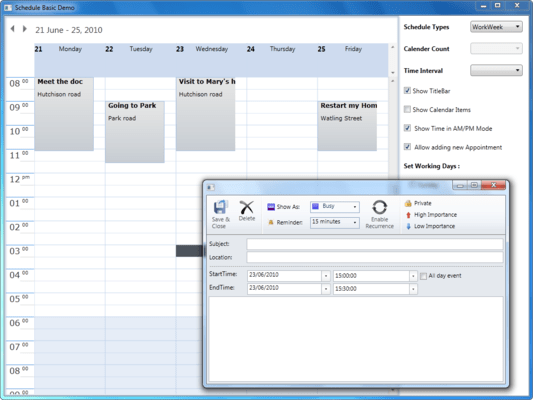
Screenshot Preview

Syncfusion Essential Schedule for WPF - Summary

by Syncfusion - Product Type: Component / ASP.NET WebForms / ASP.NET AJAX (ATLAS) / ASP.NET MVC / .NET WinForms / .NET WPF / Silverlight / 100% Managed Code

Syncfusion Essential Schedule for WPF is available as part of Syncfusion Essential Studio Enterprise Edition and Syncfusion Essential Studio User Interface Edition.

If you require more information please Contact Us

Summary

Syncfusion Essential Schedule for WPF by Syncfusion

URLs: syncfusion-essential-schedule-for-wpf, syncfusion essential schedule for wpf, syncfusionessentialscheduleforwpf, syncfusion

Schedule navigation, multiple resources, import/export and more. Syncfusion Essential Schedule for WPF is an Outlook-like scheduler control for creating and managing appointments. Syncfusion Essential Schedule for WPF includes features such as rescheduling appointments through dragging, resizing appointments, importing appointments, and exporting appointments.


Syncfusion Essential Schedule for WPF Schedule Types

The different schedule types allow appointments to be viewed in different ways.

Day View - This mode allows users to view appointments day-by-day, with only one day visible at a time.

Week View - This mode allows users to view appointments for an entire week. The working days of a week will be visible; for convience, users can define which days will be considered "working days."

Workweek View - This mode allows viewing workweek appointments only. A workweek can contain as many as seven days, or only one. The calendar found on the side is used to select the days that should appear in the view.

Month - This mode allows users to view appointments in one full month; hence, appointments for more than one week can be viewed. By default, an entire month will be displayed.

ScheduleView - The horizontal view feature in Essential Schedule for WPF provides an option to view time slots horizontally.

Syncfusion Essential Schedule for WPF Time Interval

The time-interval feature allows users to view the hours of a day in multiple time slots.

Syncfusion Essential Schedule for WPF Navigation

Use the header title bar to navigate through the days of a year, just as you would in Microsoft Outlook.

Syncfusion Essential Schedule for WPF Appointment Add/Edit/Delete

Appointments can be added, edited, or removed directly in a schedule control. This feature can also be disabled, if needed.

Syncfusion Essential Schedule for WPF Data Binding

The data-binding feature allows users to bind to any IEnumerable collection.

Syncfusion Essential Schedule for WPF Themes

The schedule control can have Office Black, Office Blue, Office Silver and Blend themes. The user can set different themes with the help of visualstyle property. The default theme is Office Silver.

Syncfusion Essential Schedule for WPF Schedule Appointment dragging and dropping

The schedule control will change an appointment’s time according where it is dropped. The appointments for an entire day can also be dragged and dropped to another day, leaving the current time intervals the same.

Syncfusion Essential Schedule for WPF Holidays and Black out days

The holidays and blackout days feature provides an option for adding holidays. Holidays can be added to the schedule control as all-day appointments, blacking out the entire day.

Syncfusion Essential Schedule for WPF Resizing Appointments

The resizing appointments feature provides an option to extend the time slot of an appointment by dragging it from the top or bottom; start and end times of an appointment will change automatically according to how it is resized.

Syncfusion Essential Schedule for WPF ICal import and export

Now you can import any ical files into schedule control for silverlight in ics file format

Syncfusion Essential Schedule for WPF Reminder alert

Essential Schedule for WPF will display a reminder window when the time for an appointment arrives. Appointments displayed in a reminder window can either be snoozed for a period of time or dismissed. Closing the reminder window will snooze all the appointments for minimum period of time. Snoozed appointments will generate another reminder after a specified snooze time.

Syncfusion Essential Schedule for WPF Recurrence Appointment Add/Edit/Delete

The recurrence appointment feature in Essential Schedule WPF allows the same appointment to occur on multiple dates or time slots.

Please note: Syncfusion Essential Schedule for ASP.NET also includes Windows Forms, Silverlight, WPF and ASP.NET MVC components.

What's new in Essential Schedule 2012 Vol 2?

All-day Appointments - With all-day appointments, you can create an engagement spanning an entire day or longer. This is useful when marking events such as tradeshows or holidays that persist for an extended time. All-day appointments have all the functionality found in normal appointments.

Dragging Appointments between Resources - An appointment can be dragged from one resource to another. For example, an appointment can be moved from one person’s schedule to the schedule of another by simply dragging and dropping the appointment. The date and time of a moved appointment will be updated accordingly.

Support for Date Ranges - You can set minimum and maximum dates to create a range of dates that can be selected in a schedule. The date range can be set relative to the current date or as a fixed range.

Customizing the Schedule View - The viewable area of a schedule can be customized to show times within a certain range. You can also start a week on a day different from the default. Time frames can also be blocked to prevent appointments from being added at specific times. Blocked time frames can be set to recur daily. The customization options for the Schedule control are differentiated enough that time frames can be specified to the minute, and background colors and images can be customized using custom CSS.

Customizing Appointment Appearance - The background, font style, and other visual elements of appointments can be customized based on resource, category, or custom CSS. This customization can be used to change the default appearance settings as well to help to distinguish certain appointments from others.

Customized Date Highlighting - The navigation panel in the Schedule control can highlight dates to indicate coming events. This highlighting can easily be customized apart from the default styles.

Localization Support - Choose which language the user interface elements will be displayed in. Most aspects of the user interface can be localized, including time formats and event reminders.

Support for Custom CSS - In addition to having 14 built-in skins, the look and feel of the Schedule control can be customized using your own CSS. Even default styles can be customized in this manner.

What’s new in Syncfusion Essential Schedule for ASP.NET 2010 vol 3?

Fixes

Cannot drag appointment on schedule if more than one schedule control is loaded.

ResourceID is 0 in AppointmentDragged event.

Syncfusion Essential Schedule for WPF is available as part of Syncfusion Essential Studio Enterprise Edition and Syncfusion Essential Studio User Interface Edition.

If you require more information please Contact Us

Schedule navigation, multiple resources, import/export and more.

Evals & Downloads: Read the Syncfusion Site License Agreement, Read the Syncfusion Company brochure - Requires Acrobat Reader, View the Syncfusion Studio Comparison Matrix - Requires Acrobat Reader, Read the Syncfusion Essential Studio brochure - Requires Acrobat Reader, Read the Syncfusion License Agreement - Requires Acrobat Reader, Download the Syncfusion Essential Studio 2012 Vol 2 (V10.2.0.56) evaluation on to your computer - Expires After 30 Days

Operating System for Deployment: Windows 7, Windows Vista, Windows XP, Windows ME, Windows 2000, Windows NT 4.0

Architecture of Product: 32Bit

Product Type: Component

Component Type: ASP.NET WebForms, ASP.NET AJAX (ATLAS), ASP.NET MVC, .NET WinForms, .NET WPF, Silverlight, 100% Managed Code

Built Using: Visual C# .NET

Compatible Containers: Microsoft Visual Studio 2010, Microsoft Visual Studio 2008, Microsoft Visual Studio 2005, Microsoft Visual Basic 2010, Microsoft Visual Basic 2008, Microsoft Visual Basic 2005, Microsoft Visual C++ 2010, Microsoft Visual C++ 2008, Microsoft Visual C++ 2005, Microsoft Visual C# 2010, Microsoft Visual C# 2008, Microsoft Visual C# 2005, Delphi 8.0, C#Builder, .NET Framework 4.0, .NET Framework 3.5, .NET Framework 3.0, .NET Framework 2.0, Silverlight 4, Silverlight 3

Product Class: User Interface Components

Keywords: syncfusion essential Schedule for wpf, essential Schedule for wpf

Syncfusion Sync fusion

Calendar calendaring calendars Scheduling Schedule Schedules