Screenshot Preview

TextDynamic - Summary

by WPCubed - Product Type: Component / .NET WinForms / .NET Class / ActiveX OCX

Summary

TextDynamic by WPCubed

URLs: textdynamic, wpcubed

Offer your customers word processing software and PDF generation. TextDynamic is a royalty free word processing and reporting control which can be embedded into applications to create text in code, to offer the end user WYSIWYG editing features and to convert document formats, such as RTF to HTML or RTF to PDF. It includes a versatile API to do mail merge, RTF reporting and dynamic text writing and is completely customizable.

What you can do with TextDynamic™

Process RTF, ANSI, UNICODE and/or HTML texts

Edit data base memo fields with simple or formatted text

Prepare and send e-mails using the interface IWPMapi

Use complete word processing with page layout view, 100% WYSIWYG, header&footer, cascading style sheets (CSS)

Use integrated spell check (optional)

Work with mail merge (insert and replace formatted text and images)

Create documents under program control

Use reporting (= mail merge with bands)

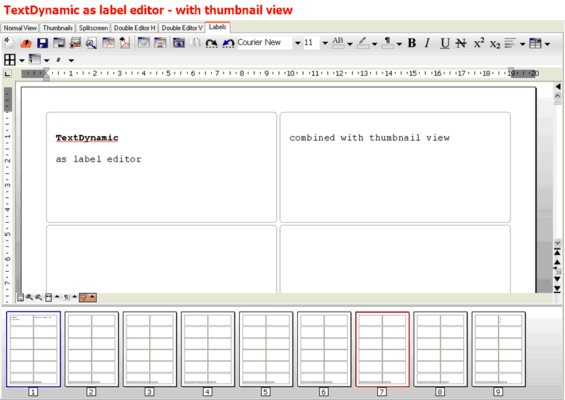
Use Memo.LabelDef to create, edit and print labels.

Convert RTF to PDF using the integrated PDF converter. The PDF exporter is now now also able to attach data (optional)

Export HTML to PDF (optional)

With "premium" license: footnotes, text boxes (frames) and columns

Where you can use TextDynamic™

In .NET WinForm applications (as .NET assembly written in C# - DLL) - with Visual Studio, Delphi 2005, Delphi 2006

In Visual Basic™ 6 applications (as ActiveX™ - OCX)

In MS Access™ Forms to enter formatted field into databases, mail merge and reporting (as ActiveX™ - OCX)

In Visual FoxPRO™ to enter formatted field into databases, create mailings, print

Features:

Create and Print Labels

Interface to create e-mails

Edit multiple documents in a single text control

Mail Merge (work with fields in text)

Customizable User Interface

Bullets, Numbering and Outlines

Header and Footer are edited WYSIWYG

Layout Modes (Page, Normal, Thumbnail...)

Option: Create PDF with integrated engine

Option: Internal Spellchecker

Use splitscreen feature

Image Support

Tables (Nestable, repeated header/footer)

Dialogs are included

.NET Edition

With TextDynamic .NET you no longer need the RichTextBox or RichEdit DLL. It is tightly integrated into the .NET (1.1, 2.0) environment using an easy to use interface class developed in C#. The licensed version also contains the C# source for this assembly. The included ActiveX is not used for .NET applications.

Optional Reporting

Most reporting tools work with page layouts. This means you may place graphics at exact positions on a form and when the report is created it will exactly look as the designed forms.

This approach is often very good, but in some cases you want the text created by the reporter to be editable. The mentioned approach has a problem with this - while it is sometimes possible to create RTF documents with the reporting tool, they are not really "editable" - the text has been broken up into the tiniest pieces - just single text boxes. Usually the RTF export is optimized to be best viewed in MS Word only.

With the TextDynamic report a text file (RTF or WPT format) is created which allows full editing, including changing of the page size, and other operations which make the re-pagination of the text necessary.

An example developed in MS Access is discussed in the provided developer manual to demonstrate it. However, it is not limited for use with Access. Since the data is provided through an event it can work with any database that your development language supports, including custom made databases and calculated data.

Technical Notes

TextDynamic is a visual control. It can be used in WinForms application developed with .NET 1.1 or .NET 2.0 Windows development tools (Delphi 2006, VS2003, VS2005). Also using the provided OCX TextDynamic can be embedded into VB6 applications and used with MS Access® or Visual FoxPro® as an editing, reporting or printing component.

TextDynamic is based upon a widely used and trusted word processing engine. The engine has been completely rewritten after 2004 to support modern text features, such as paragraph styles (CSS), layers and nestable tables. Internally it uses a hierarchical XML like memory structure with a consequent implementation of property inheritance. Unlike most other word processors TextDynamic supports an "undefined" setting for all attributes - a feature which is essential for proper CSS handling.

The programming API has been created from scratch based on the experiences from word processing development since 1996. The API used by the OCX and by the .NET editions are almost identical. However care was taken so that special features under each platform are used most efficiently.

TextDynamic is available in several editions. The support for hyper links, mail merge, header and footer, outlines and bullets, styles, tables and HTML loading and saving is included in the "basis" editions. Optionally you can license spellcheck and PDF creation. With the "premium" license you get support for WYSIWYG footnotes and text boxes (also called text frames).

An internal reporting engine is available as an option. This feature makes it easy to create documents from a template mixed with external data, i.e. a database. So invoices, contracts or lists are created quickly. The reporting feature uses a system with two templates - the first template should be prepared by the developer, the second template can be adjusted by the end user with the easy to understand template editor. After the report is created it can still be edited.

Benefits

All the text features you need:

TextDynamic includes features not found in some other competing products. For example the split screen feature, text wrap around images, numbering, header+footer, the mail merge and also the HTML import/export can be used in the entry version.

Maximum performance when working with documents:

TextDynamic .NET assembly has been developed in C#. This allows a tight integration into .NET applications - it is not required to register any OCX. Since word processing requires the allocation of a large number of small memory blocks plus fast array handling WPCubed implemented it into a native windows, highly optimized and fast DLL. The results show a 220 page RTF file (8MB) is loaded in about 5 seconds on a main stream notebook. (Pentium M1.6 Ghz)

Maximum flexibility for configuring the user interface:

TextDynamic comes with several tool panels arranged around the editor window. But the GUI can be completely configured, including the ability to change the images. It is also possible to update and localize the hint messages and the texts used by the dialogs. Switching languages at runtime is possible as well. The user interface is configured using an XML script. That script, together with the images for the buttons, is loaded from a special package file – there is also an application included to edit that file. The package file used by the GUI can be protected with a password.

Easy to use

When you start with TextDynamic you will get impressive results in minutes. But if you need special features you will find out that it does so much more. Its mail merge method handles RTF and HTML texts and also images. You can add support for styles or footnotes to your application. High quality and fast PDF export is optionally available; no 3rd party product or printer driver is required. Spellcheck is also optionally available - very fast and effective since implemented in the engine.

Easy to understand API

More than 10 years of experience in text component design helped WPCubed to create this text control API. Using a set of interfaces you can create text in code, modify the GUI, create e-mails and PDF.

Available Options:

Internal Spellchecker - This option adds a spell checking feature to the component. It is possible to locate spelling errors using a popup dialog and also to highlight misspelled words with red underlines. Also included is a dictionary compiler to create new dictionaries from word list files.

PDF Creation - This option adds the possibility to convert the text in the editor to a PDF file. The user will be asked to enter the file name for the new PDF file, then the PDF file will be created. A printer driver or any other 3rd party library is not required for this option. The optional "Server License" switches off the "Save As PDF" dialog to allow PDF creation in the background.

Premium - This option activates the support for footnotes, for text boxes, also known as "frames", and for columns. The editor supports 2 to 10 columns horizontally. It will not auto balance the text but it is possible to enter manual column break codes.

Server - The server license is important if you need to create PDF files in the background. Here it will deactivate the "Save As" dialog which is otherwise displayed by the (optional) PDF export. The Server License also makes a special application server mode available; when this mode is activated the editor will produce a screen output as compressed as possible to reduce network traffic.

Reporting - This option adds the possibility to not only use fields to merge a document with data, but also to use bands to create a table from a set of data rows. The text marked with bands can be looped along as data is available to be entered into the document. When done, the band is left and the next band will be processed.

Note for Web Server Use

If you need the TextDynamic features on your (Web) server please check out the ASP product wRTF2PDF. It includes almost the complete TextDynamic API to create and manipulate text.

Offer your customers word processing software and PDF generation.

Pricing: TextDynamic Basis Package V1.42 1 Developer License, TextDynamic Basis Package V1.42 Team License (Allows 2 to 6 developers), TextDynamic Basis Package V1.42 Site License (Allows up to 20 Developers at a Single Physical Address), TextDynamic Basis Package with Spellcheck V1.42 1 Developer License, TextDynamic Basis Package with Spellcheck V1.42 Team License (Allows 2 to 6 developers), TextDynamic Basis Package with Spellcheck V1.42 Site License (Allows up to 20 Developers at a Single Physical Address), TextDynamic Basis Package with PDF Creation V1.42 1 Developer License, TextDynamic Basis Package with PDF Creation V1.42 Team License (Allows 2 to 6 developers), TextDynamic Basis Package with PDF Creation V1.42 Site License (Allows up to 20 Developers at a Single Physical Address), TextDynamic Basis Package with Spellcheck + PDF Creation V1.42 1 Developer License, TextDynamic Basis Package with Spellcheck + PDF Creation V1.42 Team License (Allows 2 to 6 developers), TextDynamic Basis Package with Spellcheck + PDF Creation V1.42 Site License (Allows up to 20 Developers at a Single Physical Address), TextDynamic Basis Package with Spellcheck + PDF Creation + Premium V1.42 1 Developer License, TextDynamic Basis Package with Spellcheck + PDF Creation + Premium V1.42 Team License (Allows 2 to 6 developers), TextDynamic Basis Package with Spellcheck + PDF Creation + Premium V1.42 Site License (Allows up to 20 Developers at a Single Physical Address), TextDynamic Basis Package with Spellcheck + Premium V1.42 1 Developer License, TextDynamic Basis Package with Spellcheck + Premium V1.42 Team License (Allows 2 to 6 developers), TextDynamic Basis Package with Spellcheck + Premium V1.42 Site License (Allows up to 20 Developers at a Single Physical Address), TextDynamic Basis Package with Reporting V1.42 1 Developer License, TextDynamic Basis Package with Reporting V1.42 Team License (Allows 2 to 6 developers), TextDynamic Basis Package with Reporting V1.42 Site License (Allows up to 20 Developers at a Single Physical Address), TextDynamic Basis Package with Premium V1.42 1 Developer License, TextDynamic Basis Package with Premium V1.42 Team License (Allows 2 to 6 developers), TextDynamic Basis Package with Premium V1.42 Site License (Allows up to 20 Developers at a Single Physical Address), TextDynamic Basis Package with Server option V1.42 1 Developer License, TextDynamic Basis Package with Server option V1.42 Team License (Allows 2 to 6 developers), TextDynamic Basis Package with Server option V1.42 Site License (Allows up to 20 Developers at a Single Physical Address)

Evals & Downloads: Read the TextDynamic help file, Read the TextDynamic Manual, Read the TextDynamic License Agreement, Download the TextDynamic V1.42 evaluation on to your computer - Expires after 45 days

Operating System for Deployment: Windows XP

Architecture of Product: 32Bit

Product Type: Component

Component Type: .NET WinForms, .NET Class, ActiveX OCX

Built Using: Visual C# .NET

Compatible Containers: Microsoft Visual Studio 2005, Microsoft Visual Studio .NET 2003, Microsoft Visual Studio 6.0, Microsoft Visual Basic 2005, Microsoft Visual Basic .NET 2003, Microsoft Visual Basic 6.0, Microsoft Visual C++ 2005, Microsoft Visual C++ .NET 2003, Microsoft Visual FoxPro 6.0, Microsoft Access 2003, Microsoft Access 2002, Microsoft Access 2000, Delphi 2006 (10.0), Delphi 2005 (9.0)

Keywords: TextDynamic Text Dynamic

Text word words processing textbox

pdf

PDF

Part numbers: PC-517744-118291 517744-118291 PC-517744-118292 517744-118292 PC-517744-118293 517744-118293 PC-517744-139609 517744-139609 PC-517744-139610 517744-139610 PC-517744-139611 517744-139611 PC-517744-139619 517744-139619 PC-517744-139620 517744-139620 PC-517744-139621 517744-139621 PC-517744-139739 517744-139739 PC-517744-139740 517744-139740 PC-517744-139741 517744-139741 PC-517744-139754 517744-139754 PC-517744-139755 517744-139755 PC-517744-139756 517744-139756 PC-517744-269257 517744-269257 PC-517744-269258 517744-269258 PC-517744-269259 517744-269259 PC-517744-139846 517744-139846 PC-517744-139855 517744-139855 PC-517744-139856 517744-139856 PC-517744-269273 517744-269273 PC-517744-269274 517744-269274 PC-517744-269275 517744-269275 PC-517744-139857 517744-139857 PC-517744-139860 517744-139860 PC-517744-139861 517744-139861

Product Search

Enter search words:

Quick Links

Publisher

Primary Category

Related Products

Related Categories

Award