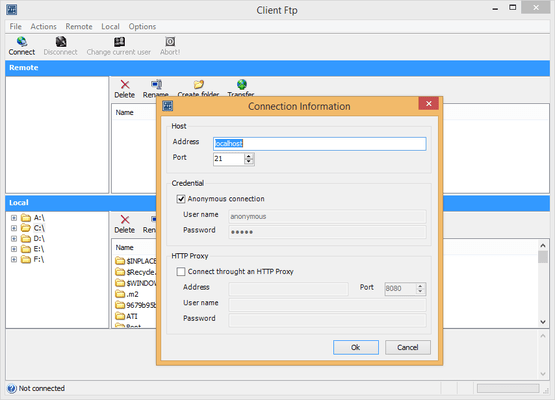
Screenshot Preview

Xceed FTP for .NET - Summary

by Xceed Software - Product Type: Component / .NET Class / 100% Managed Code

Summary

Xceed FTP for .NET by Xceed Software

URLs: xceed-ftp-net, xceed ftp net, xceedftpnet, xceed

A reliable and efficient implementation of the FTP protocol for .NET and ASP.NET. Xceed FTP for .NET is a robust and efficient 100% managed class library that allows you to easily add FTP file transfer capabilities to your .NET and ASP.NET applications. Xceed FTP for .NET provides access to the complete functionality of the FTP protocol through a straightforward, intuitive object model. Many advanced features included like support for secure FTP via SSL 3.0 and 3.1 or support for non-blocking (asynchronous) FTP operations. Xceed FTP for .NET can also send and receive files to or from disk or memory streams. VB.NET and C# sample applications included. Included in the Xceed Ultimate Suite. Vanguard Subscription provides updates to the latest versions as they are released, as well as priority support by telephone and dedicated email address. Blueprint Edition includes the product's C# source code as well as a 1-year Vanguard subscription including updates to the source code.

The Xceed FTP for .NET is designed to work well with all types of FTP servers. It provides built in support for Unix, VMS, AS/400 and DOS server types. Thanks to features such as the ability to create custom listing parsers and support for various FTP tweak properties, the library can also work with almost every other, less known FTP server types.

Xceed FTP for .NET: Minimum code, maximum value

Only a few lines of code are necessary to send and receive files, folders or entire directory structures and a rich set of events keeps your application informed of all FTP activity and statistics. This makes this library an ideal choice for developers that want to spend the least amount of time and hassle implementing and maintaining FTP code in their applications.

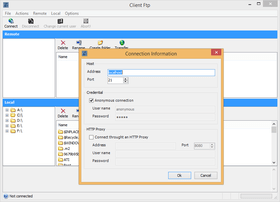
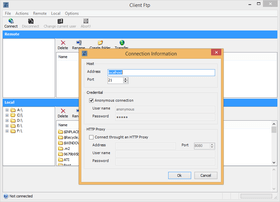
Complete sample applications are included in both VB.NET and C#, including an FTP client application in Windows Forms reminiscent of the popular "CuteFTP" or "WS-FTP" clients.

Xceed FTP for .NET is also available with its C# source code in the Blueprint Edition. This is an excellent educational tool since the source code is fully commented and a useful asset for those who will be heavily deriving from the library.

Xceed FTP for .NET: .NET technology

100% managed code written in C#, source code included in Blueprint Edition

Object-oriented design created specifically for the .NET framework

VB.NET and C# sample applications included

All error handling works through .NET exception classes

Objects don't need to be explicitly disposed of

CLS compliant (Common Language Specification)

Does not use unsafe blocks for minimal permission requirements

Documentation fully integrated into Visual Studio.NET

Built using System.Net.Sockets namespace

Xceed FTP for .NET: FTP protocol features

RFC 959, 1123 and 1579 compliant

Solid, built-in support for various server types including Unix, VMS, AS/400 and DOS

Supports all major FTP operations and allows sending of custom commands

Supports FTP passive mode for firewall and proxy server resilience

Xceed FTP for .NET Major features

Send and receive files, folders or entire directory structures quickly and easily

Send and receive files to or from disk or memory streams

Supports secure FTP via SSL 3.0 and 3.1 (TLS)

Synchronize a local directory structure with a remote directory structure on an FTP server and vice-versa

Operations can be aborted at any time

Provides a rich set of events to keep your application notified of all FTP activity

Allows you to verify at any time the exact state of the component, including whether it is connected or not, busy or not, sending, receiving, deleting, etc

Obtain a detailed listing of files on the FTP server via a collection object or by events

Rename and delete files on the FTP server

Resume file transfers from any byte offset

Support for non-blocking (asynchronous) FTP operations

Xceed FTP for .NET Component interactivity / Events

Provides status report events on a file-by-file basis as well as on the entire operation being performed

Status reports include various completion percentages, byte counts, file counts, bytes per second, bytes skipped, number of files skipped and more. Displaying a progress bar could not be easier

Events are triggered for all major operations such as whenever a file is being sent, received, listed, etc

When sending multiple files and an error occurs, allows you to retry the file, skip it and continue, or abort the entire operation

Provides complete file information for the current file being processed

Xceed FTP for .NET Other features

Create filters so you can send or receive only files that fit specific criteria such as file size or date

Allows you to rename or change filenames and paths before sending

Automatic logging to memory or to disk

Use the automatic directory listing parser or create your own custom parser for unknown listing formats and FTP server types. You can do this in two ways - through inheritance or by handling an event

Set a timeout limit on all operations and have an exception triggered if it is exceeded

Send a file to an FTP server and have the server give it a unique filename

Can send files as ASCII or Binary

Triggers an event if the connection to the FTP server is lost

Allows you to change the user that is currently logged in without disconnecting

Built-in tweaks for working with non-standard FTP server types including settable FTP server folder separator character, storage pre-allocation and TYPE command sending

Specify an FTP server by IP address or host name

Specify files to send or receive using wildcards

What's New in Xceed FTP for .NET 5.1?

Several bug fixes and version number synchronization with .NET Zip products

What's New in Xceed FTP for .NET 5.0?

Built and fully compatible with .NET Framework 4 for Visual Studio 2010

What's New in Xceed FTP for .NET 4.0?

Xceed FTP for .NET 4 features performance enhancements that eliminate certain problems related to connecting to a server residing behind a firewall through the addition of the CCC (clear command channel) command and a UseRemoteAddress property. Also, Xceed FTP for .NET internal architecture changes have been made that will eliminate hanging or small files being empty after transfer in certain situations. Finally, various enumerations have been modified to match those found in the .NET Framework to take advantage of the SslStream class.

What's New in Xceed FTP for .NET V3.7?

Full compatibility with Visual Studio 2008

What's New in Xceed FTP for .NET V3.6?

Added support for the FEAT command, which allows an FTP client to query a server on the FTP extensions it supports.

Added MODE Z data transfer, which compresses data using zlib before sending to an FTP server and decompresses it when received from a server.

A reliable and efficient implementation of the FTP protocol for .NET and ASP.NET.

Pricing: Xceed FTP for .NET V5.1 + 1 year Vanguard 1 Developer License, Xceed FTP for .NET V5.1 + 1 year Vanguard 4 Developer Team License, Xceed FTP for .NET V5.1 + 1 year Vanguard 8 Developer Team License, Xceed FTP for .NET V5.1 + 1 year Vanguard 20 Developer Team License, Xceed FTP for .NET V5.1 Blueprint Edition + 1 year Vanguard 1 Developer License, Xceed FTP for .NET V5.1 Blueprint Edition + 1 year Vanguard 4 Developer Team License, Xceed FTP for .NET V5.1 Blueprint Edition + 1 year Vanguard 8 Developer Team License, Xceed FTP for .NET V5.1 Blueprint Edition + 1 year Vanguard 20 Developer Team License, Xceed FTP for .NET V5.1 - 1 year Vanguard - Renewal Before Expiration 1 Developer License, Xceed FTP for .NET V5.1 - 1 year Vanguard - Renewal Before Expiration 4 Developer Team License, Xceed FTP for .NET V5.1 - 1 year Vanguard - Renewal Before Expiration 8 Developer Team License, Xceed FTP for .NET V5.1 - 1 year Vanguard - Renewal Before Expiration 20 Developer Team License, Xceed FTP for .NET V5.1 - 1 year Vanguard - New Subcriptions / Upgrade to the Latest Version 1 Developer License, Xceed FTP for .NET V5.1 - 1 year Vanguard - New Subcriptions / Upgrade to the Latest Version 4 Developer Team License, Xceed FTP for .NET V5.1 - 1 year Vanguard - New Subcriptions / Upgrade to the Latest Version 8 Developer Team License, Xceed FTP for .NET V5.1 - 1 year Vanguard - New Subcriptions / Upgrade to the Latest Version 20 Developer Team License, Xceed FTP for .NET V5.1 - 1 year Blueprint - Renewal Before Expiration 1 Developer License, Xceed FTP for .NET V5.1 - 1 year Blueprint - Renewal Before Expiration 4 Developer Team License, Xceed FTP for .NET V5.1 - 1 year Blueprint - Renewal Before Expiration 8 Developer Team License, Xceed FTP for .NET V5.1 - 1 year Blueprint - Renewal Before Expiration 20 Developer Team License, Xceed FTP for .NET V5.1 - 1 year Blueprint - New Subcriptions / Upgrade to the Latest Version 1 Developer License, Xceed FTP for .NET V5.1 - 1 year Blueprint - New Subcriptions / Upgrade to the Latest Version 4 Developer Team License, Xceed FTP for .NET V5.1 - 1 year Blueprint - New Subcriptions / Upgrade to the Latest Version 8 Developer Team License, Xceed FTP for .NET V5.1 - 1 year Blueprint - New Subcriptions / Upgrade to the Latest Version 20 Developer Team License

Evals & Downloads: Read the Xceed License Agreement, Read the Xceed Ultimate Suite Help Files, Download the Xceed Ultimate Suite 2012 v1 evaluation on to your computer - Expires after 45 days

Operating System for Deployment: Windows 7, Windows Vista, Windows XP, Windows 2000

Architecture of Product: 32Bit

Product Type: Component

Component Type: .NET Class, 100% Managed Code

Compatible Containers: Microsoft Visual Studio 2008, Microsoft Visual Studio 2005, Microsoft Visual Basic 2008, Microsoft Visual Basic 2005, Microsoft Visual C++ 2008, Microsoft Visual C++ 2005, Microsoft Visual C# 2008, Microsoft Visual C# 2005, Microsoft Internet Explorer 7.0, Microsoft Internet Explorer 6.0, Microsoft Internet Explorer 5.5, Delphi 2005 (9.0), C#Builder, .NET Framework 3.5, .NET Framework 3.0, .NET Framework 2.0

Product Class: Business Components

Keywords: Xceed FTP for .NET, Xceed FTP .NET, Xceed FTP

Xceed Software

upload uploading uploaded download downloading downloaded transfer transferring transferred

File Handling

Internet Communication IP comms

Part numbers: PC-514520-430678 514520-430678 PC-514520-430680 514520-430680 PC-514520-430682 514520-430682 PC-514520-430684 514520-430684 PC-514520-430686 514520-430686 PC-514520-430688 514520-430688 PC-514520-430690 514520-430690 PC-514520-430692 514520-430692 PC-514520-430694 514520-430694 PC-514520-430696 514520-430696 PC-514520-430698 514520-430698 PC-514520-430700 514520-430700 PC-514520-430702 514520-430702 PC-514520-430704 514520-430704 PC-514520-430706 514520-430706 PC-514520-430708 514520-430708 PC-514520-430710 514520-430710 PC-514520-430712 514520-430712 PC-514520-430714 514520-430714 PC-514520-430716 514520-430716 PC-514520-430718 514520-430718 PC-514520-430720 514520-430720 PC-514520-430722 514520-430722 PC-514520-430724 514520-430724

Mfr. Part No: XFTN1B-51 XFTN1L-51 XFTN1R-51 XFTN1V-51 XFTN1Y-51 XFTN1Z-51 XFTN4B-51 XFTN4L-51 XFTN4R-51 XFTN4V-51 XFTN4Y-51 XFTN4Z-51 XFTN8B-51 XFTN8L-51 XFTN8R-51 XFTN8V-51 XFTN8Y-51 XFTN8Z-51 XFTNVB-51 XFTNVL-51 XFTNVR-51 XFTNVV-51 XFTNVY-51 XFTNVZ-51

Product Search

Enter search words:

Award