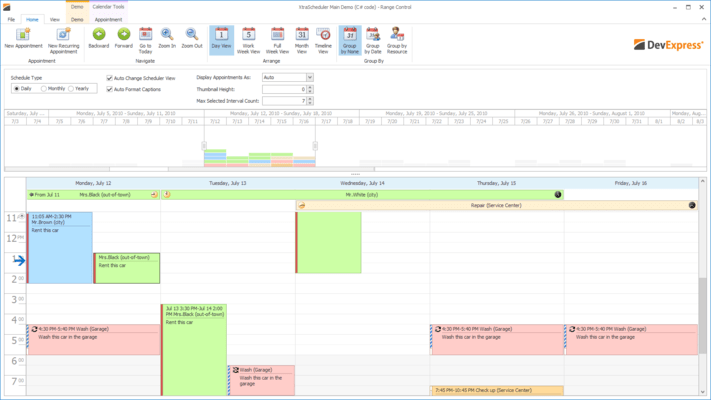
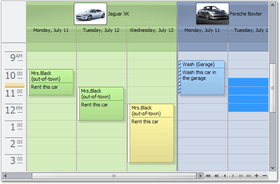
Screenshot Preview

XtraScheduler Suite - Summary

by DevExpress (Developer Express) - Product Type: Component / .NET WinForms / 100% Managed Code

Summary

XtraScheduler Suite by DevExpress (Developer Express)

URLs: xtrascheduler, devexpress

Feature-complete scheduling/calendar library for Visual Studio .NET. XtraScheduler Suite includes: days view and time rulers, week view, multi-week view, multiple resources display, date navigator and more. The Day view offers the most detailed picture of events over a single day or a few days. It displays events within vertical timelines where an event’s top-most edge corresponds to its start time and its bottom-most edge is the finish time. The Multi-Week view is the least detailed view and is designed to allow your end users to browse and analyze long-term plans. This view positions days one after another horizontally so that they construct weeks while individual weeks are placed one under another. XtraScheduler Suite also includes a DateNavigator control that provides intuitive access to specific time frames. It doesn't matter whether you need to select a particular day, a range of days, a week or multiple weeks - selection can be accomplished via a single mouse operation.

What You Can Build with the XtraScheduler Suite

Day View

Week View

Work Week View

Multi-Week View

Horizontal Timeline View

Multiple Resources Display

Date Navigator

Additional Controls - The XtraScheduler Suite provides numerous auxiliary controls that can be used to manage events. By using these controls, you can change an event's label, time status, bound resource, recurrency pattern, etc.

Event Capabilities

Reminders.Like so many of the features found in the XtraScheduler Suite, your end-users can fully control/manage reminder settings without any coding on your part. Features include: Built-in controls that allow you to set up the reminder for an event; a visual indicator (bell icon) for events with associated reminders; a built-in reminder dialog that is automatically invoked when the reminder is due.

Event recurrence. The XtraScheduler offers you a built-in solution to address this business requirement via its Event Recurrence dialog that offers built-in daily, weekly, monthly and yearly recurrence patterns.

Conflict management. The XtraScheduler can automatically determine event conflicts and prohibit conflicting appointment creation. Conflict identification can also be done manually by handling a specially designed event.

4 built-in time display options in the day view (including those events that span multiple days). If you need more time display options, you can easily add any number of them using the scheduler storage component.

11 built-in event coloring types to indicate an event’s kind/importance. As well as with time display options, you can freely add any number of custom event coloring types.

Automatic word wrap for the descriptions of events.

Automatic hints that display an event’s start and end time along with its caption

Custom Images within Events - To help end-users quickly identify specific events, you can associate unique images for individual events and appointments

Custom in-place editors. You can implement a custom editor form and use this form as an in-place editor for appointments

Data Binding Features

Microsoft Office Calendar synchronization is fully supported

Binding to an External Data Source

Unbound Data Support

Binding Custom Fields to an Event

Data Export Options

XML

A printed page, PDF or graphics file. This can be done by means of the XtraPrinting Library which must be purchased separately. You can print a day, week or month view, three views on a single page or choose one of two textual appointment representations

Microsoft Outlook calendar. The SchedulerStorage offers methods for both bi-directional data exchange and appointment synchronization.

vCalendar 1.0. You can easily transfer data between applications that use XtraScheduler and other applications that support vCalendar 1.0 format

Miscellaneous Features

Complete Localization Support

Saving and Restoring the Scheduler's Layout

Hit Information

The XtraScheduler is capable of displaying state holidays. You can export holiday lists either from Microsoft Outlook® or from a custom XML file with extremely simple syntax

End-User Capabilities

Sizing and Moving Events

Built-in Context Menus

Built-in Dialogs – including Go to Date, Appointment Editor, Event Recurrence, Time Ruler, Print Options

Full Keyboard Support

What's new in XtraScheduler v2011 vol 1?

Visual Studio 2010 Skin – This version introduces a Visual Studio style Application Wide Skin.

WinForms Project Wizard for Visual Basic -With this release, DevExpress have introduced a new Wizard to help you get started building Visual Basic based applications when using DevExpress WinForms controls.

What's new in XtraScheduler v2010 vol 2?

Scheduler Color Schemes Adjusted to Match Skins - In previous versions, resource color schemas used predefined colors and were the same regardless of the selected skin. With this release, they are automatically modified to match the specified skin.

Scheduler Reporting Enhancements - VisibleWeekdays - This new option allows you to specify the days of the week to be displayed within the DayViewTimeCells control. By using the VisibleWeekDays property, you no longer have to filter time intervals manually. VisibleIntervalsSplitting - This new option allows you to control how time cells are split across printed pages and can be used when the number of displayed intervals differs from one page to another. A typical scenario includes printing each month on a separate page, as illustrated below: ReportResourceHeaderOptions - Resource headers gain the ability to specify text direction for captions and display images specifying alignment and image interpolation mode. Now resource pictures in reports can be printed with much better quality. To take advantage of the new feature, use the Options property of the VerticalResourceHeaders and HorizontalResourceHeaders reporting controls.

Better Control over Import/Export Operations - This release introduces the ability to better handle errors during import/export operations. If a problem occurs when the exchanger object processes data, the OnException event fires. You can analyze the reason behind an exception and determine whether the entire operation should be rolled back.

Better Support for iCalendar - The iCalendar exporter is now able to export custom VEVENT properties, such as ATTENDEE - used to send out meeting invitations.

What's new in XtraScheduler v2010 vol 1?

Full Support for Visual Studio 2010 and .NET Framework Client Profile

Automatic Time Cell Sizing in Scheduler Reports - Time cells can now automatically adjust size depending on content. You can control whether cells should be shrink so that no empty space is used and whether they can be automatically enlarged to fit all available appointments.

Smart Synchronization in Scheduler Reports -If several Scheduler Report controls are placed onto the same report, the Scheduler Adapter can coordinate how controls traverse through data. For instance, you can place a Day and Week View onto the same report and keep them synchronized on every report page.

What’s new in XtraScheduler v2009 vol 2?

New Report Control for Formatted Time Interval Display - implemented a new control showing the time interval displayed within the bound scheduler element. In addition to automatic font scaling (based on size), it can automatically determine the appropriate date-time formatting based on the bound element type. You can also customize formatting for both dates displayed within the control. There's a wide range of predefined formats and the ability to specify any custom format string.

Customizable Borders for Printed Scheduler Elements - In previous versions, when printing the XtraScheduler via the XtraReports Suite, double borders appeared when placing different printed elements side-by-side. This effect has now been eliminated. You can control border visibility for every report control provided by the schedulers.

Customization of Printed Elements via Events and Services - Similar to the WinForms Scheduler control, printed scheduler elements also expose events allowing you to modify appointments when they are about to be rendered. These events allow basic customization functions like showing an additional image within an appointment or customizing its text. For advanced customization, you can create a scheduler customization "service" - a class implementing a specific XtraScheduler interface. All printed elements also have custom painting events allowing you to override default element painting. See the following image for an example of element customization using these events.

Better Design-Time Usability of Scheduler Reports - With this release, DevExpress have improved the design-time behavior of various report elements - including the addition of automatic control binding when dropped on a report and the revision of the smart tag content with several new functions.

What’s new in XtraScheduler v2009 vol 1?

Advanced Printing and Exporting for Scheduled Appointments - The Scheduling team has come up with an excellent addition to XtraScheduler that will allow you to produce professional diaries and PIM-style reports from your appointments. This new functionality is ONLY available if you own both the XtraScheduler and XtraReports Suites (it uses functionality from each product library). The team’s primary goal was to maintain as much flexibility as possible. This wasn't to be a "print screen" type solution, but a solution that should be designed. Hence the need for XtraReports: the new XtraScheduler Suite in v2009 vol 1 has a new control that descends from the XtraReport class called XtraSchedulerReport. This has the normal banded report designer that you're used to from XtraReports, and there are a set of new report controls that you can drop onto the designer surface to build up a scheduler report. The report gets its data through a print adapter. The main purpose of this adapter object is to compose a data set that will be used in the report. Provide two print adapters: a storage and control adapter. Since the print adapters provide a set of validation events, you can easily filter the scheduler data to suit the report. The next layer is the report view. This is much like the view that exists in the XtraScheduler control, so there are ReportDayView, ReportWeekView, ReportMonthView, ReportTimelineView components. Finally, as stated above, the report itself is a container for report bands, and each band has a set of controls placed inside them.

There are two distinct sets of controls. The first, and most important set consists of controls that represent time cells with appointments. They are: DayViewTimeCells, HorizontalWeek, FullWeek, and TimelineCells. The second set of controls, the auxiliary controls if you like, include:

Headers - the HorizontalResourceHeaders, VerticalResourceHeaders, HorizontalDateHeaders, DayOfWeekHeaders, and TimelineScaleHeaders.

Calendar - the CalendarControl control

Time ruler - the DayViewTimeRuler control

Information - controls used to display miscellaneous information, such as the TimeIntervalInfo and ResourceInfo controls

They are similar to the XtraReport controls you know now (in that they're only there to drop on the report designer surface, you can't use them elsewhere), although they have their own peculiarities. This way, you can easily create a nearly endless array of scheduling reports. Note that since this functionality uses the XtraReports engine, the End-User Designer is also available so that end-users or application administrators can freely modify scheduling reports without you having to re-build your projects.

Appointment Accessibility Improvements - All-day area cannot occupy more than 50% of the Scheduler's working area, so not all appointments may be visible if they do not fit. You can now enable a vertical scrollbar within this area so that all appointments can be accessed by your end-user. You can also vertically scroll a TimeLine view area when appointments do not fit within the current view.

What’s new in XtraScheduler v2008 vol 3?

Appointment Splitting - With this release, the XtraScheduler introduces a new tool allowing end-users to split an appointment in two by simply dragging a splitter line. This feature is extremely useful if you need to break a recurring appointment into two separate series. All you have to do is select the Split command from the appointment's context menu, drag the splitter to the required time and click the left mouse button. When dragging the splitter, the scheduler shows a tooltip that indicates the split time along with the splitter targeting precision. The precision is set automatically based on the appointment's duration and varies from one hour to one minute. End-users can adjust this value using the mouse wheel.

What’s new in XtraScheduler v2008 vol 2?

Full Support for iCalendar Data Exchange Standard - DevExpress Scheduler controls simplify information transmission between different platforms by implementing iCalendar RFC 2445 standard support. The support for this format allows you to easily exchange scheduling data between your application and the most popular calendars - Apple iCal, Lotus Notes, Google Calendar, Novell GroupWise, and Windows Calendar. XtraScheduler and ASPxScheduler support the main set of elements included in the iCalendar standard. Tasks and journaling capabilities of RFC 2445, as well as descriptors and extensions specific for a particular calendar application, are to be implemented in future versions.

Zooming - Improved the usability of the controls with methods that imitate zooming of the current view. The ZoomIn method displays content in greater detail, while its counterpart, ZoomOut, displays a more general view. Zooming is implemented by adjusting the time scale or changing the number of visible weeks (in Month View).

New Services - In v2008 vol 2, three new services have been implemented: One of them allows you to determine the control's state, i.e. whether the modal form, popup menu or inplace editor is opened, if appointments are being resized or dragged, and if you can start a data refresh operation. Two other services can be used to customize textual representation of date-time values within the Time Ruler, headers, tooltips and appointments. Thus, end-users can specify different display formats for different visual elements within the Scheduler’s view. This allows you to provide a more user-friendly interface. All services are now available in the ASPxScheduler Suite as well as its WinForms counterpart, the XtraScheduler Suite.

Reminders Processing - The following reminder management enhancements have been implemented in v2008 vol 2:

Reminder functionality is now fully supported by the ASPxScheduler Suite.

Reminders can now be selectively ignored when triggering alerts, meaning that they can be invoked on a per-user basis.

Often, users run the application only to check for alerts. Now an application can trigger all alerts immediately on startup, to avoid delays.

XtraScheduler - Calendar Navigation Extensions - If you own the XtraBars Suite, you can now use two new extension components that enable easy calendar management. Simply drop these components onto a form and they will automatically add proper toolbars or Ribbon tabs to your existing navigation system, so that end-users can change the active view or navigate the calendar.

What’s new in XtraScheduler v2008 vol 1?

Mapping Wizards - Newly introduced wizards are designed to solve field mapping issues. When a new data source is assigned to the scheduler at design time, the Wizard is invoked and helps establish associations between data fields and properties of scheduler's persistent objects - appointments and resources. Suitable mappings are suggested automatically, and the user can amend them at design time as needed. Further, the Wizard validates the mappings when they are set, to ensure that all required mappings are present, and that the mappings contain no duplicates or missing entries.

Filter Control Integration -A tightly packed schedule is difficult to view and hard to understand. Users will now benefit from the integration with our FilterControl, which enables them to easily filter out certain appointments. Frequently used filter settings can be saved and restored when needed.

Better Time Zone Support - You can now specify which time zone to use for appointments. If you do so, you can also enable appointment storage in UTC format, so that your schedule can be easily presented according to the client time zone. So if you schedule a tennis match in Australia's local time, you can run the scheduling app from California and see when the match begins in your local time zone right away - without having to customize anything.

What's New in XtraScheduler Suite v2007 vol. 3?

Introduced a new assembly within the XtraScheduler Suite. This assembly enhances scheduler's built-in dialogs using advanced Developer Express components - toolbars, menus, Ribbons, layout control and spell checker. Thus, if you own the XtraBars Suite, XtraLayoutControl and XtraSpellChecker, you can easily enable the following product integration features.

Appointment Form with Menus and Toolbars

Appointment Form with a Ribbon

Check Spelling via the XtraSpellChecker

Appointment Form Customization using the XtraLayoutControl's Capabilities

What's New in XtraScheduler Suite v2007 vol. 2?

State Holidays - The XtraScheduler is now capable of displaying state holidays. You can export holiday lists either from Microsoft Outlook® or from a custom XML file with extremely simple syntax. Specified holidays are visually indicated in both the date navigator and calendar. The date navigator displays holiday dates with a different color. In a calendar, holidays don't include a work hour indication (just like weekend days). In addition to visual indication, you can call a special method to create all-day appointments for all holidays. This gives you two benefits: First, end-users can be notified of upcoming holidays. Second, if conflict restriction is enabled, end-users will not be able to create any additional appointments on holidays.

Custom In-place Editors - By default, end-users have two options for appointment editing. They can either invoke Microsoft Outlook style dialog or edit an appointment’s subject using an in-place editor. Of course there are end-users that demand something in between. Subject editing is often not enough and Microsoft Outlook dialogs have too many options. Previously, you could solve this problem by providing a custom appointment editor dialog. With the release of DXperience 2007 vol. 2, a more elegant approach is now available. You can now implement a custom editor form and use this form as an in-place editor for appointments. This means that end-users will see your custom form instead of a simple subject editor. This will take place when they press F2, repeatedly click an appointment or when they start typing within the calendar to create a new appointment. Needless to say, the custom form will be automatically resized to fit the appointment being edited.

Office 2007 Appointment Navigation -You can now enable buttons that allow end-users to navigate to the closest preceding or subsequent appointment relatively to the current view. There are three visibility modes for these buttons. They can be always visible, always hidden, or visible when the current view doesn't have any appointments within it. If multiple resources are visible, navigation buttons are displayed for each individual resource. Note that if buttons cannot fit into the scheduler vertically, they are automatically collapsed. In their collapsed state, they display only arrows; the caption text is hidden. Another new change affects all-day appointments that cannot be completely displayed within the current view. These appointments now display arrows and labels indicating the appointment's actual start and end dates.

Minor New Features

Hot-track effects are now available for buttons indicating that there are more events for a particular date.

Work Week View can now display the entire week

Feature-complete scheduling/calendar library for Visual Studio .NET.

Pricing: XtraScheduler Suite Subscription Renewal for one year (for Subscriptions soon to expire or just expired), XtraScheduler Suite Subscription Renewal for one year (for Subscriptions soon to expire or just expired) - with Source code

Evals & Downloads: Read the Developer Express License Agreement - Requires Acrobat Reader, Read the XtraScheduler Suite help file, Download the DXperience v2011 vol 2 (V11.2.8) evaluation on to your computer - Expires After 30 Days

Operating System for Deployment: Windows 7, Windows Vista, Windows XP, Windows Server 2003, Windows 2000

Architecture of Product: 32Bit

Product Type: Component

Component Type: .NET WinForms, 100% Managed Code

Compatible Containers: Microsoft Visual Studio 2010, Microsoft Visual Studio 2008, Microsoft Visual Studio 2005, Microsoft Visual Basic 2010, Microsoft Visual Basic 2008, Microsoft Visual Basic 2005, Microsoft Visual C++ 2010, Microsoft Visual C++ 2008, Microsoft Visual C++ 2005, Microsoft Visual C# 2010, Microsoft Visual C# 2008, Microsoft Visual C# 2005, .NET Framework 4.0, .NET Framework 3.5, .NET Framework 3.0, .NET Framework 2.0

Keywords: xtrascheduler, devexpress scheduler, devexpress xtrascheduler, devexpress schedule, devexpress scheduling, xtrascheduler suite, xtra scheduler, developer express xtrascheduler, xtrascheduler suite subscription, xtrascheduler suite subscription with source, buy xtrascheduler, xtrascheduler upgrade, xtrascheduler renewal

devexpress, developer express, dxperience, devexpress.com, devexpress controls, devexpress download, www.devexpress.com, devexpress dxperience, devexpress suite, devexpress components, devexpress tools, devexpress universal, devexpress upgrade

Calendar calendaring calendars Scheduling Schedule Schedules

Part numbers: PC-516348-379312 516348-379312 PC-516348-379314 516348-379314

Product Search

Enter search words:

Award Award