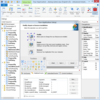
모든 플랫폼의 완벽한 설치 인증 솔루션에는 트라이얼웨어 기능, 네트워크 리포지토리, 다중언어 지원 및 Update Service Starter 에디션이 포함됩니다. InstallShield로 강하고 신뢰할 만한 새로운 설치 인증 기능을 도입하여 급변하는 현재의 기술 시장에 대처할 수 있습니다. MSI 3.0 지원, XML 파일 설정값 자동 업데이트, 트라이얼웨어 기능(Premier Edition만의 기능) 등의 새 기능으로 설치 프로젝트에 더 강력하고 유연하게 만들 수 있습니다.
최신 기술을 지원하는 빠르고 쉬운 설치 프로그램입니다. InstallShield 11 Express를 사용하면 복잡한 설치 프로그램을 직접 작성하지 않고도 쉽게 만들어낼 수 있는 설치 프로그램 제작 도구를 제공합니다. 어떤 교육도 받을 필요 없이 Windows 및 모바일 장치의 설치 프로그램을 쉽게 개발, 시험 및 구현할 수 있습니다. InstallShield 11 Express의 설치 프로그램 제작 도구는 Windows Installer 3.1, IIS 6.0 및 트라이 앤 바이(Try and Buy) 기능과 같은 최신 기술 및 업계 표준을 지원합니다. Express 판은 12년이 넘는 오랜 경험을 바탕으로 한 업계를 선도하는 신속한 설치 프로그램 제작 솔루션으로 명성을 떨치고 있습니다. Express 판은 사용자의 예산에 딱 맞춰주는 비용 효율적인 솔루션이어서 Windows 또는 모바일 장치 설치 프로그램의 전문적 외관을 만들어낼 수 있습니다.
요건과 이용 케이스에 관한 작성/ 분석 / 관리를 실현. IBM® Rational RequisitePro는 어플리케이션에서의 요건과 이용 케이스의 작성 / 분석/ 관리를 가능하게 함으로 프로젝트 팀의 계획을 유지합니다. RequisitePro는 더욱 원활한 커뮤니케이션 촉진 및 팀워크 강화 그리고 프로젝트 리스트 절감을 실현하기 위한 파워풀하고 간단히 이용할 수 있는 제품입니다. 구체적으로는 친숙하기 쉬우며 간단히 사용할 수 있는 Microsoft Word의 다큐멘트와 파워풀한 데이터 베이스 기능을 조합함으로 변경으로 인한 영향에 대한 대응능력을 팀에게 제공하며 더욱 효과적인 요건의 해석과 조사를 실현해 나갑니다. IBM Rational RequisitePro는 요건에 관한 최신정보 팀에 대한 지속적인 통지를 보증하며 또한 Web을 베이스로 한 액세스를 제공함으로 분산환경에서의 팀에 대해 정보의 일관성을 보증합니다.
Windows NT 또는 Windows95/98/2000에서 Visual C++어플리케이션 개발을 위한 선진 런타임 에러 검출・디버그 툴입니다. BoundsChecker는 Visual C++ Developer Studio내에서 디버그 처리를 자동화함으로써 개발 스피드를 올릴 수 있습니다. 대부분의 경우 C++에 고유의 프로그래밍 에러에 대해서 상세하고 알기 쉬운 분석 정보를 제공합니다. 스테틱(Static), 스텍(Stack) 및 히프(Heap)영역의 에러나 메모리 리크(Memory leak), 리소스 리크를 검출하고 진단합니다. BoundsChecker는 최신 Windows의 API, ODBC,ActiveX, DirectX, COM, Internet API 등 8,700이상의 API나 OLE 메소드를 실행 시에 검출합니다
모든 플랫폼의 완벽한 설치 인증 솔루션에는 트라이얼웨어 기능, 네트워크 리포지토리, 다중언어 지원 및 Update Service Starter 에디션이 포함됩니다. InstallShield로 강하고 신뢰할 만한 새로운 설치 인증 기능을 도입하여 급변하는 현재의 기술 시장에 대처할 수 있습니다. MSI 3.0 지원, XML 파일 설정값 자동 업데이트, 트라이얼웨어 기능 등의 새 기능으로 설치 프로젝트에 더 강력하고 유연하게 만들 수 있습니다.
5 리뷰(s).
I highly recommend TurboDemo. The product works as advertised, is easy to use, and works better than the competitors I tried. My entire e-Learning team uses the product on a variety of training, website and knowledge management solutions. The only thing that surpasses the product quality is the customer service. In an age where software customer service is unheard of, or expensive, the TurboDemo ... 충분히 읽고 검토해주세요.
5 리뷰(s).
I highly recommend TurboDemo. The product works as advertised, is easy to use, and works better than the competitors I tried. My entire e-Learning team uses the product on a variety of training, website and knowledge management solutions. The only thing that surpasses the product quality is the customer service. In an age where software customer service is unheard of, or expensive, the TurboDemo ... 충분히 읽고 검토해주세요.
3 리뷰(s).
Building good-looking menus with Menu Suite is a lot of fun. It is feature-rich, easy-to-setup, and easy-to-use with the help of its visual menu builder integrated with VS.NET. They have extremely good and prompt support as well. As a .NET and XML newbie, this was really important for me. I always got response to my questions within hours with helpful explanations that made my development a lot ea ... 충분히 읽고 검토해주세요.
3 리뷰(s).
WHAT I PURCHASED>> Autoplay Media Studio 5 (Pro) Let me start out by saying this is an excellent (the best in my opinion, on so many levels at that!) Rapid Application Design auto-run CD-ROM application! I NEED SUPPORT!>> Need support? Just create an account in their forum section and you will find in a short amount of time that you will be communicating directly with SEVERAL of their profess ... 충분히 읽고 검토해주세요.
2 리뷰(s).
Licensing is a very complex proposition. When you add in the need to obfuscate and otherwise attempt to protect your intellectual property rights/copyright, it can really be a daunting task. Fortunately for us, the Desaware Licensing System is available and has been nicely done. It was written by Dan Appleman author of the Win32 API book, so I knew that it would be good. The software includes ... 충분히 읽고 검토해주세요.
모든 플랫폼의 완벽한 설치 인증 솔루션에는 트라이얼웨어 기능, 네트워크 리포지토리, 다중언어 지원 및 Update Service Starter 에디션이 포함됩니다. InstallShield로 강하고 신뢰할 만한 새로운 설치 인증 기능을 도입하여 급변하는 현재의 기술 시장에 대처할 수 있습니다. MSI 3.0 지원, XML 파일 설정값 자동 업데이트, 트라이얼웨어 기능 등의 새 기능으로 설치 프로젝트에 더 강력하고 유연하게 만들 수 있습니다.
모든 플랫폼의 완벽한 설치 인증 솔루션에는 트라이얼웨어 기능, 네트워크 리포지토리, 다중언어 지원 및 Update Service Starter 에디션이 포함됩니다. InstallShield로 강하고 신뢰할 만한 새로운 설치 인증 기능을 도입하여 급변하는 현재의 기술 시장에 대처할 수 있습니다. MSI 3.0 지원, XML 파일 설정값 자동 업데이트, 트라이얼웨어 기능(Premier Edition만의 기능) 등의 새 기능으로 설치 프로젝트에 더 강력하고 유연하게 만들 수 있습니다.
Create advanced multi format help and documentation. Help and Manual is an advanced multi format help authoring tool that provides all the formatting and editing features of a modern word processor. You can output your projects to all standard Windows help formats (HTML Help, Winhelp and MS Help 2.0 / Visual Studio Help), browser-based Help, PDF and Word RTF. All output formats supported by Help & Manual are generated from the same project, you only have to edit your help and documentation once. Help & Manual Professional (XML Edition) Edition includes advanced features like Unicode Support or export/import help projects in XML format. Help & Manual is fully compatible with Windows Vista and also with Internet Explorer 7 on Windows XP and Windows Vista.
Build professional document imaging into your applications. LEADTOOLS Document Imaging includes API, C++ Class Libraries and .NET Class Libraries for Win32 and x64 with features that include comprehensive annotations (Text, highlights, sticky notes, stamps, and more), specialized bitonal image display and processing such as scale-to-gray and favor-black. Also features performance and memory optimizations for bitonal images, document image clean-up including hole-punch, line and staple removal and scanning with TWAIN or ISIS. Now includes JBIG2, ABIC, JPEG2000 and LEAD CMW.
고급 XML 응용프로그램을 개발. Altova XMLSpy®은 높은 품질의 표준 준수 XML 기반 응용프로그램을 이전보다 더 빨리 개발할 수 있어 생산성을 높입니다. 시작에서 종료까지 XML 개발 생산성을 높이도록 설계되었으므로, XMLSpy®는 XML 인스턴스 문서 생성과 편집, 스키마 인식 XQuery 개발과 디버깅, 시각적 XML Schema 개발, XPath 1.0/2.0 개발, DTD 편집, 데이터베이스 상호작용, 그래픽 WSDL 개발, Web 서비스 개발, SOAP 개발과 디버깅, Java/C#/C++ 코드 생성, XSLT 1.0 개발과 디버깅, VS.NET와 Eclipse 통합, 스키마 인식 XSLT 2.0 개발과 디버깅을 지원합니다.
Windows
Integrate PDF viewing, printing, format conversion, and text extraction into DotImage. Atalasoft DotImage PDF Reader Add-On quickly decodes PDF documents into color or grayscale raster images, seamlessly plugging into DotImage and associated image viewing components as an image decoder. Supports simple image only PDF's as well as complicated PDF's with vectors, text, patterns, and transparency. Extract the images out of the PDF, rasterize the vector objects to a new image, or render directly onto a printer with zero Adobe Acrobat dependencies. Requires any edition of DotImage SDK.
Compress photographic images. Atalasoft DotImage JPEG2000 Codec can be used to decode and encode JPEG2000 images using the Microsoft .NET Framework. It uses wavelet compression technology to compress photographic images further than other available compression schemes. The codec is available as a plug-in and integrates with DotImage seamlessly. DotImage JPEG2000 is based off of Luratech's Lurawave.jp2 wavelet compression technology. Licensing is runtime royalty free for desktop applications.
Decode and encode JBIG2 images using the Microsoft .NET Framework. JBIG2 compression is an open standard and can compress bi-tonal images 2 - 5 times more than the same image compressed with the industry standard TIFF CCIT Group4 compression. The codec is available as a plug-in that integrates with DotImage seamlessly. Atalasoft DotImage JBIG2 is based off of Luratech's Lurawave.jb2 compression technology. Licensing is runtime royalty free for desktop applications.
CAD/CAM Viewing. Atalasoft DotImage CAD Reader can be used to read AutoCAD DWG and DXF formats using the Microsoft .NET Framework. DWG is the default format of AutoCAD. DXF is meant to be an interchange format for AutoCAD and Autodesk publishes a specification document for it. The DotImage CAD Reader integrates with DotImage seamlessly and reads CAD drawings as rasterized images which can be viewed, processed, and converted into other formats by DotImage. DotImage CAD Reader is runtime royalty free for desktop deployments.
Increase your .NET productivity. ReSharper is an intelligent add-in to Visual Studio 2005/2008. It comes equipped with a rich set of features including: intelligent coding assistance, on-the-fly error highlighting and quick error correction, as well as support for code refactoring, unit testing, navigation and search, NAnt and MS Build Scripts Editing, ASP.NET Editing and more. All of ReSharper's advanced features are available right from Visual Studio.
Complement your client server and Web based applications with data visualization components with no additional coding. PowerGadgets adds advanced IT monitoring on your desktop and in your Vista Sidebar. IT professionals can now create gadgets that consume data from WMI, Exchange, SQL and even the Windows Registry. PowerGadgets doesn't require any development environments, servers or browsers to run real-time gadget components such as charts, gauges and maps. In addition, PowerGadgets is visually and programmatically rich - scaling from vector-based graphics and managed .NET code. You can also use PowerGadgets to retrieve information from other Microsoft applications that are built on top of PowerShell such as Exchange Server, MOM and Virtual Machine Manager.
Add complete web crawling and document indexing to your web applications. Webinator creates a full-text search interface to collections of HTML, PDF, word processing, and other types of documents, which may be on a web site, intranet, or anywhere on the Internet. Features include: relevance ranking, customizable user interface, web-based administration, Index Flash and JavaScript links and content. Index multiple sites, update while in use, similarity searches ('more like this'), indexes secure (ssl/https) sites, ignores navigation bars and duplicate pages, detailed verification and logging.
Reliable software packages prepared with automation and intelligence. With AdminStudio you can customize installations without having to edit Windows Installer database tables, or even write a single line of script. Developed specifically for System Administrators, Desktop Engineers and Corporate IT Project Teams, AdminStudio provides a wizard driven interface to navigate the repackaging process. Repackaging can be done with the standard default options or tailored to meet specific needs via detailed exclusion lists, the option to capture application or system-level changes, output preview, registry settings, and more.
기업에서 사용하는 신뢰성 있는 어플리케이션과 패치를 제작. Macrovision AdminStudio를 이용하면, Windows Installer 데이터베이스 표를 편집하거나 한 줄의 스크립트도 작성하지 않고 설치를 사용자 정의할 수 있습니다. 시스템 관리자, 데스크탑 설계자, 기업 IT 프로젝트 팀을 위해 특별하게 개발한 AdminStudio는 재가공(repackaging) 과정을 탐색하는 마법사 중심 인터페이스를 제공합니다. 재가공은 표준 기본 옵션을 통해 이루어지거나 자세한 제외 목록, 어플리케이션 또는 시스템 수준 변경 사항을 캡처하는 옵션, 출력 미리 보기, 레지스트리 설정 등을 통해 특정 요구를 만족하도록 정의할 수 있습니다.
Windows