

 (2)
(2) (5)
(5) (1)
(1)Official Supplier
As official and authorized distributors, we supply you with legitimate licenses directly from 200+ software publishers.
See all our Brands.
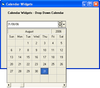
Screenshots: The DateCombo control is ideal for creating data entry forms that require date information to be entered. With a variety of options for input masking and date formatting, the DateCombo helps facilitate date selection. You can also use the DateCombo in applications where a monthly view of dates is ... Read more Show more results from this product
Description: Create dynamic calendars with this set of four reusable components. Calendar Widgets consists of: Sheridan MonthView- for displaying up to three months at a time for quick selection of multiple dates. Holidays, weekends, and special days can be highlighted; YearView- All the features of month view ... Read more
Screenshots: By default, the DateCombo control displays the date in the edit portion according to the Windows International settings. For example, the Windows International settings, found in Control Panel, can be set so that all dates in Windows are displayed in 'Month Day, Year' format. It can also ... Read more
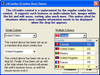
Screenshots: The ctCombo control has been enhanced to act more like the navigational drop down combo boxes ... found in many web browsers. It can also be used as a regular drop down combo or drop down list control. ... Read more Show more results from this product
Description: Add expanded functionality with this robust collection of 53 components. Component Toolbox OCX contains 53 licensed 32-bit OCX/ActiveX components for Outlook-style menus, enhanced tree view, advanced list box, calendars, edit controls, buttons, sliders, gauges, and much more. Speed time to market ... Read more
Features: palette. ctColorCombo: (NEW) A color combo-box object. ctCombo: An enhanced combo-box object. ctCPick: ... Read more

Release Notes: Remote combo needs an explicit load of the store if configured autoLoad false or not configured ... Read more Show more results from this product
Release Notes: Grid Enhancements: Smoother virtual scroller resizing. Now properly supports multi-selection with virtual stores. Improved title binding for full grid customization. Component Stability: ComboBox: Improved filter retention, ensuring consistent results even with empty input fields. Calendar: ... Read more
Release Notes: consistently hidden simultaneously, and vice versa. Incorporating an 'id' field in the combo store ... Read more

Release Notes: Bars Improved UI Automation for BarComboBox. Updated RibbonViewModel to synchronize the SelectedItem property with the Tabs collection by always selecting the first tab when no selection is currently defined or the previous selection is removed. Updated some bar controls to use a new resource brush ... Read more Show more results from this product
Release Notes: Bars Updated BarComboBox to commit the current previewed item on mouse clicks outside of the popup. Updated control templates to better propagate font family and size to ItemsControls with popups. Updated button click handlers to perform InvocationFocusBehavior logic before processing the click. ... Read more
Release Notes: Bars Added the BarControlService.DefaultImageStretchDirection property that can be set at app startup to alter the default DownOnly image stretch direction used by controls. Added the RibbonViewModel.IsOptionsButtonVisible property. Updated controls that use external headers to remeasure ... Read more

Release Notes: Bars Updated BarComboBox to commit the current previewed item on mouse clicks outside of the popup. Updated control templates to better propagate font family and size to ItemsControls with popups. Updated button click handlers to perform InvocationFocusBehavior logic before processing the click. ... Read more Show more results from this product
Release Notes: Bars Improved UI Automation for BarComboBox. Updated RibbonViewModel to synchronize the SelectedItem property with the Tabs collection by always selecting the first tab when no selection is currently defined or the previous selection is removed. Updated some bar controls to use a new resource brush ... Read more
Release Notes: Bars Added the BarControlService.DefaultImageStretchDirection property that can be set at app startup to alter the default DownOnly image stretch direction used by controls. Added the RibbonViewModel.IsOptionsButtonVisible property. Updated controls that use external headers to remeasure ... Read more


Release Notes: Bars Added RibbonViewModel.SelectedItem property for the currently selected RibbonTabViewModel. Added an InvocationFocusBehavior property to most bar controls that determines how focus should be handled following the primary invocation of the control. Improved RibbonGallery keyboard navigation to ... Read more Show more results from this product
Release Notes: Bars Added BarMainMenu control that can replace native Menu control. Added Tag property to all view models that can be used to store custom data. Added the RibbonViewModel.IsOptionsButtonVisible property. Added the RibbonBackstageViewModel.CanClose property. Added the RibbonBackstageViewModel ... Read more


Release Notes: SfComboBox Fixed an issue on Android where the SfComboBox dropdown did not close when pressing the hardware back button. 0 ... Read more Show more results from this product
Release Notes: SfComboBox Fixed an issue where ComboBoxes could overflow or be clipped when their parent was narrower; ComboBoxes now fit the parent width. SfDataForm Fixed the issue on Windows where Tab key navigation did not move the focus correctly from a text editor to a numeric editor in the control. 0 ... Read more
Release Notes: SfCalendar While swiping to navigate to the next month, the incoming month view will now align correctly, providing a smoother transition animation experience. SfComboBox The TokenWrapMode issue has been resolved in iOS platform. 0 ... Read more
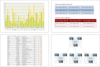
Description: Range Combo Tree Map Heat Map High-Low Chart Axes Features: Axes Position: Primary and Secondary X and Y ... Clipboard Color Pickers Combo Box Command Bars Context Menu Context Popup Cursor Date Time Box Dock Panel ... opens popup window, which assists the user with the editing. Notable drop-down edits are: Combo Box Date ... Read more Show more results from this product
Screenshots: with the editing. Notable drop-down edits are: Combo Box, Date Time Box, Color Box and Split Buttons. ... Read more
Features: Notable drop-down edits are: Combo Box, Date Time Box, Color Box and Split Buttons. Text Visualization ... Read more
Description: AutoCompleteBox Backgrounds Borders Buttons Calendar Check Box Clipboard Color Pickers Combo Box Command Bars ... edits are: Combo Box Date Time Box Color Box Split Buttons Layout Panels Layout panels are used ... Read more Show more results from this product
Features: with the editing. Notable drop-down edits are: Combo Box, Date Time Box, Color Box & Split Buttons. ... Read more

Release Notes: ComboBox Uncaught TypeError: Cannot read properties of null (reading 'get_wrapper')- ComboBox. ... Read more Show more results from this product
Release Notes: Common: Introduced new OTP Input component. [Preview] Introduced a Telerik DPL AI Coding Assistant for the PDF Processing library that can be used through a GitHub Copilot extension or an MCP server. Enhanced license popup with contextual error and trial messages. AsyncUpload: Added MIME type ... Read more
Release Notes: Common: Breaking Changes: Unified distribution for trial and commercial packages: Streamlined user experience by consolidating trial and commercial packages into a single unified distribution for Telerik UI libraries. Access is now managed through a license key file, eliminating the need for ... Read more
Tel: (888) 850 9911
Fax: +1 770 250 6199


