
官方供應商
我們作為官方授權經銷商,直接提供超過200家開發廠家所發行超過1000個的產品授權給您。
請參閱我們所有的品牌。
AddFlow for WPF Professional is a Windows Presentation Foundation custom control that lets you quickly build flowchart enabled WPF applications like workflow diagrams, database diagrams, communication networks, organizational charts, process flow, state transitions diagrams, telephone call centers, CRM (Customer Relationship Management), expert systems, graph theory, quality control diagrams, etc. Addflow for WPF is very easy to use, very light and it is designed to be very fast. Addflow for WPF Professional requires the Microsoft .NET Framework 3.5 and VS2008. Royalty free redistribution. Addflow for WPF Professional includes LayoutFlow.
Lassalle Technologies is a publisher of software components that was founded in 1997. The company is committed to creating powerful flowcharting/diagramming components. AddFlow is its main product and is available in both ActiveX and .NET editions. AddFlow is very well positioned in the ComponentSource Top 50 Best Sellers. Lassalle Technologies also provides graph layout components which automatically display graphs or flow charts, following aesthetic rules (hierarchic, symmetric, orthogonal, etc.) Currently over 2,000 companies in 60 countries, use Lassalle Technologies products.
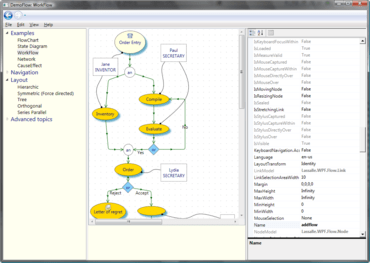
為您的 WPF 應用程式創建互動式流程圖和工作流關係圖。
Live Chat現在與我們的Lassalle Technologies 專家即時聊天詢問。

自 2002 的官方分銷商
聯繫電話: (888) 850 9911
傳真: +1 770 250 6199


