

官方供應商
我們作為官方授權經銷商,直接提供超過200家開發廠家所發行超過1000個的產品授權給您。
請參閱我們所有的品牌。
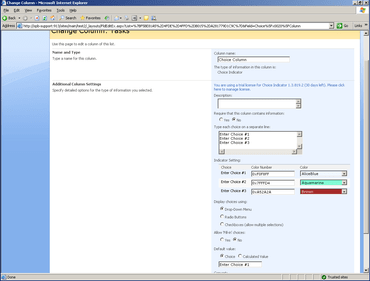
SharePoint Choice Indicator allows you to prioritize, organize and monitor task and list items by applying color-coded labels corresponding to selection criteria you specify. Choice Indicators support floating tooltip information, customizable color settings, and the ability to apply one or more colored labels to each list or task item, permitting you to quickly scan and sort through lengthy SharePoint lists without compromising individual list item data. The SharePoint Choice Indicator feature is an extension of the default SharePoint Choice Column, which does not support color-coding on SharePoint column/list views.
SharePointBoost is a leading developer of SharePoint solutions that bridge the gap between SharePoint out-of-the-box and the custom functionality needed to make daily business operations smooth and efficient. SharePointBoost believe that all businesses should have access to advanced technology solutions tailored to their specific needs and delivered with professional service and support. SharePointBoost have developed a complete suite of fully-customizable SharePoint solutions for just this purpose, designed to unlock the full potential of SharePoint.
聯繫電話: (888) 850 9911
傳真: +1 770 250 6199


