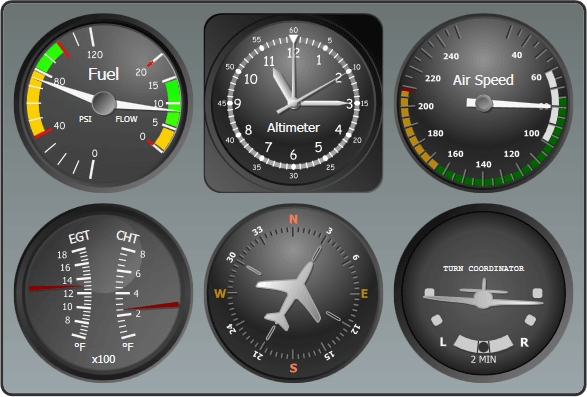
Screenshot Preview

Actipro Gauge for WPF

by Actipro Software - 상품타입: Component / .NET WPF / 100% Managed Code / Source Code

주의 : 별도의 안내가 없는 경우에는 영어제품 입니다.

*

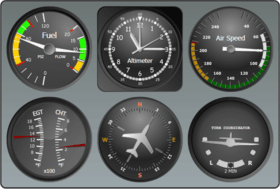
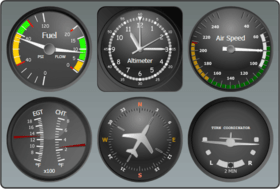
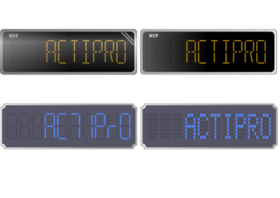
Add Gauges to your WPF applications. Actipro Gauge for WPF is a control suite that implements circular, linear, and digital gauge controls for the Windows Presentation Foundation framework. Each gauge control has tons of options available, providing for limitless possibilities. Gauge controls are ideal for displaying several data points in a concise and compact area. Everything from car dashboards to medical and industrial equipment use gauges, and are quickly recognized and understood by users. The circular and linear gauges are perfect for presenting a value, or values, bound by a specific range. The digital gauge mimics real-life LED displays. Actipro Gauge for WPF can also be bought as part of the Actipro WPF Studio.

$244.02
통화 선택

일반 적인 소비자 가격은 하기에 표시되어 있습니다. 고객님의 할인가격은 표시 하시려면 로그인 해주시기 바랍니다.

Actipro Gauge 2011.2 for WPF   *

주문 $ 244.02 1 Developer Subscription License (Includes 12 months of updates, both minor and major, email and forums based support and more)  *
메이커 제품 번호: #1110
다운로드 (62.6 MB)
주문 $ 219.62 1 Developer Subscription License, per license for 2 licenses (minimum quantity 2) (Includes 12 months of updates, both minor and major, email and forums based support and more)  *
메이커 제품 번호: #1110
다운로드 (62.6 MB)
주문 $ 195.22 1 Developer Subscription License, per license from 3 up to 4 licenses (minimum quantity 3) (Includes 12 months of updates, both minor and major, email and forums based support and more)  *
메이커 제품 번호: #1110
다운로드 (62.6 MB)
주문 $ 170.81 1 Developer Subscription License, per license from 5 up to 7 licenses (minimum quantity 5) (Includes 12 months of updates, both minor and major, email and forums based support and more)  *
메이커 제품 번호: #1110
다운로드 (62.6 MB)
주문 $ 146.41 8 or More Developer Subcription Licenses, Price per license (minimum quantity 8) (Includes 12 months of updates, both minor and major, email and forums based support and more)  *
메이커 제품 번호: #1110
다운로드 (62.6 MB)
주문 $ 1,910.02 1 Site Wide License (Allows Unlimited Developers at a Single Physical Address) (Includes 12 months of updates, both minor and major, email and forums based support and more)  *
메이커 제품 번호: #1111
다운로드 (62.6 MB)
주문 $ 3,821.02 1 Enterprise License (Allows Unlimited Developers throughout your entire organization, regardless of location) (Includes 12 months of updates, both minor and major, email and forums based support and more)  *
메이커 제품 번호: #1112
다운로드 (62.6 MB)
주문 $ 577.22 1 Blueprint License - (Source Code License) (Current Developer, Enterprise or Site License Subcriptions Required) (Includes 12 months of updates, both minor and major, email and forums based support and more)  *
메이커 제품 번호: #1113
확인 다운로드 (62.6 MB)

Actipro Gauge for WPF - Renewal   *

주문 $ 146.02 1 Developer Renewal License (if you have a current Developer Subscription or if your Developer Subscription expired within the past 30 days)  *
메이커 제품 번호: #1114
확인 다운로드 (62.6 MB)
주문 $ 131.42 1 Developer Renewal License, per license for 2 licenses (minimum quantity 2) (if you have a current Developer Subscription or if your Developer Subscription expired within the past 30 days)  *
메이커 제품 번호: #1114
확인 다운로드 (62.6 MB)
주문 $ 116.82 1 Developer Renewal License, per license from 3 up to 4 licenses (minimum quantity 3) (if you have a current Developer Subscription or if your Developer Subscription expired within the past 30 days)  *
메이커 제품 번호: #1114
확인 다운로드 (62.6 MB)
주문 $ 102.21 1 Developer Renewal License, per license from 5 up to 7 licenses (minimum quantity 5)(if you have a current Developer Subscription or if your Developer Subscription expired within the past 30 days)  *
메이커 제품 번호: #1114
확인 다운로드 (62.6 MB)
주문 $ 87.61 8 or More Developer Renewal License, Price per license (minimum quantity 8) (if you have a current Developer Subscription or if your Developer Subscription expired within the past 30 days)  *
메이커 제품 번호: #1114
확인 다운로드 (62.6 MB)
주문 $ 1,145.62 1 Site Wide Renewal License (if you have a current Site Wide Subscription or if your Site Wide Subscription expired within the past 30 days)  *
메이커 제품 번호: #1115
확인 다운로드 (62.6 MB)
주문 $ 2,292.22 1 Enterprise Renewal License (if you have a current Enterprise Subscription or if your Enterprise Subscription expired within the past 30 days)  *
메이커 제품 번호: #1116
확인 다운로드 (62.6 MB)
주문 $ 342.02 1 Blueprint Renewal License (if you have a current Blueprint Subscription or if your Blueprint Subscription expired within the past 30 days. You also need a Current Developer, Enterprise or Site License Subcription)  *
메이커 제품 번호: #1117
확인 다운로드 (62.6 MB)

가격에는 ComponentSource의 기술지원 요금이 포함되어 있습니다. 또한 다운로드 판매를 하고 있는 상품의 대부분은 온라인 백업요금이 포함되어 있어서 구입날로부터 30일 이내에 새로운 버전이 발매된 경우 무료로 업그레이드해 드리고 있습니다.  모든 주문에 대해서 당사표준 계약조건 반품조건 의 내용이 적용됩니다. 다음의 경우,고객 서비스로연락하시기 바랍니다. (상기의 리스트에 게재되지 않은 대량의 라이센스나 구 버전 등의 라이센스 옵션이 필요한 경우)

일반 적인 소비자 가격은 상기에 표시되어 있습니다. 고객님의 할인가격은 표시 하시려면 로그인 해주시기 바랍니다.

 *

What's New in Actipro Gauge for WPF 2011.2?

  • App-Wide Themes - Actipro Themes includes professionally-designed themes that cover all system and Office themes including high contrast mode.  The themes apply to all Actipro controls and optionally to native WPF controls.
  • Styles/Templates for Native WPF Controls - Enhanced styles and templates for all native WPF controls (TextBox, ToolBox, TreeView, etc.) are included.  These styles can be automatically applied app-wide via a single line of code.  Or you can choose to use them on specific controls only, accessible via pre-defined style keys.
  • Common Asset Pool - There are well over 800 asset resources for each of the system and Office themes supported. All custom and native control styles/templates use the same assets. This ensures that controls placed next to each other always render with similar colors that complement each other.
  • Advanced Tinting - Actipro Themes supports the tinting of any theme or portion of a theme towards a certain color. This means that you can take a built-in theme like the Office Silver theme, and make it a red one instead.
  • Appearance Improvements - Actipro Themes includes updated menu, toolbar, and statusbar appearances that were inspired by Visual Studio 2010’s look. The simplified design uses a darker workspace area, with lighter content areas in each docking window.  This higher contrast appearance focuses the end user's eye on the content without distracting it with non-active UI elements, thus making for a more effective user interface.

What's New in Actipro Gauge for WPF 2010.2?

  • Fixed exception when using DigitalGauge character casing feature with null text.

What's New in Actipro Gauge for WPF 2010.1?

  • Updated interactive circular pointers to use closest value between minimum and maximum when dragging outside the sweep angle.

What's New in Actipro Gauge for WPF 2009.2?

  • Version 2009.2 adds designer support for Visual Studio 2010 and Expression Blend 3.

What's New in Actipro Gauge for WPF 2009.1?

  • Windows 7 Compatible
  • Expression Blend Compatible
  • Added DesignerSerializationVisibility(DesignerSerializationVisibility.Content) attribute to read-only collection properties so they can be properly serialized

 *

Actipro Gauge for WPF is a control suite that implements circular, linear, and digital gauge controls for the Windows Presentation Foundation framework. Several data points can be presented on the same gauge, including averages and min/max values or build your own converter to show a custom value (e.g. median). Any UIElement, including other gauge controls, can be embedded and precisely placed inside the gauge controls, allowing for infinite combinations and looks. Also, all the controls in Actipro Gauge for WPF have numerous options for everything from the colors used to sizing and placement. Certain items, such as pointers, have several built-in types and effects. Actipro Gauge for WPF can also be bought as part of the Actipro WPF Studio.

Actipro Gauge for WPF Circular / Linear Gauge Features

Scales and Tick-Sets
Both the CircularGauge and LinearGauge support any number of scales which control the placement of the gauge elements, such as tick marks and pointers. In turn, any number of tick-sets can be specified when control value ranges and intervals, such as where major ticks should be rendered.

Ranges
To highlight areas of interest, ranges can be added with identifying colors. For example, a range with a dark red background can be added to a tachometer that encompasses 6,000 to 10,000 rpms. Ranges are supported by both CircularGauge and LinearGauge and can quickly convey information to the user.

Pointers
CircularGauge supports four distinct pointer types, while LinearGauge supports two different types. Any number of pointers can be included in a single gauge, which can present different value (either static or live). All pointers support smooth animation of value changes, providing for a more visually appealing effect.

Avg/Min/Max Converters
Using WPF data-binding, the average, maximum, and minimum values can be shown using value converters provided. The running average for all values can be calculated using only a few bytes of memory, or you can limit the number of values used for caculation.

Circular / Linear Gauge FeaturesActipro Gauge for WPF Digital Gauge Features

Character Display
Several ASCII characters and all numbers can be displayed using 7 or 14 segments, or a special trapezoid version with 7 segments. Certain characters, such as period and colon, are rendered in the space between characters. Italic characters can be replicated using built-in skew transform support.

Refresh Rate
By default, value changes are immediately reflected in the control's diplay. If there are several updates per second, it becomes difficult to read the values as they flash by. Increasing the refresh rate restricts the number of display updates and gives the user a chance to read the values as they change.

Customizable Look
Numerous options are available to change the look of the gauge and the associated elements. Choose your favorite frame and colors to use in the background of your gauge, or render your own. The same goes for most of the other elements.

Embedding Controls
Any UIElement-derived object can be embedded and precisely positioned inside any of the three gauge controls, and this includes other gauge controls. For example, a DigitalGauge can be embedded inside a CircularGauge and, using WPF data-binding, can show a textual representation of the current value.

Vector Rendering
Using the WPF rendering engine and precisely placed geometries, the gauge controls can scale to any size without losing resolution.

Actipro Gauge for WPF Common Features

Right-to-left and Localization
All Gauge UI supports right-to-left layouts and all text in the user interface may be localized to other languages.

XBAP Support
Gauge fully supports use in XBAPs (browser applications). We have specifically engineered it to operate within the bounds of the XBAP security sandbox.

Extensive Documentation and Samples
Actipro has spent a lot of time refining the design of Gauge to take advantage of WPF best practices. We realize that a good product is only part of the equation though and have also worked very hard to write detailed documentation on the product. In addition to that, Gauge ships with the full source for many QuickStart examples that each focus on learning a specific feature.


주의

제품 리뷰의 한국어 번역이 완료되지 않는 제품은 Google통역 서비스와 연동되어 표시되어 있습니다.통역 기계에 의한 자동 번역인 관계로 한국어 표기가 조금 부자연 스러운 점 양해 바랍니다.
에서 제공
FireFox와 Opera에서는 Flash가 필요합니다.

상품검색

검색어를 입력해주세요:

ComponentSource에서 구입하는 이유?

ComponentSource는 세계 1,000,000명 이상의 개발자에게 각종 글로벌 서비스를 제공합니다.

상세 | About Us

개발 코스트 계산


ROI 계산을 참고해주세요.

코드행 수: 59,000
인월 : 59
인건비: $295,000

필요한 기능:

1000행 당 인월:

1개월당 인건비:

Award